



A potential customer visits your website, requests a quotation, and speaks with your sales team. Two weeks later, the same person contacts your business again, but nobody remembers the previous conversation. The customer has to explain everything from the beginning.
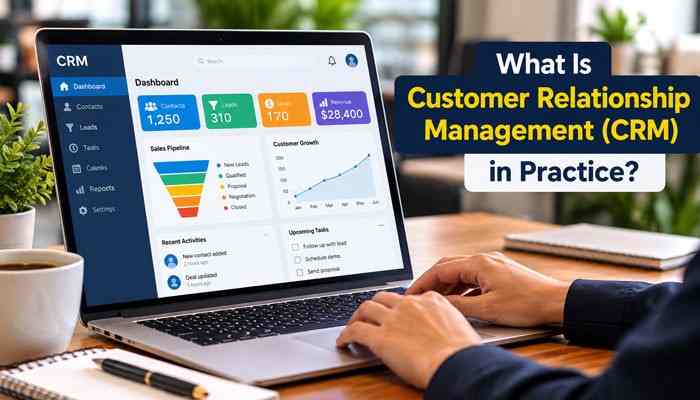
This situation illustrates why customer relationship management matters to businesses of every size. What is customer relationship management (CRM)? It is a business strategy supported by processes and technology that help companies organize customer information, manage interactions, track sales opportunities, improve customer service, and build long-term relationships.
CRM is much more than software for storing names and phone numbers. It connects sales, marketing, and customer support activities so employees can understand customer needs, respond consistently, and make informed decisions.
For example, a small business can use CRM software to capture website inquiries, assign leads to employees, schedule follow-ups, manage quotations, and identify customers who need additional assistance.
Understanding how CRM works is especially important for businesses that want to reduce missed opportunities, improve customer satisfaction, and manage growth without creating unnecessary administrative work.
This guide explains CRM in practice, including its main types, essential features, benefits, real-world applications, software costs, implementation strategies, AI capabilities in 2026, and methods for measuring business results.
What Does Customer Relationship Management Mean?
Customer relationship management refers to the organized approach businesses use to develop, maintain, and improve relationships with potential and existing customers. The concept combines three important elements: a customer-focused business strategy, clearly defined operating processes, and technology that supports those processes.
CRM as a strategy focuses on understanding customer expectations and delivering consistent experiences throughout the relationship. CRM as technology helps employees carry out this strategy by organizing records, tracking activities, and coordinating responsibilities. For example, a company may establish a policy requiring sales representatives to contact new inquiries within one business day.
That policy is part of its customer relationship management strategy. A CRM system that automatically assigns inquiries, records responses, and creates reminders provides the technology supporting it. According to Microsoft’s explanation of CRM, customer relationship management connects customer information, business processes, and technology across sales, marketing, and customer service.
The most important principle is that CRM should improve how a business treats and understands customers, not simply increase the amount of information it collects.
What Is Customer Relationship Management (CRM) Software?
Customer relationship management software is a digital platform that helps businesses organize customer records, manage communications, and coordinate customer-facing activities.
Depending on the platform and its integrations, CRM software can maintain:
- Customer names, contact details, and business information.
- Emails, meetings, telephone calls, and communication histories.
- Sales opportunities, quotations, and expected closing dates.
- Customer service requests and resolution details.
- Assigned employees, upcoming tasks, and follow-up reminders.
- Purchase histories and account preferences, where relevant.
Consider a customer contacting a company about an existing contract. With a properly configured CRM, an authorized employee can review relevant account details, previous conversations, and unresolved issues without searching through several disconnected applications. The software helps preserve important context, particularly when multiple employees interact with the same customer.
How Does CRM Work in Practice?
CRM works by connecting customer information with specific business activities. Instead of relying on employee memory or scattered spreadsheets, businesses use structured records and workflows to manage each relationship.
Consider a digital marketing agency that receives inquiries through its website.
Step 1: Capturing Customer Inquiries
A business owner submits a website form requesting SEO services. If the website is integrated with the CRM, the system creates a lead record containing the person’s contact information, inquiry source, and service requirements. This helps the agency organize incoming requests and identify how prospective customers are finding its services.
Step 2: Assigning Leads to Employees
- The CRM assigns the inquiry to a salesperson based on the agency’s lead-routing rules.
- The employee receives the information and can review the prospect’s requirements before making contact.
- This process establishes responsibility for the inquiry and reduces confusion about who should respond.
Step 3: Recording Customer Conversations
After the initial discussion, the salesperson records relevant details such as project goals, estimated budget, service expectations, and next steps.
If another employee later becomes responsible for the account, the recorded information can help maintain continuity.
Step 4: Managing Sales Opportunities
When the prospect requests a proposal, the representative updates the opportunity’s position in the sales pipeline. The CRM may display the potential contract value, current sales stage, responsible employee, and expected closing date. Managers can use this information to review active opportunities and identify deals requiring attention.
Step 5: Scheduling Follow-Ups
If the customer does not respond to the proposal, the CRM can remind the representative to follow up. Some systems also support automated emails and workflow-based communications, depending on platform capabilities and applicable marketing requirements.
Step 6: Supporting Customers After Purchase
Once the customer accepts the proposal, the company can connect the account to onboarding, project management, and support processes. If an issue occurs later, employees can review relevant relationship information before responding. This example shows that CRM is not limited to generating sales. It helps businesses manage relationships throughout the customer journey.
How Is Customer Information Organized Inside a CRM?
A CRM database does more than store contact details. It organizes different types of information into related records, helping employees understand how customers, companies, business opportunities, and activities are connected.
Many sales-focused CRM platforms use structured data models involving leads, contacts, accounts, and opportunities.
| CRM Record | What It Represents | Business Example |
| Lead | A potential customer not yet fully qualified | Someone requesting a product demonstration |
| Contact | An individual associated with a relationship | Purchasing manager at a client company |
| Account | A company or customer organization | A manufacturing business |
| Opportunity | A potential sale being pursued | A proposed $15,000 supply agreement |
| Activity | A recorded interaction or task | Sales meeting or follow-up call |
| Case | A customer service issue | Complaint requiring investigation |
Suppose an industrial equipment supplier negotiates with a manufacturing company. The purchasing manager, finance executive, and technical supervisor may all participate in the buying decision.
A structured CRM system can associate these individuals with the same company account while maintaining their relevant communications and responsibilities.
This reduces confusion and helps employees preserve important information when responsibilities change. Salesforce’s CRM data-model documentation explains how objects, fields, and records organize related business information.
What Customer Information Should Businesses Collect?
A small business does not need dozens of custom fields when beginning with CRM. Basic records may include customer contact details, lead source, service requirements, assigned employee, current relationship status, most recent interaction, and next follow-up date.
Additional information should be collected only when it serves a legitimate business purpose. Maintaining unnecessary personal data increases administrative work and can introduce additional security and privacy risks.
Understanding the Customer Lifecycle in CRM
The customer lifecycle describes the different stages a person moves through while interacting with a company, from initial awareness to repeat purchases and long-term loyalty.
CRM helps businesses maintain continuity as customers move between marketing, sales, onboarding, and support activities.
| Customer Stage | Business Activity | How CRM Helps |
| Awareness | A prospect discovers the company | Records campaign or inquiry source |
| Lead generation | The prospect submits an inquiry | Creates a lead record |
| Qualification | Sales evaluates customer needs | Records qualification information |
| Sales | The prospect considers an offer | Tracks quotations and opportunities |
| Onboarding | The prospect becomes a customer | Coordinates tasks and handoffs |
| Customer service | The customer requests assistance | Maintains relevant support history |
| Retention | The company maintains the relationship | Supports renewals and follow-ups |
| Advocacy | Customers recommend the business | Records feedback or referrals |
Different business models place greater emphasis on different stages. A consulting firm may prioritize proposals and contract renewals, while an e-commerce retailer may focus more heavily on customer service, repeat purchases, and loyalty.
The purpose is to maintain useful relationship information throughout the customer’s experience.
The Three Main Types of CRM Systems
CRM systems are commonly classified into operational, analytical, and collaborative CRM. These categories describe their main functions, although many modern platforms combine features from all three.
1. Operational CRM
Operational CRM focuses on organizing and improving everyday customer-facing activities. It helps businesses manage repetitive processes such as lead assignment, customer follow-ups, service requests, and workflow automation.
For example, a home renovation company could use operational CRM to assign incoming inquiries and remind employees about pending quotations.
This type is useful when manual administration and missed follow-ups interfere with customer service.
2. Analytical CRM
Analytical CRM focuses on interpreting customer and business information. It helps companies examine purchasing patterns, sales performance, marketing effectiveness, and customer retention.
For example, a subscription company might analyze cancellation reasons to identify recurring problems or opportunities to improve onboarding.
Analytical CRM supports better decisions, but its usefulness depends on accurate records and appropriate analysis.
3. Collaborative CRM
Collaborative CRM emphasizes information sharing and coordination between departments. When a customer moves from sales to technical support, employees can use relevant shared records to understand the relationship.
This reduces dependence on personal notes and individual inboxes. Businesses rarely need to choose only one CRM category. The appropriate combination depends on their processes, customer relationships, and operating requirements.
Essential Features of Customer Relationship Management Software
CRM platforms offer different capabilities, but the most valuable features are those that solve specific business problems. A system with numerous tools can still be ineffective if employees struggle to use it or if the configuration does not match their workflow.
Contact and Account Management
Contact management organizes customer details and relevant communication histories. Account management helps businesses maintain relationships with organizations containing several contacts.
For example, a wholesaler may work with different purchasing employees within the same client company. CRM can organize those relationships under the appropriate account.
Lead and Opportunity Management
- Lead management tracks potential customers from their initial inquiry through qualification.
- Opportunity management focuses on potential deals, including estimated values, current stages, expected closing dates, and next actions.
- Separating leads from qualified opportunities makes sales reporting more meaningful.
Sales Pipeline Management
- A sales pipeline shows how active opportunities progress through the selling process.
- Common stages may include qualification, discovery, proposal, negotiation, and a final won-or-lost decision.
- Each stage should have a clear definition. Otherwise, inconsistent updates can make forecasts unreliable.
Workflow Automation
CRM automation can handle repetitive activities such as assigning leads, creating reminders, notifying managers, and updating selected records. For example, a business might create an automatic reminder when a proposal has been awaiting a response for several days.
Automation should support a useful process rather than create unnecessary notifications.
Customer Service Management
- CRM systems with service capabilities can organize complaints, support cases, case ownership, and resolution history.
- Employees can use relevant information to understand previous problems and provide more informed assistance.
- Some vendors provide advanced customer service functionality through separate applications or paid subscriptions.
Reporting and Analytics
- CRM dashboards help businesses monitor sales opportunities, follow-up activities, customer interactions, and performance metrics.
- For example, a sales manager might discover that many prospects receive proposals but relatively few become customers.
- The business can then investigate whether the problem relates to pricing, qualification, communication, or other factors.
Integration With Other Business Tools
CRM systems can connect with email, calendars, accounting applications, ecommerce platforms, and other business software. Integrations can reduce repeated data entry and help departments access more consistent information. Availability depends on the CRM platform, subscription, and technical configuration.
How Does CRM Lead Qualification and Lead Scoring Work?
Not every inquiry represents a genuine sales opportunity. Someone downloading a product brochure may be researching different solutions, while another person requesting a quotation may have an immediate purchasing requirement.
Lead qualification helps businesses evaluate whether a prospective customer is suitable for their products or services. Lead scoring provides a structured method for prioritizing prospects using relevant characteristics and engagement signals.
Marketing Qualified Leads vs. Sales Qualified Leads
A marketing qualified lead (MQL) is a prospect who meets the marketing team’s criteria for further attention. A sales qualified lead (SQL) is a prospect the sales team considers suitable for direct selling activities.
These definitions should reflect the company’s agreed qualification process. For example, a visitor downloading a software guide may become an MQL. After confirming requirements, suitability, and purchasing intentions, the sales team may classify the person as an SQL.
Practical Example of CRM Lead Scoring
A company can assign points based on characteristics associated with suitable customers.
| Prospect Signal | Illustrative Score |
| Matches target industry | +20 |
| Fits preferred company size | +15 |
| Visits an important service page | +5 |
| Requests a consultation | +25 |
| Requires services outside the coverage area | −20 |
These values are hypothetical, not universal scoring standards. A higher score may indicate that a prospect deserves closer attention, but it does not guarantee a purchase.
Businesses should compare scoring results with actual conversions and adjust their criteria when necessary. HubSpot’s lead-scoring documentation explains how businesses can use record characteristics and engagement activities to evaluate leads.
Major Benefits of CRM for Businesses
A common question from business owners is what CRM should improve first: sales performance, customer service, or internal efficiency. The answer depends on the company’s existing problems. CRM provides the greatest practical value when it helps resolve issues that negatively affect customer relationships.
Better Sales Follow-Ups
CRM helps representatives identify outstanding opportunities and upcoming tasks. This can reduce the risk of losing potential customers because employees forget to respond or schedule another conversation.
More Consistent Customer Service
Support employees can review relevant interaction histories to understand previous complaints and unresolved issues. This may reduce repeated explanations and help teams provide more relevant assistance.
Stronger Team Coordination
Shared customer records reduce dependence on information held by individual employees. If an account manager becomes unavailable, another authorized employee can review the relationship history and continue the conversation.
Improved Sales Visibility
CRM gives managers a clearer view of active opportunities, expected sales, and unfinished tasks. Instead of assuming a company needs more leads, management may discover that existing opportunities frequently stall after proposals are submitted.
Better Customer Retention
Businesses can use CRM to support account reviews, contract renewals, customer feedback, and relevant follow-ups. These activities may improve retention, although results also depend on pricing, product quality, and customer satisfaction.
Reduced Administrative Work
CRM automation and integrations may reduce manual data entry and repetitive task management. Employees can potentially spend more time on customer interactions and less time organizing information.
These benefits are possibilities rather than guaranteed outcomes. Software alone cannot compensate for poor service or ineffective business processes.
Practical CRM Example: How a Small Business Finds Sales Problems
Consider a hypothetical commercial cleaning company that receives 80 inquiries in one month. The business uses CRM to track each inquiry from initial contact through qualification, proposal, and final decision.
At the end of the month, its report shows the following results.
| Sales Activity | Illustrative Monthly Result |
| New inquiries | 80 |
| Qualified prospects | 48 |
| Proposals submitted | 20 |
| Customers acquired | 8 |
| Average first-contract value | $3,000 |
| Total value of new contracts | $24,000 |
These figures are illustrative, not real company results or industry benchmarks. They assume the eight customers came from the same group of 80 inquiries.
The overall inquiry-to-customer conversion rate is 10%, while the proposal-to-customer closing rate is 40%. However, the most useful information may be the questions behind those results.
Why did 32 inquiries fail qualification? Why did only 20 of the 48 qualified prospects receive proposals? Were some opportunities lost because of pricing, scheduling, or unsuitable service requirements?
By reviewing recorded qualification reasons, conversations, and unfinished tasks, management can identify possible improvements.
This is the practical value behind the question: what is customer relationship management (CRM)? The system should help a business turn customer information into actions that improve its operations.
What Is Customer Relationship Management (CRM) for Small Businesses?

For a small business, CRM often begins with solving straightforward problems: missed inquiries, forgotten follow-ups, unclear responsibilities, and scattered customer information.
A small company may not need sophisticated predictive analytics or extensive automation. It may benefit more from a reliable system that records customer conversations and reminds employees about necessary actions.
For example, a local service provider handling several inquiries each day could use CRM to organize appointments, quotations, follow-ups, and repeat customer requests.
As the business grows, the same system may support more advanced sales reporting, account management, and customer service workflows.
CRM Applications Across Different Industries
Retail and ecommerce: Businesses can organize customer service interactions, purchase histories, and relevant loyalty communications.
Real estate: Agencies can track property inquiries, buyer preferences, appointments, and follow-up conversations.
Manufacturing: Companies can coordinate commercial relationships involving quotations, technical requirements, multiple decision-makers, and longer sales cycles.
Professional services: Accountants, consultants, and marketing agencies can manage proposals, client onboarding, and contract renewals.
Healthcare and financial services: Organizations may use appropriately configured CRM for permitted customer or patient interactions, subject to applicable confidentiality, privacy, security, and recordkeeping requirements.
These applications demonstrate that CRM can be adapted to different industries, but the configuration should reflect the company’s actual workflow.
B2B CRM vs. B2C CRM: What’s the Difference?
Customer relationship management is used by companies selling to other businesses and by companies selling directly to individual consumers.
However, these relationships often involve different purchasing processes and communication requirements.
B2B CRM commonly focuses on company accounts, several decision-makers, quotations, negotiations, and ongoing commercial relationships.
B2C CRM often emphasizes individual customer records, purchasing histories, service interactions, segmentation, and repeat purchases.
| Feature | B2B CRM | B2C CRM |
| Main customer | Businesses and organizations | Individual consumers |
| Buying process | Often involves multiple stakeholders | Often involves individual decisions |
| Record structure | Company accounts with associated contacts | Individual customer profiles |
| Common priority | Account and opportunity management | Engagement and customer service |
| Typical example | Manufacturing equipment supplier | Online clothing retailer |
An equipment supplier may spend several months negotiating a contract with a manufacturing company.
An e-commerce retailer may instead use CRM to manage support requests and customer engagement across numerous transactions.
These are common patterns rather than fixed rules. Some consumer purchases involve lengthy sales cycles, while some B2B transactions occur quickly.
CRM vs. Spreadsheets, ERP, and Other Business Software
Many small companies initially manage customer relationships through spreadsheets, shared email inboxes, and calendars.
These tools can work when the number of customers and interactions is manageable.
However, they may become harder to maintain when several employees need to coordinate the same relationships.
| Software | Primary Function | Typical Use |
| CRM | Manage customer relationships and interactions | Sales, service, and account management |
| Spreadsheet | Organize and calculate general data | Simple contact tracking |
| ERP | Manage internal resources and operations | Accounting, inventory, and procurement |
| Marketing automation | Manage marketing processes | Email campaigns and lead nurturing |
| Customer Data Platform (CDP) | Unify customer information | Audience analysis and customer profiles |
| Help desk software | Manage customer support requests | Ticket handling and issue resolution |
CRM differs from spreadsheets because it provides structured customer records, interaction tracking, ownership, and dedicated workflows.
It also differs from ERP because CRM primarily supports customer-facing relationships, while ERP focuses on internal business operations.
For example, a wholesale distributor might use CRM for customer negotiations and ERP for inventory and order processing.
Integrating the systems may provide employees with relevant information without requiring the business to replace every application.
Cloud CRM vs. On-Premise CRM
Businesses can access CRM through different technology arrangements. Cloud CRM is generally provided as an online service where the vendor manages the underlying application infrastructure.
On-premise CRM runs on infrastructure controlled by the organization or its selected hosting provider.
Cloud CRM often appeals to smaller businesses that want simpler setup, remote access, and fewer infrastructure responsibilities.
On-premise CRM may suit organizations with specialized operational, technical, or integration requirements.
However, on-premise deployment typically creates additional responsibilities for maintenance, updates, backups, and security.
Neither option is automatically more secure. Businesses should evaluate actual access controls, vendor practices, infrastructure, configuration, and regulatory obligations.
What Is AI-Powered CRM in 2026?
Artificial intelligence is an increasingly important feature of modern customer relationship management platforms.
Traditional CRM systems primarily organize information and support predefined workflows. AI-enabled CRM can also analyze patterns, summarize communications, and recommend possible next actions.
According to IBM’s explanation of CRM, modern customer relationship management can incorporate AI capabilities that support analytics, customer interactions, and sales processes.
Practical Uses of AI in CRM
Predictive lead scoring: AI can analyze relevant historical patterns to help prioritize sales prospects.
Conversation summaries: Generative AI can summarize supported emails, meetings, and customer service interactions.
Sales forecasting: AI-enabled tools can help identify patterns in opportunity data and historical sales.
Customer support assistance: AI can suggest responses, retrieve relevant information, or assist with selected routine requests.
Customer segmentation: Analytical models may identify groups of customers with similar characteristics or behavior.
AI agents: Some CRM platforms support agents that can assist with multi-step business processes under configured rules and permissions.
These capabilities vary by vendor and subscription. Advanced functions may require additional licensing, integrations, or particular data configurations.
Limitations of AI-Powered CRM
AI does not guarantee accurate recommendations or stronger revenue.
Incomplete records, outdated information, and biased historical patterns can affect predictions. AI-generated summaries may also omit important details or misunderstand conversations.
Businesses should evaluate data-processing arrangements, access permissions, and human oversight before relying on AI for sensitive activities.
For many small businesses, improving CRM data quality and employee adoption may provide more immediate value than purchasing advanced AI features.
Popular CRM Software Options for Businesses
There is no universally best CRM platform.
The appropriate system depends on company size, customer relationships, business processes, budget, and required integrations.
| CRM Platform | General Positioning | Worth Evaluating For |
| HubSpot CRM | Connected sales, marketing, and service tools | Startups and growing businesses |
| Salesforce | Broadly configurable CRM ecosystem | Companies with complex requirements |
| Zoho CRM | Sales management, reporting, and automation | Small and medium-sized companies |
| Microsoft Dynamics 365 Sales | CRM within Microsoft’s business application ecosystem | Organizations using Microsoft tools |
| Pipedrive | Sales-focused pipeline management | Teams prioritizing deal tracking |
These examples are not a performance ranking based on independent product testing.
HubSpot CRM offers a free entry-level option with limitations, while CRM vendors provide different subscription packages and feature sets.
Businesses should review current pricing, user limits, integration support, data-export capabilities, and security features before choosing a system.
A practical trial involving actual business workflows is often more informative than comparing advertised features alone.
How Much Does CRM Software Cost?
CRM costs vary depending on the provider, subscription model, number of users, and required capabilities.
Some businesses can begin with limited free software. Others require paid subscriptions, integrations, implementation assistance, or advanced customization.
Common CRM Expenses
CRM expenses may include software subscriptions, implementation, data migration, application integrations, employee training, and ongoing administration.
Advanced AI functions, specialized service modules, and additional automation capabilities may also involve separate charges. The advertised monthly subscription price may represent only part of the total cost.
Before choosing a platform, businesses should calculate their expected first-year spending and recurring expenses. A low-cost subscription may still require substantial work to clean customer records, configure workflows, and train employees.
How to Calculate CRM Return on Investment (ROI)
CRM represents a business investment, so companies should evaluate whether its measurable benefits justify the cost.
CRM return on investment estimates financial gains attributable to the system compared with the amount spent implementing and operating it.
CRM ROI = [(Financial Gains − Total CRM Costs) ÷ Total CRM Costs] × 100
Practical Example of CRM ROI
Assume a hypothetical service company evaluates its CRM after one year.
The company spends $6,000 on subscriptions, implementation, training, and administration.
It also estimates $10,000 in measurable financial gains attributable to CRM through documented labor savings and additional contribution profit from acquired customers.
| Financial Measure | Illustrative Annual Amount |
| Total CRM costs | $6,000 |
| Measured financial gains | $10,000 |
| Net financial benefit | $4,000 |
| Calculated ROI | 66.7% |
The calculation is:
[($10,000 − $6,000) ÷ $6,000] × 100 = 66.7%
Under these assumptions, the company generated approximately $0.67 in net benefit for every dollar invested.
This example is hypothetical and does not represent typical CRM performance.
Businesses should distinguish additional revenue from additional profit and avoid double-counting benefits.
Results should also be evaluated against other factors that may have influenced business performance during the measurement period.
How to Choose the Right CRM for Your Business
Choosing CRM should begin with identifying the business problems the software needs to solve.
A company struggling with missed follow-ups has different requirements from an organization that needs advanced customer service reporting.
Identify Your Business Requirements
Determine whether your priority is managing leads, improving customer service, tracking sales opportunities, coordinating employees, or producing better reports.
Focus on essential requirements before considering advanced features.
Evaluate Ease of Use
Employees should be able to find information, record conversations, and update opportunities without unnecessary difficulty.
A platform that managers appreciate but employees avoid may produce incomplete information and unreliable reports.
Review Integrations and Data Export
Check whether the CRM connects with existing business applications.
Also review how easily customer records can be exported if the company later changes providers.
Examine Security and Permissions
Evaluate user permissions, authentication, vendor security practices, and applicable data-processing requirements.
Different employees may need access to different categories of customer information.
Test Real Business Workflows
Run a pilot involving representative customer records, sales opportunities, and everyday tasks.
Observe whether employees can complete those tasks efficiently and whether the system’s reports reflect actual activities.
Practical CRM Selection Scorecard
A business can compare shortlisted platforms using consistent evaluation criteria.
| Evaluation Area | Suggested Weight |
| Required features and workflow fit | 30% |
| Ease of use | 20% |
| Integration capabilities | 15% |
| Total cost of ownership | 15% |
| Security and data management | 15% |
| Vendor support and training | 5% |
| Total | 100% |
These weights are illustrative. Businesses should adjust them according to their priorities.
For example, an organization handling sensitive information may assign greater weight to security, privacy, and compliance requirements.
How to Implement CRM Successfully
Successful CRM implementation requires more than purchasing subscriptions and importing contacts.
Businesses need clear goals, reliable information, defined responsibilities, and employees who understand how to use the system.
Step 1: Define Measurable Goals
Choose practical objectives such as reducing missed follow-ups, improving sales visibility, or tracking response times.
These goals should guide the implementation and later performance reviews.
Step 2: Assign CRM Ownership
Appoint someone responsible for configuration, record ownership, permissions, reporting, and data quality.
Clear ownership helps prevent the system from becoming disorganized.
Step 3: Prepare Customer Records
Review spreadsheets and other applications before importing information.
Correct inaccurate records, identify duplicates, and remove unnecessary data where appropriate and permitted.
Step 4: Configure Essential Workflows
Create realistic pipeline stages, assign responsibilities, and establish necessary fields and reminders.
Avoid excessive customization during the initial setup.
Step 5: Validate Data Migration
Import a small sample before transferring all customer information.
Check contact details, account relationships, opportunity stages, ownership, and important dates.
Step 6: Train Employees
Training should focus on real activities such as recording inquiries, updating opportunities, and creating follow-up tasks.
Practical exercises help employees understand how CRM supports their work.
Step 7: Monitor Adoption and Improve
Review incomplete records, overdue tasks, duplicate information, and employee feedback.
Improve workflows when necessary without constantly changing important reporting definitions.
A Practical 30-Day CRM Implementation Plan
A small business introducing a relatively simple CRM can use a phased approach.
| Timeline | Main Activity | Expected Result |
| Days 1–7 | Identify requirements and map processes | Defined goals and workflow |
| Days 8–14 | Configure CRM and prepare data | Working contact and pipeline structure |
| Days 15–21 | Train pilot employees and test workflows | Validated records and feedback |
| Days 22–30 | Expand adoption and review results | Initial adoption and performance report |
This schedule is illustrative rather than a guaranteed implementation timeline.
Large migrations, specialized integrations, and regulated data may require substantially more time.
CRM Metrics Every Business Should Track
CRM reporting becomes valuable when it helps companies evaluate performance and identify opportunities for improvement.
Lead Conversion Rate
Lead conversion rate measures the percentage of leads that become customers or reach another defined conversion stage.
Formula: (Converted Leads ÷ Total Leads) × 100
If 100 leads generate 12 customers, the lead-to-customer conversion rate is 12%.
Sales Win Rate
Sales win rate measures the percentage of closed opportunities that result in successful sales.
Formula: [Closed-Won Deals ÷ (Closed-Won Deals + Closed-Lost Deals)] × 100
The calculation should use consistent definitions of closed opportunities.
Average Sales Cycle
The average sales cycle measures how long it takes to complete a sale.
Businesses can use this information to identify delays in qualification, proposals, negotiations, or final approvals.
Customer Retention Rate
Customer retention rate measures the percentage of existing customers retained during a defined period.
Formula: [(Customers at Period End − New Customers Acquired) ÷ Customers at Period Start] × 100
This formula assumes consistent customer definitions and excludes newly acquired customers from the retained starting group.
Customer Acquisition Cost
Customer acquisition cost compares relevant sales and marketing acquisition expenses with the number of new customers acquired.
Formula: Sales and Marketing Acquisition Costs ÷ New Customers Acquired
Businesses should use a consistent definition of acquisition expenses.
Customer Lifetime Value
Customer lifetime value estimates the economic value generated by a customer relationship over time.
Revenue-based calculations provide a simple estimate, while contribution-margin-based calculations offer a more useful perspective on profitability.
No single CRM metric fully describes relationship quality. Businesses should interpret reports alongside profitability, service performance, and customer feedback.
How CRM Helps With Sales Forecasting
Sales forecasting estimates potential future revenue using active opportunities, historical information, and other relevant factors.
CRM supports forecasting by organizing expected deal values, opportunity stages, anticipated closing dates, and recorded sales activities.
Understanding Weighted Sales Forecasts
One common approach multiplies an opportunity’s estimated value by its assigned probability of closing.
Weighted Opportunity Value = Deal Value × Estimated Closing Probability
Suppose a company has a potential contract worth $20,000 and estimates a 50% probability of closing.
Its weighted forecast contribution would be:
$20,000 × 50% = $10,000
This is not confirmed revenue. It represents a probability-weighted estimate used for planning.
Managers can apply similar calculations across opportunities, but forecasts depend on realistic probabilities, accurate information, and regular reviews.
Microsoft’s sales-forecasting documentation explains how opportunity data, forecast categories, and targets support revenue planning.
Common CRM Mistakes and How to Avoid Them
CRM can underperform when businesses focus on purchasing software without addressing employee behavior and operational processes.
Employees Do Not Update Records
Missing conversations and outdated opportunity stages make CRM reporting unreliable.
Businesses should keep required fields manageable, provide practical training, and regularly review record quality.
Duplicate Customer Information
Duplicate records can create conflicting information and unnecessary customer communication.
Establish consistent data-entry rules and review records before imports or merges.
Excessive Customization
Too many custom fields, dashboards, and automated processes can make everyday tasks difficult.
Begin with essential requirements and add complexity only when it solves a demonstrated problem.
Poor Employee Adoption
A system may fail to deliver value when employees see it as unnecessary administrative work.
Involve users during selection, demonstrate practical benefits, and provide ongoing support.
Excessive Automation
Automated messages can damage relationships when they are irrelevant, repetitive, or poorly timed.
Use appropriate triggers, suppression rules, and human review for sensitive communications.
CRM Data Privacy, Security, and Customer Trust
Customer information is valuable, but collecting and storing it creates responsibilities.
CRM systems may contain personal contact details, purchasing information, correspondence, and service histories.
Businesses must protect this information according to applicable requirements and the sensitivity of the data.
The Federal Trade Commission’s business data-security guidance recommends understanding what personal information is collected, limiting unnecessary retention, protecting stored data, and preparing for security incidents.
Essential CRM Security Practices
Businesses should consider safeguards such as:
- Role-based permissions and strong authentication.
- Secure integrations and appropriate encryption.
- Employee security-awareness training.
- Clear data retention and deletion procedures.
- Vendor security assessments and incident-response plans.
Organizations subject to European data-protection rules should also review the European Data Protection Board’s guidance. Important GDPR principles include lawful processing, transparency, data minimization, accuracy, and storage limitation.
Businesses should also evaluate applicable marketing regulations before using CRM to send promotional communications. The ability to automate an email does not automatically make every message legally permissible.
Protecting customer information is an essential part of building long-term trust.
How to Know Whether Your Business Needs CRM
Not every business needs paid CRM software immediately. A freelancer managing a small group of clients may be able to maintain relationships using secure contact records, spreadsheets, and calendar reminders.
However, dedicated CRM becomes more useful when manual coordination creates recurring problems. Common signs include missed inquiries, unclear sales responsibilities, scattered communication histories, unreliable pipeline reports, and overdue follow-ups.
A business may also benefit from CRM when customers repeatedly provide the same information to different employees or when management cannot identify why opportunities are being lost.
Before purchasing software, business owners should consider whether the expected improvements justify implementation costs and ongoing maintenance.
The right CRM should make customer relationships easier to manage rather than introduce unnecessary complexity.
Final Thoughts
So, what is customer relationship management (CRM) at its most practical level? It is a way to help businesses understand their customers, maintain reliable interaction histories, and determine what should happen next.
The software provides structure, but effective CRM also depends on accurate information, clear responsibilities, consistent communication, and genuine attention to customer needs.
For small businesses, the immediate priority may be preventing missed inquiries and maintaining organized records. Growing companies may need more sophisticated sales pipelines, automation, analytics, and forecasting. Larger organizations may require coordinated processes across multiple departments.
The right approach is not to collect the most customer data or purchase the most expensive platform. It is to establish a dependable system that helps employees understand customers, respond appropriately, and make better business decisions.
Ultimately, successful CRM improves the customer relationship—not merely the record of it.
Customer Relationship Management (CRM) FAQs
1. What Is Customer Relationship Management (CRM) in Simple Words?
Customer relationship management is the process of organizing customer information, managing interactions, tracking sales, and maintaining business relationships. It includes both the company’s customer-management strategy and the software that supports it.
2. What Is a Real-Life Example of CRM?
A real estate agency using software to record buyer inquiries, schedule property viewings, track customer preferences, and manage follow-up conversations is an example of CRM in practice.
3. Why Is CRM Important for Small Businesses?
CRM can help small businesses organize leads, track customer communications, coordinate employee responsibilities, and reduce missed follow-ups. It becomes especially useful when manual methods are difficult to maintain.
4. What Are the Three Main Types of CRM?
The three commonly recognized types are operational CRM, analytical CRM, and collaborative CRM. They focus on managing daily processes, analyzing customer information, and improving coordination between teams.
5. Is CRM Only Used for Sales?
No. CRM also supports marketing, customer service, account management, customer retention, and reporting. Its broader purpose is to improve customer relationships throughout the customer lifecycle.
6. Can Small Businesses Use CRM for Free?
Yes. Some vendors offer free entry-level CRM plans with feature or usage limitations. Businesses should review user limits, integrations, automation capabilities, and upgrade costs before choosing a system.
7. Does CRM Automatically Increase Sales?
No. CRM can improve organization, follow-ups, and sales visibility, but results depend on effective business processes, consistent employee use, customer demand, and the quality of products or services.
8. Can AI Replace Employees in Customer Relationship Management?
AI can assist with selected administrative, analytical, and communication tasks. However, relationship building, complex customer issues, sensitive decisions, and accountability still require appropriate human oversight.
