



A Dunkin e Gift Card is a convenient way to send prepaid value for coffee, donuts, breakfast, and other eligible Dunkin purchases without mailing a physical card. It can be delivered electronically, scheduled for a future date, and personalized with a message for birthdays, holidays, or everyday gifting.
Unlike a traditional Dunkin gift card, an eGift is designed for fast digital delivery. Recipients can use it at participating U.S. Dunkin restaurants, check their gift card balance, register eligible cards, reload funds, and use an enrolled card for supported orders through the Dunkin app.
This guide explains how to buy, send, receive, use, check, reload, and safely manage a Dunkin e Gift Card, including important rules about balances, expiration, delivery, and app use.
Quick Answer
A Dunkin e Gift Card is a digital stored-value card that can be sent electronically to yourself or another person. The buyer chooses the gift amount, recipient, delivery date, and personal message before completing the purchase.
Dunkin’s eGift provider says most same-day eGift Cards are sent within about one hour. Standard Dunkin Cards do not expire, and eGift Cards delivered by email have no shipping charge or eGift fee.
Recipients can spend the available balance at participating U.S. Dunkin locations and manage eligible registered cards through Dunkin’s website or app.
Key Takeaways
- A Dunkin e Gift Card is sent electronically rather than mailed as a physical card.
- Most same-day eGift Cards are delivered within about one hour.
- Future delivery dates can be scheduled.
- Standard Dunkin Cards do not expire or lose their stored value.
- Dunkin does not charge a service fee for maintaining a gift-card balance.
- A Dunkin gift card balance can be checked online, through an account, or by phone.
- Eligible registered cards can be reloaded and qualifying balances can be combined.
- Dunkin Cards bought directly inside the app are virtual cards that are usable only from within the Dunkin app.
- An enrolled Dunkin gift card can be used for supported Dunkin app order-ahead purchases.
- Purchasing or reloading a Dunkin gift card does not earn Dunkin Rewards points.
- A gift card does not automatically include Dunkin free coffee.
What Is a Dunkin e Gift Card?
A Dunkin e Gift Card is an electronic version of a Dunkin stored-value gift card. Instead of receiving a plastic card, the recipient receives digital gift-card information through email.
The eGift can contain the recipient’s name, gift value, selected design, personal message, and card information needed for redemption.
A Dunkin e Gift Card is useful when you want to send a gift quickly without waiting for physical delivery.
People may also search for a Dunkin Donuts e gift card or Dunkin Donuts gift card. Dunkin now primarily uses the shorter Dunkin brand name, but these older search terms generally refer to the same gift-card program.
Dunkin e Gift Card at a Glance
Before buying or sending a Dunkin e Gift Card, here are the most important details about delivery, expiration, balance checks, fees, and redemption.
| Feature | Current Details |
|---|---|
| Card type | Digital stored-value card |
| Main delivery method | |
| Same-day delivery | Most orders arrive within about one hour |
| Scheduled delivery | Available |
| Expiration | No expiration |
| Standard service fee | None |
| eGift delivery fee | None |
| Balance check | Online, through an account/app, or by phone |
| Registration required to use | No |
| Registration recommended | Yes |
| Reloading | Available for eligible registered cards |
| Balance transfers | Available for qualifying registered cards |
| Main redemption | Participating U.S. Dunkin locations |
| Cash redemption | Generally unavailable except where required by law |
A Dunkin e Gift Card does not expire or lose its stored value, and Dunkin does not charge a standard service fee for maintaining the card balance.
How Does a Dunkin e Gift Card Work?
A Dunkin e Gift Card works like a prepaid digital card that can be sent electronically and used for eligible purchases at participating U.S. Dunkin restaurants. The process is simple.
1. Buy the eGift: Choose the gift amount, enter the recipient’s details, add a personal message if desired, and select an immediate or future delivery date.
2. The Recipient Gets the Gift: The eGift is delivered electronically to the recipient. Most same-day orders are sent within about one hour, although occasional processing delays can occur.
3. Use the Stored Value: The recipient can use the available balance toward eligible Dunkin purchases. Each transaction is deducted from the card until the balance is used.
Because a Dunkin e Gift Card holds monetary value, keep the card number and other sensitive details private and treat them like cash.
How to Buy a Dunkin e Gift Card
Buying a Dunkin e Gift Card is straightforward. For the safest purchase, use Dunkin’s official gift-card service or another authorized seller.
Follow these steps:
- Choose the Dunkin eGift option and select a card design.
- Enter the gift amount you want to send.
- Add the recipient’s name and email address.
- Write an optional personal message.
- Choose immediate delivery or select a future delivery date.
- Enter your payment information.
- Review the recipient, amount, and delivery details before completing the purchase.
Dunkin’s eGift provider currently accepts major payment cards, including Visa, Mastercard, American Express, and Discover. Payment is charged when the purchase is completed.
Can You Buy a Dunkin e Gift Card for Yourself?
Yes. You can purchase a Dunkin e Gift Card for yourself by entering your own email address as the recipient during checkout.
This option can be convenient if you prefer keeping Dunkin value digitally instead of carrying a physical gift card. After receiving the eGift, follow the provided instructions to access and manage the card.
Can You Personalize a Dunkin e Gift Card?
Yes. You can personalize a Dunkin e Gift Card with a message for the recipient. CashStar states that there is no additional charge for adding a personalized message.
This makes an eGift suitable for occasions such as:
- Birthdays
- Holidays
- Graduations
- Thank-you gifts
- Employee appreciation
- Customer rewards
- Workplace incentives
Adding a short personal message can make the gift feel more thoughtful while keeping the convenience of digital delivery.
How to Send a Dunkin e Gift Card
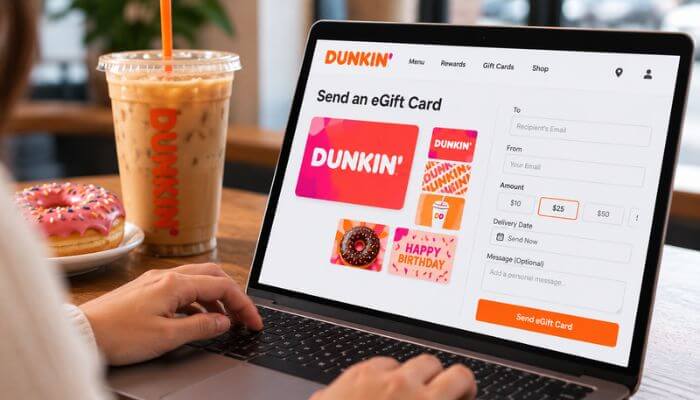
Email is the primary delivery method for eGift Cards purchased through Dunkin’s CashStar service. Enter the recipient’s name and email address during checkout, then choose when you want the gift delivered.
Before completing the order, double-check the recipient’s email address. An incorrect address can prevent the intended recipient from receiving the Dunkin e Gift Card.
Dunkin also supports digital gift-card features through its app and other eligible digital services.
How Long Does Dunkin e Gift Card Delivery Take?
Most same-day Dunkin e Gift Card orders are sent within approximately one hour after purchase, although occasional processing delays can occur.
For a scheduled order, the eGift is generally sent during the morning of the selected delivery date.
This makes a Dunkin eGift convenient for both last-minute gifts and occasions planned in advance.
Can You Schedule a Dunkin e Gift Card?
Yes. You can schedule a Dunkin e Gift Card for a future delivery date instead of sending it immediately.
This option is useful when planning ahead for birthdays, holidays, anniversaries, graduations, employee milestones, or thank-you gifts.
The eGift is generally sent on the selected delivery date, subject to normal processing. Before completing the purchase, confirm the recipient’s email address and scheduled date to avoid delivery problems.
How to Track a Dunkin e Gift Card
If your Dunkin e Gift Card has not arrived, CashStar provides a self-service system for checking the order.
After entering the relevant email address, you can receive a secure link with available options to:
- Track the eGift order
- Check its delivery status
- View the receipt
- Print the receipt
This can help determine whether the eGift is still processing, has already been sent, or requires further assistance.
What If the Dunkin e Gift Card Email Does Not Arrive?
If a Dunkin e Gift Card email does not arrive, it does not necessarily mean the purchase failed. Delivery can be affected by email filters, inbox settings, or incorrect recipient information.
Common reasons include:
- The email was sent to the spam or junk folder.
- An email filter or firewall blocked the message.
- The recipient’s inbox is full.
- The recipient’s email address was entered incorrectly.
- The eGift is still being processed.
First, check the recipient’s spam and junk folders and confirm that the email address entered during checkout is correct. Next, use CashStar’s official self-service system to check the order status.
If the Dunkin e Gift Card still cannot be located, contact official eGift customer support with the order details for further assistance.
How to Use a Dunkin e Gift Card
A Dunkin e Gift Card can be used toward eligible purchases at participating U.S. Dunkin restaurants. The card works as stored value, so the cost of each qualifying purchase is deducted from the available balance.
To use your eGift:
- Open the eGift and access the card information.
- Visit a participating U.S. Dunkin location.
- Present the eGift or eligible card information when paying.
- The purchase amount will be deducted from your available balance.
- Keep the remaining balance for future eligible purchases.
If the purchase costs more than the available Dunkin e Gift Card balance, ask the participating location whether the remaining amount can be paid with another accepted payment method.
Remember that an eGift is a form of prepaid value. It is different from a coupon, promotional offer, or Dunkin Rewards benefit.
Do You Have to Register a Dunkin e Gift Card?
No. You do not have to register a Dunkin e Gift Card before using it for eligible purchases at participating Dunkin locations.
However, registering an eligible card is recommended because it makes the card easier to manage and may provide additional protection if the card is lost or stolen.
Registration can also make it easier to:
- Check and manage the card balance
- Reload eligible cards
- Manage qualifying cards in one account
- Access supported Dunkin account and app features
If you plan to keep using your Dunkin e Gift Card after the initial balance is spent, registration can make ongoing management more convenient.
Dunkin e Gift Card vs. Virtual Dunkin Card in the App
A Dunkin e Gift Card and a virtual Dunkin Card purchased directly through the Dunkin app are both digital, but they are not exactly the same.
An eGift is primarily designed for gifting and can be sent electronically to a recipient. By comparison, Dunkin states that cards purchased directly within the app are virtual cards that can be used only through the Dunkin app. No physical card is issued.
| Feature | Dunkin e Gift Card | Virtual Dunkin Card in App |
|---|---|---|
| Main purpose | Digital gifting | App-based stored value |
| Email delivery | Yes | Not the standard eGift process |
| Physical card provided | No | No |
| Stores prepaid value | Yes | Yes |
| App required for basic use | No | Yes |
| Designed for gifting | Yes | Not primarily |
| App-only restriction | No general app-only restriction | Yes |
The key difference is how the digital card is issued and used. A Dunkin e Gift Card is designed to be delivered as a gift, while a virtual card purchased directly in the Dunkin app is intended for use from within the app.
How to Add a Dunkin Gift Card to the Dunkin App
An eligible Dunkin e Gift Card or existing Dunkin gift card can be associated with a Dunkin account for easier digital management.
To add an eligible card:
- Open the Dunkin app and sign in to your account.
- Go to the card-management section.
- Choose the option to add or manage a card.
- Enter the requested gift card information.
- Follow the prompts to complete the process.
Once the eligible card is associated with your account, you can more easily check its balance and access supported card-management features.
The exact menu names and screen layout may change as the Dunkin app is updated, so follow the current options displayed in your version of the app.
Can You Use a Dunkin e Gift Card for Mobile Orders?
Yes. An eligible Dunkin e Gift Card that has been properly enrolled can be used for supported mobile orders through the Dunkin app.
Dunkin’s order-ahead system allows eligible enrolled gift cards as a payment method for supported orders at participating locations.
A typical mobile ordering process is:
- Open the Dunkin app.
- Choose the order option.
- Select a participating location.
- Choose an available pickup method.
- Add your food and drinks.
- Proceed to checkout.
- Select your enrolled Dunkin gift card as the payment method when available.
- Review and place the order.
This does not mean a Dunkin gift card can automatically be used on every website or third-party food-delivery platform. Those services may have separate payment rules.
Can You Use a Dunkin e Gift Card for Online Orders?
Dunkin’s general gift-card guidance states that its cards cannot be redeemed for online orders. However, Dunkin’s mobile order-ahead guidance separately explains that an enrolled gift card can be used for supported orders placed through the Dunkin app.
The important distinction is the ordering method. You should not assume a Dunkin e Gift Card will work at every online checkout or third-party ordering platform.
For eligible mobile orders, use Dunkin’s supported app ordering and payment process with an enrolled card.
How to Check a Dunkin Gift Card Balance
Checking your Dunkin gift card balance before placing an order can help you know how much stored value is available.
Dunkin provides several ways to check or manage a card balance:
| Balance Method | How It Works |
|---|---|
| Dunkin website | Enter the required card number and PIN |
| Dunkin account or app | View an eligible registered card |
| Phone | Call 1-800-447-0013 |
| Dunkin location | Ask about the balance when available |
Registered cards can also be managed through an eligible Dunkin account, making it easier to monitor the remaining balance.
What Card Number and PIN Do You Need?
Dunkin’s online balance checker currently requests:
- A 16- or 19-digit card number
- An 8-digit PIN
For a physical Dunkin gift card, these details are generally located on the card itself. The PIN may be protected by a scratch-off area.
For a Dunkin e Gift Card, check the digital card information and instructions provided with the eGift.
Keep the card number and PIN private because they may be used to access or manage the stored value.
Can You Check a Dunkin Gift Card Balance Without a PIN?
Dunkin’s online balance checker requires a PIN. If your card does not have one, Dunkin directs customers to visit a participating location to check the available balance.
You can also contact Dunkin Card customer service at 1-800-447-0013 if you need help with the card.
Avoid repeatedly guessing a PIN or entering unrelated numbers. Instead, use an official balance-check method or contact Dunkin for assistance.
What If Your Dunkin Gift Card Balance Is Wrong?
If the balance on your Dunkin e Gift Card appears incorrect, first make sure you are checking the correct card and review any recent purchases that may have reduced the available value.
If you recently used the card, allow time for your account information to update. Registered users can also review eligible card details through their Dunkin account.
If the balance still appears incorrect, contact official Dunkin Card customer support for assistance. Keep any purchase receipts or transaction details that may help explain the discrepancy.
For security, avoid entering your card number or PIN into unofficial gift-card balance websites.
Can You Reload a Dunkin e Gift Card?
Yes. Eligible registered Dunkin Cards can be reloaded, allowing you to continue using the card after the original balance has been spent.
Dunkin supports accepted reload payment methods such as cash, credit cards, and debit cards, depending on how and where the reload is completed.
Reloading a Dunkin e Gift Card can be useful for regular customers who prefer to continue managing their Dunkin spending through the same eligible card.
However, you cannot use the balance from one Dunkin Card to purchase or reload another Dunkin Card.
How Does Dunkin Auto Reload Work?
Dunkin offers Auto Reload for eligible registered cards, allowing funds to be added automatically instead of requiring a manual reload each time.
There are two main Auto Reload options:
- Reload by Schedule: You can set an eligible card to receive additional funds on a recurring schedule.
- Reload by Balance: You can set the card to reload when its available balance falls below a selected minimum.
Auto Reload can be convenient for frequent Dunkin customers. However, it is still a good idea to check your available balance before making a purchase, especially if a scheduled or automatic reload has not yet been processed.
Can You Combine Multiple Dunkin Gift Cards?
Eligible registered Dunkin Cards can be managed through a Dunkin account, and qualifying card balances may be transferred or combined using available card-management features.
This can be particularly useful if you receive more than one Dunkin e Gift Card and want to avoid managing several small balances separately.
Follow the current balance-transfer or card-management options displayed in your Dunkin account or app, as available features and menu names can change.
Does a Dunkin e Gift Card Expire?
No. A standard Dunkin e Gift Card does not expire, and Dunkin states that its gift cards do not lose their stored value simply because time has passed.
This means you do not have to spend the entire balance within a few weeks or months of receiving the card.
However, do not confuse gift-card value with coupons, promotional offers, or Dunkin Rewards benefits. Those may have separate expiration dates and terms.
Are There Fees on a Dunkin e Gift Card?
Dunkin does not charge a standard service fee simply for maintaining the balance on a Dunkin e Gift Card.
CashStar also states that eGift Cards delivered electronically do not have shipping charges or eGift fees.
Physical gift cards ordered online may involve different purchase or shipping costs. For that reason, do not assume the costs associated with a physical card are identical to those of an electronic gift card.
Can You Change the Dunkin e Gift Card Amount After Purchase?
No. The value of a Dunkin e Gift Card cannot currently be changed after payment has been completed.
Before placing the order, carefully review:
- Gift amount
- Recipient name
- Recipient email address
- Delivery date
- Personal message
Checking these details before payment can help prevent problems that may be difficult to correct afterward.
Dunkin e Gift Card Rules and Restrictions
Before buying or using a Dunkin e Gift Card, it helps to understand the rules covering cancellations, purchase limits, cash redemption, additional gift-card purchases, and delivery orders.
1. Can You Cancel a Dunkin e Gift Card Before Delivery?
Cancellation options are limited. CashStar states that a Dunkin Card cannot be returned or canceled after it has been received.
If the eGift has not yet been delivered, contact eGift customer support as soon as possible to ask whether cancellation is still available. Applicable restrictions may apply.
Act quickly if you entered an incorrect recipient email address or selected the wrong delivery date.
2. Are There Dunkin e Gift Card Purchase Limits?
Yes. CashStar’s current terms state that total Dunkin gift-card purchases for one individual may not exceed $10,000 in a single calendar day.
This is a total daily purchase limit. It does not mean that a single card can necessarily be loaded with $10,000.
Businesses purchasing large quantities for employee recognition, customer rewards, or promotional programs should check the applicable business or bulk-purchasing options and terms.
3. Can You Use a Dunkin e Gift Card to Buy Another Gift Card?
No. Dunkin does not allow a Dunkin Card to be used to purchase another gift card.
Use another accepted payment method when buying an additional gift card.
4. Can You Get Cash Back From a Dunkin Gift Card?
Generally, no. Dunkin gift cards are not normally redeemable for cash or refundable unless applicable law requires otherwise.
Some jurisdictions may require cash redemption when a gift card has a small remaining balance. Check the rules that apply in your location if you want to cash out a remaining balance.
5. Can You Use a Dunkin e Gift Card for Delivery?
Do not assume a Dunkin e Gift Card will work with every food-delivery platform.
Eligible gift cards may work through supported Dunkin ordering and payment channels. However, third-party delivery services use their own checkout systems and determine which payment methods they accept.
Before placing a delivery order, check the payment options offered by the specific service.
Gift-card payment and Dunkin Rewards eligibility should also be considered separately because delivery orders may follow different Rewards rules.
Dunkin e Gift Card and Dunkin Rewards
A Dunkin e Gift Card and Dunkin Rewards serve different purposes. The gift card holds prepaid money, while Dunkin Rewards is the company’s loyalty program for earning points on qualifying purchases.
Rewards members can generally earn points on eligible purchases when they follow Dunkin Rewards requirements, including when paying with an eligible enrolled Dunkin Gift Card.
However, there is an important distinction:
- Buying a Dunkin gift card: Does not earn Rewards points
- Reloading a Dunkin gift card: Does not earn Rewards points
- Using an eligible enrolled gift card for a qualifying purchase: Can earn Rewards points when program requirements are met
For example, adding $25 to a gift card does not itself earn points. But using an enrolled Dunkin e Gift Card to pay for an eligible food or beverage purchase can earn points when the transaction meets Dunkin Rewards requirements.
In short, Rewards points are tied to qualifying purchases, not simply to adding money to a gift card.
Does a Dunkin e Gift Card Include Dunkin Free Coffee?
No. A standard Dunkin e Gift Card does not automatically include Dunkin free coffee or a complimentary drink.
The card simply contains prepaid value that can be used toward eligible Dunkin purchases.
Dunkin Rewards works separately. Members can earn points on qualifying purchases and redeem eligible points for available food and beverage rewards according to the current Rewards program.
Occasionally, Dunkin may run limited-time gift-card promotions that include a bonus or special offer. These promotions are separate from the standard gift card and may have their own eligibility requirements, redemption rules, and expiration dates.
Therefore, do not assume that purchasing an eGift automatically includes free coffee unless a specific promotion clearly states that it does.
Dunkin e Gift Card vs. Physical Dunkin Gift Card
Both digital and physical Dunkin gift cards provide prepaid value, but the way they are purchased, delivered, and stored is different.
| Feature | Dunkin e Gift Card | Physical Dunkin Gift Card |
|---|---|---|
| Format | Digital | Physical card |
| Delivery | Electronic | In person or by shipping |
| Good for last-minute gifts | Yes | Less convenient when shipping is required |
| Standard expiration | None | None |
| Standard service fee | None | None |
| Registration | Available for eligible cards | Available |
| Easy to send remotely | Yes | Less convenient |
| Physical card required | No | Yes |
| Main risk | Card details can be copied or shared | Card can be lost or stolen |
The biggest advantage of a Dunkin e Gift Card is speed and convenience. It can be sent electronically without waiting for a physical card to arrive.
A physical Dunkin gift card may be a better choice when you want something tangible to place inside a greeting card or hand directly to the recipient.
Does a Dunkin e Gift Card Include Dunkin Free Coffee?
No. A standard Dunkin e Gift Card does not automatically include Dunkin free coffee or a complimentary drink. It contains prepaid value that can be used toward eligible Dunkin purchases.
Dunkin Rewards is separate from the gift card. Members may earn points on qualifying purchases and redeem eligible points for available food and beverage rewards under the current program rules.
Dunkin may occasionally offer limited-time gift-card promotions with bonuses or special offers. However, these promotions have separate terms and should not be considered a standard gift-card benefit.
In short, an eGift only includes free coffee when a specific eligible promotion explicitly provides it.
Dunkin e Gift Card vs. Physical Dunkin Gift Card
Both options provide prepaid Dunkin value, but they differ mainly in how they are delivered, stored, and given to the recipient.
| Feature | Dunkin e Gift Card | Physical Dunkin Gift Card |
|---|---|---|
| Format | Digital | Physical card |
| Delivery | Electronic | In person or by shipping |
| Best for last-minute gifts | Yes | Less convenient if shipping is needed |
| Standard expiration | None | None |
| Standard service fee | None | None |
| Registration | Available for eligible cards | Available |
| Easy to send remotely | Yes | Less convenient |
| Physical card required | No | Yes |
| Main risk | Card details can be copied or shared | Card can be lost or stolen |
The main advantage of a Dunkin e Gift Card is fast electronic delivery, making it particularly convenient for last-minute or long-distance gifting.
A physical card may be the better option when you want a tangible gift to place inside a greeting card or give to someone in person.
What Happens If a Dunkin e Gift Card Is Lost or Stolen?
A Dunkin e Gift Card contains stored value, so its card number and PIN should be protected like other sensitive payment information.
If the eGift details are lost, copied, or stolen, contact official customer support as soon as possible. Proof of purchase may be required when requesting assistance, particularly if the card was not previously registered.
Registering an eligible card can also provide additional account-management and protection options.
If you believe your Dunkin e Gift Card has been compromised:
- Check the remaining balance.
- Save the original purchase confirmation or receipt.
- Do not share the card number or PIN with anyone else.
- Contact official customer support immediately.
- Provide proof of purchase or other requested information.
Never post or send a public screenshot that displays the complete gift-card number, PIN, or other sensitive card details.
Common Dunkin e Gift Card Problems and Solutions
Most Dunkin e Gift Card problems involve delivery, balance checks, card details, reloading, or payment. Use this quick troubleshooting table to identify the most appropriate next step.
| Problem | What to Do |
|---|---|
| Gift email not received | Check spam or junk folders and verify the recipient’s email |
| Delivery appears delayed | Check the official order status |
| Card balance looks incorrect | Review recent transactions and confirm you are checking the correct card |
| Online balance check fails | Verify the card number and PIN |
| Card has no PIN | Use Dunkin’s available in-store balance-check option |
| Reload fails | Check the card’s eligibility and your funding method |
| Wrong recipient email entered | Contact eGift customer support as soon as possible |
| Card details are compromised | Contact official customer support immediately |
| Mobile payment fails | Confirm card enrollment, available balance, and participating location |
| Third-party delivery rejects the card | Use another payment method accepted by that platform |
Keep the original Dunkin e Gift Card email, purchase confirmation, receipt, and order information. These details can make troubleshooting easier if you need assistance from customer support.
How to Protect a Dunkin e Gift Card From Scams
A Dunkin e Gift Card contains stored value, which means anyone who obtains usable card details may be able to spend the available balance.
Reduce the risk of gift-card scams by following these precautions:
- Buy gift cards directly from Dunkin or a trusted authorized seller.
- Register eligible cards when registration is available.
- Never post the full card number or PIN online.
- Do not send screenshots that reveal complete card details.
- Never share the PIN with strangers.
- Avoid websites claiming to generate free gift-card balances or codes.
- Ignore offers promising to increase or multiply your gift-card value.
- Be suspicious of anyone demanding payment specifically through gift cards.
- Check your balance only through official Dunkin services.
- Keep your purchase confirmation and receipt until the balance is fully used.
Be especially careful with unexpected calls, emails, text messages, or social-media messages requesting gift-card numbers or PINs.
Treat your Dunkin e Gift Card details like cash or other sensitive payment information. Once valid card credentials are shared with a scammer, recovering the spent balance may be difficult.
Dunkin e Gift Card Customer Support
If you have a problem with a Dunkin e Gift Card, use the support channel that matches the type of issue. General card problems and eGift order problems may be handled through different customer-service channels.
1. General Dunkin Card Support
Phone: 1-800-447-0013
Use Dunkin Card support for issues such as:
- Gift-card balance assistance
- General card questions
- Problems managing an existing card
- Help with eligible registered cards
2. Dunkin eGift Support
Phone: 866-286-3253
CashStar provides support for eGift-related issues, including:
- eGift order problems
- Delivery questions
- Incorrect recipient information
- Order-status assistance
- Eligible cancellation requests before delivery
Before contacting support about a Dunkin e Gift Card, have relevant information available, such as your order number, purchase date, sender email, recipient email, and proof of purchase.
Only provide card numbers, PINs, or other sensitive information through verified official support channels.
Is a Dunkin e Gift Card Worth It?
A Dunkin e Gift Card can be worth buying for someone who regularly visits Dunkin for coffee, donuts, breakfast, or other eligible purchases. Its biggest advantages are fast delivery, easy gifting, and no standard expiration date.
Advantages
- Fast electronic delivery
- Future-date scheduling
- Personalized gift messages
- No standard expiration date
- No ongoing service fee
- No eGift delivery fee
- Convenient balance checking
- Digital card management
- Reloading for eligible registered cards
- Supported mobile ordering with an eligible enrolled card
Possible Drawbacks
- Most useful for someone who already visits Dunkin
- Not accepted by every third-party delivery platform
- Incorrect recipient details can cause delivery problems
- Gift-card value generally cannot be redeemed for cash
- Unregistered cards may have fewer protection options
- Buying the card does not automatically include free coffee
- Buying or reloading a gift card does not itself earn Rewards points
For a regular Dunkin customer, a Dunkin e Gift Card is particularly useful when you need a convenient last-minute or long-distance gift. A physical gift card may be better when you want something tangible to give in person.
Conclusion
A Dunkin e Gift Card offers a fast and convenient way to send prepaid Dunkin value without mailing a physical card. You can choose a gift amount, add a personal message, select a delivery date, and send the gift electronically.
After receiving the card, the recipient can use it toward eligible purchases at participating U.S. Dunkin locations. Eligible cards can also be registered and managed digitally, making it easier to check a Dunkin gift card balance, reload funds, and use supported Dunkin app features.
Standard Dunkin gift cards do not expire or lose their stored value, and Dunkin does not charge a service fee for maintaining the balance.
For the safest experience, purchase your Dunkin e Gift Card through an authorized source, double-check the recipient’s email address, keep the purchase confirmation, register the card when appropriate, and protect the card number and PIN like cash.
FAQs About Dunkin e Gift Card
1. Can I print a Dunkin e Gift Card and give it to someone?
Yes. A Dunkin e Gift Card can generally be printed after accessing the eGift information, making it possible to give the digital gift in person.
2. Can I send a Dunkin e Gift Card to multiple people?
You can purchase gifts for different recipients, but each Dunkin e Gift Card should have the correct recipient and delivery information entered during ordering.
3. Can I send a Dunkin e Gift Card anonymously?
The available sender and message details depend on the eGift ordering process. Review the information displayed before sending a Dunkin e Gift Card if you want to limit identifying details.
4. Can I save a Dunkin e Gift Card for a future trip?
Yes. Because standard Dunkin gift cards do not expire, you can keep a Dunkin e Gift Card for a future visit without needing to spend it immediately.
5. Can a Dunkin e Gift Card be shared with a family member?
You can give a Dunkin e Gift Card to another person, but protect the card number and PIN because anyone with usable credentials may be able to access its value.
6. Can I use a Dunkin e Gift Card more than once?
Yes. You can continue using a Dunkin e Gift Card for eligible purchases until its available balance has been spent.
7. Can I print a Dunkin e Gift Card in black and white?
Yes. A printed Dunkin e Gift Card does not generally require a color printer, provided the necessary card information remains clear and readable.
8. Should I keep my Dunkin e Gift Card purchase receipt?
Yes. Keep the purchase confirmation for your Dunkin e Gift Card until the balance is used. It may be useful if you experience delivery, loss, or account problems.
