



Many Instagram users want more privacy without switching their account to private. One common question is how to hide your following list on Instagram without private account settings. This is especially important for creators, business owners, influencers, professionals, and regular users who want a public profile but do not want everyone to see who they follow.
The honest answer is simple: Instagram does not currently offer a universal setting that lets every public account completely hide the following list from everyone. Instagram’s official privacy controls focus mainly on account privacy, blocking, restricting, comment controls, and content visibility. Instagram says users can control who sees posts, who comments, and who follows them, and one major privacy option is making the account private.
However, you still have some practical privacy options. You can block specific people, restrict interactions, remove unwanted followers, limit story visibility, use Close Friends, clean up your following list, or create a separate private account for personal activity. This guide explains what works, what does not work, and the safest ways to protect your Instagram privacy in 2026.
Key Takeaways
- Instagram does not currently provide a universal setting to hide your following list while keeping a public account.
- The strongest way to hide your following list from non-followers is to make your account private.
- If you only want to hide your profile from one specific person, blocking is the most effective option.
- Restrict, Close Friends, Hide Story, and Limit Interactions improve privacy but do not hide your following list.
- Avoid third-party apps that claim to hide your Instagram following list because they may risk your account security.
- The best solution for public users is to clean up the following list, block unwanted viewers, reduce discoverability, and use a separate private account for personal activity.
Quick Answer: Can You Hide Your Following List on Instagram Without Private Account?
No, you cannot fully hide your Instagram following list from everyone while keeping a normal public account. If you are wondering how to hide your following list on Instagram without private account, Instagram does not provide a simple “hide following list” button for all users.
If your account is public, people may be able to view your profile information and activity depending on Instagram’s visibility rules. Instagram also states that some profile information is public for both public and private accounts.
The best privacy options are:
- Block specific people you do not want viewing your profile.
- Restrict accounts to reduce interaction visibility.
- Remove suspicious followers.
- Hide your stories from selected users.
- Use Close Friends for personal stories.
- Create a separate private account for personal following activities.
- Switch to a private account if you want stronger privacy.
What You Can and Cannot Hide on Instagram
Before trying different Instagram privacy settings, it is important to understand what each setting can actually do. Many users confuse hiding stories, restricting comments, or limiting interactions with hiding the following list. These are different privacy features.
If your Instagram account is public, your profile is designed to be discoverable. Some profile information can still be visible even when you use privacy tools. Instagram also explains that certain profile information is public for both public and private accounts.
| Instagram Privacy Action | Can It Hide Your Following List? | What It Actually Does |
| Private account | Partly | Limits followers/following list visibility from non-followers |
| Block someone | Yes, from that person’s account | Stops that user from finding your profile |
| Restrict someone | No | Limits messages, comments, and activity visibility |
| Hide story | No | Stops selected users from seeing your stories |
| Close Friends | No | Shares stories with selected people only |
| Turn off activity status | No | Hides when you are active or recently active |
| Turn off account suggestions | No | Reduces profile discovery through suggestions |
| Third-party apps | No | Unsafe and not recommended |
This is why the answer to how to hide your following list on Instagram without private account is not a single setting. You need a combination of privacy controls depending on who you want to hide from.
What Is the Instagram Following List?
Your Instagram following list shows the accounts you follow. This can include friends, brands, creators, celebrities, competitors, customers, private interests, business partners, or personal contacts.
For many users, this list feels sensitive because it can reveal the following:
- Personal interests
- Business research
- Competitors you monitor
- Friends and relationships
- Influencers you follow
- Shopping preferences
- Political, entertainment, or lifestyle interests
- Networking connections
That is why many people search for how to hide your following list on Instagram without private account. They want the reach of a public profile but the privacy of a private account.
Why People Want to Hide Their Following List
People want to hide their Instagram following list for many reasons. Some users want to avoid judgment. Some do not want friends, partners, coworkers, or competitors checking who they follow. Business users may want to keep their market research private. Influencers may want to avoid showing brand connections or competitor research. These are some of the main reasons people search for how to hide your following list on Instagram without private account.
Common reasons include:
- Privacy from strangers
- Avoiding online stalking
- Protecting professional image
- Keeping personal interests private
- Avoiding relationship misunderstandstandings
- Preventing competitors from copying research
- Reducing unwanted attention
- Separating business and personal life
Instagram is both a social platform and a public discovery tool. If your account is public, visibility is part of how the platform works. That is why hiding the following list without making the account private is limited.
Can Public Instagram Accounts Hide Their Following List?
For most users, public Instagram accounts cannot fully hide the following list. If you are searching for how to hide your following list on Instagram without private account, it is important to understand that a public profile is designed to be discoverable. Instagram’s public/private account system is the main way to control broad visibility.
Instagram explains that post visibility depends on account privacy settings. Private accounts limit posts to approved followers, while public account content may be visible more broadly.
This means that if your account remains public, Instagram does not give you full private-account-level control over your following list. You can reduce who interacts with you, block specific people, and limit some content visibility, but you cannot completely hide the following list from everyone with one setting.
Can Followers See Your Following List on Instagram?
Yes, in many cases, followers can still see your following list depending on your account type and Instagram’s current visibility rules. This is one of the main reasons people search for how to hide your following list on Instagram without private account. If your account is public, people may be able to view your followers and following list from your profile. If your account is private, people usually need to send a follow request before they can see your posts, followers, or following list. Instagram’s privacy guidance states that when posts are private, people who want to see posts, followers, or following list need to send a follow request first.
However, private account privacy is not perfect. Approved followers may still be able to view your followers and following lists. That means if you want to hide your following list from a current follower, making your account private may not be enough. You may need to remove that follower or block the person.
This section is important because many users think a private account hides everything from everyone. In reality, private accounts mainly protect your content and profile from non-followers, not necessarily from people you have already approved.
What Actually Works in 2026?
Here is the most accurate breakdown.
| Method | Does It Hide Your Following List? | Best For |
| Make account private | Yes, from non-followers | Strong privacy |
| Block a user | Yes, from that specific blocked person | One-person privacy |
| Restrict a user | No | Reducing interactions |
| Hide story from someone | No | Story privacy |
| Close Friends | No | Private story sharing |
| Remove follower | Only useful if account is private | Removing unwanted viewers |
| Professional account | No | Business growth |
| Meta Verified | Not a guaranteed universal solution | Identity/security features |
| Third-party apps | No, unsafe | Avoid them |
Best Realistic Answer
The most realistic answer to how to hide your following list on Instagram without private account is that you cannot fully hide it from everyone while keeping a normal public profile.
However, you can reduce visibility by blocking specific users, turning off account suggestions where available, controlling tags and mentions, cleaning your following list, hiding stories from selected users, limiting interaction signals, and using a separate private account for personal activity.
If your goal is full privacy from strangers, a private account is still the strongest option. If your goal is privacy from one person, blocking is the strongest option. If your goal is public growth with private browsing habits, using a second private account is the most practical solution.
Method 1: Block a Specific Person
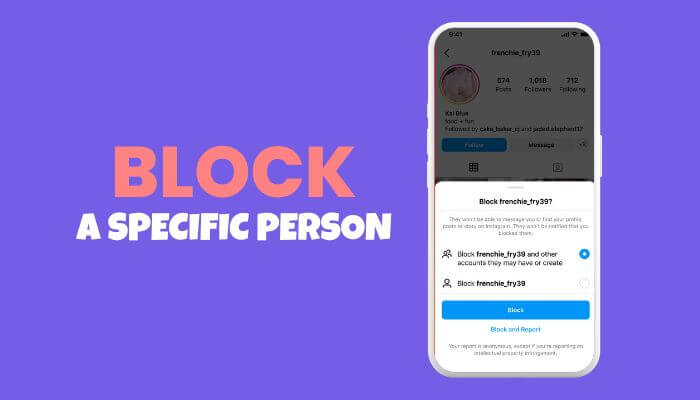
If you want to hide your following list from one specific person without making your account private, blocking is the strongest option. For users searching for how to hide your following list on Instagram without private account, blocking is one of the most effective privacy methods when you only want to prevent a specific person from viewing your profile.
When you block someone on Instagram, they won’t be able to find your profile, posts, or story. Instagram also says people are not notified when you block them.
How to Block Someone on Instagram
- Open Instagram.
- Go to the person’s profile.
- Tap the three dots in the top-right corner.
- Tap Block.
- Confirm your choice.
Blocking is useful when one person is checking your following list, watching your activity, or making you uncomfortable.
Important Note
Blocking does not make your public account fully private. If your profile remains public, the blocked person may still try to view your profile from another account. For stronger privacy, you may need to combine blocking with a private account or reduce public activity.
Method 2: Restrict Someone on Instagram
Restricting someone does not hide your following list. However, it can help reduce unwanted interaction.
Instagram says restricted users cannot see when you are online or when you have read their messages.
What restricting does:
- Limits direct interaction
- Hides activity status from that person
- Reduces pressure in messages
- Helps manage uncomfortable users without blocking
What restricting does not do:
- It does not hide your following list.
- It does not hide your followers list.
- It does not hide your profile from them.
- It does not make your public account private.
Use restrict when you want softer privacy, not full profile privacy.
Method 3: Remove Suspicious Followers
If you have a private account, removing a follower can stop them from seeing your private content. But if your account is public, removing a follower does not fully stop them from viewing your public profile. If you are looking for how to hide your following list on Instagram without private account, it is important to know that removing followers alone is not a complete solution for public accounts.
This is why removing followers is more useful for private accounts than public accounts.
How to Remove a Follower
- Go to your Instagram profile.
- Tap Followers.
- Find the user.
- Tap Remove.
- Confirm removal.
If your account is public, the removed person can still search for your profile and view public information. If you want removal to work better, switch to a private account after removing them.
Method 4: Hide Your Story From Specific People
Hiding your story does not hide your following list, but it helps protect your personal updates.
You can use this if you want to keep your account public but stop certain people from seeing your daily activity, personal moments, travel, family updates, or behind-the-scenes content.
How to hide your Instagram story:
- Open Instagram.
- Go to Settings and privacy.
- Tap Hide story and live or similar story privacy option.
- Select the people you want to hide your story from.
- Save your settings.
This is helpful for content privacy, but it is not a solution for hiding your following list.
Method 5: Use Close Friends
Close Friends is one of the best privacy tools for users who want a public profile but private sharing.
You can keep your account public for business, growth, reels, posts, and discovery while sharing personal stories only with selected people.
Best uses of Close Friends:
- Personal updates
- Family content
- Private travel updates
- Behind-the-scenes content
- Close community posts
- Sensitive lifestyle updates
Close Friends does not hide your following list, but it reduces how much personal information public visitors can see.
Method 6: Clean Up Your Following List
If you cannot hide your following list completely, the next best option is to control what appears there.
Review the accounts you follow and remove anything you do not want connected to your public profile. This is especially important for professionals, business owners, influencers, coaches, and public creators.
What to unfollow or review:
- Inactive accounts
- Spam accounts
- Suspicious profiles
- Competitors you do not want visible
- Personal accounts you want to keep private
- Accounts that may damage your brand image
- Old interests that no longer match your profile
This method does not hide the list, but it makes your list safer and cleaner.
Method 7: Create a Separate Private Account
This is the best solution if you want a public Instagram presence but private following activity.
Use two accounts:
1. Public account: For business, creator content, networking, brand growth, and public posts.
2. Private account: For personal friends, family, private interests, and accounts you do not want publicly connected to your main profile.
This is one of the most practical ways to solve the problem of how to hide your following list on Instagram without private account while still keeping your main profile public.
Reduce Instagram Discoverability Without Making Your Account Private
If you do not want to make your Instagram account private, you can still reduce how easily people discover your profile. This does not fully hide your following list, but it can reduce unwanted attention. For people searching for how to hide your following list on Instagram without private account, reducing your account’s discoverability is another useful privacy step to consider.
One useful option is turning off account suggestions for your Instagram profile. Instagram has a help page for turning off account suggestions, and the feature is available from supported devices such as the web version.
You can also reduce privacy exposure by controlling tags, mentions, and public interactions. Instagram allows users to manage who can tag or mention them, which helps reduce unwanted profile connections.
To Reduce Discoverability:
- Turn off account suggestions when available.
- Avoid following sensitive accounts from your public profile.
- Control who can tag or mention you.
- Remove old tagged posts from your profile.
- Avoid public comments on sensitive pages.
- Use a private account for personal interests.
- Review your followers and following list monthly.
This is not the same as hiding your following list, but it gives you more control over how people discover your account.
Method 8: Switch to a Private Account for Stronger Privacy
If your main concern is privacy, switching to a private account is still the most effective option. Although many users search for how to hide your following list on Instagram without private account, switching to a private account remains the strongest privacy solution offered by Instagram.
Instagram’s privacy controls clearly support private accounts as a core visibility feature. Private accounts help control who follows you and who can see your posts.
How to Make Your Instagram Account Private
- Open Instagram.
- Go to your profile.
- Tap the menu icon.
- Open Settings and privacy.
- Tap Account privacy.
- Turn on Private account.
What Private Account Helps With
- Non-followers cannot freely view your posts.
- New followers need approval.
- Your content is limited to approved followers.
- Random users have less access to your activity.
What Private Account Does Not Fully Solve
Approved followers may still see your followers and following lists. So if you want to hide your following list from current followers, you may need to remove or block specific users.
Does Instagram Have a “Hide Following List” Button?
Unfortunately, no. If you’re searching for how to hide your following list on Instagram without private account, there is no official setting that lets public accounts completely hide their following list from everyone.
Many videos, blog posts, and social media tips claim there is a hidden trick or secret setting, but most of them confuse other Instagram privacy features with following-list privacy. Tools such as Restrict, Limit Interactions, Hide Story, Close Friends, and Activity Status can improve your privacy, but they cannot completely hide your following list on a public Instagram account.
If someone promises a one-click method to hide your following list without making your account private, it is almost certainly misleading. The safest approach is to use Instagram’s official privacy features instead of relying on unofficial tricks or third-party apps.
Instagram Privacy Settings That Do Not Hide Your Following List
Some Instagram settings are useful, but they do not solve this exact issue.
- Restrict: Restricting someone limits interaction visibility, but it does not hide your following list.
- Hide Story: This hides stories from selected people, but it does not hide your following list.
- Close Friends: This limits story sharing to selected people, but it does not hide followers or following.
- Limit Interactions: This can reduce comments, messages, and unwanted interactions, but it does not make your following list private.
- Professional Account: Switching to a business or creator account does not hide your following list.
- Blocking Comments: Comment controls help manage comments, not following-list visibility.
Hide Related Instagram Activity Signals
Even if you cannot fully hide your following list without a private account, you can still reduce other activity signals that may reveal your interests, relationships, or online behavior. If you’re looking for how to hide your following list on Instagram without private account, adjusting these privacy settings can help protect your account, even though they do not hide your following list directly.
For example, Instagram lets users turn Activity Status on or off. If Activity Status is enabled, people you follow or message may be able to see when you are active or recently active.
Instagram also explains that when you like a photo, your like may be visible to anyone who can view that post.
To Improve Your Instagram Privacy
- Activity Status: Turn it off if you do not want others to see when you are online.
- Likes: Avoid liking sensitive public posts if you do not want your activity noticed.
- Comments: Avoid commenting on public posts that may reveal private interests.
- Tags: Control who can tag you in posts.
- Mentions: Limit who can mention you in comments, captions, and stories.
- Story Privacy: Hide stories from people you do not fully trust.
- Close Friends: Use Close Friends for personal updates instead of sharing with everyone.
These settings do not directly hide your following list, but they provide an extra layer of privacy and help reduce how much of your Instagram activity is visible to others.
Public vs Private vs Block: Which Option Should You Choose?
| Your Goal | Best Option | Why |
| Hide from strangers | Make account private | Non-followers need approval |
| Hide from one person | Block that person | They cannot find your profile from that account |
| Keep growing as creator | Stay public | Better for reach and discovery |
| Keep personal interests private | Use second private account | Separates public and personal activity |
| Reduce unwanted comments | Restrict or limit interactions | Helps manage harassment or spam |
| Hide stories only | Hide story or use Close Friends | Best for personal content |
| Reduce profile discovery | Turn off suggestions if available | Reduces suggested-account visibility |
This table helps readers quickly choose the right privacy action instead of trying random settings that do not solve the problem.
Best Privacy Strategy for Public Instagram Accounts
If you want to keep your account public, use a layered privacy strategy.
Best setup:
- Keep your public profile clean and professional.
- Unfollow accounts you do not want publicly visible.
- Block specific people who should not see your profile.
- Restrict users who make you uncomfortable.
- Hide stories from selected people.
- Use Close Friends for personal stories.
- Keep sensitive interests on a separate private account.
- Review your followers and following list every month.
This gives you more control without fully sacrificing public reach.
Public Account vs Private Account: Which Is Better?
| Feature | Public Account | Private Account |
| Better for growth | Yes | No |
| Better for privacy | No | Yes |
| Good for creators | Yes | Sometimes |
| Good for businesses | Yes | Usually no |
| Can strangers discover you? | Yes | Limited |
| Can you approve followers? | No | Yes |
| Can you fully hide following list from everyone? | No | Not from approved followers |
If your goal is growth, stay public and manage privacy carefully. If your goal is personal privacy, private is better.
Should Business Accounts Hide Their Following List?
For most businesses, hiding the following list is not usually necessary unless the account follows competitors, private clients, research accounts, or sensitive personal profiles. If you’re searching for how to hide your following list on Instagram without private account, business accounts should first consider whether hiding their following list is actually beneficial for their brand.
In many cases, a well-managed following list can help build credibility and trust when it includes:
- Industry leaders
- Business partners
- Clients
- Trusted brands
- Local organizations
- Relevant creators
- Professional communities
However, if your business account follows random, inactive, or unrelated accounts, it may appear less professional to potential customers or partners. Reviewing and cleaning up your following list regularly helps maintain a stronger and more trustworthy brand image.
Safety Warning: Avoid Third-Party Apps
If you’re searching for how to hide your following list on Instagram without private account, be careful of third-party apps that promise quick or secret privacy solutions. Do not trust apps or websites that claim they can hide your Instagram following list, as many of them request login access that could put your account security and personal information at risk.
Avoid apps that claim to:
- Hide your following list instantly
- Reveal secret Instagram privacy settings
- Control who can see your followers or following list
- Track private followers or private profiles
- Unlock hidden Instagram features
- Require your Instagram username, password, or login credentials
The safest way to manage your Instagram privacy is through the official Instagram app or website. Avoid sharing your account details with unknown tools, as they may compromise your account security or violate Instagram’s policies.
Common Myths About Hiding Instagram Following List
Myth 1: Restricting someone hides your following list
False. Restricting limits interaction features, but it does not hide your following list.
Myth 2: Hiding your story hides your following list
False. Story privacy and following-list visibility are different.
Myth 3: Switching to a professional account hides following
False. Business and creator accounts do not automatically hide your following list.
Myth 4: There is a secret Instagram setting to hide following
For most users, false. There is no universal setting available to all accounts.
Myth 5: Removing a follower works on public accounts
Not fully. If your account is public, removed followers may still view your public profile.
Best Answer for 2026
The best answer to how to hide your following list on Instagram without private account is this:
You cannot fully hide your following list from everyone while keeping a normal public Instagram account. The closest solutions are blocking specific users, cleaning your following list, using a separate private account, hiding personal stories, and limiting unwanted interactions.
If you need full privacy from strangers, switch to a private account. If you need privacy from one person, block them. If you need a public profile for growth but private browsing and following activity, create a second private account.
Monthly Instagram Privacy Checklist
If you’re looking for how to hide your following list on Instagram without private account, reviewing your privacy settings regularly can help improve your overall account security and reduce unwanted visibility. Use this simple checklist once a month to keep your public Instagram account safer:
- Review your following list and unfollow accounts you do not want publicly connected to your profile.
- Remove suspicious or unwanted followers.
- Block users who repeatedly check, harass, or bother you.
- Restrict users who make you uncomfortable but do not need to be blocked.
- Check who can tag and mention you.
- Turn off Activity Status if you want more privacy.
- Hide stories from people who should not see personal updates.
- Use Close Friends for private posts and stories.
- Avoid third-party tools that ask for your Instagram password.
- Keep two-factor authentication (2FA) enabled for better account security.
Following this monthly checklist not only strengthens your Instagram privacy but also helps you stay in control of who can interact with your account and what information others can see.
Conclusion
If you’re searching for how to hide your following list on Instagram without private account, the most important thing to know is that Instagram does not currently offer a complete setting to hide your following list on a public account. While features like blocking, restricting, story controls, Close Friends, and follower cleanup can improve your privacy, they cannot completely hide your following list from everyone.
The best solution depends on your needs. Creators and businesses should keep their public profiles professional and review their following list regularly, while users who want maximum privacy should consider switching to a private account or using a separate private profile for personal activity.
Ultimately, how to hide your following list on Instagram without private account has no one-click solution in 2026. The safest approach is to use Instagram’s official privacy features, avoid misleading third-party apps, and regularly review your account settings to protect your privacy and stay in control of your online presence.
How to Hide Your Following List on Instagram Without Private Account FAQs
1. Is there any official Instagram feature for how to hide your following list on Instagram without private account?
A. No. Instagram does not currently provide an official setting that lets public accounts completely hide their following list. You can only use privacy features like blocking, restricting, and story controls to reduce visibility.
2. Can Instagram updates change how to hide your following list on Instagram without private account?
A. Yes. Instagram regularly updates its privacy features, so visibility options may change in future updates. Always check the latest privacy settings inside the Instagram app.
3. Does using Meta Verified help hide your following list?
A. No. Meta Verified improves account verification and security but does not provide a feature to hide your followers or following list.
4. Can someone view my following list through a browser if my account is public?
A. Yes. If your Instagram account is public, people may still be able to access your public profile information, including your following list, through supported web browsers.
5. Does changing my Instagram username hide my following list?
A. No. Changing your username does not affect who can view your followers or following list. Privacy settings remain the same.
6. Can archived posts help hide my following list?
A. No. Archiving posts only hides selected posts from your profile. It does not affect the visibility of your following list.
7. Does turning off profile recommendations hide my following list?
A. No. Turning off profile recommendations may reduce how often your account is suggested to others, but it does not hide your followers or following list.
8. Is using two Instagram accounts better for privacy?
A. Yes. Many users keep one public account for creators or business purposes and a separate private account for personal activity to improve privacy.
Safety Disclaimer: Do not use third-party apps, browser extensions, or websites that promise to hide your Instagram following list. Instagram privacy settings should be managed only through the official Instagram app or website. Any tool that asks for your Instagram username, password, login code, or account access may put your account at risk. Some fake privacy tools may collect login details, misuse your account, or cause account security problems.
