



Instagram offers several tools for controlling who can follow you, view your posts, and interact with your profile. However, learning how to hide followers on Instagram is not as simple as activating one privacy setting.
Many people assume there is a hidden setting that makes followers invisible, but Instagram’s privacy controls don’t work that way. The platform separates profile visibility, follower approvals, account discovery, and interaction controls into different features. Understanding those differences makes it much easier to choose the right privacy settings for your specific situation.
As of 2026, Instagram does not provide a universal option that completely hides your followers or following list from everyone. You can make your account private, remove unwanted followers, block selected users, and reduce how Instagram recommends your profile, but every method has limitations.
It is also important to separate two different privacy concerns:
- Your follower count: The number displayed on your profile
- Your followers list: The individual accounts that follow you
Instagram treats follower and following counts as public profile information. These numbers remain visible even when your account is private. Access to individual accounts in your lists can be limited, but Instagram does not give users complete control over list visibility.
This guide explains what actually works, what Instagram does not allow, and which privacy method is best for your situation.
Key Takeaways
These key points summarize how to hide followers on Instagram without overstating what the platform’s privacy controls can do.
- Instagram does not have a universal Hide Followers button.
- Making your account private is the best general way to control who follows you.
- A private account does not hide your follower or following counts.
- Public accounts connected to you may remain visible even when your profile is private.
- Existing followers remain approved after you switch to private mode.
- You can remove a follower from a private account without notifying them.
- Blocking provides the strongest protection from a specific account.
- Restricting, muting, and using Close Friends do not hide follower lists.
- Business and Creator accounts must switch to personal accounts before becoming private.
- Instagram can filter suspected spam and bot followers for review.
- Turning off contact syncing can reduce recommendations, but does not hide followers.
- Third-party apps cannot safely add a follower-hiding feature that Instagram does not offer.
Instagram Follower Privacy at a Glance
If you only need the essentials, this quick reference explains what Instagram currently allows.
| Privacy Goal | Is It Possible? | Best Solution |
|---|---|---|
| Hide your follower list from everyone | ❌ No | Instagram doesn’t provide this option. |
| Control who can follow you | ✅ Yes | Switch to a private account and approve requests. |
| Remove one follower quietly | ✅ Yes | Remove the follower from your private account. |
| Hide your profile from one person | ✅ Yes | Block the account. |
| Hide follower count | ❌ No | Instagram keeps follower and following counts public. |
Understanding these limitations helps you choose the most effective privacy settings without relying on unsupported third-party tools.
Quick Answer: Can You Hide Followers on Instagram?
For most users searching for how to hide followers on Instagram, the practical answer is to combine private mode with follower removal or blocking.
Instagram does not let you completely hide your followers from everyone through one setting.
The closest practical solution is to:
- Make your Instagram account private.
- Review your existing followers.
- Remove anyone you no longer trust.
- Reject unwanted follow requests.
- Block specific accounts when stronger separation is necessary.
Private mode limits access to your content and gives you control over new followers. However, your name, username, profile picture, biography, links, follower count, and following count remain public.
Public accounts that follow you or that you follow may also remain identifiable. Therefore, making an account private improves privacy but does not make every social connection invisible.
What Works at a Glance
The table below shows how to hide followers on Instagram for different privacy goals and where each method falls short.
| Your privacy goal | Best available method | Main limitation |
| Control who can follow you | Make your account private | Existing followers remain approved |
| Hide posts from non-followers | Make your account private | Basic profile details remain public |
| Remove access from one follower | Remove them while your account is private | They can send another request |
| Hide your profile from one person | Block the account | They may use another account |
| Hide followers from approved followers | Not available | Removal or blocking is required |
| Hide your follower count | Not available | The number remains public |
| Hide only your following list | Not available | Instagram has no separate setting |
| Manage unwanted comments or messages | Restrict the person | Restrict does not hide your profile |
| Hide Stories from selected people | Use Story privacy controls | Other profile content remains visible |
| Reduce contact-based discovery | Disable contact syncing | This affects recommendations only |
| Hide your entire account temporarily | Temporarily deactivate it | The account is hidden from everyone |
| Remove suspected bots | Review Potential Spam followers | Instagram’s detection may not be perfect |
Can You Completely Hide Your Followers on Instagram?
A common reason people search for how to hide followers on Instagram is to make every connection invisible, but Instagram does not currently provide that option.
No. Instagram currently has no standard privacy setting that allows you to:
- Hide your entire followers list from everyone
- Hide your following list from everyone
- Hide followers from approved followers
- Hide one connection while showing all others
- Hide your followers, but keep your following list visible
- Hide your following list, but keep your followers visible
- Hide the number of followers displayed on your profile
- Keep a professional account public while concealing its connections
Instagram provides controls for accounts, posts, Stories, comments, messages, mentions, and tags. It does not offer the same level of control for follower and following lists.
Be cautious with videos, extensions, or websites that promise a secret Hide Followers option. They may be outdated, misleading, or referring to a platform-level restriction that ordinary users cannot activate.
What Information Remains Public on a Private Instagram Account?
Before deciding how to hide followers on Instagram, you should know which profile details stay public even after you enable private mode. A private account provides meaningful protection, but it does not hide every part of your profile.
The following information generally remains public:
- Your display name
- Your username
- Your profile picture
- Your biography
- Links in your bio
- Your follower count
- Your following count
- Your Threads username, when connected
- Channels you have created
You can edit or remove your name, biography, profile image, and links. You cannot use Instagram’s normal settings to hide your follower and following numbers.
Follower Count vs. Followers List
Understanding this difference is essential when researching how to hide followers on Instagram because Instagram handles the count and the list separately.
| Feature | Follower Count | Followers List |
| What it means | The total number of people following your account | The individual usernames of people following you |
| Example | “4,250 followers” | A list of the 4,250 accounts following you |
| Visible on a public account | Yes | Generally yes |
| Visible on a private account | Yes | Visibility is more limited, but not completely hidden |
| Can you hide it? | No | Not completely |
| Best privacy method | No setting is available | Make your account private, remove followers, or block selected users |
| Main limitation | The number remains public | Approved followers and some public connections may still be visible |
The same distinction applies to your following count and following list. Instagram does not provide a setting that completely hides either the numerical count from your profile.
Public vs. Private Instagram Accounts
The first decision in how to hide followers on Instagram is whether your account should remain public or become private. A public account allows people to view its content and follow it without approval.
A private account requires users to send a follow request before they can view private posts. Private mode improves control, but it does not make every connection invisible.
| Instagram feature | Public account | Private account |
| Who can follow you? | Anyone | People you approve |
| Who can see posts and reels? | Generally anyone | Approved followers |
| Are follower counts visible? | Yes | Yes |
| Are the following counts visible? | Yes | Yes |
| Are public accounts connected to you visible? | Generally yes | May remain visible |
| Are private accounts connected to you visible? | Generally yes | Usually approved followers |
| Can posts appear publicly in Explore? | When eligible | Generally no |
| Is follower approval required? | No | Yes |
| Can the account use professional tools? | Yes | No |
| Can public posts be embedded elsewhere? | When embedding is enabled | No |
This distinction matters because a private profile does not necessarily conceal every public account that follows it or that it follows.
For example, another person may still identify a public brand, creator, or business account connected to your private profile.
Can People See Mutual Followers on a Private Account?
Anyone learning how to hide followers on Instagram should also consider mutual followers and other indirect signs of a connection. Making an account private does not erase all traces of your interactions with other Instagram users.
People may still discover connections through:
- Mutual-follower information shown on profiles
- Public accounts following you
- Public accounts you follow
- Comments left on public posts
- Likes visible on public content
- Tags and mentions
- Collaborative posts and reels
- Shared group conversations
- Account recommendations
- Content reposted or shared by other users
Someone may be unable to view your private posts, but still notice that you and a public account follow each other.
Therefore, understanding how to hide followers on Instagram also requires understanding indirect visibility. Private mode controls direct access, but it cannot guarantee that every relationship will remain undiscoverable.
How to Reduce Indirect Connection Exposure
A complete approach to how to hide followers on Instagram includes reducing tags, public comments, and recommendations that can expose relationships.
You can reduce public signals by:
- Reviewing posts in which you are tagged
- Manually approving tagged posts
- Limiting who can mention you
- Limiting who can tag you
- Avoiding comments on public posts when privacy is important
- Reviewing collaboration invitations
- Removing unnecessary links from your bio
- Turning off contact syncing
- Turning off similar-account suggestions
- Separating personal and professional accounts
These actions do not hide your followers list, but they reduce other ways people may identify your connections.
How to Hide Followers on Instagram With a Private Account
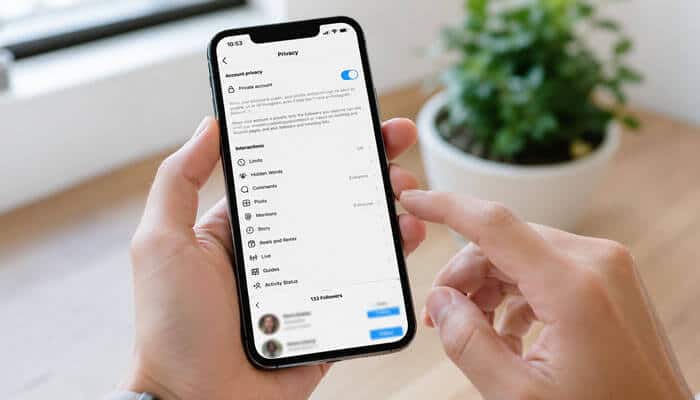
Making your account private is the most effective starting point for limiting access to your content and controlling future followers. When your account is private, people must send a follow request. You can approve or reject each request.
How to Make Instagram Private on Android or iPhone
On a phone, the simplest route for how to hide followers on Instagram begins in the Account privacy menu.
- Open the Instagram app.
- Tap your profile picture in the bottom-right corner.
- Tap the three-line menu in the top-right corner.
- Open Account privacy under Who can see your content.
- Turn on Private account.
- Confirm by selecting Switch to private.
Instagram periodically changes menu names and layouts. Search the settings for “Account privacy” if the option is not immediately visible.
How to Make Instagram Private on a Computer
Desktop users asking how to hide followers on Instagram can enable the same private-account setting through a web browser.
- Sign in to Instagram through a web browser.
- Select More in the lower-left corner.
- Open Settings.
- Select Account privacy.
- Enable Private account.
- Confirm your choice.
The privacy change applies across the mobile app and the Instagram website.
What Happens When You Make Instagram Private?
Knowing what changes—and what stays visible—is a critical part of how to hide followers on Instagram effectively.
After you switch to a private account:
- New followers must receive your approval.
- Your posts and reels become limited mainly to approved followers.
- Your private content generally stops appearing publicly in Explore.
- Private posts do not normally appear publicly on hashtag or location pages.
- Existing followers remain approved.
- Instagram does not automatically remove anyone.
- Your public profile information remains visible.
- Your follower and following counts remain visible.
- Public accounts connected to you may remain identifiable.
Because existing followers keep their access, switching to private mode should be followed by a follower review.
How to Review Your Existing Instagram Followers
Private mode alone is not enough; how to hide followers on Instagram also involves checking who already has access.
A private account is only as private as the people you have already approved.
Open your followers list and look for:
- People you no longer know or trust
- Former colleagues or acquaintances
- Accounts with copied photographs
- Profiles containing suspicious links
- Accounts with little or no genuine activity
- People who repeatedly ignore boundaries
- Fake profiles impersonating someone you know
- Automated or spam accounts
Do not keep suspicious accounts merely to preserve a larger follower count. A smaller, trusted audience provides better privacy than an inflated audience filled with unknown users.
How to Remove a Follower Without Blocking Them
For users who want a discreet method, hiding followers on Instagram can involve removing a follower after making the account private.
Removing a follower is useful when you want someone to lose access to your private content without using the stronger Block feature.
Instagram does not notify people when they are removed as followers.
Steps to Remove an Instagram Follower
- Open Instagram and go to your profile.
- Tap Followers.
- Search for the person’s username.
- Tap Remove beside the account.
- Select Remove again to confirm.
The person will no longer be an approved follower. If your account is private, they must send a new follow request before accessing your posts again.
Do not approve another request from that account when you want them to remain outside your private audience.
Will Someone Know You Removed Them?
Privacy-conscious users researching how to hide followers on Instagram often want to know whether removal triggers an alert.
Instagram does not send a removal notification. However, the person may discover the change if:
- Your posts disappear from their feed
- They visit your profile and see a Follow button
- They cannot open your private content
- They notice they are no longer following you
- They see a change in your follower count
Removing someone is discreet, but it is not guaranteed to remain unnoticed.
Does Removing a Follower Work on a Public Account?
When considering how to hide followers on Instagram, remember that removal offers little protection while your profile remains public.
Removing someone from a public account provides limited protection because they may still:
- Visit your profile
- View public posts and reels
- See public profile information
- Follow you again without approval
For stronger privacy:
- Switch to a private personal account.
- Remove the unwanted follower.
- Reject future requests from that account.
Block the user when you need stronger separation.
How to Review and Remove Potential Spam Followers
Another useful part of how to hide followers on Instagram is removing suspicious accounts that should not have access to your audience or content.
Instagram can identify accounts that may be spam or bots and place them in a separate review area.
Removing suspicious followers can improve privacy and audience quality. Spam accounts may be used to distribute scams, collect public information, post automated comments, or create artificial engagement.
How to Review Potential Spam Followers
- Open Instagram and visit your profile.
- Tap Followers.
- Look for Potential spam, Flagged for review or a similar section.
- Review each account.
- Confirm accounts you recognize as genuine.
- Remove accounts you do not want following you.
The wording and availability may vary by app version or account.
Can You Remove Spam Followers in Bulk?
For accounts with many suspicious followers, how to hide followers on Instagram may include using Instagram’s bulk spam-removal controls, where available.
Where the feature is available:
- Open your followers list.
- Select the potential-spam section.
- Choose Remove all spam followers.
- Confirm the removal.
Instagram does not notify accounts when you remove them from your followers list.
Why Did Your Follower Count Suddenly Drop?
People researching how to hide followers on Instagram may notice count changes after Instagram removes disabled, fake or automated accounts.
A drop does not always mean genuine followers deliberately unfollowed you.
Your count may decrease when Instagram removes:
- Disabled accounts
- Fake profiles
- Suspected bots
- Accounts generating automated activity
- Followers created through inauthentic services
Avoid buying followers or using automation tools. Artificial followers do not create meaningful engagement and may expose your account to unsafe third-party services.
How to Hide Instagram Followers From One Person
The most targeted version of how to hide followers on Instagram is removing or blocking one specific user.
Instagram does not have a setting called “Hide followers from this person.” You must use one of two alternatives.
Option 1: Make Your Account Private and Remove the Person
This approach to how to hide followers on Instagram is suitable when you want to reduce access without immediately blocking the person.
This is the less confrontational option.
- Make your account private.
- Open your followers list.
- Remove the selected person.
- Reject future requests from that account.
The person will lose access to private posts and follower-only areas. They may still see public profile information and public accounts connected to you.
Option 2: Block the Person
Blocking is the strongest answer to how to hide followers on Instagram from a particular account.
Blocking provides the strongest separation between two Instagram accounts.
To block someone:
- Open the person’s profile.
- Tap the three-dot menu.
- Select Block.
- Choose whether to block only that account or related accounts they may have or create.
- Confirm your decision.
Instagram does not send a notification when you block someone.
Remove vs. Block
| Feature | Remove follower | Block account |
| Sends a notification | No | No |
| Removes the user as a follower | Yes | Yes |
| Stops an immediate refollow | Only while you are private | Yes |
| Hides most of your profile from that account | No | Yes |
| Prevents normal mentions and tags | No | Yes |
| Removes previous likes and comments | No | Yes |
| Allows a future follow-up request | Yes | No |
| Best for | Quietly reducing access | Strong privacy or safety |
Choose removal when you want to reduce access without using a stronger barrier.
Choose blocking when someone is harassing you, monitoring your profile, repeatedly returning or ignoring your boundaries.
What Happens When You Block Someone?
Understanding blocking is important when deciding how to hide followers on Instagram from someone who repeatedly crosses your boundaries.
Blocking affects more than follower access.
When you block an Instagram account:
- The account stops following you.
- You stop following it.
- Instagram does not notify the user.
- Previous likes and comments from that account are removed from your posts.
- Unblocking does not automatically restore those likes and comments.
- The account cannot normally tag or mention you.
- Existing direct-message threads may remain visible.
- Normal direct messaging between the accounts is interrupted.
- Instagram may let you block related accounts that the person has or creates.
Blocking does not guarantee complete invisibility everywhere.
A blocked person may still see:
- Your activity on certain public posts
- Messages in a shared group conversation
- Content shared outside your account
- Your profile through another unblocked account
For harassment or threats, save screenshots or other evidence before blocking and use Instagram’s reporting tools where appropriate.
Does Restricting Someone Hide Your Followers?
Restrict is often confused with how to hide followers on Instagram, but it controls interactions rather than follower-list visibility.
No. Restricting someone does not hide your:
- Followers list
- Following list
- Follower count
- Following count
- Posts
- Reels
- Profile
The Restrict feature is designed to quietly manage unwanted interactions.
When you restrict someone:
- They cannot see when you are online.
- They cannot see whether you read their messages.
- Their new comments may initially be visible only to them.
- You can approve or delete their comments.
- Their messages are handled separately.
- You do not receive normal notifications for their comments.
Restrict is useful for controlling uncomfortable comments or messages. It is not a solution for hiding Instagram connections.
Remove vs. Restrict vs. Block
This comparison helps you choose how to hide followers on Instagram based on whether your priority is quiet removal, interaction control, or complete separation.
| Privacy action | Remove | Restrict | Block |
| Removes the person as a follower | Yes | No | Yes |
| Hides private posts after removal | Yes, if you are private | No | Yes |
| Controls their comments | No | Yes | Yes |
| Hides your online status from them | No | Yes | Yes |
| Prevents normal tags and mentions | No | No | Yes |
| Prevents another follow request | No | No | Yes |
| Notifies the person | No | No | No |
| Best use | Quiet follower cleanup | Managing interactions | Strong separation |
Do Close Friends, Story Privacy, or Muting Hide Followers?
These features may appear relevant to how to hide followers on Instagram, but none of them change who can see your followers or following information.
No. These features solve different problems.
Close Friends
Close Friends lets you share selected Stories with a smaller audience. It does not hide your followers list, following list or profile.
Hide Story From
The Hide Story From setting prevents selected users from seeing your Stories. It does not hide posts, reels, followers or profile information.
Mute
Muting changes what you see from another account. The muted person can still view your profile and content according to your normal privacy settings.
Activity Status
Turning off Activity Status hides information about when you are active. It does not affect follower visibility.
Can You Hide Followers Without Making Your Account Private?
Users searching how to hide followers on Instagram without going private should understand that a public profile cannot fully conceal its follower list.
You cannot hide your complete followers list while maintaining a normal public profile.
For public accounts, the strongest available option is to block selected people. Blocking may prevent those accounts from viewing your profile, but it does not hide your followers from the public generally.
You can still reduce exposure by:
- Removing personal information from your bio
- Avoiding links to private profiles
- Reviewing tagged content
- Limiting mentions and tags
- Hiding Stories from selected users
- Using Close Friends for personal Stories
- Turning off Activity Status
- Limiting message requests
- Disabling contact syncing
- Turning off similar-account suggestions
- Blocking suspicious accounts
These settings improve general privacy, but none create a public Instagram account with a hidden followers list.
Can You Hide Followers From Existing Followers?
A major limitation of how to hide followers on Instagram is that approved followers cannot be selectively denied access to the list while keeping all other access. Instagram does not let you keep someone as an approved follower while selectively hiding your follower list from them.
To prevent an existing follower from accessing private areas of your account, you must:
- Remove them while your account is private, or
- Block them
Restricting, muting, or hiding Stories from the person will not hide your followers.
This limitation matters when you want someone to continue viewing your posts but not your social connections. Instagram does not currently offer that level of selective list privacy.
Can You Hide Who You Follow on Instagram?
Questions about how to hide followers on Instagram frequently include the related goal of hiding the accounts you follow.
Instagram does not provide a separate setting for hiding only your following list.
You can:
- Make your account private
- Remove selected followers
- Block selected users
- Unfollow accounts you no longer want connected to your profile
- Create a separate private account for sensitive connections
You cannot keep your profile public while making your complete following list private through an official Instagram setting.
Can You Hide Your Instagram Follower Count?
Even after applying every available method for how to hide followers on Instagram, the numerical follower count remains public. No. Your follower and following numbers remain visible on both public and private accounts.
Do not confuse follower counts with like and view counts. Instagram allows users to hide certain engagement totals on posts and reels, but that feature does not apply to the follower count displayed on a profile. An external app cannot reliably change this profile-level rule.
How to Reduce Instagram Discovery Through Contact Syncing
Reducing contact-based recommendations supports how to hide followers on Instagram by making your account less likely to appear to people who know your phone number.
Turning off contact syncing does not hide your followers. However, it can reduce recommendations based on people saved in your device’s contact list.
This can be useful when you want to keep a personal account separate from:
- Colleagues
- Customers
- Clients
- School contacts
- Professional acquaintances
- People who have your phone number
How to Turn Off Contact Syncing
- Open Instagram and visit your profile.
- Tap the three-line menu.
- Open Accounts Center.
- Select Your information and permissions.
- Tap Upload contacts.
- Select the Instagram account.
- Turn off Connect contacts.
- Confirm by selecting Disconnect.
You should also disable contact access through your phone’s system settings and repeat the process on other devices logged in to your account.
Does Disconnecting Delete Previously Uploaded Contacts?
No. Turning off contact syncing stops future syncing but does not automatically delete contacts previously uploaded.
How to Delete Previously Synced Contacts
Deleting uploaded contacts strengthens your wider strategy for how to hide followers on Instagram, although it does not directly conceal the list.
Instagram may require you to complete this process through a computer:
- Sign in to Instagram.com.
- Open your profile.
- Select Edit profile.
- Open Accounts Center.
- Select Your information and permissions.
- Open Manage contacts.
- Select Delete all.
- Confirm the deletion.
Instagram may take time to complete the deletion, and recommendations may continue during part of that period.
How to Turn Off Similar-Account Suggestions
Turning off profile suggestions can complement how to hide followers on Instagram by reducing one route through which people discover your account. Instagram may recommend similar profiles when someone follows an account. These suggestions can include mutual contacts or potentially related accounts.
To disable similar-account suggestions:
- Sign in through Instagram.com using a desktop or mobile browser.
- Open your profile.
- Select Edit profile.
- Turn off Show account suggestions on profiles.
- Save the change.
Disabling this setting may stop:
- Similar profiles from appearing on your account
- Your profile from appearing as a similar-account suggestion elsewhere
It reduces one form of discovery but does not hide your account from search or conceal your followers.
Can Professional Accounts Hide Their Followers?
Business and Creator users researching how to hide followers on Instagram face an extra limitation because professional accounts cannot be private.
Instagram professional accounts include Business and Creator profiles. Professional accounts cannot be made private.
A professional account can still:
- Block selected users
- Restrict unwanted interactions
- Control comments and messages
- Manage tags and mentions
- Hide Stories from selected accounts
- Review suspicious followers
- Improve account security
However, removing someone from a public professional account does not prevent that person from returning to view its public content.
For meaningful follower approval, you must switch to a personal account and then make it private.
How to Switch From a Professional to a Personal Account
- Open your Instagram profile.
- Tap the three-line menu.
- Open Business tools and controls or Creator tools and controls.
- Look under Account or Preferences if necessary.
- Tap Switch account type.
- Select Switch to personal account.
- Confirm the change.
- Return to Account privacy.
- Enable Private account.
Switching to a personal account removes access to some professional features, including Insights, advertising tools and parts of the professional dashboard.
Should Creators Make Their Accounts Private?
For creators, how to hide followers on Instagram must be balanced against discovery, analytics and partnership goals.
A creator who depends on discovery, recommendations, brand partnerships or audience growth may lose valuable reach by switching to private mode.
A better arrangement may be:
- One public professional account for business and content
- One private personal account for trusted friends and family
This separates public visibility from personal connections without sacrificing professional tools.
How Instagram Privacy Works for Teen Accounts
For younger users, how to hide followers on Instagram should be combined with careful follow approvals, supervision and account-security controls. Instagram accounts belonging to users under 18 are private by default under Meta’s current Teen Account system.
Younger teenagers generally need parental permission to make protective settings less strict. Exact options can depend on age, supervision status, and region.
Teen users should:
- Approve only people they recognize
- Remove unknown followers
- Avoid displaying their school or address
- Avoid posting a live location
- Review tags and mentions
- Report impersonation or harassment
- Enable two-factor authentication
- Avoid follower-tracking applications
- Speak to a trusted adult about threatening contact
A private Teen Account still displays basic profile information and follower counts.
Can You Temporarily Hide Your Entire Instagram Account?
Temporary deactivation goes beyond how to hide followers on Instagram because it conceals the entire profile from everyone. Temporary deactivation is the closest option to hiding your complete Instagram presence. When you temporarily deactivate your account, your profile, photos, comments, and likes are hidden until you reactivate it by signing back in.
This is broader than making your profile private. However, deactivation is not a selective follower-privacy tool because it hides the account from everyone.
How to Temporarily Deactivate Instagram
- Open Instagram or Instagram.com.
- Go to Accounts Center.
- Select Personal details.
- Open Account ownership and control.
- Select Deactivation or deletion.
- Choose your Instagram account.
- Select Deactivate account.
- Tap Continue.
- Enter your password.
- Choose a reason and confirm.
Instagram generally allows an account to be deactivated only once per week.
| Option | What becomes hidden | Best use |
| Private account | Posts from unapproved users | Ongoing privacy |
| Remove follower | Private content from a removed user | Quietly reducing access |
| Block account | Most access from one account | Strong separation |
| Temporary deactivation | Your complete profile and activity | Taking a full break |
Why Third-Party “Hide Followers” Apps Are Risky
No safe guide to how to hide followers on Instagram should recommend an app that asks for your password or promises unavailable privacy controls.
Some applications, websites, and browser extensions claim they can:
- Hide your followers
- Hide your follower count
- Conceal selected connections
- Reveal every profile visitor
- Show secret unfollowers
- Bypass Instagram restrictions
- Unlock hidden privacy settings
Treat these claims cautiously.
A third-party service cannot safely add a privacy feature that Instagram itself does not provide. Services requesting login credentials may expose you to:
- Phishing
- Account theft
- Unauthorized posts
- Spam messages
- Data collection
- Artificial engagement
- Account restrictions
- Malicious browser extensions
Warning Signs of an Unsafe Service
Avoid a service when it:
- Requests your Instagram password directly
- Uses an unofficial login page
- Promises invisible followers
- Claims to reveal all profile visitors
- Guarantees access to private information
- Requests unnecessary permissions
- Has no clear company identity
- Has no understandable privacy policy
- Requires an unknown browser extension
- Offers followers or likes in exchange for account access
How to Remove a Connected App
Removing suspicious integrations is an important security step after using a service that claimed to explain how to hide followers on Instagram.
Menu labels may vary, but connected services can generally be reviewed through Instagram’s website permissions:
- Open Instagram settings.
- Find Website permissions.
- Select Apps and websites.
- Review active services.
- Remove services you do not trust or use.
After removing a suspicious service:
- Change your Instagram password.
- Enable two-factor authentication.
- Review login activity.
- Sign out of unfamiliar devices.
- Check your email address and phone number.
- Review unexpected posts, messages, and profile changes.
How to Secure Your Instagram Account
Strong security supports how to hide followers on Instagram because privacy settings cannot help if another person gains access to your account. Privacy settings cannot protect your followers if another person gains access to your account.
Enable Two-Factor Authentication
Two-factor authentication requires additional verification when Instagram detects a login from an unfamiliar device.
Available methods may include:
- Authentication apps
- Text messages
- WhatsApp codes
An authentication app is generally the strongest option. Store your backup codes in a secure place.
Use a Unique Password
Your Instagram password should be:
- Long
- Unique
- Difficult to guess
- Unrelated to your name or birthday
- Different from your email password
- Stored securely in a password manager
Review Login Activity
Check for devices or locations you do not recognize. Sign out of suspicious sessions and change your password immediately.
Be Careful With Fake Instagram Messages
Scammers often send messages claiming that:
- Your account will be suspended
- Your verification is expiring
- You violated copyright rules
- You won a prize
- You need to confirm your password
- A brand wants to pay you immediately
Do not enter your password through links in unexpected messages.
What Does “We Limit Certain Things You Can See” Mean?
This message sometimes appears when people investigate how to hide followers on Instagram, but it is usually an Instagram-imposed limit rather than a setting chosen by the profile owner. Some users encounter a message stating that Instagram limits certain information, such as followers or following lists, to protect its community.
This does not necessarily mean the profile owner activated a secret setting. Instagram may apply platform-level limits for safety, security, or anti-spam reasons. The company does not publicly explain every trigger.
Possible explanations include:
- Rapidly opening many follower lists
- Unusual activity from the viewing account
- A temporary anti-spam restriction
- Age-related safety protections
- An account-specific limitation
- An app or server problem
- A temporary platform test
Do not use scraping software or unofficial applications to bypass the restriction.
Instead:
- Close and reopen Instagram.
- Update the official app.
- Wait before checking again.
- Try Instagram.com.
- Review your Account Status.
- Avoid repeatedly opening multiple lists.
- Report the problem through Instagram’s Help settings if it continues.
Why Can’t You Find the Private Account Setting?
If the first step in how to hide followers on Instagram is missing, your account type, app version or current menu layout may be the reason.
Several issues may prevent the setting from appearing.
- You Have a Professional Account
Business and Creator accounts cannot be private. Switch to a personal account first.
- Your App Is Outdated
Update Instagram through your device’s official app store.
- The Menu Has Changed
Search the settings for:
- Account privacy
- Private account
- Who can see your content
- Privacy
Instagram Has a Temporary Problem
Try:
- Closing and reopening the app
- Checking your internet connection
- Restarting your phone
- Signing out and back in
- Clearing the app cache on Android
- Reinstalling the official app
- Changing the setting through Instagram.com
Why Can’t You See Someone’s Followers List?
Not seeing a list does not prove that another user discovered a special method for how to hide followers on Instagram.
Not being able to open a complete followers list does not automatically mean that the person activated a special privacy setting.
Possible causes include:
- The profile is private and has not approved you.
- The account blocked you.
- The profile was disabled or deleted.
- Instagram applied a temporary safety limitation.
- The app failed to load the list.
- Your activity triggered an anti-spam restriction.
- Instagram is experiencing a technical problem.
- Your internet connection is unstable.
There is no standard setting that allows someone to keep a normal public profile while completely hiding the followers list from everyone.
How to Check Whether Your Privacy Changes Worked
Testing from a second account is the best way to confirm whether your chosen method for how to hide followers on Instagram is working as expected.
Do not assume a privacy setting worked simply because its switch is enabled. Test what other people can actually see.
Five-Minute Instagram Privacy Test
- Confirm that Private account is enabled.
- Check that unwanted people are no longer followers.
- View your profile from a second account that does not follow you.
- Check your profile through a signed-out browser.
- Confirm which profile details remain visible.
- Search for your username from another account.
- Review publicly visible tagged posts.
- Check public comments and mentions.
- Test whether a removed follower can open private content.
- Test Story visibility separately.
- Review connected apps and websites.
- Confirm that contact syncing is disabled where required.
This test helps distinguish between:
- Content privacy
- Profile visibility
- Followers-list visibility
- Story privacy
- Account discoverability
These areas are related but controlled separately.
Best Privacy Setup for Different Situations
| Situation | Recommended setup |
| Personal profile for friends and family | Private account with careful approvals |
| Unwanted acquaintance following you | Private account plus Remove |
| Harassment or repeated monitoring | Save evidence, block and report |
| Public creator profile | Remain professional and block selected accounts |
| Business account | Stay public but manage comments, messages and followers |
| Teen account | Private settings, trusted-adult support and 2FA |
| Personal and professional use combined | Separate private and public accounts |
| Suspicious third-party app used | Remove access, change password and enable 2FA |
| Too many bots following you | Review Potential Spam followers |
| Need a complete break | Temporarily deactivate the account |
| Do not want contacts finding you | Disconnect and delete synced contacts |
Common Myths About Hiding Instagram Followers
Myth 1: Restricting Someone Hides Your Followers
Restrict managers’ interactions. It does not hide your followers, following list or profile.
Myth 2: A Private Account Hides Everything
Private mode protects your content and follow approvals, but basic profile information and follower counts remain public.
Myth 3: Close Friends Hide Your Follower List
Close Friends controls who sees selected Stories. It does not affect your profile connections.
Myth 4: Muting Someone Hides Your Account
Muting changes what you see. It does not change what the muted account sees.
Myth 5: Removing a Follower Blocks Them
A removed user can send another request. A blocked user cannot normally refollow or interact through the blocked account.
Myth 6: Hiding Like Counts Hides Follower Counts
Like-count controls apply to posts and reels, not profile follower numbers.
Myth 7: Contact Syncing Controls List Privacy
Contact syncing affects recommendations. It does not hide followers.
Myth 8: Third-Party Apps Can Unlock Hidden Privacy Settings
An external service cannot safely activate a feature that Instagram does not officially offer.
Instagram Privacy Checklist
- Make your personal account private.
- Review existing followers.
- Remove unknown or unwanted people.
- Review Potential Spam followers.
- Reject suspicious follow requests.
- Block accounts that repeatedly cross boundaries.
- Limit mentions and tags.
- Approve tagged posts manually.
- Hide personal Stories from selected people.
- Use Close Friends for sensitive Stories.
- Control message requests.
- Turn off Activity Status where appropriate.
- Remove unnecessary information from your bio.
- Disable contact syncing.
- Delete previously uploaded contacts.
- Turn off similar-account suggestions.
- Review connected apps and websites.
- Use a unique password.
- Enable two-factor authentication.
- Save backup codes securely.
- Review login activity.
- Keep Instagram updated.
- Avoid unofficial Instagram applications.
- Separate professional and personal accounts when necessary.
How This Guide Was Researched
This research process was designed to make the advice on how to hide followers on Instagram accurate, transparent and useful in 2026.
This guide was prepared by reviewing Instagram and Meta documentation covering:
- Public and private account visibility
- Profile information that remains public
- Follower removal
- Blocking and restricting
- Potential spam followers
- Contact syncing
- Account suggestions
- Professional account limitations
- Temporary deactivation
- Two-factor authentication
Instagram frequently changes interface labels and menu locations. The underlying privacy limitations explained in this guide are more important than the exact wording of a menu, which may vary by device, app version, account type, and region.
Quick Instagram Privacy Checklist
Before assuming your account is private, confirm that you have:
- Switched to a personal private account (if appropriate).
- Reviewed and removed unwanted followers.
- Rejected suspicious follow requests.
- Limited tags and mentions.
- Disabled contact syncing if you want less discoverability.
- Enabled two-factor authentication.
- Reviewed connected apps and websites.
- Tested your profile using a second account.
Completing these steps gives you the highest level of privacy currently available through Instagram’s official settings.
Final Verdict: How to Hide Followers on Instagram
Learning how to hide followers on Instagram begins with understanding that Instagram does not provide complete follower-list privacy in 2026. There is no universal switch for hiding followers, concealing only the following list, or removing follower counts from public view.
The most effective approach is to make your personal account private, review current followers, and remove anyone who should no longer have access. Blocking is the strongest option for separating your profile from a specific account. Restrict should be used to manage unwanted messages and comments rather than follower visibility.
You can improve privacy further by reviewing potential spam followers, disabling contact syncing, removing uploaded contacts, turning off account suggestions, and enabling two-factor authentication. Creators and business owners may benefit from maintaining a public professional account and a separate private personal profile.
Remember that follower and following counts remain public, some public connections may remain identifiable, and third-party tools cannot safely create features Instagram does not offer. Combining official privacy controls with regular follower reviews and strong security provides the best practical protection available.
How to Hide Followers on Instagram FAQs
1. How to hide followers on Instagram from everyone?
Instagram does not offer a setting that completely hides your followers from everyone. The closest solution is to make your account private, review your existing followers, and remove or block people you do not trust.
2. How to hide followers on Instagram from one person?
Make your account private and remove that person from your followers list. For stronger privacy, block the account so it cannot normally view your profile, follow you again, tag you, or mention you.
3. Can I hide my Instagram followers without making my account private?
No. A public Instagram account cannot completely hide its followers list. You can block selected users, but your follower information generally remains visible to other people.
4. Does a private Instagram account hide followers?
A private account limits access to your posts and requires approval for new followers. However, it does not hide your follower count, and some public connections may still be identifiable.
5. Does restricting someone hide my Instagram followers?
No. Restricting someone only controls comments, messages, read receipts, and activity visibility. It does not hide your followers list, following list, posts, or profile.
