




H5 FireKirin brings fish-shooting and arcade-style games to compatible web browsers without requiring a separate app. However, login access depends on the operator, and not every website using the Fire Kirin name is trustworthy.
This guide covers how to access H5 FireKirin, play online, fix login problems, check device compatibility, and avoid unsafe gaming websites.
Quick Answer
H5 FireKirin is a browser-based gaming format associated with fish-shooting and arcade-style games. Players may access supported games without installing an app, but login credentials and available features depend on the operator. Always verify the website before signing in.
Key Takeaways
- H5 FireKirin may offer browser-based fish-shooting and arcade games without requiring an APK.
- Login and registration depend on the account operator or distributor.
- Game availability and compatibility vary across Android, iPhone, and computers.
- Player accounts and administrative dashboards serve different purposes.
- Virtual gaming credits are not always redeemable for real money.
- Verify website security, operator legitimacy, and applicable gaming laws before playing.
What Is H5 FireKirin and How Does It Work?
H5 FireKirin refers to browser-based Fire Kirin gaming, commonly associated with fish-shooting and arcade-style games. Supported versions may run directly in a web browser without requiring an app download.
However, game availability, login access, and device compatibility depend on the service provider.
What Does H5 Mean?
H5 refers to HTML5-based web technology that supports interactive graphics, animations, sound, and touchscreen controls.
This allows compatible games to run on smartphones, tablets, and computers through supported browsers.
How Does Browser-Based Gaming Work?
The typical process includes:
- Website access: Open a verified gaming website.
- Account login: Enter credentials provided by your operator.
- Game selection: Choose from the available arcade games.
- Gameplay: Use on-screen controls to play, with credit usage and scoring determined by each game’s rules.
- Account management: Check available balances, settings, and support options.
Features may differ between gaming platforms.
Who Operates H5 FireKirin?
Different businesses may handle the software, gaming access, and player accounts.
| Provider Type | Main Responsibility |
|---|---|
| Software developer | Develops gaming technology |
| Distributor | Provides access to gaming services |
| Account operator | Manages player accounts and support |
Not every website using the Fire Kirin name belongs to the same company. Always verify the operator before registering or sharing personal information.
H5 FireKirin Login and How to Access Your Account
The login process depends on your account operator or distributor. Different Fire Kirin websites may use separate login systems, so credentials from one provider may not work on another.
How to Log In to H5 FireKirin
Follow these steps to access your account:
- Verify your provider: Identify the operator managing your account.
- Open the login page: Use the website address confirmed by your provider.
- Choose your browser: Open Chrome, Safari, or Edge.
- Enter your credentials: Type your assigned username and password.
- Confirm account access: Check that your account details appear correctly.
Avoid entering passwords through unfamiliar links or suspicious websites.
How to Verify a Login Link
Before signing in, check these details:
- Website address: Confirm the domain matches your provider.
- HTTPS security: Look for a secure connection, but remember HTTPS alone does not prove legitimacy.
- Operator details: Check for identifiable business information.
- Customer support: Verify the provider’s contact information.
- Privacy policy: Review how your account information is handled.
Avoid websites with unexpected redirects, suspicious downloads, or requests for unnecessary personal information.
Player Login vs Admin Login
Fire Kirin gaming systems may offer different login portals depending on account permissions.
| Login Type | Main Purpose |
|---|---|
| Player login | Access games and account features |
| Agent login | Manage authorized player services |
| Distributor login | Manage assigned gaming operations |
| Admin login | Access authorized system settings |
Regular players should use only their assigned player login portal.
How to Register for an Account
Registration requirements vary by provider. Some operators issue accounts directly, while others use distributor-managed registration.
Before registering, confirm:
- The operator’s identity and contact details
- Minimum age and local gaming laws
- Required personal information
- Game credit and payment conditions
- Available account support
Never share sensitive financial information with an unverified provider.
How to Reset Your H5 FireKirin Password
If you cannot access your account:
- Visit your verified login website.
- Select Forgot Password, if available.
- Follow the recovery instructions.
- Contact your account provider if recovery is unavailable.
- Set a strong, unique password.
Never share verification codes or pay unexpected password recovery fees.
How to Delete Your Account
Account closure depends on the provider’s policies.
- Contact your verified account operator.
- Request account closure and personal data deletion.
- Review any remaining balances or transactions.
- Save important records before closing your account.
Some information may remain stored when legally required, even after account closure.
How to Play H5 FireKirin Online
H5 FireKirin offers browser-based access to fish-shooting and arcade-style games, depending on the operator. Players may encounter moving underwater targets, cannon controls, and virtual credit systems.
How Do Fish-Shooting Games Work?
Players aim at animated fish and other underwater creatures using on-screen controls.
Common gameplay features include:
- Moving targets: Fish move across the screen.
- Cannon controls: Players aim and fire at targets.
- Virtual credits: Certain actions may consume game credits.
- Scoring system: Different targets may carry different values.
- Game results: Scores and balances change according to game rules.
Some games involve chance-based outcomes, so no strategy guarantees winnings.
What Games Are Available on H5 FireKirin?
Available games depend on the provider and platform version.
| Game Category | Typical Gameplay |
|---|---|
| Fish-shooting | Aim at moving underwater targets |
| Arcade games | Complete interactive challenges |
| Slot-style games | Spin themed reels |
| Keno-style games | Select numbers for draws |
Not every operator offers all these game categories.
Are Fish-Shooting Games Fair?
Fairness in H5 FireKirin games cannot be confirmed through gameplay alone. Some games may use randomized outcomes or software-controlled scoring.
Before playing games involving money or redeemable prizes, check:
- Published game rules and scoring systems
- Credit costs and payout conditions
- Independent fairness testing
- Operator licensing and legal authorization
Do not assume a game is independently certified without credible evidence.
Is There an H5 FireKirin Free Demo?
Some providers advertise demos, free-play accounts, or promotional credits.
- Demo games: Let users preview gameplay features.
- Free-play accounts: May provide entertainment-only credits.
- Promotional credits: May include usage or redemption restrictions.
A universally available, verified public demo has not been confirmed. Check registration, payment, and privacy requirements before accessing an advertised free version.
H5 FireKirin on Android, iPhone, and PC
H5 FireKirin may work on smartphones, tablets, and computers through compatible browsers. However, access depends on the device, browser, and gaming provider.
- Android: H5 FireKirin may run through Chrome or another supported browser without downloading an APK.
- iPhone and iPad: H5 FireKirin may work through Safari if the operator supports iOS browser access.
- Windows and Mac: Compatible games may run through Chrome, Edge, or Safari, depending on the device.
- iPhone Home Screen: Open the verified website in Safari, tap Share, select Add to Home Screen, and tap Add.
- Browser updates: Keep your browser updated to reduce compatibility and security problems.
- App downloads: Avoid unknown APK files, suspicious certificates, or unnecessary device permissions.
- Incognito mode: Private browsing may support gameplay, but saved sessions and cookies can be cleared when the window closes.
- Game performance: Loading speed and responsiveness depend on your internet connection, device capabilities, and browser compatibility.
- Account access: H5 FireKirin accounts may work across devices, but login availability and saved balances depend on the operator.
Browser access does not guarantee that every game will work on every device. Always use a verified website.
H5 FireKirin vs Fire Kirin APK
H5 FireKirin allows access through a compatible web browser, while the Fire Kirin APK is an Android application installation file. Both versions may offer similar gaming features, but accessibility and performance depend on the provider.
| Feature | Browser Version | APK Version |
|---|---|---|
| Access | Web browser | Installed Android app |
| Installation | Usually not required | Required |
| Android | Supported browsers | Compatible Android devices |
| iPhone | Possible through Safari | APK not supported |
| Updates | Website-managed | App updates may be needed |
| Security | Depends on website and operator | Depends on app source |
Which Version Is Better?
The browser version is convenient for playing without installing software, while an APK may offer device-specific features. Neither option is automatically safer.
Can You Use the Same Account on Multiple Devices?
Cross-device access depends on the operator. Before switching devices, check:
- Whether the same login credentials work
- Whether game progress and credits are synchronized
- Whether the provider supports multiple devices
Important: Account balances may not transfer between different distributors.
What Browser Permissions Does H5 FireKirin Need?
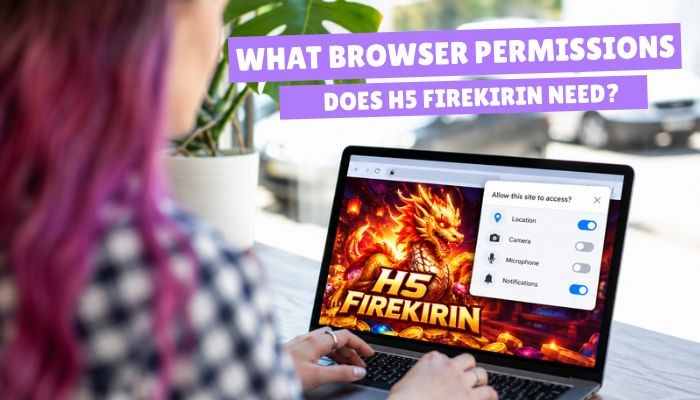
Browser permissions affect privacy and security. Most fish-shooting games do not need access to sensitive device features.
- Sound: Game audio may require browser playback settings.
- Notifications: Optional alerts, if supported.
- Location: May be required for legal eligibility checks.
- Camera and microphone: Generally unnecessary for normal gameplay.
- Downloads: Avoid unfamiliar files or unauthorized applications.
- Clipboard: Grant access only when clearly needed.
Deny unexpected permission requests and never disable browser security features to access a game.
H5 FireKirin Not Working? Common Problems and Fixes
Login failures, blank screens, and freezing may result from browser settings, internet connectivity, or server problems.
| Problem | Possible Cause | Quick Fix |
|---|---|---|
| Login failed | Incorrect credentials | Verify login details |
| Blank screen | Browser loading issue | Refresh or update browser |
| Page not found | Incorrect or inactive URL | Check the official provider link |
| Game freezing | Slow connection | Restart browser or network |
| Repeated logouts | Expired session or cookies | Check browser settings |
| Missing credits | Account or transaction issue | Contact your account provider |
Why Does H5 FireKirin Keep Logging You Out?
Repeated logouts may occur because of expired sessions, deleted cookies, private browsing, or account restrictions.
Try restarting your browser, checking cookie settings, and signing in again through your verified provider.
How to Fix Loading Problems
Try these simple fixes:
- Check your internet connection.
- Restart or update your browser.
- Open the website in another compatible browser.
- Clear site-specific cache if necessary.
- Contact your provider if the problem continues.
Will Clearing Browser Cache Delete H5 FireKirin Credits?
Clearing cached files usually removes temporary browser data, not server-stored balances. However, deleting cookies may log you out, and credit storage depends on the operator.
Confirm how your provider stores and recovers credits before clearing website data.
Is H5 FireKirin Safe and Legit?
H5 FireKirin should not be considered safe simply because a website uses familiar gaming logos. Its legitimacy depends on the operator, website security, account protection, and applicable gaming laws.
Different websites may use similar branding without belonging to the same company.
How to Check Whether a Website Is Safe
Before logging in or sharing personal information, check these factors:
| Safety Factor | What to Verify |
|---|---|
| Website ownership | Identifiable operator and business details |
| Domain name | Correct website address |
| HTTPS | Encrypted connection |
| Privacy policy | Clear data collection and protection rules |
| Gaming license | Valid authorization where required |
| Account security | Strong passwords and available two-factor authentication |
| Payment terms | Transparent fees and withdrawal conditions |
| Customer support | Genuine and verifiable contact details |
Important: HTTPS protects data during transmission but does not guarantee a website is legitimate. Avoid entering personal or payment information until you can verify the operator.
How to Recognize Fake H5 FireKirin Websites
Fake gaming websites may copy logos, login pages, and promotional offers to steal personal information or money.
Common warning signs include:
- Misspelled website addresses or suspicious redirects
- Promises of guaranteed winnings
- Requests for upfront payments to release prizes
- Unknown APK downloads or security warnings
- Requests for passwords or verification codes
- Missing business details or unexplained fees
Avoid entering personal information until the website’s operator is verified.
Is H5 FireKirin Safe on Public Wi-Fi?
Public Wi-Fi networks can expose users to additional security risks, especially on unfamiliar connections.
- Use trusted, password-protected networks.
- Check for HTTPS and certificate warnings.
- Avoid entering payment details on unfamiliar networks.
- Keep your browser and device updated.
HTTPS protects transmitted data but does not guarantee website legitimacy.
What If You Entered Details on a Suspicious Website?
Take these steps immediately:
- Stop using the suspicious website.
- Change affected passwords through legitimate services.
- Update passwords on other accounts if reused.
- Enable two-factor authentication where available.
- Contact your bank if financial information was exposed.
Does H5 FireKirin Collect Personal Information?
Gaming websites may collect information for account access, security, and customer support.
Depending on the operator, collected information may include:
- Username and contact information
- IP address and device details
- Login sessions and gaming activity
- Transaction and support records
Data collection practices vary by provider. Check the relevant privacy policy before registering.
How to Protect Your Personal Information
- Verify the website operator before creating an account.
- Use a strong, unique password.
- Avoid sharing unnecessary personal or financial details.
- Review data collection, sharing, and deletion policies.
- Avoid services with unclear privacy practices.
Are H5 FireKirin Credits, Bonuses, and Withdrawals Real?
Some gaming services advertise virtual coins, promotional bonuses, and redeemable balances. However, displayed credits do not automatically represent real money.
| Credit Type | Possible Meaning |
|---|---|
| Virtual coins | Entertainment-only game credits |
| Demo credits | Simulated gameplay balance |
| Promotional credits | Bonus credits with restrictions |
| Purchased credits | Credits obtained through payment |
| Redeemable balance | Potential prize value subject to terms and laws |
Always verify redemption rules and legal restrictions before spending money.
Is H5 FireKirin Free to Play?
Some providers advertise free registration, demo games, or promotional credits. However, free access does not guarantee that every game is available without payment.
Check for hidden fees, credit restrictions, and withdrawal conditions.
What If H5 FireKirin Credits or Withdrawals Go Missing?
If credits disappear or a withdrawal is delayed:
- Check your account balance and transaction history.
- Save payment receipts and confirmation messages.
- Contact your verified account provider.
- Request a written explanation of the missing balance.
- Avoid paying additional fees to release supposed winnings.
Important: Unexpected payment requests to unlock withdrawals may indicate fraud.
Is H5 FireKirin Legal in Your Location?
- Legality depends on the gaming activity, operator, and local laws.
- Browser-based games are not automatically classified as gambling.
- Games involving money or redeemable prizes may face legal restrictions.
H5 FireKirin Legality in the United States
- Online gambling laws vary by state.
- Some states permit licensed online gaming, while others restrict or prohibit certain activities.
- Verify the operator’s license, age requirements, and state regulations before participating.
Legality in India
- India’s Promotion and Regulation of Online Gaming Act, 2025, prohibits online money games, including skill-based and chance-based formats.
- The implementing rules took effect on May 1, 2026.
- Permitted social games and esports are treated differently from prohibited money games.
- Accessing foreign gaming websites does not override Indian law.
Important: Always confirm the legal status of a gaming service before spending money.
How to Use H5 FireKirin Responsibly
Fish-shooting and casino-style games may involve rapid gameplay, uncertain outcomes, and financial risks.
Follow these responsible gaming practices:
- Meet the legal minimum age requirements.
- Set clear playing time and spending limits.
- Never consider gaming a reliable income source.
- Avoid borrowing money or chasing losses.
- Take regular breaks and monitor your spending.
- Seek support if gaming becomes difficult to control.
H5 FireKirin Features and Claims Worth Verifying
Not every website using Fire Kirin branding offers the same features. Check these claims before registering.
| Feature | What to Verify |
|---|---|
| Browser access | Supported website and browser |
| Player login | Correct account provider |
| Device compatibility | Android, iPhone, or PC support |
| Free demo | Availability and restrictions |
| Account synchronization | Cross-device support |
| Redeemable credits | Payment terms and legal restrictions |
| Game fairness | Independent testing, if claimed |
| Customer support | Genuine contact information |
Do not assume that features advertised by one distributor apply to every gaming website.
H5 FireKirin Safety Checklist Before Logging In
Before accessing your account, check the following:
- Verify the website address and operator’s identity.
- Confirm local gaming laws and age restrictions.
- Review privacy policies and registration requirements.
- Check credit values, fees, and withdrawal conditions.
- Avoid suspicious downloads and unnecessary permissions.
- Use a strong password and keep browser security enabled.
- Confirm that customer support is genuine.
Important: These precautions can reduce risks but cannot guarantee that a gaming website is safe or legitimate.
Conclusion
H5 FireKirin brings arcade-style gaming into the browser, but convenience alone does not establish credibility. With different operators managing accounts, games, and virtual credits, the real question is not simply how to access the platform, but who stands behind it.
Before using H5 FireKirin, consider the operator’s legitimacy, payment transparency, and legal requirements. A reliable gaming experience starts with clear information, accountable providers, and informed decisions—not familiar branding or promises of easy winnings.
Frequently Asked Questions About H5 FireKirin
1. Can H5 FireKirin Work Without an Internet Connection?
Browser-based games generally require internet access to load and connect to player accounts. An offline version has not been verified.
2. Why Is There No Sound in H5 FireKirin?
Muted device settings, browser audio restrictions, or disabled game sound can cause this issue. Check your volume and game settings.
3. How Much Mobile Data Does H5 FireKirin Use?
Data usage depends on game graphics, loading requirements, and session length. Check your phone’s data usage settings to monitor consumption.
4. Does H5 FireKirin Support Landscape Mode?
Some browser games support landscape viewing, but compatibility depends on the game and device. Try rotating your screen with orientation lock disabled.
5. Can a VPN Affect H5 FireKirin Access?
Yes. A VPN may trigger location restrictions or security checks. Avoid using one to bypass gaming laws or operator restrictions.
6. Does H5 FireKirin Require JavaScript?
Interactive browser games generally rely on JavaScript. Blocking essential scripts may prevent the gaming interface from loading correctly.
7. Can H5 FireKirin Run on a Smart TV?
A compatible television browser may support access, but touchscreen controls, graphics, and gameplay compatibility are not guaranteed.
8. Can Ad Blockers Interfere With H5 FireKirin?
Some browser extensions may block game scripts or other required elements. Contact your verified provider before changing security settings.
