


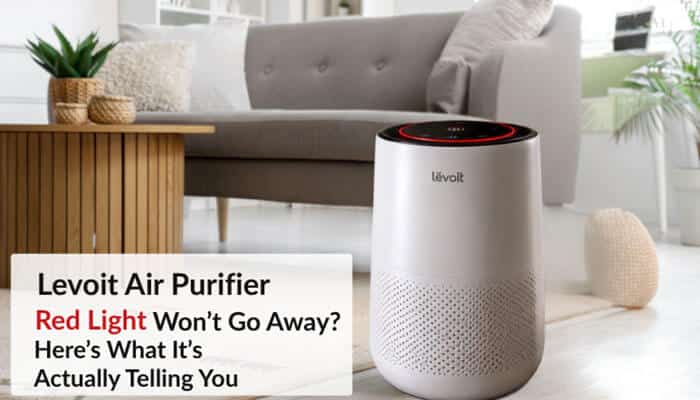

A Levoit air purifier red light can mean two completely different things, and knowing which one you are seeing is the key to fixing it correctly. On many Levoit air purifiers, a small red filter-shaped symbol is the Check Filter Indicator, which tells you to inspect the filter. On smart Levoit models, however, a larger red air-quality ring can mean the built-in particle sensor currently detects poor air quality.
That difference explains why changing the filter sometimes does nothing to the Levoit air purifier red light. You may have successfully dealt with the filter while the purifier is still detecting cooking particles, smoke, dust, outdoor pollution, aerosol mist, or another airborne particle source.
The fastest solution is not simply pressing Reset. First determine which red light is showing, which Levoit model you own, and whether the problem is filter maintenance or air quality.
This guide explains what the Levoit air purifier red light means on popular models including the Core Mini, Core 200S, Core 300-P, Core 300S, Core 400S, Core 600S, Vital 100S, Vital 200S, LV-H132, and LV-PUR131. It also covers filter resets, sensor problems, VeSync, humidifier interference, weak airflow, and red lights that remain after a filter change.
Quick Answer: What Does the Levoit Air Purifier Red Light Mean?
A Levoit air purifier red light normally means one of these two things:
- Small red filter icon: The filter should be checked.
- Large red air-quality ring: The purifier detects elevated airborne particles.
Use this troubleshooting table first.
| What You See | Most Likely Meaning | Best First Step |
| Small red filter icon | Check Filter Indicator | Inspect the filter |
| Large red ring around display | Poor detected air quality | Identify the particle source |
| Red light remains after new filter | Filter reminder was not reset | Perform the correct reset |
| Red ring stays on in a clean-looking room | Particles or dirty sensor | Check room and sensor |
| Red appears when humidifier runs | Mist may affect sensor | Move or turn off humidifier |
| Filter light returns after reset | Reset may not have completed | Repeat model-specific procedure |
| Airflow is weak | Clogged or improperly installed filter | Inspect filter and air path |
| New filter produces almost no airflow | Plastic may still be on filter | Remove filter packaging |
Key Takeaways About the Levoit Air Purifier Red Light
- A small red Check Filter Indicator is different from a large red air-quality ring.
- A Levoit air purifier red light can indicate filter maintenance or poor detected air quality depending on the model.
- Levoit says genuine filters are typically replaced every 6–12 months, although model-specific intervals vary according to usage and home air quality.
- Core 200S and Core 300-series replacement filters currently have guidance closer to 6–8 months.
- Smart models such as the Core 300S, Core 600S, and Vital 100S combine filter-status features with real-time air-quality monitoring.
- Replacing a filter may not automatically clear its electronic maintenance reminder.
- A dirty sensor, cooking particles, outdoor smoke, or humidifier mist can make an air-quality indicator remain red.
- Always remove protective plastic from a replacement filter before operating the purifier.
Why Is My Levoit Air Purifier Red Light On?
There are two main explanations for a Levoit air purifier red light.
1. The Check Filter Indicator Is On
Many Levoit models have an electronic filter-life or Check Filter Indicator.
It is primarily a maintenance reminder.
Levoit’s current replacement-filter guidance says genuine filters typically need replacement every 6–12 months, depending on usage and air quality.
Individual models can differ.
For example:
- Core 200S-P: About 6–8 months
- Core 300-P/Core 300S-P: About 6–8 months
- Core 600S-P: About 6–12 months
- Vital 100S-P: About 6–12 months
- Vital 200S-P: About 6–12 months
Heavy smoke, pets, construction dust, frequent cooking, long daily run times, or polluted outdoor air can shorten real-world filter life.
2. The Air-Quality Indicator Is Red
Some smart Levoit purifiers have particle sensors that monitor the surrounding air.
On those models, a large colored ring or display may change as particle levels change.
The general color pattern used on several sensor-equipped models is:
| Indicator Color | Typical Meaning |
| Blue | Very Good |
| Green | Good |
| Orange | Moderate |
| Red | Bad |
A red air-quality ring can therefore be completely normal if you have just cooked, burned a candle, vacuumed, opened a window during poor outdoor air quality, or generated another source of fine particles.
In this situation, the Levoit air purifier red light is reporting the current particle reading rather than telling you to replace the filter.
Levoit Air Purifier Red Light: Filter Warning vs Air-Quality Warning
This is the most important troubleshooting step.
Small Red Filter Icon
A filter-shaped icon generally means:
Check the filter.
Possible next steps include:
- Inspecting the filter
- Cleaning the pre-filter when allowed
- Replacing the main filter
- Resetting the Check Filter Indicator
Large Red Ring
A larger colored ring usually refers to:
Detected air quality.
Possible next steps include:
- Removing a smoke or particle source
- Increasing fan speed
- Closing windows if outdoor pollution is entering
- Moving an ultrasonic humidifier
- Checking or cleaning the air-quality sensor
Resetting a filter reminder will not necessarily affect an air-quality ring.
So when troubleshooting a Levoit air purifier red light, always identify the shape and location of the red indicator before pressing any reset button.
What Does the Red Air-Quality Light Actually Detect?
This distinction is important because the purifier is not measuring every possible indoor contaminant.
The Core 300S uses Levoit’s AirSight technology to provide real-time air-quality updates, while the Core 600S includes a laser dust sensor and PM2.5 display.
The Vital 100S uses an infrared dust sensor to scan surrounding air and provide real-time air-quality information.
These sensors primarily respond to airborne particles.
Therefore:
- Red does not mean every type of pollutant is elevated.
- Blue or green does not prove the room contains no gases.
- Odors do not always correspond directly with the particle reading.
- A Levoit purifier is not a carbon-monoxide detector.
- It is not a substitute for a smoke alarm.
Think of the colored indicator as a reading from the purifier’s particle sensor, not a complete test of indoor air safety.
Levoit Air Purifier Red Light Reset Guide by Model
Reset procedures differ across the Levoit lineup.
| Model | Red Light Usually Means | Typical Filter Guidance | Common Reset Approach |
| Core Mini-P | Filter reminder | Model dependent | Hold main Control Button |
| Core 200S-P | Filter reminder | 6–8 months | Hold Sleep Mode about 3 seconds |
| Core 300-P | Filter reminder | 6–8 months | Hold Check Filter control |
| Core 300S-P | Filter or air-quality warning | 6–8 months | Use Check Filter reset procedure |
| Core 400S-P | Filter or air-quality warning | Depends on use | Use Check Filter reset control |
| Core 600S-P | Filter or air-quality warning | 6–12 months | Hold Check Filter reset control |
| Vital 100S-P | Filter or air-quality warning | 6–12 months | Use designated filter reset |
| Vital 200S-P | Filter or air-quality warning | 6–12 months | Use designated filter reset |
| LV-H132 | Filter reminder | Around 6 months on current filter guidance | Hold Check Filter Indicator |
| LV-PUR131 | Filter reminder | Around 6 months | Use recessed Filter Reset button |
Levoit maintains separate manuals for individual models, so confirm the model number printed on your purifier before following any reset procedure.
Levoit Core Mini Red Light
The Core Mini-P primarily uses its filter indicator as a maintenance reminder rather than a smart real-time air-quality warning.
If the red filter indicator appears, inspect the filter first.
For Core Mini owners, this type of Levoit air purifier red light generally relates to filter maintenance rather than real-time air-quality monitoring.
How to Reset the Core Mini Red Light
On commonly documented Core Mini-P versions:
- Keep the purifier plugged in.
- Turn the fan off.
- Press and hold the main Control Button for approximately three seconds.
- Confirm that the filter indicator switches off.
If the controls on your purifier differ, use the manual for that exact model revision instead of forcing another Core model’s procedure.
Levoit Core 200S Red Light
The Core 200S is VeSync-enabled, but its filter reminder should not be confused with the air-quality ring used on some other smart Levoit models.
Levoit currently recommends changing its genuine Core 200S-P filter about every 6–8 months and says filter life can be monitored through VeSync.
How to Reset the Core 200S Filter Light
A commonly documented reset process is:
- Turn the purifier on.
- Press and hold the Sleep Mode button for approximately three seconds.
- Wait for the Check Filter Indicator to respond.
- Confirm that the light disappears.
If you use VeSync, check the filter-life status afterward.
If the Levoit air purifier red light remains after resetting the Core 200S, confirm that the filter is correctly installed and that the warning you are seeing is actually the filter indicator.
Levoit Core 300-P Red Light
The standard Core 300-P has a Check Filter Indicator but does not use the same smart air-quality sensor interface as the Core 300S.
Levoit currently recommends replacing its genuine Core 300-series filter every 6–8 months.
How to Reset the Core 300 Red Light
After checking or replacing the filter:
- Turn the purifier on.
- Locate the Check Filter Indicator.
- Press and hold the control for approximately three seconds.
- Release it when the indicator switches off.
If the warning remains, verify the instructions for your exact Core 300 revision.
Levoit Core 300S Red Light
The Core 300S can be more confusing because it combines a Check Filter Indicator with real-time air-quality monitoring.
Levoit says the Core 300S uses AirSight Plus technology to scan surrounding air and provide real-time air-quality updates. It also lists a separate Check Filter Indicator among the purifier’s features.
If the Filter Icon Is Red
Check the filter and reset its maintenance reminder when appropriate.
If the Large Air-Quality Indicator Is Red
The purifier is detecting elevated particles.
Common triggers include:
- Cooking
- Smoke
- Dust
- Candles
- Incense
- Outdoor pollution
- Cleaning aerosols
- Humidifier mist
If the filter icon disappeared but the large colored indicator remains red, the filter reset may have worked perfectly.
In other words, a Levoit air purifier red light on the Core 300S can represent two separate issues depending on whether you are looking at the filter icon or the air-quality indicator.
Levoit Core 400S Red Light
The Core 400S also combines filter-maintenance functions with sensor-based air-quality monitoring.
If the small filter indicator is illuminated, inspect the filter.
If the larger air-quality display shows red, investigate airborne particles rather than repeatedly resetting the filter.
Levoit continues to provide dedicated manuals for Core-series models, so use the current manual for your exact Core 400S revision when resetting the maintenance indicator.
Levoit Core 600S Red Light
The Core 600S-P clearly illustrates why the two red-light types should not be confused.
Levoit lists both a Check Filter Indicator and Air Quality Indicator Rings as separate features. The purifier also displays airborne particle information detected by its laser dust sensor.
Levoit’s current Core 600S replacement filter is designed to last approximately 6–12 months.
How to Reset the Core 600S Filter Light
After appropriate filter replacement:
- Turn the purifier on.
- Locate the Check Filter reset control.
- Press and hold it for approximately three seconds.
- Confirm that the filter-maintenance warning disappears.
If the air-quality ring remains red afterward, investigate the room rather than resetting the filter again.
A Levoit air purifier red light that remains on the Core 600S after the filter icon disappears is often an air-quality reading, not evidence that the new filter failed.
Levoit Vital 100S Red Light
The Vital 100S-P includes a Check Filter Indicator, real-time air-quality readings, an infrared dust sensor, Auto Mode, and a washable pre-filter.
Its genuine replacement filter is currently designed to last approximately 6–12 months, depending on usage.
If the Filter Indicator Is Red
Inspect the filter and reset the maintenance reminder when required.
If the Air-Quality Indicator Is Red
Look for particle sources or sensor interference.
One important difference with the Vital 100S is that its pre-filter is washable. That does not mean the entire filter assembly should be washed.
Levoit Vital 200S Red Light
The Vital 200S is another smart purifier where the red light can relate either to filter maintenance or detected air quality.
Levoit’s current Vital 200S replacement filter is designed to last approximately 6–12 months.
If the air-quality indicator is red, investigate particle sources.
If the separate Check Filter Indicator is illuminated, inspect the filter and perform the correct maintenance reset.
What About the Levoit Air Purifier Red Light on Older Models?
Older Levoit purifiers can use different reset systems.
Levoit LV-H132
The LV-H132 uses a dedicated Check Filter Indicator rather than the smart air-quality ring found on newer sensor-equipped models.
Levoit currently recommends replacing its genuine LV-H132 filter approximately every six months for optimal performance.
After replacement, use the dedicated Check Filter Indicator reset procedure described in the model manual.
Levoit LV-PUR131
The LV-PUR131 differs even more noticeably from newer Core models.
Its filter-reset system uses a recessed Filter Indicator Reset button rather than a standard touch-panel button.
This is exactly why advice telling every Levoit owner to “hold the filter button for three seconds” can be misleading.
Why Won’t the Levoit Air Purifier Red Light Go Away After Changing the Filter?
This is one of the most common troubleshooting situations.
Installing a replacement filter and resetting the electronic maintenance reminder are often two separate actions.
If your Levoit air purifier red light won’t go away after changing the filter, check these causes.
1. You Did Not Reset the Filter Indicator
- The purifier may not automatically know that a new filter was installed.
- Complete the reset procedure for your model.
2. You Tapped Instead of Holding the Button
Many Levoit models require you to hold a control rather than press it briefly.
3. You Used the Wrong Reset Control
Depending on the model, the reset may involve:
- Check Filter button
- Sleep Mode button
- Main Control button
- Recessed reset switch
4. You Are Looking at the Air-Quality Indicator
- If the small filter icon is gone but a large ring is still red, your filter reset may already be complete.
- The remaining light represents detected air quality.
5. Display Lock Is Enabled
- On compatible models, locked controls may interfere with button input.
- Unlock the control panel before repeating the reset.
6. The Filter Is Not Installed Correctly
Switch off and unplug the purifier, then verify that the filter is properly seated and the housing is correctly closed.
7. The Protective Plastic Is Still on the Filter
This mistake is surprisingly easy to make.
Levoit ships many genuine filters sealed in protective packaging and specifically instructs users to remove the plastic before use.
A wrapped filter can dramatically restrict airflow.
Levoit Air Purifier Red Light After a New Filter: Check the Plastic First
If airflow suddenly becomes very weak immediately after replacing the filter, inspect the installation before assuming the purifier or replacement filter is defective.
Turn the purifier off and unplug it.
Then verify:
- All plastic packaging has been removed.
- The filter is correctly oriented.
- No packing material remains inside.
- The intake is unobstructed.
- The filter cover is installed correctly.
A new filter that is still wrapped can restrict airflow enough to make the purifier appear faulty.
Why Is My Levoit Air Purifier Red Light Still On After Resetting?
If the filter symbol disappeared but the larger ring remains red, stop troubleshooting the filter.
The purifier is probably displaying air quality.
Potential triggers include:
- Frying or searing food
- Cooking smoke
- Wildfire smoke
- Candles
- Incense
- Dust
- Vacuuming
- Pet activity
- Renovation work
- Aerosol sprays
- Outdoor pollution
- Ultrasonic humidifier mist
Remove the source where possible and continue running the purifier.
This is one of the most important distinctions when a Levoit air purifier red light remains after a successful filter reset.
Why Did My Levoit Suddenly Turn Red While Cooking?
Cooking can produce substantial fine-particle pollution, particularly when frying, searing, grilling, or burning food.
A particle-sensitive purifier may therefore move quickly from blue or green to orange or red.
Try:
- Turn on the kitchen exhaust fan.
- Remove the source of smoke.
- Increase purifier fan speed.
- Keep cooking particles from spreading into other rooms.
- Ventilate when outdoor air quality is suitable.
If the indicator improves after the cooking particles clear, the purifier is probably working normally.
Why Does My Levoit Air Purifier Red Light Stay On When the Air Looks Clean?
Visible appearance is not a reliable measure of fine-particle concentration.
The air can look completely clear while still containing particles that a sensor can detect.
However, a red indicator that remains stuck for a long time with no obvious source may have another explanation.
Check for:
- Outdoor pollution entering through doors or windows
- Ultrasonic humidifier mist
- Dust near the sensor
- Aerosol products
- Poor purifier placement
- A sensor requiring cleaning
Do not assume the sensor is defective until these causes have been eliminated.
Can a Humidifier Cause a Levoit Air Purifier Red Light?
Yes, particularly with an ultrasonic humidifier.
Ultrasonic humidifiers create extremely small droplets that some optical particle sensors can interpret as airborne particles.
If your Levoit air purifier red light appears whenever the humidifier operates, perform a simple test:
- Turn the humidifier off.
- Leave the purifier running.
- Observe the air-quality indicator.
- Move the humidifier farther away before using it again.
If the indicator gradually improves after the humidifier is switched off, the mist was probably influencing the sensor.
How Long Should the Red Air-Quality Light Stay On?
There is no single correct amount of time.
How quickly the indicator improves depends on:
- Particle concentration
- Whether pollution is still being produced
- Room size
- Purifier size and CADR
- Fan speed
- Air circulation
- Open windows or doors
- Outdoor pollution
- Purifier placement
A ring that moves from red to orange, green, and eventually blue after a smoky cooking event is behaving differently from one that remains red all day under stable conditions.
The second situation deserves closer investigation.
How to Clean a Levoit Air-Quality Sensor Safely
Do not assume every Levoit sensor should be cleaned the same way.
Different models use different sensor designs, including infrared and laser-based systems.
Use this general approach:
- Turn the purifier off.
- Unplug it.
- Locate the sensor using your exact model manual.
- Follow only that model’s specified cleaning method.
- Never pour liquid into the sensor opening.
- Do not spray cleaning solution into the purifier.
- Do not dismantle electronics unless Levoit specifically instructs you to.
If the red reading remains obviously unrealistic after correct maintenance, contact Levoit support.
Cleaning the sensor can be especially useful when a Levoit air purifier red light stays on despite no obvious source of smoke, dust, or other particles.
Solid Red vs Flashing Red: Is There a Difference?
Potentially, yes.
A solid red air-quality ring usually represents the current particle reading on sensor-equipped models.
A red filter icon generally relates to maintenance.
A flashing indicator may appear during:
- Filter reset confirmation
- Control input
- Mode changes
- Model-specific status sequences
Because flashing behavior varies by model, do not treat a flashing red light as one universal Levoit error code.
Identify the icon that is flashing and check the manual for your exact purifier.
Does Unplugging a Levoit Air Purifier Reset the Red Light?
Usually not.
Disconnecting the purifier from power is not normally a substitute for resetting its filter-maintenance indicator.
Depending on the model, a reset may involve:
- Holding a Check Filter button
- Holding Sleep Mode
- Holding the main Control button
- Pressing a recessed reset switch
Power cycling can help with an unresponsive control panel, but it should not replace the documented filter-reset process.
Can You Reset the Filter Light Without Replacing the Filter?
The indicator can often be reset, but first inspect the filter.
Look at:
- Airflow
- Visible dust
- Filter discoloration
- Odors
- Noise
- Time since replacement
- How heavily the purifier has been used
If the filter is visibly clogged or performance has declined substantially, resetting the warning without replacing the filter will not restore filtration performance.
How Do You Know When a Levoit Filter Really Needs Replacing?
Consider more than the calendar.
Common signs include:
- Reduced airflow
- Persistent odors
- Heavy visible dust
- Significant discoloration
- Higher operating noise
- Reduced cleaning performance
- Reaching the model-specific replacement interval
Levoit currently recommends replacing genuine air-purifier filters roughly every 6–12 months in general, with actual life depending on usage and home air quality.
A Levoit air purifier red light should therefore be treated as a reason to inspect the filter, not automatically as proof that the filter has failed.
Can You Clean a Levoit Filter Instead of Replacing It?
It depends on the filter layer.
Pre-Filter
Some Levoit pre-filters can be vacuumed, brushed, or washed.
The Vital 100S, for example, specifically includes a washable pre-filter.
Main Filter
Do not automatically wash the main filter.
Levoit’s maintenance guidance emphasizes regular pre-filter cleaning while main filters are generally replaced rather than washed.
Always follow the instructions for your exact model.
Why Did My Levoit Air Purifier Red Light Turn On Early?
A filter warning that appears earlier than expected does not necessarily mean something is wrong.
Filter life can be shortened by:
- Wildfire smoke
- Tobacco smoke
- Heavy pet hair
- Large amounts of dust
- Frequent cooking
- Renovation work
- Urban pollution
- Continuous operation
Levoit explicitly says replacement frequency depends on usage and home air quality.
If the Levoit air purifier red light appears earlier than the typical replacement interval, inspect the actual filter condition rather than relying on the calendar alone.
Why Has My Filter Light Never Turned On?
If you operate the purifier infrequently, the reminder may take longer to appear.
Do not rely on the indicator alone.
Inspect the filter periodically if you notice:
- Reduced airflow
- New odors
- Increased noise
- Heavy dust buildup
Does VeSync Help With the Levoit Air Purifier Red Light?
Yes, on compatible smart models.
VeSync can offer:
- Filter-life information
- Air-quality readings
- Smart notifications
- Remote controls
- Schedules
For example, Levoit states that the Core 600S app can check filter life and provide real-time air-quality updates.
The Vital 100S also supports real-time air-quality information and filter-life monitoring through VeSync.
If the physical indicator and app do not appear to agree after a filter change, make sure the filter reset was completed.
For smart-model owners, VeSync can help determine whether the Levoit air purifier red light relates to filter life or current air quality.
Is It Safe to Use a Levoit With the Red Filter Light On?
The filter indicator itself does not automatically mean the purifier has become unsafe.
However, an excessively clogged filter can restrict airflow and reduce performance.
Inspect the filter rather than ignoring the warning for months.
If the red signal is an air-quality indicator, continue removing the particle source and operating the purifier as appropriate.
Is a Levoit Air Purifier Red Light Dangerous?
The red ring is not itself an emergency alarm.
It means the purifier’s particle sensor currently detects a relatively high concentration of particles according to its own measurement system.
Respond to the likely source.
For example:
- Cooking smoke: Stop the source and ventilate appropriately.
- Wildfire smoke: Reduce outdoor-air entry and continue filtration.
- Construction dust: Control the source.
- Humidifier mist: Move the humidifier.
- Persistent unexplained reading: Inspect and clean the sensor.
Remember that an air purifier does not replace smoke or carbon-monoxide alarms.
What If the Levoit Air Purifier Red Light Comes Back Immediately?
Identify which light returned.
If the Filter Icon Returns
Check:
- Correct reset button
- Correct hold duration
- Display Lock
- Filter installation
- Protective plastic
- Filter cover
- Whether your model uses a recessed reset button
If the Air-Quality Ring Returns
Check for:
- Cooking particles
- Smoke
- Dust
- Aerosols
- Candles
- Outdoor pollution
- Humidifier mist
- Dirty sensor
- Poor purifier placement
A returning air-quality ring does not mean the filter reset failed.
Best Troubleshooting Order for a Levoit Air Purifier Red Light
Before buying another filter, follow this sequence:
- Find your exact Levoit model number.
- Identify whether the Levoit air purifier red light is a filter icon or air-quality indicator.
- Inspect the filter.
- Make sure all protective plastic has been removed.
- Clean the pre-filter if your model allows it.
- Replace the main filter if necessary.
- Perform the correct model-specific reset.
- If a red air-quality light remains, investigate particle sources.
- Turn off or reposition an ultrasonic humidifier.
- Check purifier placement and airflow.
- Clean the air-quality sensor according to the manual.
- Check VeSync on compatible models.
- Contact Levoit if the purifier still behaves abnormally.
This sequence avoids two common mistakes: buying an unnecessary filter when the purifier is actually reporting air quality, and repeatedly resetting a genuinely clogged filter.
When Could the Red Light Indicate a Real Malfunction?
Most red-light problems involve normal maintenance or particle detection.
Contact Levoit or stop using the purifier if it:
- Will not respond to controls
- Randomly shuts off repeatedly
- Produces a burning or electrical smell
- Has a damaged power cord
- Makes severe abnormal mechanical noise
- Shows obviously unrealistic readings after proper sensor maintenance
- Cannot complete the documented reset
- Shows visible electrical damage
Do not dismantle electrical components yourself.
If ordinary troubleshooting does not clear the Levoit air purifier red light and the purifier also shows abnormal electrical or mechanical behavior, professional support is more appropriate than repeated resetting.
How to Prevent Future Levoit Air Purifier Red Light Problems
You cannot prevent legitimate warnings, and you should not disable them permanently.
Instead:
- Clean approved pre-filters regularly.
- Keep the air intake and outlet clear.
- Inspect filters periodically.
- Remove all packaging from replacement filters.
- Keep ultrasonic humidifiers away from particle sensors.
- Leave appropriate clearance around the purifier.
- Check filter life in VeSync when supported.
- Replace filters according to condition and model guidance.
- Reset the maintenance indicator after replacement.
Regular maintenance makes a Levoit air purifier red light easier to understand and reduces unnecessary filter changes.
Conclusion: Levoit Air Purifier Red Light
A Levoit air purifier red light becomes much easier to troubleshoot once you identify exactly which red light you are seeing. A small red Check Filter Indicator generally tells you to inspect the filter. Depending on the model and filter condition, the solution may involve cleaning an approved pre-filter, replacing the main filter, removing forgotten protective packaging, and completing the correct reset.
A large red air-quality ring tells a different story. On sensor-equipped Levoit models, it generally means the purifier currently detects elevated airborne particles. Cooking smoke, dust, wildfire smoke, aerosols, pet activity, outdoor pollution, humidifier mist, or a dirty sensor may all contribute.
If your Levoit air purifier red light won’t go away after changing the filter, do not immediately buy another replacement or assume the purifier is broken. Confirm the exact model, determine which indicator remains red, check the filter installation, perform the correct reset, and troubleshoot the surrounding air or sensor only when necessary.
Understanding the difference between filter maintenance and air-quality monitoring is the fastest way to solve a Levoit air purifier red light without unnecessary resets or replacement filters.
Levoit Air Purifier Red Light FAQs
1. What does the Levoit Air Purifier Red Light mean?
The Levoit Air Purifier Red Light may indicate a filter reminder or poor detected air quality. Check whether you see a small filter icon or a large red air-quality ring.
2. Why won’t the Levoit Air Purifier Red Light go away?
The light may remain on because the filter indicator was not reset, the filter is installed incorrectly, or the purifier is still detecting airborne particles such as smoke, dust, or humidifier mist.
3. How do I reset the Levoit Air Purifier Red Light?
Most Levoit models require you to press and hold the Check Filter, Sleep Mode, or main control button for about three seconds. Always confirm the correct reset method for your exact model.
4. Why is the red light still on after changing the filter?
Changing the filter does not always reset the electronic reminder automatically. Remove all protective plastic, install the filter correctly, and complete the model-specific reset procedure.
5. Can a humidifier cause the Levoit Air Purifier Red Light?
Yes. Mist from an ultrasonic humidifier may be detected as airborne particles, causing the air-quality indicator to turn red. Move the humidifier farther away and observe whether the light changes.
