



Contactless payment lets you pay quickly by holding a compatible card, smartphone, smartwatch, or other supported device close to a payment reader. Instead of swiping or inserting a card, you can simply tap or hold your device near the terminal to complete the transaction.
Most modern contactless payment transactions use Near Field Communication, or NFC. This technology allows payment information to move securely over a very short distance and is now widely used for debit cards, credit cards, mobile wallets, wearables, and public transport.
As tap-to-pay technology becomes more common, consumers have more ways to pay while businesses gain faster and more flexible checkout options. Understanding how contactless systems work, their benefits, security features, limits, and supported devices can help you use them with greater confidence.
Quick Answer
A contactless payment is a transaction completed by placing an NFC-enabled card, phone, watch, or other compatible payment device near a contactless reader.
The card or device communicates with the terminal over a short distance. The transaction is then processed through the merchant, payment network, and card issuer.
Modern EMV contactless technology generates a one-time security code for each transaction, helping protect payment information against fraudulent reuse.
Contactless Payment at a Glance
Contactless payment combines NFC technology with compatible cards, smartphones, wearables, and payment terminals to make everyday transactions faster and easier. The table below gives a quick overview of how the technology works and where it is commonly used.
| Feature | Details |
|---|---|
| Main technology | NFC |
| Common payment methods | Debit card, credit card, smartphone and smartwatch |
| Typical action | Hold or tap the card or device near a reader |
| Physical contact required | Usually no |
| Mobile wallets | Google Wallet, Google Pay, Apple Pay and Samsung Wallet |
| Security | EMV security, tokenization and device authentication |
| Internet on customer’s phone | Not always required |
| Common uses | Shopping, restaurants, public transport, fuel, vending and services |
| If contactless payment fails | Insert the card or use another payment method |
This contactless payment snapshot provides the basics at a glance. Limits, security requirements, wallet support and authentication methods can vary by bank, card, device, merchant and country.
Key Takeaways
- Contactless payment usually works through NFC.
- A debit card, credit card, smartphone, or smartwatch can be used on compatible terminals.
- A debit card with NFC normally displays the contactless symbol.
- Google Wallet, Google Pay, Apple Pay, and Samsung Wallet support tap payments in eligible markets.
- Contactless payment limits and authentication requirements vary by country and bank.
- Mobile wallets can protect card information through tokenization.
- Some tap payments work without active mobile data or Wi-Fi on the customer’s phone.
- Public transport systems such as London’s accept eligible contactless cards and devices.
- Walmart began introducing standard Tap to Pay at selected U.S. locations in August 2026.
- Some smartphones can now act as contactless payment terminals for businesses.
What Is Contactless Payment?
Contactless payment is a way to pay for goods or services by holding a compatible card, smartphone, smartwatch, or other supported device close to a payment reader. Unlike traditional card payments, you usually do not need to swipe the card or insert it into the terminal.
Most systems use Near Field Communication, or NFC, to exchange payment information over a short distance. This makes contactless payment useful for everyday purchases at shops, restaurants, transport systems, vending machines, and other locations with compatible readers.
You may also see contactless transactions described as:
- Tap to pay
- NFC payment
- Contactless card
- Mobile payment
- Digital wallet payment
- Touchless payment
- Tap card
These terms are closely related, but they do not always mean exactly the same thing. For example, a mobile wallet can support tap-to-pay transactions, while a physical contactless card can work without a smartphone or digital wallet.
How Does Contactless Payment Work?
A contactless payment may take only a few seconds, but several steps happen behind the scenes to securely process the transaction.
1. The Merchant Starts the Transaction
The merchant enters or confirms the purchase amount on the payment terminal. The contactless reader then becomes ready to accept the payment.
2. You Hold Your Card or Device Near the Reader
Hold your contactless card, smartphone, or smartwatch close to the reader. You usually do not need to physically touch the terminal.
3. NFC Connects the Card or Device
Near Field Communication, or NFC, creates a short-range wireless connection between your payment method and the terminal. The required payment information is then exchanged securely.
4. The Payment Is Authorized
The transaction request is sent through the merchant’s payment processor and relevant payment network to the card issuer or payment provider.
Depending on the payment method, the issuer may check:
- Available balance or credit
- Account and card status
- Transaction amount
- Fraud and security signals
- Authentication requirements
- Cardholder payment controls
5. The Transaction Is Confirmed
If approved, the terminal displays a confirmation, check mark, light, message, or sound. In some situations, you may be asked to enter a PIN or complete additional authentication.
For customers, the entire contactless payment process usually feels almost instant, even though authorization and security checks take place in the background.
How NFC Makes Contactless Payment Possible
NFC stands for Near Field Communication. It is a short-range wireless technology that allows compatible devices to exchange information when they are placed close together.
In a contactless payment, NFC creates a short-range connection between the card, smartphone, smartwatch, or other supported device and the payment terminal. This allows the information needed to process the transaction to be exchanged without swiping or normally inserting a card.
Because NFC works over a very short distance, you need to bring your payment method close to the reader. This is why the process is commonly called tap to pay, even though the card or device does not always need to physically touch the terminal.
NFC is not limited to payments. The technology can also be used for transit passes, digital keys, access credentials, device pairing, and other short-range interactions.
What Does the Contactless Payment Symbol Look Like?
The contactless payment symbol usually looks like four curved radio waves. It indicates that a card, device, or payment terminal supports contactless technology.
You may see the symbol on:
- Debit cards
- Credit cards
- Payment terminals
- Ticket gates
- Public transport readers
- Vending machines
- Fuel or petrol station terminals
When you see the symbol on both your payment method and the reader, you can usually hold your card or device close to that area to make a payment. Wait for a check mark, light, sound, or on-screen message confirming that the transaction has been recognized.
The contactless symbol can look similar to a Wi-Fi icon, but they represent different technologies. The Wi-Fi symbol indicates a wireless network connection, while the contactless symbol identifies short-range payment or NFC capability.
Contactless Payment vs NFC
NFC and contactless payment are closely related, but they are not the same thing. NFC, or Near Field Communication, is the short-range wireless technology used to exchange information between compatible devices, while contactless payment is the transaction that takes place when you tap or hold an eligible payment method near a reader.
In simple terms, NFC is the technology, while contactless payment is one of its uses. A physical tap card, smartphone, or smartwatch can use NFC to communicate with a compatible payment terminal.
NFC is also used outside payments. Other applications include:
- Digital keys
- Transit passes
- Access credentials
- Device pairing
- Identification
- NFC information tags
This distinction is important because not every use of NFC involves making a payment.
Types of Contactless Payment
There are several ways to make a contactless payment, ranging from traditional bank cards to smartphones and wearables.
| Type | Example | How It Works |
|---|---|---|
| Contactless debit card | Visa, Mastercard or RuPay debit card | Hold the card near an NFC reader |
| Contactless credit card | NFC-enabled credit card | Hold the card near the payment terminal |
| Smartphone wallet | Google Wallet or Apple Pay | Authenticate the phone and hold it near the reader |
| Smartwatch | Apple Watch or supported wearable | Hold the watch near the reader |
| Transit payment | Contactless bank card or phone | Present the card or device to the transit reader |
| NFC-based UPI | Supported Google Pay transaction | Tap compatible NFC merchant equipment |
Although these methods use different devices and payment systems, they share the same basic idea: completing a transaction without swiping or normally inserting a physical card.
Debit Card With NFC
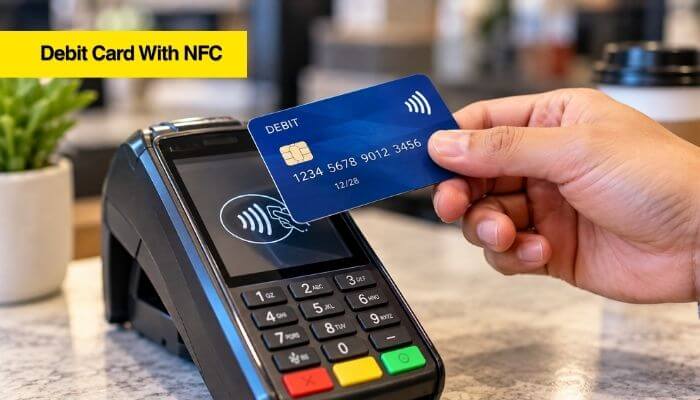
A debit card with NFC contains contactless technology that allows the card to communicate wirelessly with a compatible payment reader. Instead of inserting or swiping the card, you can hold it close to the terminal to make a contactless payment.
Look for the contactless symbol on your debit card. When paying, hold the card near the reader for a moment and wait for a confirmation message, light, or sound.
Most contactless debit cards also contain an EMV chip. If tapping does not work or additional verification is required, you may be asked to insert the card and enter your PIN.
Depending on the bank, customers may also have controls that allow them to:
- Enable or disable contactless transactions
- Set or manage transaction limits
- Control international payments
- Temporarily freeze the card
- Receive transaction alerts
What About Contactless Credit Cards?
Contactless credit cards work in much the same way as contactless debit cards. Hold the card near a compatible reader, and the transaction is processed through the relevant payment network and card issuer.
The main difference is the source of funds. A debit card generally draws money from a linked bank account, while a credit card uses an available credit line.
Depending on the transaction amount, location, issuer, and security requirements, you may occasionally be asked to enter a PIN or complete another form of verification.
How to Use Contactless Payment With a Card
Using a physical tap card for a contactless payment is simple and usually takes only a few seconds.
- Wait for the terminal to be ready. The merchant will enter or confirm the purchase amount.
- Look for the contactless symbol. This shows where you should present your card.
- Hold your card near the reader. Keep it close for a moment rather than repeatedly tapping it.
- Wait for confirmation. The terminal may display a check mark, message, light, or sound when the card has been recognized.
- Complete additional verification if required. Depending on the transaction, you may be asked to enter a PIN or follow another authentication step.
If the contactless payment does not work, reposition the card and try once more. If it still fails, insert the card’s EMV chip or use another available payment method.
How to Use Google Wallet for Contactless Payment
To make a contactless payment with Google Wallet, you generally need a compatible Android device with NFC, an eligible payment card, and the required screen lock or device security.
How to Use Google Wallet
- Open Google Wallet and choose the option to add a payment card.
- Add an eligible debit or credit card and enter the required details.
- Complete bank verification if your card issuer requests it.
- Turn on NFC in your phone’s settings if it is not already enabled.
- Set up a screen lock or other required device security.
- Unlock your phone when you are ready to pay.
- Hold the phone near the contactless reader until the payment is recognized.
Once everything is set up, you generally do not need to open Google Wallet before every eligible tap-to-pay transaction. Unlock your phone and hold it near the reader when required.
Google Wallet can be used for eligible contactless payment transactions on supported devices and at compatible payment terminals. Availability depends on your country, device, bank, card issuer, and payment-card support.
How to Use Google Pay for Tap to Pay
How to use Google Pay for Tap & Pay depends on your country, device, bank, and available Google Pay features. In India, eligible Android users can make a contactless payment with supported debit or credit cards added to Google Pay.
For card-based Tap & Pay, you generally need:
- A compatible Android device
- NFC turned on
- A supported debit or credit card
- Contactless transactions enabled for the card
- A secure screen lock
- The phone unlocked when making the payment
Once the card is set up, you generally do not need to manually open the Google Pay app for every eligible transaction. Unlock your phone, hold it near a compatible NFC reader, and wait for the payment confirmation.
Google also states that an active internet connection is not required on the customer’s phone for eligible card-based Tap & Pay transactions in India. This makes contactless payment convenient even when mobile data or Wi-Fi is unavailable, although other parts of the payment-processing system may still require connectivity.
Google Pay Tap & Pay on UPI
Google Pay in India also supports Tap & Pay on UPI.
Eligible users with NFC-enabled Android phones can tap compatible merchant NFC tags or devices to initiate a UPI transaction.
Google currently supports Tap & Pay on UPI with payment methods including bank accounts, UPI Lite, RuPay credit cards, and eligible credit lines.
This is different from a standard card-based NFC transaction because UPI remains the underlying payment system.
Google Wallet vs Google Pay
Google Wallet and Google Pay are closely related, but they serve different purposes. Google Wallet primarily stores supported payment cards and other eligible digital items, while Google Pay provides payment functionality for supported transactions.
In simple terms, Google Wallet is where eligible payment credentials can be stored, while Google Pay technology can be used to complete a contactless payment or other supported transaction. The exact features, app experience, and availability vary by country, device, bank, and payment method.
How to Use Apple Pay for Contactless Payment
Apple Pay allows customers to make a contactless payment with eligible Apple devices and supported cards. Once a card is added to Apple Wallet, the user can authenticate the transaction and hold the device near an NFC-enabled payment reader.
To pay with Apple Pay:
- Add an eligible card to Apple Wallet and complete any verification required by the issuer.
- Activate Apple Pay when you are ready to make a purchase.
- Authenticate the payment using Face ID, Touch ID, or your device passcode, depending on the device.
- Hold the iPhone or Apple Watch near the reader until the transaction is recognized and confirmed.
Apple Pay officially launched in India on September 30, 2026. At launch, support included eligible Axis Bank-issued Visa and Mastercard credit cards, although card and issuer availability can expand over time.
Apple says the actual payment card number is not shared with merchants when Apple Pay is used. Instead, the service uses device-specific payment credentials to help protect card information.
Google Wallet vs Apple Pay vs Samsung Wallet
Google Wallet, Apple Pay, and Samsung Wallet can all support contactless payment, but device compatibility, bank support, card eligibility, and available features differ by platform and country.
| Feature | Google Wallet / Google Pay | Apple Pay | Samsung Wallet |
|---|---|---|---|
| Main devices | Compatible Android devices | iPhone and Apple Watch | Compatible Samsung Galaxy devices |
| NFC payments | Yes, where supported | Yes, where supported | Yes, where supported |
| Biometric authentication | Supported | Face ID or Touch ID | Supported |
| Stores eligible payment cards | Yes | Yes | Yes |
| Physical card needed at checkout | No | No | No |
| Compatible merchant reader required | Yes | Yes | Yes |
The best option usually depends on the device you own, your country, your bank, and whether your debit or credit card is supported. Wallet features can also vary by market, so users should check current compatibility before adding a card.
Contactless Payment Limits and PIN Requirements
There is no single contactless payment limit that applies everywhere. Transaction limits and authentication requirements can vary depending on:
- Country
- Bank or card issuer
- Card network
- Card type
- Merchant
- Transaction amount
- Security controls
- Mobile wallet
In India, the Reserve Bank of India increased the per-transaction limit for eligible contactless card payments made without Additional Factor of Authentication (AFA) from ₹2,000 to ₹5,000, effective January 1, 2021.
This does not mean ₹5,000 is necessarily the maximum amount that can be paid using contactless technology. Transactions above the applicable no-AFA threshold may still be possible when the required authentication is completed.
Customers may also occasionally be asked to enter a PIN or complete another security check because of issuer rules, transaction value, or fraud-prevention controls.
Is Contactless Payment Secure?
Yes. Modern contactless payment systems use multiple security measures to help protect transaction and card information. EMV contactless technology generates transaction-specific security data, including a one-time-use security code, which helps prevent captured transaction information from simply being reused for another payment.
This makes EMV contactless transactions different from older magnetic-stripe payments that rely more heavily on static card data. Mobile wallets can add further protection through features such as:
- Tokenization
- Device authentication
- Fingerprint or facial recognition
- Screen locks and passcodes
- Virtual or device-specific payment credentials
- Remote device security controls
A contactless payment is not completely immune to fraud, just as no payment method is risk-free. However, EMV security, issuer fraud monitoring, tokenization on supported wallets, and device authentication can provide several layers of protection when the technology is used correctly.
What Is Payment Tokenization?
Tokenization is a security method that replaces sensitive payment-card information with a substitute digital value, or token. The token can be used for eligible transactions while reducing the need to use the actual card number throughout the payment process.
In mobile-wallet contactless payment, tokenization can help protect card information if transaction data is intercepted or compromised. A stolen token may have restrictions that make it less useful than obtaining the underlying card credentials.
For example, Google states that eligible cards added to Google Pay in India use a virtual account number or token instead of the actual card number for supported transactions.
Tokenization does not eliminate every form of payment fraud, but it adds another layer of protection alongside EMV security, device authentication, biometrics, and issuer fraud monitoring.
Physical Contactless Card vs Mobile Wallet Security
Both physical cards and mobile wallets can provide secure contactless payment, but the protections available are not identical.
| Security Feature | Physical Contactless Card | Mobile Wallet |
|---|---|---|
| EMV transaction security | Yes | Yes, for supported card transactions |
| Dynamic transaction data | Yes | Yes |
| Payment tokenization | Depends on the system | Common |
| Device authentication | Not applicable | Usually required |
| Fingerprint or face authentication | No | Often supported |
| Remote device controls | No | Often available |
| Physical card presented at checkout | Yes | No |
| Actual card can remain stored away | No | Yes |
A physical contactless card can already provide strong EMV transaction security. Mobile wallets may add further protection through tokenized credentials, biometric or device authentication, and remote security controls.
Neither method is completely immune to fraud, so users should still monitor transactions and quickly report a lost card or device.
Contactless Payment Security Risks and Lost Devices
Modern contactless payment technology includes several security protections, but users may still have concerns about card-number exposure, unauthorized transactions, lost cards, and stolen phones. Knowing what to do in these situations can reduce the risk of financial loss.
1. Does Contactless Payment Reveal Your Card Number?
Not necessarily. The information used during a transaction depends on the card, wallet, payment network, and implementation.
Mobile wallets commonly use tokenized or device-specific payment credentials instead of relying on the physical card number for eligible transactions. Physical contactless cards use EMV security and transaction-specific data to help protect payments.
Tokenization and EMV security reduce certain risks, but consumers should still monitor their accounts for unfamiliar transactions.
2. Can Someone Charge Your Contactless Card by Standing Near You?
Simply standing near a contactless card does not normally result in a valid payment.
NFC is designed to operate over a very short distance, and a legitimate transaction still needs to be initiated and processed through the payment system. Issuer authorization, EMV security, payment-network rules, and fraud controls can also apply.
For additional protection:
- Turn on transaction notifications.
- Check bank and card statements regularly.
- Report unfamiliar transactions promptly.
- Freeze or block a missing card immediately.
3. What Happens If Your Contactless Card Is Lost?
If your physical card is lost or stolen, act quickly rather than waiting for an unauthorized contactless payment to appear.
- Freeze or block the card through your banking app if the feature is available.
- Contact your bank or card issuer and report the card as lost or stolen.
- Review recent transactions for purchases you do not recognize.
- Report unauthorized charges according to your issuer’s dispute process.
- Request a replacement card if necessary.
A temporary freeze can be useful when you think the card may simply be misplaced, but follow your bank’s instructions if you believe it has been stolen.
4. What Happens If Your Phone Is Lost?
A lost smartphone does not automatically mean someone can use the mobile wallet. Modern devices commonly use passcodes, biometrics, and other authentication controls, but you should still act quickly.
If your phone is lost or stolen:
- Use the device’s remote location or security service where available.
- Lock or mark the device as lost.
- Suspend or remove payment credentials when appropriate.
- Contact your card issuer if you are concerned about unauthorized use.
- Review recent transactions for suspicious activity.
Apple users can use Find My features on supported devices, while Android users can use Google’s available device-location and security tools. The exact options depend on the device, operating system, and wallet.
Benefits of Contactless Payment
The popularity of contactless payment is largely driven by speed, convenience, and flexibility. Customers can pay with compatible cards, smartphones, or wearables, while businesses may benefit from a smoother checkout experience.
| Benefit | Why It Matters |
|---|---|
| Faster checkout | Tapping can be quicker than inserting a card and completing additional steps |
| Easy to use | Hold a compatible card or device close to the payment reader |
| Less card handling | Customers can usually keep their card in their own hand |
| Mobile-wallet security | Tokenization and device authentication can add protection |
| Transit convenience | Eligible cards or devices can be used directly on supported transport systems |
| Wearable payments | Compatible watches can reduce the need to use a physical card |
| More payment choice | Customers may choose between cards, smartphones and wearables |
| Business efficiency | Faster transactions can help improve checkout flow |
| Convenient everyday use | Tap payments can work across retail, dining, transport and other services |
The exact benefits depend on the card, wallet, merchant, device, and country. However, for everyday purchases, contactless payment can provide a convenient balance of speed, payment choice, and security.
Disadvantages and Limitations of Contactless Payment
Although contactless payment is fast and convenient, it is not available in every situation. Compatibility, device requirements, authentication rules, and merchant technology can affect whether a tap transaction works.
Common limitations include:
- Limited merchant support: Some businesses still use payment terminals without NFC capability.
- Device compatibility: Older smartphones and wearables may not support NFC payments.
- Card and wallet restrictions: Not every bank or card is supported by every digital wallet.
- Additional authentication: Some transactions may require a PIN, passcode, or another verification step.
- Battery dependence: Smartphone and smartwatch payments may be unavailable if the device has no usable battery power.
- Regional differences: Wallet features, transaction rules, and supported banks vary between countries.
- NFC positioning: Holding a phone or card in the wrong position can cause a transaction to fail.
- Wallet compatibility: A merchant may accept contactless cards without necessarily supporting every mobile-wallet configuration.
These limitations do not make contactless payment unreliable, but they show why carrying an alternative payment method can still be useful, especially when travelling or visiting merchants with older payment equipment.
Does Contactless Payment Work Without Internet?
Yes, some contactless payment methods can work without an active internet connection on the customer’s device. A physical contactless debit or credit card does not require the cardholder to have mobile data or Wi-Fi.
Some mobile-wallet transactions can also be initiated without an internet connection on the phone. For example, Google states that eligible Google Pay card-based Tap & Pay transactions in India do not require an active internet connection on the customer’s device.
However, this does not mean the entire transaction happens offline. The merchant’s payment terminal, processor, card network, or bank may still require connectivity to authorize and complete the payment, depending on the system and transaction.
In simple terms, contactless payment can work without internet on your phone, but other parts of the payment infrastructure may still need a network connection.
Contactless Payment vs Offline Payment
Contactless payment and offline payment are not the same thing. Contactless describes how the card or device communicates with the payment terminal, while offline describes whether a transaction can be processed without immediate network authorization or connectivity.
Depending on the payment system and transaction, a payment may be:
- Contactless and online: The card or device communicates through NFC while the transaction is authorized through a network.
- Contactless with offline processing: Certain payment systems may allow limited processing without immediate online authorization, subject to specific rules and controls.
- Contact-based and online: A card is inserted into the terminal while authorization occurs through the payment network.
In simple terms, contactless refers to the payment interaction, while offline refers to connectivity and processing. A contactless transaction should not automatically be assumed to be an offline transaction.
How Contactless Payment Refunds Work
A refund for a contactless payment is generally returned to the original payment method used for the purchase. The exact process can vary depending on the merchant, card issuer, payment network, and mobile wallet.
For a purchase made with a physical contactless card, the merchant may ask you to present the same card or provide information from the original transaction.
If you paid with a mobile wallet, the payment credential used for the transaction may differ from the number printed on your physical card. In some cases, the merchant may ask you to identify or present the same device or provide the relevant virtual card details.
You usually do not receive the refunded money immediately. Processing time depends on the merchant and card issuer and can take several business days.
A contactless payment refund therefore works much like a standard card refund, but the steps used to identify the original payment method may differ when a digital wallet is involved.
Can a Contactless Payment Be Cancelled?
Once a contactless payment has been authorized or completed, you generally cannot cancel it yourself simply by removing the card from a mobile wallet or payment app.
If you made a purchase by mistake or want to return an item, contact the merchant and request a cancellation or refund. If the transaction is still pending, whether it can be stopped depends on the merchant, issuer, and payment-processing stage.
If the charge is unauthorized, duplicated, or otherwise suspicious, contact your bank or card issuer promptly. They can explain the appropriate dispute process and any available protections.
The exact procedure depends on the payment method, card issuer, merchant, and transaction status.
Why Is My Contactless Payment Not Working?
A contactless payment can fail because of problems with NFC, card settings, device compatibility, the payment terminal, or bank authorization. If tapping does not work, check these common causes.
- NFC is turned off: If you are paying with a smartphone, check the device settings and make sure NFC is enabled.
- Your phone does not support NFC: A smartphone without compatible NFC hardware cannot make standard NFC tap-to-pay transactions.
- Your card is not enabled for contactless use: Some banks may require a new card to be activated or contactless functionality to be enabled before it can be used.
- Your card or bank is not supported by the wallet: Not every debit or credit card can be added to every mobile wallet. Check your bank and wallet provider’s current compatibility requirements.
- The terminal does not support contactless payments: Some older terminals require you to insert the card instead.
- Your phone is locked or not authenticated: Mobile wallets may require you to unlock or authenticate the device before making a payment.
- The NFC antenna is positioned incorrectly: NFC antenna placement differs between phones. Move the device slightly and hold it close to the reader for a moment rather than repeatedly tapping it.
- Your bank declined the transaction: Insufficient funds, credit limits, fraud controls, card restrictions, transaction limits, or other account settings can cause a payment to be declined.
- Additional verification is required: Your bank or payment system may occasionally require a PIN or another authentication step before approving the transaction.
If your contactless payment still does not work, try inserting the physical card or using another payment method. For repeated failures, check your banking app or contact your card issuer to determine whether the problem is related to the card or account.
London Bus Contactless Payment Reader Explained
The London bus contactless payment reader is a practical example of contactless payment being used for public transport. Passengers can use an eligible contactless bank card or supported mobile device to pay for travel across Transport for London services.
On London buses and trams, passengers should touch in when boarding but should not touch out when leaving. On the Tube, DLR, London Overground, Elizabeth line, and applicable rail services, passengers generally need to touch in at the beginning of the journey and touch out at the end.
When using contactless payment on London transport, remember these important rules:
- Use the same card or device: If you touch in with your smartphone, use that same smartphone when touching out where required.
- Do not switch between a card and its mobile-wallet version: TfL can treat them as different payment methods even when they are connected to the same bank account.
- Keep devices consistent: A smartphone and smartwatch can also be treated as separate payment methods.
- Avoid card clash: Do not present a wallet containing several contactless cards to the reader. Use only the card or device you intend to pay with.
- Wait for confirmation: Make sure the reader recognizes your card or device before moving away.
Using the same payment method throughout the journey helps TfL correctly match your travel and calculate the appropriate fare.
How Contactless Fare Capping Works in London
Transport for London applies daily and weekly fare caps to eligible pay-as-you-go journeys made with Oyster or contactless payment. Once qualifying travel reaches the applicable cap, additional eligible journeys within that period may not increase the amount charged beyond the relevant limit.
To receive the correct fare and benefit from applicable capping, use the same contactless card or device throughout your journeys. Switching between a physical card, smartphone, or smartwatch can cause TfL to treat the payments separately.
Fare amounts and caps can change over time. As of October 6, 2026, TfL lists the adult bus and tram pay-as-you-go fare at £1.75 per journey, with a £5.25 daily cap and a £24.70 Monday-to-Sunday weekly cap.
Travellers should check current TfL fares before travelling, particularly when using older articles or trip-planning information.
Walmart Contactless Payment Rollout
The Walmart contactless payment rollout marks a significant change in how customers can pay at Walmart and Sam’s Club locations in the United States.
Walmart announced on August 21, 2026 that Tap to Pay would begin rolling out at selected U.S. Walmart stores and Sam’s Club locations starting August 24. The company said it plans to expand the technology to all U.S. Walmart stores and Sam’s Club locations by the end of 2026, with fuel-station availability targeted for mid-2027.
At locations where the new terminals are enabled, supported contactless payment options can include:
- Contactless debit cards
- Contactless credit cards
- Compatible smartphones
- Supported smartwatches
- Eligible digital wallets
The rollout means shoppers will increasingly be able to tap a compatible card or device at checkout instead of relying only on previously available payment methods.
Because deployment is taking place gradually, Tap to Pay availability may still vary by Walmart or Sam’s Club location during the rollout. Customers who specifically want to use contactless payment should check the payment terminal or confirm available options at their location.
Contactless Payment vs Chip and PIN
Both contactless payment and Chip and PIN can use EMV technology, but the way customers interact with the payment terminal is different.
| Feature | Contactless Payment | Chip and PIN |
|---|---|---|
| Card interaction | Hold the card or device near the reader | Insert the physical card into the terminal |
| NFC required | Yes for standard tap transactions | No |
| Card inserted | No | Yes |
| PIN | Sometimes required | Commonly required, depending on market and transaction |
| Smartphone or wearable payments | Supported through compatible wallets | Not part of a standard Chip and PIN transaction |
| Typical checkout experience | Usually quick tap or hold | Card remains inserted during processing |
| Alternative if tap fails | Insert the card if it has an EMV chip | Use another available payment method if declined |
A modern tap card usually also contains an EMV contact chip. This means the same physical card can often be tapped for a contactless transaction or inserted into the terminal when contactless functionality is unavailable or additional verification is required.
Contactless Payment vs QR Code Payment
Contactless and QR code payments can both reduce the need to insert a physical card, but they use different technologies.
A contactless payment typically uses NFC to exchange payment information over a very short distance. The customer holds a compatible card, smartphone, or wearable close to the payment reader.
A QR payment uses a visual code. Depending on the payment system, the customer may scan a merchant’s QR code with a smartphone camera or payment app, or the merchant may scan a code displayed by the customer.
India provides a useful example of the two technologies working alongside each other. UPI is widely associated with QR code payments, while supported services such as Google Pay Tap & Pay on UPI can also use NFC to initiate eligible transactions.
Neither method is universally better. NFC can provide a fast tap experience, while QR codes can be useful in payment environments where dedicated NFC terminals are not required or available.
Contactless Payment vs Mobile Wallet
A mobile wallet and contactless payment are related, but they are not the same thing. A mobile wallet is software that stores supported payment credentials and other eligible digital items, while contactless payment describes a method used to complete a transaction.
Depending on the wallet and device, a digital wallet may store:
- Debit and credit cards
- Transit cards
- Loyalty cards
- Tickets
- Boarding passes
- Digital keys
- Identification or other supported credentials
A mobile wallet can be used to make an eligible contactless transaction by holding a compatible smartphone or wearable near an NFC reader. However, mobile wallets may also support online and in-app purchases that do not involve NFC.
Likewise, you do not need a mobile wallet to make every contactless transaction. A physical NFC-enabled debit or credit card can be tapped directly at a compatible payment terminal.
How Businesses Accept Contactless Payment
Businesses can accept contactless payment through compatible point-of-sale equipment or supported mobile payment technology. The exact setup depends on the payment provider, merchant hardware, card networks, and country.
A business generally needs:
- An NFC-enabled payment terminal or compatible smartphone
- A merchant account or supported payment provider
- Payment-processing software
- Support for the relevant card networks or payment methods
- A reliable way to process and manage transactions
Traditional businesses commonly use NFC-enabled point-of-sale terminals. Customers can hold an eligible debit card, credit card, smartphone, or smartwatch near the reader to pay.
Newer payment technology can also turn compatible smartphones into contactless acceptance devices. These systems are commonly described as Tap to Phone, Tap to Pay, or SoftPOS, depending on the provider and platform.
For businesses, accepting contactless payments can provide customers with more payment choice while potentially improving checkout speed and reducing reliance on separate card-reader hardware in supported setups.
Can a Phone Accept Contactless Payment Without a Card Reader?
Yes. Some payment systems allow merchants to accept a contactless payment directly on a compatible smartphone without connecting a traditional external card reader.
The technology uses the phone’s built-in NFC hardware together with supported payment software. A customer can hold an eligible contactless card, smartphone, or wearable near the merchant’s device to initiate the transaction.
This type of payment acceptance may be described as:
- Tap to Pay
- Tap to Phone
- SoftPOS
- Mobile contactless acceptance
The merchant still needs a compatible device, supported payment application, payment provider, and appropriate merchant setup. Availability depends on the country, smartphone, operating system, provider, and supported payment networks.
Smartphone-based contactless payment acceptance can be particularly useful for:
- Small retailers
- Market and street sellers
- Delivery businesses
- Tradespeople
- Mobile service providers
- Pop-up stores
- Events and temporary sales locations
For eligible businesses, this technology can reduce the need for dedicated card-reader hardware while allowing customers to pay with supported contactless cards and digital wallets.
Using Contactless Payment Abroad
A contactless card or mobile wallet can often be used internationally wherever the merchant accepts the relevant card network or supported payment method. However, using contactless payment does not automatically remove the fees or currency-conversion costs associated with international purchases.
Depending on your card, bank, and transaction, costs or considerations may include:
- Foreign transaction fees
- Currency conversion rates or charges
- Issuer or account-specific fees
- Dynamic currency conversion when a merchant offers to charge you in your home currency
Before using contactless payment abroad, check:
- Whether international transactions are enabled on your card
- Whether your bank charges foreign transaction fees
- Whether your card network is widely accepted at your destination
- Whether your mobile wallet and card are supported in that country
- Which currency is being offered at checkout
- Whether your bank has placed international security controls on the card
Using a smartphone instead of the physical card generally does not by itself eliminate foreign transaction fees. Those charges usually depend on the underlying card, issuer, currency, and account terms.
Should You Pay in Local Currency When Abroad?
When using contactless payment abroad, a merchant or payment terminal may offer you the choice between paying in the local currency or having the purchase converted into your home currency.
When the merchant converts the transaction into your home currency, this is commonly known as dynamic currency conversion (DCC). The exchange rate and any associated charges may differ from the rate that would apply if your card network or bank handled the currency conversion.
Before choosing, check:
- The exchange rate displayed by the merchant
- Any fees or markup shown for currency conversion
- Your card issuer’s foreign transaction fees
- Your bank or card network’s currency-conversion terms
The contactless payment technology itself does not determine which currency option is cheaper. The final cost depends on the exchange rate, conversion terms, card issuer, and any applicable fees.
For this reason, compare the options shown at checkout rather than assuming that paying in your home currency will provide the better rate.
Where Can You Use Contactless Payment?
You can use contactless payment wherever a merchant or service provider has a compatible payment terminal and accepts your card network or mobile wallet. Look for the contactless symbol on the card reader before paying.
Common places that may accept contactless payments include:
- Supermarkets and grocery stores
- Restaurants and cafes
- Pharmacies
- Petrol or fuel stations
- Hotels
- Convenience stores
- Retail shops
- Public transport systems
- Vending machines
- Parking terminals
- Ticket machines
- Entertainment venues
- Airports and travel services
- Self-service checkout terminals
Acceptance can vary by merchant, country, card network, and payment method. A business may accept a physical contactless card without necessarily supporting every digital wallet.
When available, contactless payment can be used for many everyday purchases simply by holding your eligible card, smartphone, or wearable near the reader and completing any authentication requested.
Contactless Payment Safety Tips
Although modern contactless payment systems include multiple security protections, good payment habits can further reduce the risk of unauthorized transactions and account misuse.
Follow these practical safety tips:
- Use a strong passcode on your smartphone.
- Enable fingerprint or facial authentication where available.
- Turn on bank or wallet transaction notifications.
- Review your card and bank statements regularly.
- Keep your smartphone, wallet apps, and operating system updated.
- Download payment and wallet apps only from trusted official sources.
- Never share your PIN, OTP, verification code, or account password.
- Freeze or report a lost contactless card as soon as possible.
- Use remote device-security features if your smartphone is lost or stolen.
- Contact your card issuer promptly if you notice an unfamiliar transaction.
These precautions complement the security features already built into contactless payment cards and mobile wallets. If a card or device is lost, acting quickly can help limit unauthorized use.
The Future of Contactless Payment
Contactless payment is moving beyond the traditional tap-enabled bank card as smartphones, wearables, transit systems, and merchant devices take on larger roles in the payment process.
Several developments are shaping its future:
- Phones as payment terminals: Compatible smartphones can increasingly accept eligible tap payments without a separate card reader.
- Greater wearable adoption: Smartwatches and other supported devices can function as payment credentials.
- Open-loop transit payments: More transport systems can allow passengers to use eligible bank cards and mobile wallets directly at transit readers.
- NFC and account-to-account payments: Systems such as UPI are expanding beyond QR codes to include supported NFC payment experiences.
- Stronger digital credentials: Tokenization and device authentication can reduce reliance on exposing traditional card credentials during supported transactions.
- Fewer hardware barriers for businesses: Smartphone-based payment acceptance can give smaller merchants additional ways to accept tap payments.
As payment technology develops, the distinction between a card, digital wallet, smartphone, wearable, and payment terminal may become less obvious. The broader direction of contactless payment is toward more device choice, easier acceptance, and increasingly digital payment credentials.
Conclusion
Contactless payment has evolved from a simple bank-card feature into a wider payment ecosystem involving debit and credit cards, smartphones, smartwatches, digital wallets, public transport, UPI, and modern merchant devices.
A debit card with NFC can communicate directly with a compatible terminal, while services such as Google Wallet, Google Pay, Apple Pay, and Samsung Wallet allow supported mobile devices to make fast and convenient tap payments.
Technologies such as EMV security, tokenization, device authentication, NFC-based UPI transactions, and smartphone payment terminals are also changing how consumers pay and how businesses accept transactions. These developments provide more payment choices without changing the basic idea behind tap-to-pay technology.
Whether you use a physical tap card, smartphone, smartwatch, or digital wallet, the process remains simple. Hold the supported payment method near a compatible reader, complete any required authentication, and wait for confirmation.
For consumers and businesses, contactless payment offers a practical combination of speed, convenience, flexibility, and security. Understanding how it works and how to use it safely can help you make the most of modern tap-to-pay technology.
FAQs About Contactless Payment
1. Does contactless payment affect my credit score?
No. Using contactless payment does not directly affect your credit score. Credit-card balances, payment history, utilization, and other credit factors may affect it.
2. Can contactless payment be used for recurring subscriptions?
The initial payment method may support contactless payment, but recurring subscriptions are normally processed as stored or recurring transactions rather than new NFC taps.
3. Can I get cashback when using contactless payment?
Possibly. Cashback and rewards usually depend on your card, bank, merchant, and rewards program rather than whether you use contactless payment.
4. Does contactless payment work through a phone case?
Usually, yes. Contactless payment can work through many standard phone cases, although very thick, metallic, or NFC-blocking cases may interfere with communication.
5. Can children or teenagers use contactless payment?
Yes, where banks or wallet providers offer eligible youth accounts or cards. Age requirements, spending controls, and mobile-wallet availability vary by provider and country.
6. Can contactless payment be used at an ATM?
Some ATMs support contactless payment or NFC-based card access, but availability depends on the bank, ATM, card, and supported mobile-wallet features.
7. Can I earn credit card rewards with contactless payment?
Generally, eligible purchases can still earn rewards when made through contactless payment, subject to the card issuer’s rewards program and transaction rules.
8. Does contactless payment cost customers extra?
Usually, tapping itself does not create a separate consumer fee. However, normal card, account, currency-conversion, merchant, or issuer charges may still apply.
