



HubSpot CRM is an AI-powered customer relationship management platform that helps businesses manage contacts, companies, leads, sales pipelines, customer interactions, reporting, automation, and connected business data from one place.
One of the biggest reasons companies choose HubSpot CRM is its flexible starting point. Small teams can begin with the HubSpot free CRM, while growing businesses can add advanced sales, marketing, customer service, content, data, and AI capabilities as their needs become more complex.
However, HubSpot CRM pricing is not as simple as choosing a single monthly plan. The final HubSpot cost can depend on the number of users, paid seats, marketing contacts, subscription tier, onboarding fees, HubSpot Credits, integrations, and optional capacity.
This guide explains how HubSpot CRM works, its main features, free-plan limits, paid pricing, Breeze AI tools, integrations, security, advantages, limitations, and how to choose the right plan for your business.
Quick Answer
HubSpot CRM is customer relationship management software that centralizes customer data and connects it with sales, marketing, service, content, reporting, automation, and AI.
The HubSpot free CRM currently costs $0 and supports up to 2 users and 1,000 contacts. It includes contact management, companies, deals, pipelines, tasks, CRM imports, reporting, email-related tools, meeting scheduling, and Breeze Assistant.
Paid HubSpot plans add more advanced automation, reporting, permissions, sales tools, marketing features, customer service capabilities, custom objects, enterprise controls, and expanded AI functionality.
Key Takeaways
- HubSpot CRM combines customer data, sales, marketing, service, content, reporting, and AI.
- The free CRM currently supports up to 2 users and 1,000 contacts.
- The free version has no fixed expiration date.
- HubSpot increasingly refers to its CRM foundation as Smart CRM.
- Paid Smart CRM plans add stronger automation, reporting, permissions, and customization.
- Sales Hub, Marketing Hub, Service Hub, Content Hub, and Data Hub use the same underlying CRM.
- HubSpot cost can rise because of paid seats, marketing contacts, onboarding fees, and AI usage.
- Some advanced AI actions use HubSpot Credits.
- HubSpot supports thousands of integrations through its marketplace.
- The right HubSpot plan depends on team size, contact volume, automation needs, and budget.
What Is HubSpot CRM?
HubSpot CRM is customer relationship management software that helps businesses store, organize, and manage customer information throughout the sales and customer lifecycle. It gives teams a central place to track leads, conversations, deals, activities, and customer relationships.
CRM stands for customer relationship management. Instead of relying on spreadsheets, separate inboxes, and disconnected tools, businesses can use the HubSpot CRM platform to keep important customer information organized and accessible.
Traditional CRM software helps businesses manage contacts, track sales opportunities, record customer interactions, and monitor sales activity. HubSpot expands this approach by connecting CRM data with marketing, sales, customer service, website content, reporting, automation, integrations, and AI tools.
A typical HubSpot customer record can include:
- Name and contact information
- Company details
- Emails and calls
- Meetings and notes
- Tasks and deals
- Website activity
- Form submissions
- Marketing activity
- Customer support interactions
- Record associations
- Custom properties
Instead of sales, marketing, and customer service teams maintaining separate versions of customer data, HubSpot CRM creates a shared system of record that can give teams a more consistent view of each customer.
How Does HubSpot CRM Work?
HubSpot CRM works by bringing customer information, sales activity, communications, and related business records into one centralized system. A business can start by importing existing contacts or creating customer records manually.
Contacts can then be associated with companies, deals, tasks, emails, meetings, tickets, and other activities. As employees interact with a prospect or customer, the HubSpot CRM platform can maintain a connected history of those interactions.
A simple customer journey might look like this:
Website Visitor → Lead → Qualified Prospect → Deal → Customer → Retention
For example:
- A visitor submits a website form.
- HubSpot creates or updates the contact record.
- The contact can be associated with a company.
- A salesperson creates a deal and assigns it to a pipeline.
- Emails, calls, meetings, notes, and tasks are recorded.
- The deal moves through relevant sales stages.
- The prospect becomes a customer after the deal closes.
- Marketing and service teams can continue working from the same CRM record.
This shared customer history is one of the main benefits of HubSpot CRM because sales, marketing, and service teams can work with connected customer information instead of maintaining separate records.
HubSpot CRM Features
The exact HubSpot CRM features vary by subscription, but the platform combines contact management, sales tracking, communication, reporting, and customer data in one system. The HubSpot CRM platform can support both small teams with basic needs and growing businesses that require more advanced tools.
1. Contact and Company Management
Businesses can store contacts and connect them with company records, communication history, activities, deals, lifecycle stages, and custom properties. This creates a more organized customer database and reduces reliance on separate spreadsheets.
2. Deals and Sales Pipelines
Sales teams can create deals and move them through stages such as:
New Lead → Qualified → Proposal → Negotiation → Closed Won
This gives representatives and managers a clearer view of active opportunities and overall pipeline progress.
3. Tasks, Email, and Meetings
HubSpot brings everyday sales activities into the CRM. Depending on the plan, teams can manage tasks, record calls and meetings, connect supported Gmail or Outlook accounts, track emails, use templates, and schedule appointments.
4. Reporting and CRM Imports
Businesses can use dashboards to monitor metrics such as pipeline value, revenue, conversions, sales activity, and team performance. Existing customer data can also be imported from spreadsheets or other CRM software.
5. Permissions and Customization
Paid plans provide stronger control over user access and CRM configuration. Higher tiers can offer advanced permissions, team structures, and custom objects for specialized records such as memberships, properties, equipment, or subscriptions.
6. Mobile Access
The HubSpot CRM tool can also be accessed through supported mobile devices, allowing sales representatives and other employees to review customer records, tasks, meetings, and activities while away from their desks
What Is HubSpot Free CRM?
The HubSpot free CRM is the $0 version of HubSpot CRM, designed for individuals and small teams that need essential customer and sales management tools without immediately purchasing a paid subscription.
Unlike a limited-time trial, the free version has no fixed expiration date. Businesses can use it to organize contacts, track deals, manage pipelines, schedule tasks, import CRM data, and access basic reporting.
Current free-plan limits and features include:
| Feature | Free HubSpot CRM |
|---|---|
| Monthly cost | $0 |
| Users | Up to 2 |
| Contacts | Up to 1,000 |
| Credit card required | No |
| Fixed expiration | No |
| Contact management | Included |
| Company records | Included |
| Deals and tasks | Included |
| CRM imports | Included |
| Pipeline management | Included |
| Reporting | Included |
| Breeze Assistant | Included |
For startups and small teams, the free plan provides a practical way to test the HubSpot CRM platform and build an organized customer database before deciding whether advanced paid features are necessary.
What Can You Do With HubSpot Free CRM?
The free plan is suitable for freelancers, consultants, startups, and small businesses that need basic customer and sales management without paying for advanced features.
With the free version of HubSpot CRM, teams can:
- Manage contacts and companies
- Track deals and sales pipelines
- Create tasks and follow-up activities
- Use supported email tracking and templates
- Schedule meetings
- Import existing CRM data
- Access basic reporting
- Use live chat and shared inbox tools
- Access Breeze Assistant
For a small team, these tools can provide a practical alternative to managing customer relationships through spreadsheets and disconnected applications.
HubSpot Free CRM Limitations
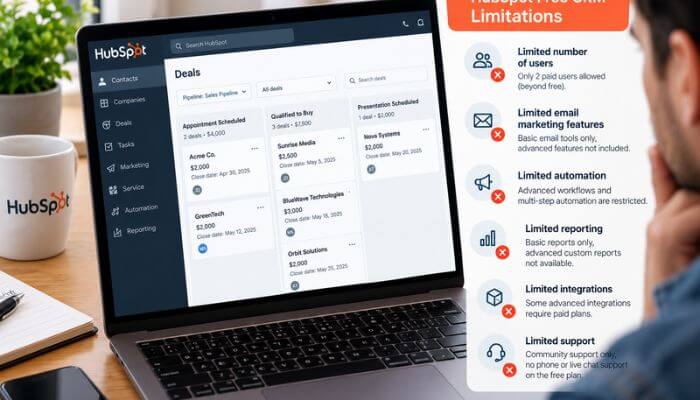
The free plan can become restrictive as a business grows. Key limitations include the 2-user and 1,000-contact limits, along with less advanced automation, reporting, customization, permissions, and administrative functionality than paid editions.
Businesses that require larger teams, sophisticated workflows, custom objects, stronger reporting, or advanced controls should consider upgrading to an appropriate paid plan.
HubSpot CRM Pricing
HubSpot CRM pricing varies because HubSpot offers its CRM alongside several specialized products rather than relying on one universal paid plan.
The main products include:
- Smart CRM
- Sales Hub
- Marketing Hub
- Service Hub
- Content Hub
- Data Hub
- Customer Platform
A small business may use the HubSpot CRM platform for free, while a growing organization may pay for additional seats, advanced Hubs, marketing contacts, onboarding, or AI usage.
For this reason, businesses should compare the features they actually need before choosing a paid HubSpot subscription.
HubSpot Smart CRM Pricing
Businesses that outgrow the free tools can upgrade HubSpot CRM through Smart CRM or purchase specialized HubSpot products for sales, marketing, service, content, and data management.
Smart CRM Professional currently starts at about $45 per seat per month with annual commitment, while Enterprise starts at about $75 per seat per month. Professional adds stronger reporting, CRM administration, duplicate management, and process tools, while Enterprise provides more advanced customization, permissions, security, and custom objects.
HubSpot Customer Platform Pricing
The Customer Platform bundles HubSpot’s major business tools into one package. Current pricing starts at $0 for Free, while promotional Starter pricing may be available for new customers. Professional starts at approximately $1,300 per month, and Enterprise starts at approximately $4,700 per month.
For businesses considering the wider HubSpot CRM platform, the Customer Platform can be worth comparing with purchasing several Hubs separately.
HubSpot Cost by Product
HubSpot also sells specialized products that work with its CRM. The table below provides a simpler overview of current starting prices.
| HubSpot Product | Free | Professional | Enterprise |
|---|---|---|---|
| Smart CRM | $0 tools available | From $45/seat/month* | From $75/seat/month |
| Sales Hub | $0 | From $90/seat/month* | From $150/seat/month |
| Service Hub | $0 | From $90/seat/month* | From $150/seat/month |
| Marketing Hub | Free tools available | From $800/month* | From $3,600/month |
| Content Hub | $0 | From $450/month* | From $1,500/month |
| Data Hub | $0 | From $720/month* | From $2,000/month |
*Some prices shown reflect annual commitments. Promotional offers, onboarding fees, included seats, marketing-contact allowances, and other charges can affect the final price.
What Can Increase HubSpot CRM Pricing?
The advertised subscription price does not always represent the complete HubSpot CRM cost. Depending on the products selected, businesses may also need to budget for:
- Additional paid seats
- Marketing-contact tiers
- Required onboarding
- HubSpot Credits for certain AI features
- Third-party integrations
- Data migration or implementation services
For this reason, businesses should compare the total expected cost rather than choosing a plan based only on its advertised starting price.
What Determines the Real HubSpot Cost?
The advertised subscription price may not represent the complete cost of HubSpot CRM. Depending on the products and features a business uses, the final amount can include several additional expenses.
A simple way to estimate the total is:
Total HubSpot Cost = Subscription + Paid Seats + Marketing Contacts + Onboarding + HubSpot Credits + Add-ons + Implementation
Not every business will pay for every component. The main factors to watch include:
- Paid seats: Some HubSpot products use seat-based pricing, so costs can increase as more employees require paid access.
- Marketing contacts: Marketing Hub pricing can depend partly on the number of contacts designated for marketing activities.
- Contact tiers: Exceeding a purchased marketing-contact tier can increase billing, making regular contact-list reviews important.
- Onboarding: Certain Professional and Enterprise products may include required onboarding fees.
- AI usage: Some advanced HubSpot AI features consume HubSpot Credits, which can create additional costs at higher usage levels.
- Implementation and integrations: Data migration, consulting, custom setup, and paid third-party applications can add to the overall expense.
When evaluating HubSpot CRM pricing, businesses should calculate the expected total cost based on their actual users, contacts, AI usage, and required features rather than comparing plans only by their advertised starting prices.
HubSpot Onboarding Costs
When calculating the total cost of HubSpot CRM, businesses should also consider onboarding fees. Certain Professional and Enterprise Hub products may require one-time onboarding in addition to the recurring subscription.
| Product | Plan | Approx. Onboarding Fee |
|---|---|---|
| Sales Hub | Professional | $1,500 |
| Sales Hub | Enterprise | $3,500 |
| Service Hub | Professional | $1,500 |
| Service Hub | Enterprise | $3,500 |
| Marketing Hub | Professional | $3,000 |
| Marketing Hub | Enterprise | $7,000 |
These fees are separate from recurring subscription charges. Businesses implementing HubSpot CRM may also have additional expenses for data migration, consulting, custom integrations, workflow configuration, or employee training.
Because onboarding requirements and pricing can change, businesses should confirm current fees with HubSpot before purchasing.
Real HubSpot Cost Examples
Practical examples make HubSpot CRM pricing easier to understand because the final amount depends on team size, subscription level, onboarding, contacts, and additional services.
1. Small Business Using the Free Plan
A business with two users and fewer than 1,000 contacts may be able to use the HubSpot free CRM at $0 per month. An upgrade becomes necessary when the team needs more users or advanced functionality.
2. Five-Person Sales Team
If five employees use Sales Hub Professional at approximately $90 per seat per month, the base subscription would be about $450 per month or $5,400 per year. Adding a $1,500 onboarding fee would bring the estimated first-year base cost to approximately $6,900.
3. Marketing Hub Professional
At approximately $800 per month with annual billing, Marketing Hub Professional would cost about $9,600 per year. With a $3,000 onboarding fee, the estimated first-year base cost would be around $12,600.
These examples show why the advertised subscription price may not represent the complete cost of HubSpot CRM. Marketing contacts, HubSpot Credits, integrations, implementation, consulting, and other services can increase the final amount.
Because HubSpot pricing and promotional offers can change, businesses should confirm current rates before purchasing.
Monthly vs Annual HubSpot Pricing
Some paid HubSpot products offer a lower effective monthly price when customers choose an annual commitment instead of month-to-month billing. This can reduce the ongoing cost of HubSpot CRM, but it also requires a longer commitment.
For example, Smart CRM Professional may cost around $45 per seat per month with annual commitment, compared with approximately $50 per seat on a monthly option. Sales Hub and Service Hub Professional may similarly be priced around $90 per seat per month with annual commitment, compared with approximately $100 per seat on a monthly option.
Annual billing can make HubSpot CRM pricing more economical for businesses planning to use the platform long term. However, companies should compare the total contract value, cancellation terms, required seats, and expected future needs before committing.
Because pricing and billing options can change, always verify the latest HubSpot rates before purchasing.
HubSpot CRM AI Tools
Artificial intelligence is an important part of HubSpot CRM, with many AI capabilities grouped under the Breeze brand. These tools help businesses work with customer data, create content, research prospects, support customers, and automate selected tasks.
Breeze Assistant
Breeze Assistant helps users work with CRM and business information. It can support tasks such as:
- Summarizing CRM records
- Preparing for meetings
- Researching companies
- Drafting sales outreach
- Generating content
- Answering CRM-related questions
Because Breeze Assistant works within the HubSpot CRM platform, it can use relevant CRM context to support everyday sales, marketing, and service activities.
Breeze Agents
HubSpot also provides specialized AI agents for different business functions:
- Customer Agent helps answer supported customer questions and can escalate conversations when human assistance is required.
- Data Agent supports account research, data enrichment, customer intelligence, and CRM data tasks.
- Prospecting Agent helps sales teams research prospects and prepare personalized outreach.
Some AI agent activities may consume HubSpot Credits, making usage monitoring important for businesses using these tools at scale.
AI Content Tools
HubSpot provides AI assistance for drafting and editing marketing and business content. Teams can use these tools to speed up content creation while maintaining human review for important information such as pricing, statistics, technical claims, and customer-sensitive content.
Overall, AI expands HubSpot CRM beyond traditional contact and pipeline management by helping teams research, communicate, create content, and automate selected work within the same platform.
How HubSpot Credits Work
Some AI features within HubSpot CRM use HubSpot Credits. Credit usage can apply to supported activities involving tools such as Customer Agent, Data Agent, and Prospecting Agent.
Some subscriptions include a monthly credit allowance, while businesses with heavier AI usage may need additional credits. Companies planning to automate large volumes of sales, data, or customer-service activity should therefore consider AI usage when estimating their total HubSpot cost.
HubSpot CRM Integrations
Integrations allow HubSpot CRM to connect with other applications a business already uses. HubSpot’s marketplace includes thousands of integrations across sales, marketing, communication, ecommerce, analytics, accounting, automation, customer service, and productivity.
Popular integrations include:
- Gmail and Outlook
- Google Calendar
- Slack
- Salesforce
- WordPress
- Zoom
- Zapier
Before installing an integration, businesses should review its permissions, synchronization rules, third-party pricing, and data-handling requirements.
HubSpot Login and Security
HubSpot supports several account-access methods, including email and password, passkeys, and supported third-party sign-in options. Single sign-on is also available with qualifying subscriptions.
For stronger CRM security, businesses should:
- Enable two-factor authentication where appropriate
- Review user permissions regularly
- Remove access for former employees
- Limit unnecessary administrator privileges
- Audit connected applications
These practices help protect customer information stored within the HubSpot CRM platform and reduce unnecessary account access.
How Different Teams Use HubSpot CRM
Because customer information is shared across the platform, HubSpot CRM can support multiple teams throughout the customer lifecycle. Sales, marketing, service, and data teams can work with connected information rather than maintaining completely separate records.
1. Sales Teams
Sales teams can use the CRM to manage leads, track deals, organize pipelines, schedule follow-ups, record calls and meetings, and monitor sales activity. Smaller teams may find the free tools sufficient, while businesses requiring advanced automation, sequences, forecasting, and prospecting can evaluate Sales Hub.
2. Marketing Teams
Marketing teams can use CRM data to understand lead sources, form submissions, website activity, email engagement, campaigns, lifecycle stages, and sales outcomes. Marketing Hub adds more advanced automation, segmentation, advertising, attribution, and email marketing capabilities.
3. Customer Service Teams
When combined with Service Hub, customer support teams can access relevant contact details, previous conversations, deals, tickets, company information, and customer activity. This gives representatives more context when responding to customer requests.
4. Data Teams
Data Hub can help businesses connect applications, synchronize customer information, improve data quality, and automate selected data processes. This is useful when information is distributed across CRM software, accounting platforms, ecommerce systems, support tools, advertising platforms, and internal databases.
Together, these capabilities allow the HubSpot CRM platform to serve as a shared customer-data foundation across different business functions.
How to Set Up HubSpot CRM
A well-planned HubSpot CRM setup can help businesses maintain cleaner customer data, improve sales visibility, and make the platform easier for employees to use.
- Define your goals: Decide what you want the CRM to improve, such as sales follow-ups, lead response, reporting, or centralized customer information.
- Clean existing data: Remove duplicates, correct outdated information, and standardize important fields before migration.
- Import contacts and companies: Map spreadsheet columns carefully to the appropriate HubSpot properties when importing existing customer data.
- Build your sales pipeline: Create deal stages that reflect how your business actually sells rather than relying on a generic pipeline.
- Connect email and calendar: Integrate supported email and calendar accounts so relevant communication and meeting activity can be connected with CRM records.
- Configure user permissions: Give employees the access they need while limiting unnecessary administrative privileges.
- Add essential integrations: Connect only applications that serve a clear business purpose and review their permissions and synchronization settings.
- Create useful reports: Focus on metrics that support real decisions, such as pipeline value, conversions, revenue, and sales activity.
- Introduce automation carefully: Automate repetitive processes after the underlying workflow is clearly defined and tested.
- Train your team: Establish consistent data-entry and CRM usage practices so employees understand how HubSpot CRM fits into their daily workflow.
A structured setup can reduce data problems and help businesses get more practical value from the platform over time.
Benefits of HubSpot CRM
One of the main benefits of HubSpot CRM is that businesses can start with essential customer-management tools and expand the platform as their sales, marketing, service, and data requirements grow.
Key benefits include:
- Free entry point: The HubSpot free CRM gives small teams access to essential customer and sales tools without an immediate software subscription.
- Centralized customer data: Sales, marketing, and service teams can work from connected customer information instead of maintaining separate records.
- Sales pipeline visibility: Teams can track deals and understand where opportunities are within the sales process.
- Built-in AI tools: Breeze and other AI capabilities can assist with research, content, customer support, data tasks, and sales activities.
- Large integration ecosystem: HubSpot connects with a wide range of business applications, helping companies bring more of their workflows together.
- Scalable platform: Businesses can start with basic CRM functionality and add more advanced sales, marketing, service, content, or data tools when needed.
- Flexible upgrade path: Growing companies can expand their HubSpot CRM platform without immediately migrating customer records to a completely different CRM system.
These advantages can make HubSpot useful for businesses that want a CRM capable of growing alongside their customer-management needs.
Limitations of HubSpot CRM
While HubSpot CRM offers useful tools for businesses of different sizes, there are some limitations to consider before choosing a paid plan.
- Costs can increase as you grow. A business may start with the free CRM but later need additional seats, advanced Hubs, marketing contacts, onboarding, HubSpot Credits, or implementation support.
- Pricing can be difficult to calculate. HubSpot pricing varies by product, subscription tier, number of seats, marketing contacts, billing commitment, and additional services. This can make the final cost higher than the advertised starting price.
- The free plan has clear limits. The free version currently supports up to two users and 1,000 contacts. This may be enough for a small business but restrictive for a growing team.
- Advanced features require paid plans. Businesses that need sophisticated automation, custom reporting, advanced permissions, custom objects, or enterprise controls generally need to upgrade.
- Some AI tools have usage limits. Certain AI activities use HubSpot Credits, so companies planning extensive AI automation should consider credit consumption when estimating the cost of HubSpot CRM.
- Good processes are still essential. CRM software cannot automatically correct poor-quality data, unclear sales processes, or inconsistent employee usage. Businesses still need clear workflows, clean customer information, and proper employee training.
Overall, these limitations are most important for growing businesses that need advanced features. Comparing actual requirements with the total cost can help determine whether HubSpot remains suitable as the organization expands.
HubSpot CRM vs Basic CRM Software
A basic CRM generally focuses on contacts, companies, deals, customer interactions, and sales pipelines. HubSpot CRM includes these core functions while also connecting with HubSpot’s broader marketing, sales, service, content, data, automation, and AI tools.
| Capability | HubSpot CRM | Basic CRM Software |
|---|---|---|
| Contact and company management | Included | Usually included |
| Deal and pipeline tracking | Included | Usually included |
| Email and meeting tools | Available | Varies |
| Marketing tools | Available through HubSpot | Often separate or limited |
| Customer service tools | Available through HubSpot | Varies |
| Content tools | Available through HubSpot | Often separate |
| AI capabilities | Available | Varies |
| Integrations | Large ecosystem | Varies by provider |
| Advanced automation | Available on paid plans | Varies by provider |
| Free option | Available | Depends on provider |
The main difference is that HubSpot CRM can grow into a broader customer platform as a company’s needs expand. A basic CRM may be more suitable for businesses that only need straightforward contact and sales management.
The better choice depends on team size, required features, integrations, automation needs, scalability, and total cost rather than the number of features alone.
Who Should Use HubSpot CRM?
HubSpot CRM can suit businesses that want to organize customer data, manage sales activity, and connect customer relationships with marketing, service, automation, and reporting tools.
It can be particularly useful for:
- Startups and small businesses that want to move away from spreadsheets and establish a structured sales process.
- Consultants and agencies that manage multiple prospects, clients, deals, and follow-up activities.
- B2B and SaaS companies that need lead management, pipelines, customer records, and sales visibility.
- Sales and marketing teams that want customer data and campaign activity connected in one platform.
- Growing companies that need more advanced automation, reporting, permissions, integrations, and data management.
The free version of HubSpot CRM is best suited to small teams with basic requirements. Professional plans become more relevant when a business needs advanced automation, reporting, customization, and management tools, while Enterprise plans are designed for organizations with more complex security, permissions, governance, and data requirements.
The right plan ultimately depends on team size, customer volume, required features, and budget.
How to Choose the Right HubSpot CRM Plan
Choosing the right HubSpot CRM plan depends on your team size, customer database, required features, automation needs, and budget. Before upgrading, consider these factors:
- Number of users: The free CRM may work for a two-user team, while larger teams should calculate how many paid seats they actually need.
- Contact volume: Consider both your total CRM contacts and, when using Marketing Hub, the number of contacts that need to be designated as marketing contacts.
- Sales requirements: Businesses needing sequences, forecasting, prospecting, or advanced sales automation should evaluate the appropriate Sales Hub tier.
- Marketing needs: Marketing Hub may be useful for companies requiring segmentation, campaign automation, attribution, and larger-scale email marketing.
- Customer service needs: Businesses requiring more advanced support workflows should compare Service Hub features and plan limits.
- Data and customization: Companies managing information across multiple systems or requiring specialized CRM structures should evaluate Data Hub and relevant Enterprise capabilities.
- AI usage: If your team plans to use AI agents extensively, estimate HubSpot Credit consumption and any potential additional cost.
- Total first-year cost: Calculate subscriptions, paid seats, marketing contacts, onboarding, integrations, HubSpot Credits, migration, training, and consulting before committing.
The best HubSpot CRM plan is not necessarily the one with the most features. Choose the tier that meets your current requirements while providing reasonable room for future growth.
How to Reduce HubSpot Cost
Businesses can control the cost of HubSpot CRM by matching their subscription and add-ons to the features they actually use. Regular account reviews can also prevent unnecessary spending as the team grows.
Practical ways to reduce costs include:
- Start with the free CRM if it meets current business needs.
- Purchase paid seats only for employees who require them.
- Review marketing-contact counts regularly.
- Monitor HubSpot Credit usage for AI features.
- Remove integrations and add-ons that are no longer needed.
- Audit subscriptions and seat requirements before renewal.
- Compare bundled HubSpot packages with purchasing individual Hubs.
- Upgrade to Enterprise only when its advanced features provide clear business value.
The goal is not simply to find the cheapest plan. A better approach is to keep HubSpot CRM costs aligned with actual users, contacts, features, and business requirements so the company is not paying for tools it rarely uses.
HubSpot CRM Total Cost of Ownership
The advertised subscription price is only one part of the total cost of HubSpot CRM. Depending on the products and services a business uses, additional expenses may include paid seats, marketing contacts, onboarding, HubSpot Credits, integrations, implementation, training, and ongoing administration.
For example, migrating customer data, configuring workflows, connecting third-party applications, and training employees can create costs beyond the monthly software subscription.
When comparing HubSpot CRM with another CRM platform, businesses should therefore evaluate the total cost of ownership rather than comparing advertised subscription prices alone.
Is HubSpot CRM Worth It?
Whether HubSpot CRM is worth the investment depends on the size of the business and the capabilities it needs.
For very small teams, the free CRM can provide substantial value because it includes customer records, deals, pipelines, tasks, reporting, email-related tools, and AI assistance without a monthly software fee.
Growing companies may benefit from paid HubSpot products when they need more advanced automation, sales management, marketing, customer service, reporting, or data capabilities.
The main concern is cost growth.
A company using multiple Professional or Enterprise products can face a significantly higher HubSpot cost once seats, marketing contacts, onboarding fees, AI usage, and implementation are included.
The best approach is to start with the capabilities the business genuinely needs and upgrade only when additional functionality creates measurable value.
Conclusion
HubSpot CRM combines customer management with sales, marketing, service, reporting, automation, integrations, data tools, and AI capabilities in one connected platform. Its free plan gives small teams a practical starting point, while paid products provide more advanced functionality as business requirements grow.
One of the biggest advantages of the HubSpot CRM platform is its flexibility. Businesses can begin with essential contact, deal, and pipeline management and later add advanced automation, reporting, marketing, customer service, data management, and AI tools when needed.
However, companies should look beyond the advertised subscription price. Paid seats, marketing contacts, onboarding, HubSpot Credits, integrations, and implementation can all affect the total HubSpot CRM cost.
For businesses considering HubSpot CRM, the best approach is to choose features that solve real operational needs, maintain clean customer data, monitor ongoing costs, and upgrade only when additional capabilities provide clear business value.
FAQs About HubSpot CRM
1. Can HubSpot CRM replace spreadsheets?
Yes. HubSpot CRM can replace many spreadsheet-based customer-management processes by organizing contacts, companies, deals, activities, and follow-ups in a centralized system.
2. Can HubSpot CRM be used without Marketing Hub?
Yes. HubSpot CRM can be used independently without purchasing Marketing Hub. Businesses can add specialized HubSpot products later if their requirements change.
3. Can I migrate from another CRM to HubSpot CRM?
Yes. Businesses can move customer data into HubSpot CRM through supported imports and migration methods. Data should be cleaned and mapped carefully before migration.
4. Does HubSpot CRM work for B2B companies?
Yes. HubSpot CRM can support B2B companies by connecting contacts with companies, deals, sales activities, pipelines, and customer interactions.
5. Can multiple sales pipelines be created in HubSpot CRM?
Depending on the subscription, HubSpot CRM can support multiple pipelines for businesses that manage different sales processes, teams, products, or services.
6. Does HubSpot CRM support lead scoring?
HubSpot provides lead-scoring capabilities on qualifying plans. Businesses can use scoring to help prioritize contacts or companies based on selected criteria and engagement signals.
7. Can HubSpot CRM track customer emails automatically?
HubSpot CRM can log and track supported email activity when users connect compatible email accounts and configure the appropriate tools and permissions.
8. Can HubSpot CRM be customized for different industries?
Yes. Businesses can customize HubSpot CRM using properties, pipelines, workflows, integrations, and, on qualifying plans, custom objects to better match industry-specific processes.
