



SFM Compile turns editable 3D assets into Source-compatible model files that can be used in Valve’s Source Filmmaker. For creative studios, animators, and digital production teams, the process connects model creation with testing, asset management, and final production.
In professional workflows, SFM Compile goes beyond preparing a single model. It can involve StudioMDL, QC files, Blender Source Tools, Crowbar, quality checks, version control, and organized client delivery. A well-planned compilation workflow helps creative businesses reduce technical errors, reuse assets, manage freelancers more efficiently, and keep Source Filmmaker projects production-ready.
Quick Answer: What Is SFM Compile?
SFM Compile refers to preparing and compiling Source-compatible models so they can work correctly in Valve’s Source Filmmaker.
Valve’s StudioMDL tool converts intermediate model files into the MDL format used by the Source engine.
A typical workflow is:
Create model → Rig and texture → Export SMD/DMX → Prepare QC file → Compile with StudioMDL → Test → Use in Source Filmmaker
For creative businesses, a successful compile should also produce an asset that is organized, reusable, tested, and ready for team or client use.
Key Takeaways
- SFM Compile is a workflow for preparing Source-compatible models for Source Filmmaker.
- StudioMDL is the main tool used to compile Source models.
- SMD and DMX are common intermediate model formats.
- QC files define how StudioMDL should build a model.
- Model compilation is different from rendering a finished animation.
- Models and materials use related but separate Source workflows.
- HLMV helps inspect models before production use.
- Standardized workflows can reduce errors, revisions, and wasted production time.
- Businesses should confirm licensing rights for every third-party asset used.
What Is Source Filmmaker?
Source Filmmaker, or SFM, is Valve’s filmmaking application for creating animated scenes inside the Source engine. It combines tools for cameras, lighting, character animation, sound, particles, and virtual sets in one production environment.
Unlike a traditional 3D modeling program, SFM is mainly used for animation and scene production. Custom models are usually created or prepared in external software before entering the Source pipeline, which is where SFM Compile becomes important.
Key SFM functions include:
- Character and object animation
- Camera and lighting control
- Sound and particle effects
- Virtual set production
- Movie and image rendering
Original SFM vs Source 2 Filmmaker
Original Source Filmmaker and Source 2 Filmmaker (S2FM) use different engine generations and should not be treated as the same workflow.
- Original SFM: Built on the Source engine and commonly uses SMD, DMX, QC files, and StudioMDL.
- Source 2 Filmmaker: Built for Source 2 and uses a newer asset-production pipeline.
For this reason, tutorials based on traditional SFM Compile workflows, QC files, and StudioMDL should not automatically be applied to Source 2 projects.
What Does “Compile” Mean in SFM?
In Source Filmmaker, compiling means converting editable or intermediate model data into files the Source engine can use. SFM Compile connects the asset-creation stage with the final engine-ready model.
A typical 3D asset may include:
- Mesh geometry
- UV coordinates
- Skeleton and bones
- Skin weights
- Animations
- Material assignments
- Facial controls
- Attachments
Source Filmmaker does not use the original Blender or other working file as a finished Source model. The asset must first be exported into supported formats and processed through the Source model pipeline.
StudioMDL is Valve’s command-line model compiler. It converts intermediate model files into the binary MDL format used by the Source engine.
Is SFM Compile the Same as Rendering?
No. SFM Compile prepares the asset for Source Filmmaker, while rendering creates the final visual output after the scene has been animated, lit, and framed.
Compilation
Compilation prepares assets such as:
- Characters
- Props
- Vehicles
- Custom animations
- Collision data
Rendering
Rendering turns the completed scene into the final image or movie.
Compile = prepare the asset
Render = create the final output
A studio may compile a character once and then render that same character across many different scenes or projects.
How Does the SFM Compile Process Work?
The SFM Compile process usually follows a simple path from creating a 3D asset to testing it inside Source Filmmaker.
| Stage | Main Task | Result |
|---|---|---|
| Asset creation | Build and rig the model | Editable 3D file |
| Export | Convert the model for Source | SMD or DMX |
| QC setup | Add compile instructions | QC/QCI file |
| Compilation | Run StudioMDL | MDL and related files |
| Materials | Prepare textures | VTF/VMT files |
| Testing | Check the final model | Production-ready asset |
1. Create the Original 3D Asset
The process starts in a 3D application such as Blender.
Artists may create:
- Character or prop geometry
- UV maps
- Skeleton and bones
- Textures
- Animations
- Facial controls
The original editable project file should always be saved so the asset can be updated later.
2. Prepare the Model for Source
Before export, the model should be checked carefully.
Review:
- Scale
- Orientation
- Bone names
- Vertex weighting
- UV maps
- Normals
- Materials
- Animation names
Fixing problems at this stage makes the SFM Compile workflow faster and reduces errors later.
3. Export Source-Compatible Data
The model is then exported into a format supported by the Source pipeline.
Common formats include:
.smd.dmx.vtafor certain animation data
Blender users often use Blender Source Tools to export Source-compatible model files.
Studios should also record the exporter version used for important projects so the same workflow can be reproduced later.
4. Create the QC File
A QC file tells StudioMDL how the model should be compiled.
It can define details such as:
- Model name
- Mesh files
- Material paths
- Animations
- Collision model
- Body groups
- Attachments
- LOD settings
Studios should keep QC files with the project because they are needed if the model must be rebuilt or updated.
Reusable QC templates can also save time when producing similar characters or props.
5. Compile the Model With StudioMDL
StudioMDL converts the prepared Source files into the final model format used by Source Filmmaker.
A successful compile may create:
| File | Purpose |
|---|---|
.mdl |
Main model file |
.vvd |
Vertex data |
.vtx |
Rendering data |
.phy |
Collision data when required |
.ani |
Separate animation data in some setups |
Not every model creates every file.
The final step of SFM Compile is to keep the related model files together and test the asset before using it in a production scene.
SFM Compile File Structure Explained
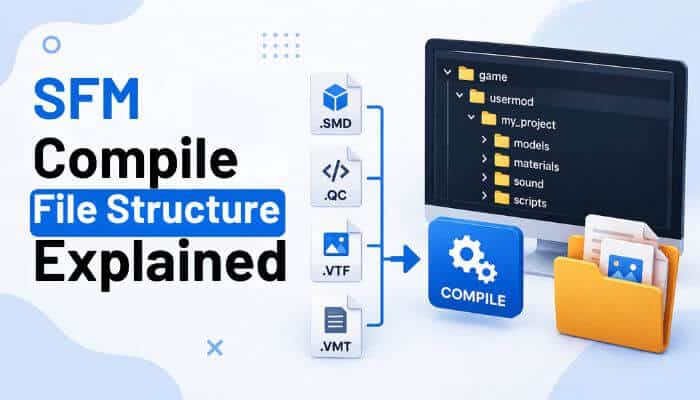
A clean folder structure is important because SFM Compile depends on correct file paths and organized Source assets.
Traditional Source projects usually separate editable source files from compiled model and material files.
- SMD and QC files stay in source-model folders.
- StudioMDL compiles model data into MDL-related files.
- Texture and material files are stored separately under the materials structure.
A simple project may look like this:
project/
├── modelsrc/
│   ├── character.qc
│   ├── character.smd
│   └── animations/
│
├── models/
│   └── company/
│       └── character/
│
└── materials/
    └── models/
        └── company/
            └── character/
Exact folders can vary, but consistency makes the SFM Compile workflow easier to manage.
Why Folder Structure Matters
Poor organization can lead to:
- Missing models
- Broken material paths
- Duplicate files
- Assets that work only on one computer
- Difficult client handoffs
- Version confusion
Creative teams should use a standard folder structure before multiple artists begin working on the same project.
Model Compilation and Texture Compilation Are Different
Model and texture preparation are separate parts of the SFM Compile workflow.
StudioMDL compiles model data, while Source textures and materials use their own files and paths.
Typical material files include:
VTF
VTF files contain the texture data used by the Source engine.
VMT
VMT files tell Source how a texture should appear, including material and shader settings.
A model can compile successfully but still display incorrectly if its materials are missing or use the wrong paths. Purple-and-black textures commonly indicate a missing or incorrectly referenced material.
For this reason, repeating SFM Compile will not fix a texture problem if the real issue is the VTF, VMT, or material path.
What Tools Are Commonly Used for SFM Compile?
The tools used for SFM Compile depend on how models are created, exported, compiled, and tested.
| Tool | Main Use |
|---|---|
| Source Filmmaker | Animation and scene production |
| Blender | Modeling, rigging, and asset creation |
| Blender Source Tools | Source-compatible import and export |
| StudioMDL | Compiling Source models |
| Crowbar | Graphical model compiling and decompiling |
| HLMV | Testing and inspecting models |
| Text Editor | Editing QC and QCI files |
| Version Control | Managing team asset versions |
A few important points:
- StudioMDL is the main Source model compiler.
- Blender Source Tools helps prepare Blender assets for the Source pipeline.
- Crowbar provides a graphical interface that can make common Source model tasks easier.
For creative teams, using a consistent SFM Compile tool set makes asset production easier to repeat, troubleshoot, and manage.
How to Test an SFM Compile Before Production
A successful SFM Compile should be tested before the model is used in an animation or client project. HLMV can help inspect the model and identify technical problems.
Check the following:
- Geometry: Look for missing parts, clipping, incorrect normals, and scale problems.
- Skeleton: Check bones, hierarchy, vertex weighting, and attachments.
- Animations: Test sequences, pose parameters, blending, and flex animations.
- Materials: Confirm textures, transparency, material assignments, and paths.
- LODs: Make sure lower-detail models do not introduce visible errors.
Fixing these issues before production helps prevent costly revisions later.
SFM Compile Performance Optimization
A model can work correctly but still be too complex for an efficient SFM Compile workflow.
For better performance, review:
- Polygon count: Use suitable detail for the model’s importance in the scene.
- LOD levels: Reduce unnecessary complexity for distant models.
- Materials: Remove unused materials and keep texture names organized.
- Rig complexity: Keep only the bones and controls required for production.
- StudioMDL reports: Use available reporting tools to review model complexity and performance.
Creative teams should balance visual quality with efficient asset performance rather than adding unnecessary detail.
Common SFM Compile Problems and Solutions
Most SFM Compile issues come from incorrect paths, materials, rigging, QC settings, or missing files.
| Problem | What to Check |
|---|---|
| Model does not appear | Output path, model name, target game |
| Purple/black textures | VMT/VTF files and material paths |
| Wrong scale | Export and model scale settings |
| Broken animation | Skeleton, sequences, export settings |
| Distorted mesh | Bone weighting |
| Compile stops | QC syntax and source files |
| Missing collision | Collision-model settings |
| Different result on another PC | Paths, dependencies, tool versions |
For faster troubleshooting:
- Check the StudioMDL compile log for warnings and errors.
- Confirm that all required model and material files are present.
- Fix QC syntax or path problems before recompiling.
- Test the finished SFM Compile output before using it in production.
Can Businesses Automate SFM Compile?
Yes. Studios handling many assets can automate parts of SFM Compile to make production more consistent.
Useful StudioMDL options include:
-verify— checks the model without writing final files.-parsecompletion— helps detect compile success or failure.-makefile— creates a simple makefile while checking QC data.
A simple automated workflow can be:
Export → Validate → Compile → Review Log → Test → Approve
Keep Compile Logs
Businesses should keep records of recurring issues such as:
- QC errors
- Missing files
- Material problems
- Skeleton errors
- Export problems
- Version mismatches
Keeping these records helps teams solve future SFM Compile problems faster and build a more reliable production workflow.
Why SFM Compile Matters for Creative Businesses
A well-organized SFM Compile workflow can save creative businesses time, reduce technical errors, and make Source assets easier to reuse across projects.
Faster Production
Standardized folders, QC files, naming rules, and approved model versions help teams work faster without repeatedly checking where assets belong.
Reusable Asset Libraries
Studios can build reusable libraries containing:
- Brand mascots
- Characters
- Props
- Product models
- Virtual sets
- Animations
Once tested, these assets can support multiple videos and client projects.
Lower Revision Costs
Early testing helps catch problems with rigs, materials, scale, or animations before they affect completed scenes. A reliable SFM Compile process can therefore reduce costly rework and production delays.
Better Freelancer Management
Clear project requirements help freelancers deliver usable assets the first time. Studios should define:
- Required source files
- QC and model formats
- Skeleton standards
- Material structure
- Naming rules
- Testing requirements
- Usage rights
Clear specifications make handoffs smoother and reduce confusion about what counts as a finished asset.
Business Uses for Source Filmmaker
Source Filmmaker can support several commercial creative services when businesses use properly licensed assets and a reliable SFM Compile workflow.
Branded Animation
Businesses can create original characters, mascots, and virtual scenes for:
- Marketing videos
- Social media campaigns
- Product promotions
- Brand storytelling
- Community content
Reusable characters can reduce production time across future campaigns.
YouTube and Digital Content
Creators can build libraries of:
- Characters
- Props
- Sets
- Camera layouts
- Animations
This makes recurring video production faster and more consistent.
Freelance Source Asset Services
Specialists can offer services such as:
- Model preparation
- Rigging
- Material setup
- QC creation
- Source model compilation
- Troubleshooting
- Custom prop creation
A reliable SFM Compile process helps freelancers deliver assets that are ready for real production use.
Gaming-Focused Marketing
Gaming brands and communities can use SFM for game-style promotional videos, virtual characters, and niche audience campaigns.
Previsualization
Creative teams can use SFM to test:
- Camera angles
- Scene timing
- Character positions
- Lighting
- Shot composition
This can help identify production problems before more expensive final work begins.
SFM Compile Workflow for a Creative Studio
A simple SFM Compile workflow helps creative teams keep asset production organized and consistent.
Step 1: Define the Asset
Decide:
- Intended use
- Required animations
- Rig needs
- Material needs
- Delivery format
Step 2: Build the Asset
Create the:
- Mesh
- UVs
- Rig
- Materials
- Animations
Keep the original editable file.
Step 3: Check Before Export
Review:
- Scale
- Normals
- Bone names
- UVs
- Materials
- Mesh deformation
Step 4: Export Source Files
Create the required SMD, DMX, or other Source-compatible files.
Step 5: Prepare QC Files
Create or update the QC/QCI instructions needed for compilation.
Step 6: Compile the Model
Use StudioMDL or a compatible front end to complete the SFM Compile process.
Step 7: Review Errors and Warnings
Check the compile log before approving the asset.
Step 8: Test the Model
Inspect the model in HLMV and Source Filmmaker.
Step 9: Approve the Asset
Confirm that the model, materials, animations, and rig work correctly.
Step 10: Archive the Project
Save:
- Editable model
- Source files
- QC/QCI files
- Materials and textures
- Compiled files
- Compile logs
- License records
- Version details
A complete archive makes future revisions and client updates much easier.
SFM Compile Client Delivery Checklist
A professional SFM Compile delivery should include everything another qualified artist needs to use, update, and reproduce the asset.
| Deliverable | Why It Matters |
|---|---|
| Compiled model files | Ready for production |
| Editable source model | Allows future revisions |
| QC/QCI files | Reproduces the compile setup |
| SMD/DMX files | Preserves source model data |
| Materials and textures | Ensures correct appearance |
| Animation sources | Supports future updates |
| Compile information | Helps with troubleshooting |
| Version number | Identifies the approved build |
| License documentation | Confirms usage rights |
| Target environment | Helps reproduce the setup |
Perform a Clean Delivery Test
Before delivery, test the final SFM Compile package in a clean project or test environment.
Check that:
- The model loads correctly.
- Textures and materials appear properly.
- Animations and flexes work.
- Required dependencies are included.
- Folder structure is correct.
- The approved version is clearly identified.
- The exact delivered package is archived.
A clean test helps reveal missing files or dependencies that may exist only on the original artist’s computer.
SFM Compile Costs for Creative Businesses
Although Source Filmmaker has a low software-entry cost, an SFM Compile workflow can still involve significant business expenses.
Common costs include:
- 3D modeling and character design
- Rigging and animation
- Textures and materials
- Technical setup and troubleshooting
- Hardware
- Quality assurance
- Project management
- Licensing
- Client revisions
For studios, labor efficiency often matters more than software cost. A free tool can become expensive when technical problems create hours of unnecessary work.
Commercial Use, Copyright and Asset Licensing
Using Source Filmmaker commercially does not automatically provide commercial rights to every model, texture, character, sound, or other asset used in an SFM Compile project.
Businesses should verify rights for:
- Characters and models
- Props and textures
- Music and sound effects
- Voice recordings
- Logos and fonts
- Third-party assets
Compilation Does Not Create Ownership
Compiling another creator’s model does not transfer copyright or automatically grant permission to sell, advertise, redistribute, or license that asset to clients.
For commercial projects, businesses should use original assets or content with clear commercial-use permission and keep licensing records with the project files.
How Creative Businesses Can Improve Their SFM Compile Workflow
A consistent SFM Compile workflow helps creative teams reduce errors, manage assets more efficiently, and make projects easier to maintain.
Standardize Naming
Use clear names for:
- Models
- Textures
- Materials
- Animations
- QC files
- Versions
Avoid names such as:
character_final_final_new
Use a structured format instead:
brand_character_v014
Standardize Folder Structure
Create fixed locations for:
- Working files
- Source models
- Compiled models
- Materials
- Textures
- QC files
- Final deliverables
A consistent structure makes SFM Compile projects easier to share between employees and freelancers.
Maintain Version Control
Track important changes with:
- Version number
- Editor
- Date
- Changes made
- Approval status
This helps teams identify the latest approved asset quickly.
Maintain an Asset Registry
| Field | Example |
|---|---|
| Asset | Company Mascot |
| Version | 1.4 |
| Owner | Client |
| Compile Status | Approved |
| License Status | Cleared |
| Project | Campaign A |
An asset registry becomes more valuable as the studio’s model library grows.
Create Reusable QC Templates
Reusable QC templates can save time for similar characters, props, or product models.
Each asset should still be checked for its own:
- Paths
- Bones
- Materials
- Animations
- Physics settings
Build an Internal Troubleshooting Guide
Record recurring SFM Compile problems using a simple format:
Problem → Cause → Solution
This creates a useful internal reference and helps teams solve repeated technical issues faster.
Advantages and Limitations of SFM Compile for Businesses
SFM Compile can offer a practical workflow for studios already producing Source-based animation, but it also comes with technical and licensing limitations.
| Advantages | Limitations |
|---|---|
| Low software-entry cost | Older Source workflow |
| Reusable models and assets | Technical learning curve |
| Strong creator community | Careful path management required |
| Useful for gaming content | Older production toolchain |
| Supports custom characters and props | Asset licensing requires attention |
| Repeatable production process | Troubleshooting can take time |
Businesses should evaluate SFM based on their existing assets, team skills, project requirements, and long-term production needs.
SFM Compile vs Modern 3D Pipelines
SFM Compile may still suit teams with established Source assets, while newer 3D platforms can offer modern rendering, collaboration, lighting, and asset-management features.
SFM can remain practical for teams that:
- Already use Source-compatible assets
- Produce gaming-focused content
- Have experienced SFM artists
- Maintain existing Source projects
- Need reusable characters and props
The better choice depends on workflow requirements rather than simply choosing the newest software.
Is SFM Compile Worth Learning in 2026?
SFM Compile remains useful for specialists working with Source Filmmaker, custom Source models, or existing SFM asset libraries.
It is most relevant for:
- Source Filmmaker animators
- Source modders
- Gaming-content creators
- 3D asset freelancers
- Character artists
- Machinima creators
- Creative studios using SFM
For these professionals, the real value comes from being able to prepare, test, troubleshoot, and maintain reliable Source assets—not simply run the compiler.
Final Thoughts
For creative businesses, SFM Compile is less about running a technical command and more about building a reliable production system. The real value comes from faster asset preparation, fewer avoidable errors, cleaner freelancer handoffs, and the ability to reuse well-managed models across multiple projects.
Studios that already operate in the Source Filmmaker ecosystem can gain the most by treating SFM Compile as part of a broader asset-management strategy rather than an isolated technical task. Standardized files, clear licensing records, consistent quality checks, and disciplined version control can turn a niche workflow into a more efficient and commercially useful production process.
The technology may be specialized, but the business principle is familiar: better systems reduce friction, protect creative investment, and make future production easier to scale.
FAQs About SFM Compile
1. Does SFM Compile require an internet connection?
No. The actual SFM Compile process runs on local model and QC files, although internet access may be needed to download tools, updates, or assets.
2. Can SFM Compile use OBJ files?
Yes. StudioMDL can use OBJ files as reference meshes, but SMD or DMX is generally more suitable when skeletal animation is required.
3. Can SFM Compile target a different Source game folder?
Yes. StudioMDL can target another valid Source game directory by using its -game option.
4. Does SFM Compile work for static props?
Yes. Custom static props still require model compilation, although their QC setup is usually simpler than an animated character.
5. Can SFM Compile handle facial flex animations?
Yes. StudioMDL supports vertex and flex-animation data through formats such as VTA and DMX when the model is configured correctly.
6. Can HLMV create hitboxes for SFM Compile?
HLMV can generate QC hitbox code. Artists can add that code to the model’s QC or QCI file and compile the model again.
7. Is map compilation part of SFM Compile?
Not usually. StudioMDL compiles models, while Source maps use separate tools such as VBSP, VVIS, and VRAD.
8. Can an SFM Compile model move directly to Source 2?
Not as a direct replacement. Source 2 uses a different asset pipeline, and legacy Source models may require conversion and additional work.
