




Learning how to find SERP features opportunity can help your website gain prominent Google visibility without depending entirely on the traditional number-one organic position.
Modern search results may contain featured snippets, AI Overviews, People Also Ask questions, image packs, video results, local listings, product panels, discussion results, review snippets, and sitelinks. These elements can attract attention before searchers reach standard organic listings.
The objective is not to pursue every feature Google displays. It is to identify features that:
- Appear consistently for searches relevant to your business
- Provide meaningful visibility or clickable attribution
- Match your content, product or business type
- Are occupied by competitors you can realistically challenge
- Support traffic, leads, sales or brand recognition
- Can be influenced through better content, technical eligibility, structured data, media, internal linking or business information
Understanding how to find SERP features opportunity also helps you avoid wasting resources on search elements that provide little traffic, do not suit your website, or cannot be directly influenced.
Google’s Search Appearance documentation covers many ways content can appear beyond a basic title link, including featured snippets, images, videos, AI features, local business information, sitelinks, and structured-data-supported results.
Quick Answer: How to Find SERP Features Opportunity
The fastest way to understand how to find SERP features opportunity is to begin with keywords for which your website already has some Google visibility.
Follow this process:
- Confirm that the target page is crawlable, indexable, and snippet-eligible.
- Export existing queries and pages from Google Search Console.
- Prioritize relevant keywords ranking between positions 2 and 20.
- Group the keywords by search intent.
- Inspect each live SERP using the correct country, language, and device.
- Record which search features appear and which domains occupy them.
- Identify features competitors own, but your website does not.
- Assess click potential, business value, and feature stability.
- Decide whether to update an existing page or create a new one.
- Match the page format to the target feature.
- Score and prioritize each opportunity.
- Publish, validate, and measure gains, losses, and conversions.
The position ranges in this guide are practical prioritization guidelines rather than Google ranking requirements.
Key Takeaways
- A SERP feature opportunity exists when a valuable search element appears for a relevant query, but your website does not occupy it.
- Existing pages ranking close to page one usually offer faster opportunities than completely new content.
- A visible feature is not always a valuable one; some generate awareness but few website visits.
- Search Console reveals your existing visibility but does not show every feature competitors own.
- Manual SERP inspection remains essential because results can differ by query, device, language, country and location.
- Structured data can establish eligibility for supported rich results, but it does not guarantee their appearance.
- FAQ and HowTo markup should not be treated as broad rich-result opportunities for ordinary publishers.
- The strongest opportunities combine ranking proximity, business value, click potential, technical eligibility, feature stability, and a clear weakness in the current result.
Place an automatic table of contents here in WordPress.
What Is a SERP Feature?
A SERP feature is an element on a search engine results page that goes beyond a conventional organic title link and description.
Common examples include:
- Featured snippets
- AI Overviews
- AI Mode citations
- People Also Ask boxes
- Image packs
- Video results
- Local packs
- Product and merchant listings
- Recipe results
- Review snippets
- Job and event listings
- Top Stories
- Discussions and forums
- Knowledge panels
- Sitelinks
Some features send users directly to external websites. Others help searchers complete a task without leaving Google.
That distinction matters. Winning a prominent search feature can increase visibility and brand recognition, but it may not produce substantial traffic when the result completely answers the query.
What Is a SERP Feature Opportunity?
A SERP feature opportunity is a query for which:
- A relevant search feature appears
- Your website can satisfy the search intent
- Another source currently occupies the feature
- Your website does not occupy it
- The current result has a weakness you can address
- Earning the feature could produce useful visibility, traffic, or conversions
Suppose your article ranks sixth for:
How to calculate customer retention rate
A competing page owns the featured snippet, but its answer:
- Uses an unexplained formula
- Includes no worked example
- Fails to define the measurement period
- Does not explain how new customers affect the calculation
- Contains outdated information
That keyword may represent a strong opportunity because your page is already relevant, the query produces a featured snippet, and the current answer can be materially improved.
By contrast, a general blog article is unlikely to replace the knowledge panel for a widely recognized organization, public figure, or landmark.
Why Learning How to Find SERP Features Opportunity Matters
Traditional keyword research usually focuses on:
- Search volume
- Keyword difficulty
- Ranking position
- Cost per click
- Estimated traffic
- Competitor authority
Those metrics are valuable, but they do not reveal how much attention remains available to a standard organic listing.
A keyword may have significant search volume while the results page contains:
- Paid advertisements
- An AI Overview
- A featured snippet
- A video carousel
- A local pack
- Product listings
- A People Also Ask section
- Only a few traditional results above the fold
In that environment, ranking fifth may produce less visibility than the position suggests.
SERP feature analysis answers three additional questions:
- What is attracting attention away from ordinary organic results?
- Can my website realistically appear inside that feature?
- Would earning the feature support a valuable business outcome?
Is the Feature Likely to Produce Clicks?
A highly visible feature is not automatically a valuable SEO target.
Before pursuing it, ask:
- Does the feature display a clickable external source?
- Is the source link visually prominent?
- Does the feature answer the entire question?
- Does the query suggest that users need deeper information?
- Is the likely visitor relevant to your business?
- Can the landing page produce a signup, enquiry or sale?
- Could the feature strengthen brand recognition even without many clicks?
Visibility-versus-Value Matrix
| Feature situation | Likely value | Recommended response |
| Prominent feature with a clear external link | Strong visibility and traffic potential | Prioritize |
| Feature provides only a partial answer | Strong discovery potential | Prioritize |
| Feature supports a commercial or local action | High potential business value | Prioritize when relevant |
| Feature fully answers a simple factual query | Visibility may exceed traffic value | Evaluate carefully |
| Feature provides no external attribution | Limited direct traffic potential | Usually deprioritize |
| Feature attracts an irrelevant audience | Weak conversion value | Deprioritize |
| Feature appears inconsistently | Uncertain return | Monitor before investing |
Search Console can reveal how users discovered your website, while analytics can show what happened after they arrived. Combining both datasets provides a more complete performance picture than relying on rankings alone.
Which SERP Features Should You Prioritize?
| SERP feature | Best suited to | Strong opportunity signal | Main optimization method |
| Featured snippet | Informational pages | You rank near page one, and another page owns it | Direct answer with a paragraph, list, or table |
| People Also Ask | Question-led content | Questions expose missing subtopics | Question headings and immediate answers |
| AI citation | Comprehensive informational pages | Cited sources are incomplete or generic | Original, accessible and well-supported content |
| Image pack | Visual topics and tutorials | Existing images are generic or unclear | Original images and strong page context |
| Video results | Demonstrations and tutorials | Existing videos are shallow or outdated | Useful video on a dedicated watch page |
| Local pack | Location-based businesses | Competing profiles are incomplete | Business Profile and local relevance |
| Product results | Ecommerce pages | Competing products appear, but yours do not | Product data, Merchant Center and supported markup |
| Review snippet | Eligible review content | Competitors display valid rating information | Visible reviews and accurate structured data |
| Recipe result | Recipe publishers | Recipe cards dominate the results | Complete recipe content and Recipe markup |
| Job or event result | Employers and event organizers | Relevant listings appear | Dedicated pages and supported markup |
| Discussion result | Genuine online communities | First-hand perspectives dominate | Crawlable discussions and appropriate markup |
| Sitelinks | Established websites and brands | Competitors show useful internal shortcuts | Clear architecture and internal links |
| Preferred Sources | News and topical publishers | Readers recognize the publication | Original reporting and audience selection |
Google maintains a structured-data search gallery showing which markup types can support rich results. Check the current gallery before investing in implementation.
SERP Features You Usually Cannot Directly Control
Not every visible search element represents an actionable SEO opportunity.
Examples include:
- Knowledge panels for established public entities
- Search refinements without publisher links
- Google-generated filters
- Features whose contents cannot be tied to an external URL
- Features that require a different business or content model
- Local results for locations where a company has no legitimate presence
SEO tools may identify that these elements are present, but they cannot always associate them with a particular website because some search features contain no extractable publisher URL.
How to Find SERP Features Opportunity: 11-Step Process
Step 0: Confirm Technical Eligibility
Before changing the content, confirm that the target page can qualify for search visibility.
Check that it:
- Returns a successful HTTP response
- Is not blocked by robots.txt
- Does not contain a noindex directive
- Uses the intended canonical URL
- Can be rendered by Googlebot
- Contains the main answer in crawlable content
- Does not require a login to access essential information
- Works correctly on mobile devices
- Provides crawlable images or video where relevant
- Uses structured data that matches visible content
- Is eligible to display a search snippet
Snippet Controls to Review
| Directive | Possible effect |
| nosnippet | Prevents regular and featured snippets |
| data-nosnippet | Excludes selected text from snippets |
| max-snippet | Limits how much text Google may use |
| noindex | Prevents the page from appearing in Search |
| max-video-preview | Limits the permitted video preview length |
Publishers cannot manually declare a page as a featured snippet. Google chooses the source automatically. However, nosnippet and data-nosnippet can prevent content from appearing in standard and featured snippets.
Step 1: Export Your Existing Keywords
Start with queries for which Google already considers your website relevant.
In Google Search Console, open:
Performance → Search results → Queries
Export:
- Query
- Clicks
- Impressions
- Click-through rate
- Average position
Prioritize queries that have:
- Meaningful impressions
- An average position between 2 and 20
- A page that matches the search intent
- A lower-than-expected CTR
- Clear relevance to your audience or business
- A visible feature on the live results page
Search Console omits anonymized searches and displays only a limited set of rows in its standard interface. Its query table is therefore valuable but not a complete record of every query that produced an impression.
Step 2: Separate Branded and Non-Branded Queries
Branded queries frequently produce:
- Sitelinks
- Knowledge panels
- Navigational results
- Business information
- Social profiles
Non-branded searches are generally more useful for reaching new audiences.
Classify keywords as:
- Branded
- Non-branded
- Informational
- Commercial
- Transactional
- Local
- Navigational
| Query | Classification |
| ExampleCo login | Branded and navigational |
| Best project management software for agencies | Non-branded and commercial |
| How to create a project timeline | Informational |
| Project management consultant near me | Local and transactional |
Search Console supports combined filters for dimensions such as query, page, device, and country. However, filtered totals may differ because of anonymized searches and data truncation.
Step 3: Group Keywords by Search Intent
SERP features often reflect the format Google believes will best satisfy the searcher.
| Search intent | Common wording | Likely features |
| Definition | what is, meaning, definition | Featured snippet, AI Overview, People Also Ask |
| Process | how to, steps, tutorial | Featured snippet, video, images |
| Comparison | versus, difference, best | Tables, AI results, products, videos |
| Local | near me, in city, nearby | Local pack and maps |
| Transactional | buy, price, discount | Product and merchant listings |
| Visual | examples, designs, before and after | Images and videos |
| Timely | latest, today, current | Top Stories and news results |
| Entity | person, company, landmark | Knowledge panel and images |
| Troubleshooting | why, fix, not working | Snippets, forums and videos |
| Experience | worth it, reviews, experience | Discussions, forums and reviews |
A text-only guide may struggle when the results are dominated by video demonstrations. A standard article cannot replace a complete Google Business Profile when the intent is local.
Step 4: Inspect the Live SERP
Anyone researching how to find SERP features opportunity must inspect the live search results rather than relying only on keyword-tool databases.
Search each priority keyword and record:
- Which features appear
- Where they appear
- Which domains occupy them
- Whether they contain external links
- Which content format they use
- Whether they appear on desktop, mobile or both
- Whether results change by country or city
- Whether the feature survives repeated checks
- Whether Google interprets the query in multiple ways
Use the country, language, and device that match your actual audience.
Recommended Audit Columns
| Column | What to record |
| Keyword | Exact query |
| Target URL | Existing or proposed page |
| Search intent | Definition, comparison, local, transactional, etc. |
| Feature present | Snippet, image, video, local pack, AI result, etc. |
| Feature position | Where it appears |
| Current owner | Domain occupying it |
| Format | Paragraph, list, table, image, video or other |
| Device | Mobile, desktop or both |
| Location | Country or city tested |
| Click potential | Low, medium or high |
| Feature stability | Stable, moderate or volatile |
| Competitor weakness | What could be improved |
| Required action | Content, media, markup, links or technical work |
Step 5: Identify the Current Feature Owner
For every target feature, assess the existing source.
Ask:
- Is it a direct competitor?
- Does the page fully satisfy the intent?
- Is the information accurate and current?
- Is the answer easy to understand?
- Does the page provide original evidence?
- Are its examples useful?
- Do its images or videos add value?
- Does the author demonstrate relevant experience?
- Does the page answer the entire question?
- Does the landing page provide a good user experience?
Do not assume that a large domain is automatically unbeatable. Evaluate the relevance and quality of the specific page.
Step 6: Find Features Your Competitors Already Own
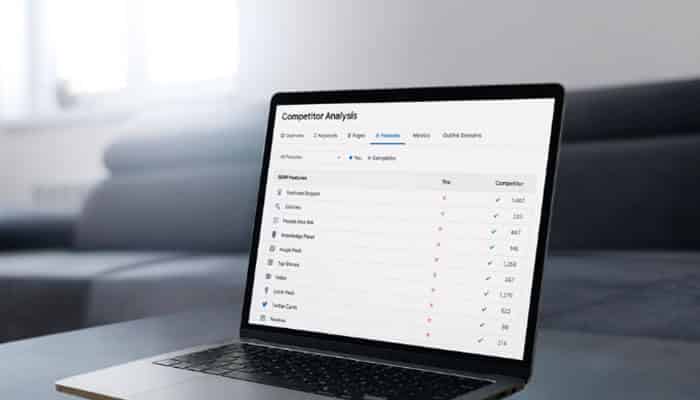
Do not limit your research to queries already visible in your Search Console account.
Reverse competitor analysis can uncover opportunities before your website has generated enough impressions to reveal them.
Reverse Competitor Workflow
- Select three to five direct organic competitors.
- Export the keywords for which they rank.
- Filter for keywords that trigger SERP features.
- Identify the features each competitor occupies.
- Remove irrelevant branded searches.
- Group the remaining keywords by topic and intent.
- Check whether your website already has a relevant page.
- Compare your page with the current feature owner.
- Estimate the work required to compete.
- Add realistic gaps to your opportunity list.
Classify the Gap
| Gap type | Meaning | Recommended action |
| Existing-page gap | You have a relevant page but do not own the feature | Improve the current URL |
| Coverage gap | Your page misses an important subquestion | Expand the page |
| Format gap | Google favors a table, image or video you do not provide | Create the missing asset |
| Evidence gap | Your page lacks data, examples or sourcing | Strengthen the evidence |
| Experience gap | The competitor provides credible first-hand insight | Add genuine testing or expert input |
| Intent gap | Your page serves a different objective | Reposition it or create a focused page |
| Complete content gap | Your site does not cover the topic | Consider a new page |
| Ineligible gap | The feature does not suit your site type | Do not pursue it |
Semrush and Ahrefs can both identify keywords where a feature appears but the analyzed website does not occupy it. Use their reports as research datasets, then verify the live results manually.
Step 7: Look for Competitor Weaknesses
A feature becomes more attractive when the existing result has clear limitations.
Look for:
- Outdated statistics or regulations
- Missing steps
- Vague definitions
- Unsupported claims
- No worked example
- Poor table formatting
- Generic images
- Low-quality video
- Missing product information
- Thin local content
- No explanation of exceptions
- Unclear editorial methodology
- Content that answers only part of the query
Do not copy the current feature.
Provide a direct answer first, then strengthen it with:
- Context
- Evidence
- Examples
- Limitations
- Exceptions
- Practical next steps
Step 8: Check Feature Stability
A feature that appears once is not automatically worth targeting.
Features can:
- Appear and disappear
- Move to another part of the SERP
- Select different sources
- Change by location
- Change by device
- Respond to seasonal demand
- Shift during a news event
- Be part of a temporary interface test
Check valuable keywords:
- On more than one day
- On desktop and mobile
- In the target country
- In the correct language
- From relevant locations
- During different points in a seasonal cycle
Stability Classification
| Stability level | Observation | Recommended action |
| Stable | Appears consistently in a similar form | Strong target |
| Moderately stable | Usually appears but changes owner or position | Test cautiously |
| Volatile | Frequently appears and disappears | Reduce priority |
| Seasonal | Appears during predictable periods | Prepare content early |
| Location-dependent | Changes substantially by location | Target relevant markets only |
| Device-dependent | Appears mainly on one device | Match the dominant device |
Step 9: Decide Whether to Update or Create
Creating a new page for every opportunity can produce duplication and keyword cannibalization.
| Situation | Best action |
| Existing page matches the primary intent | Update the existing page |
| Existing page ranks but lacks one important section | Expand the page |
| Existing page targets a different audience or objective | Create a focused page |
| Two pages compete for the same query | Consolidate or clarify their purposes |
| Topic requires a distinct tool, template or calculator | Create a dedicated resource |
| SERP favors a format the current page cannot support | Build a suitable new asset or page |
| Opportunity has weak business relevance | Do not create content merely for traffic |
Before publishing a new page, search your own website for:
- Similar titles
- Overlapping headings
- Pages ranking for the same query
- Older articles that could be updated
- Thin pages that could be consolidated
Step 10: Match the Format to the Feature
| Target feature | Recommended format |
| Definition snippet | Brief definition followed by fuller explanation |
| Process snippet | Numbered steps in the correct order |
| List snippet | Clearly structured ordered or unordered list |
| Table snippet | Simple HTML table with descriptive headings |
| People Also Ask | Question heading and immediate answer |
| Image result | Original, relevant and crawlable image |
| Video result | Useful video on a dedicated watch page |
| Product result | Accurate product, price and availability information |
| Local pack | Complete Business Profile and relevant local page |
| Sitelinks | Clear architecture and descriptive internal links |
| Discussion result | Genuine first-hand community content |
| AI citation | Original, comprehensive and accessible information |
There is no universal ideal answer length for a featured snippet. Provide the shortest complete answer that remains accurate, then add supporting information underneath.
Step 11: Score Every Opportunity
A scoring framework prevents teams from prioritizing keywords only because they have high search volume.
100-Point Opportunity Score
| Factor | Maximum score |
| Current ranking proximity | 20 |
| Business or conversion value | 15 |
| Feature prominence | 10 |
| Likely click potential | 10 |
| Match between page and feature | 10 |
| Weakness of current feature owner | 10 |
| Search demand and impressions | 10 |
| Technical eligibility | 5 |
| Feature stability | 5 |
| Effort required | 5 |
| Total | 100 |
Score Interpretation
- 80–100: Immediate priority
- 65–79: Strong opportunity
- 50–64: Test after higher-priority pages
- Below 50: Monitor or deprioritize
Effort Score
Award more points when less work is required:
- 5 points: Minor answer or formatting improvement
- 4 points: Moderate content expansion
- 3 points: New original images, research or expert review
- 2 points: New video, interactive tool or specialist input
- 1 point: Major technical or sitewide change
- 0 points: Currently unrealistic or ineligible
A lower-volume commercial query can be more valuable than a high-volume informational query with little click or conversion potential.
How to Find SERP Features Opportunity With Google Search Console
Google Search Console is the best starting point because it shows where Google already considers your website relevant.
Search Console Workflow
- Select a meaningful period, such as the previous three months.
- Compare it with the preceding period.
- Enable clicks, impressions, CTR and average position.
- Open the Queries tab.
- Export the results.
- Filter for positions 2–20.
- Sort by impressions.
- Select a query and open the Pages tab.
- Identify the URL Google is displaying.
- Inspect the live SERP.
- Record the available feature.
- Repeat the analysis by device and country.
Average position can be difficult to interpret when the same website appears through several search elements. Treat it as one prioritization signal rather than a complete measurement of visibility.
Use the Search Appearance Dimension
The Search appearance dimension can help identify visibility from supported result types, including:
- Rich results
- Video appearances
- Product appearances
- Other eligible search experiences
However, it is not a complete inventory of every feature shown for every query. A feature your site has never occupied may not provide useful opportunity data in this report.
Search Console Limitations
Search Console may omit or limit:
- Anonymized searches
- Rare long-tail query rows
- Exact competitor information
- Complete feature-to-click attribution
- Features that have never generated impressions for your website
The table may display fewer rows than the chart totals because of anonymization, truncation and interface limitations.
Generative AI Performance Reporting
Google announced dedicated Generative AI performance reporting in Search Console in June 2026.
For properties with access, the reports may show:
- Impressions in AI Overviews and AI Mode
- Pages that appeared
- Countries
- Devices
- Performance by date
The information remains included in broader performance totals, while the dedicated report provides a separate view of generative AI visibility. Availability may differ between properties.
How to Find SERP Features Opportunity With SEO Tools
Paid SEO tools can accelerate competitor research, historical analysis and bulk filtering.
Semrush Workflow
- Enter your domain in Organic Rankings.
- Open the Positions report.
- Apply the SERP Features filter.
- Select the target feature.
- Show keywords where the feature appears.
- Exclude results where your domain already owns it.
- Add a position filter, such as 1–20.
- Filter by topic or intent.
- Export the results.
- Inspect the live SERPs manually.
- Apply your opportunity score.
Ahrefs Workflow
- Enter your domain in Site Explorer.
- Open Organic keywords.
- Set a position range of 1–20.
- Open the SERP features filter.
- Select a feature.
- Choose the option excluding your target from it.
- Export the results.
- Review current and historical SERPs.
- Compare the feature owner with your page.
- Score the opportunity.
No third-party database includes every query Google processes. Treat SEO-tool data as a useful research source rather than a complete record of all searches.
How to Find SERP Features Opportunity Without Paid Tools
You can complete an effective audit with free platforms, including:
- Google Search Console
- Google Search
- Google Sheets
- Rich Results Test
- URL Inspection
- Google Business Profile
- Google Trends
- Your analytics platform
Free Opportunity Spreadsheet
| Column | What to enter |
| Keyword | Exact query |
| Target URL | Existing or proposed page |
| Average position | Search Console position |
| Impressions | Search Console impressions |
| CTR | Search Console CTR |
| Search intent | Informational, commercial, local, etc. |
| Feature present | Snippet, image, video, local pack, AI result, etc. |
| Current owner | Domain occupying the feature |
| Feature format | Paragraph, list, table, image, video or other |
| Click potential | Low, medium or high |
| Competitor weakness | Missing, outdated or unclear information |
| Required improvement | Content, media, technical work or markup |
| Stability | Stable, moderate, volatile or seasonal |
| Business value | Low, medium or high |
| Priority score | Score out of 100 |
| Status | Planned, updating, published, won or lost |
For high-value queries, save dated screenshots so you can distinguish a persistent change from a temporary SERP test.
How to Scale the Process for a Large Website
Publishers and ecommerce websites with thousands of URLs may need more than a manual spreadsheet.
Large-Site Workflow
- Configure Search Console bulk export.
- Store query, URL, country, device and date data.
- Build position and impression bands.
- Cluster similar queries.
- Map query clusters to canonical URLs.
- Join Search Console data with analytics or conversion data.
- Add third-party SERP-feature observations.
- Identify pages ranking between positions 2 and 20.
- Calculate opportunity scores automatically.
- Send the highest-priority pages for editorial review.
Useful Automated Flags
Flag pages with:
- High impressions and low CTR
- Positions 2–5 without feature ownership
- Positions 6–10 with a stable search feature
- Multiple URLs competing for the same intent
- Recent losses in clicks
- Structured-data errors
- Generative AI impressions
- Strong mobile but weak desktop performance
- Country-specific opportunities
- Traffic without conversions
How to Optimize for Different SERP Features
Featured Snippets
Google selects featured snippets automatically. There is no dedicated featured-snippet markup.
Use this checklist:
- Place the relevant question in a clear heading.
- Answer it immediately.
- Use a concise paragraph for definitions.
- Use numbered steps for processes.
- Use bullets for unordered collections.
- Use a simple table for comparisons.
- Explain essential technical terms.
- Keep the direct answer consistent with the rest of the page.
- Add examples and exceptions underneath.
- Cite authoritative sources where appropriate.
- Update time-sensitive information.
- Avoid a long introduction before the answer.
- Review snippet-control directives.
Weak Answer
Customer retention rate is an important metric that businesses use in several situations, and it can be calculated in different ways.
Improved Answer
Customer retention rate is the percentage of existing customers a business keeps during a defined period. Subtract customers acquired during the period from the ending customer count, divide by the starting customer count, and multiply by 100.
The improved answer defines the metric and explains the calculation without unnecessary introductory wording.
People Also Ask
People Also Ask questions can reveal:
- Missing subtopics
- Follow-up questions
- Definitions requiring clarification
- Comparisons
- Objections
- Cost concerns
- Safety questions
- Troubleshooting needs
Use a question heading followed by:
- A direct answer
- A brief explanation
- A relevant example, condition or exception
- A useful internal link where appropriate
Do not add dozens of near-duplicate questions simply because they appear in the box. Include them only when their answers improve the page.
AI Overviews and AI Mode
Google’s established SEO fundamentals continue to matter for AI Overviews and AI Mode.
Prioritize:
- Crawlable and indexable pages
- Original, useful information
- Expert or first-hand knowledge
- Clear technical structure
- Accurate facts
- Helpful images and videos
- Current product or local information
- People-first content
Map the Query Fan-Out
A complex search may require several types of supporting information.
For example:
What is the best accounting software for a small construction company?
may involve:
- Job costing
- Construction invoicing
- Payroll integrations
- Contractor payments
- Mobile receipt capture
- User permissions
- Pricing
- Implementation
- Industry reporting
| Main need | Supporting information | Best format |
| Which option is best? | Evaluation criteria | Comparison table |
| How much will it cost? | Pricing and ownership costs | Pricing analysis |
| Will it work for my company? | Use cases and limitations | Scenario examples |
| How does it compare? | Differences and trade-offs | Side-by-side table |
| Can I trust the recommendation? | Testing and methodology | Editorial methodology |
| How do I implement it? | Setup process | Numbered guide |
Cover supporting questions when they make the main resource more useful. Do not create a separate thin page for every possible keyword variation.
Improve AI citation potential with:
- Original research or observations
- Clear factual explanations
- First-hand experience
- Unique examples
- Transparent sourcing
- Crawlable text
- Useful images and video
- Logical internal links
- Accurate structured data
Avoid invented statistics, unsupported claims, generic filler and mass-produced keyword variations.
Rich Results and Structured Data
Structured data can help Google understand a page and make it eligible for supported rich results.
Use this process:
- Check Google’s current structured-data gallery.
- Confirm that your page type qualifies.
- Add every required property.
- Add recommended properties when accurate.
- Match the markup to visible content.
- Test it with the Rich Results Test.
- Inspect the live URL in Search Console.
- Deploy it to a limited group of pages first.
- Monitor the relevant enhancement report.
- Correct invalid items.
Valid structured data creates eligibility, not a guarantee.
FAQ and HowTo Limitations
FAQ content can still help readers, but FAQ rich results are generally restricted to specific authoritative websites.
HowTo rich results are no longer a broad Google search opportunity. Numbered instructions remain useful for readers and featured snippets, but HowTo markup should not be treated as a guaranteed enhancement.
Verify current Google documentation instead of relying on an outdated schema checklist.
Product Results
Google can obtain product information through Product structured data, Merchant Center feeds or both.
Use:
- Accurate product titles
- Clear variant details
- Current prices
- Correct currencies
- Availability
- Product condition
- Shipping information
- Return policies
- High-quality product images
- Consistent Merchant Center information
- Valid Product markup
- Unique descriptions
- Genuine reviews
Image Results
Image opportunities are especially useful for tutorials, product comparisons, recipes, travel, designs, before-and-after topics, charts and troubleshooting.
Use:
- Original, high-quality images
- Descriptive filenames
- Accurate alt text
- Relevant nearby text
- Crawlable image URLs
- Responsive delivery
- Useful captions
- Image sitemaps where appropriate
- Consistent metadata
Describe each image naturally in its page context rather than forcing the focus keyword into every alt attribute.
Original diagrams, annotated screenshots and comparison photographs generally provide more editorial value than generic stock images.
Video Results
Video results work well when a subject is easier to demonstrate than explain.
Suitable topics include:
- Software tutorials
- Repairs
- Product demonstrations
- Exercises
- Cooking methods
- Assembly instructions
- Visual comparisons
- Troubleshooting
Use:
- A dedicated watch page
- A descriptive video title
- A strong thumbnail
- A useful introduction
- Visible supporting text
- A transcript or detailed summary
- Accurate timestamps
- Video structured data
- A crawlable video source
- Correct duration and upload details
Local Packs and Sitelinks
For local opportunities, test searches such as:
- Service + city
- Service + neighborhood
- Service + near me
- Emergency service + location
- Product category + location
- Best provider + city
Review competing profiles for:
- Business categories
- Descriptions
- Hours
- Services
- Products
- Photos
- Reviews
- Owner responses
- Address consistency
- Local-page quality
For sitelinks, use:
- Logical navigation
- Unique page titles
- Descriptive internal anchors
- Prominent links to important pages
- Clear content categories
- Hub pages
- Breadcrumbs
- Consistent canonicalization
Google generates sitelinks automatically. Website owners cannot manually submit a particular sitelink.
Discussions and Forums
Discussion-oriented features often appear for searches involving:
- Product ownership experiences
- Technical troubleshooting
- Travel recommendations
- Career decisions
- Long-term outcomes
- Community opinions
- Sensitive purchasing decisions
- Questions with several reasonable answers
Publishers without a genuine community should not invent comments, testimonials, reviews or discussion threads.
Instead, add genuine:
- Interviews
- Survey findings
- Expert commentary
- First-hand testing
- Case studies
- Reader questions
- Transparent author experience
Authentic communities can use crawlable discussion URLs, visible contributor details, moderation, descriptive titles, profile pages and appropriate discussion markup.
Preferred Sources for Publishers
News and topical publishers can also evaluate Google’s Preferred Sources feature.
When readers select a publication as a preferred source, its content may become more prominent for those readers in eligible search experiences.
Publishers can:
- Check whether their domain appears in the source-preferences tool
- Add a preferred-source prompt near subscription options
- Promote the option through newsletters
- Share it on social platforms
- Continue publishing timely and original reporting
Preferred Sources does not replace content quality or ordinary SEO.
Create a SERP Feature Content Brief
Use this template for every approved opportunity.
SERP Feature Brief
Target keyword:
[Insert query]
Target URL:
[Insert existing or proposed URL]
Search intent:
[Informational, commercial, transactional, local or navigational]
Primary feature goal:
[Featured snippet, video, image, product result, etc.]
Current feature owner:
[Competitor domain]
Current average position:
[Insert position]
Current format:
[Paragraph, list, table, video or other]
Feature stability:
[Stable, moderate, volatile, seasonal or location-dependent]
Click potential:
[Low, medium or high]
Business value:
[Low, medium or high]
Why the current result is vulnerable:
[Outdated, incomplete, unclear, unsupported, weak media, etc.]
Required improvements:
- [Direct answer]
- [Supporting explanation]
- [Evidence]
- [Original example]
- [Image or video]
- [Internal links]
- [Technical fix]
- [Structured data]
Opportunity score:
[Score out of 100]
Baseline date:
[Date]
Review date:
[Date]
Worked Example
Imagine that an email-marketing website ranks sixth for:
How to calculate email conversion rate
The SERP contains:
- An AI Overview
- A paragraph featured snippet
- People Also Ask
- A video result
- Standard organic listings
The featured snippet gives a formula but does not explain whether the denominator should be delivered emails, unique clicks or landing-page sessions.
Opportunity Analysis
| Factor | Finding |
| Current position | 6 |
| Feature prominence | High |
| Click potential | Medium to high |
| Content match | Excellent |
| Competitor weakness | Formula lacks denominator context |
| Business value | High |
| Feature stability | Stable |
| Required work | Definition, formula, example, and comparison table |
| Priority score | 87/100 |
Recommended Update
Add this heading:
How Do You Calculate Email Conversion Rate?
Follow it with a direct answer:
Email conversion rate is calculated by dividing completed conversions by the selected audience base—such as delivered emails, unique clicks or landing-page sessions—and multiplying the result by 100. Identify the denominator clearly because each method measures a different stage of campaign performance.
Then include:
- The formula
- A worked numerical example
- A comparison of possible denominators
- Common calculation mistakes
- Related follow-up questions
- A video only when it improves understanding
The update should make the page more useful, not merely more similar to the existing featured snippet.
How to Measure Results
Track feature ownership and business performance.
Visibility Metrics
- Feature presence
- Feature owner
- Average position
- Impressions
- Clicks
- CTR
- Mobile and desktop visibility
- Country-level visibility
- Generative AI impressions
- Feature gains and losses
Business Metrics
- Landing-page sessions
- Engagement
- Newsletter signups
- Enquiries
- Sales
- Assisted conversions
- Revenue per visit
Before-and-After Table
| Metric | Before | After | Change |
| Average position | 7.2 | 4.8 | Improved by 2.4 positions |
| Monthly impressions | 8,500 | 11,900 | +40% |
| Monthly clicks | 310 | 515 | +66% |
| CTR | 3.6% | 4.3% | +0.7 percentage points |
| Feature ownership | No | Yes | Won |
| Conversions | 12 | 21 | +75% |
Do not attribute every change to a single content adjustment.
Performance can also be affected by:
- Competitor updates
- Seasonality
- Changes in demand
- SERP layout tests
- Ranking-system changes
- News events
- Indexing changes
What to Do When You Lose a SERP Feature
Losing a SERP feature does not automatically indicate a penalty.
Feature-Loss Checklist
| Possible cause | What to check |
| Feature disappeared | Search on several dates and devices |
| Competitor replaced your page | Compare content, evidence and freshness |
| Organic ranking declined | Review broader page performance |
| Another page from your site replaced it | Check cannibalization and canonical signals |
| Page became ineligible | Review indexing and snippet controls |
| Structured data became invalid | Test the markup |
| Information became outdated | Update dates, prices, regulations or statistics |
| Search intent changed | Compare the current SERP layout |
| Video disappeared | Confirm the watch page and video remain accessible |
| Google retired the feature | Review current documentation |
Recovery Process
- Confirm that the feature still exists.
- Check whether the page remains indexed.
- Identify the replacement source.
- Compare its answer with yours.
- Update outdated information.
- Correct technical eligibility problems.
- Validate structured data.
- Review internal links.
- Record every change and date.
- Allow time for recrawling and reprocessing.
Avoid rewriting a strong page every time a volatile feature briefly changes owners.
Common SERP Feature Research Mistakes
- Targeting Every Feature: Some features provide no publisher link or do not suit your content type.
- Ignoring Search Intent: A list will not win a query that requires a product result, local business, calculation or video demonstration.
- Treating Structured Data as a Ranking Trick: Structured data describes eligible content. It does not replace relevance, accuracy, or usefulness.
- Copying the Existing Result: Copying does not give Google or the reader a reason to prefer your page.
- Ignoring Mobile Results: Features can differ substantially between devices.
- Checking the SERP Only Once: A temporary interface test can be mistaken for a stable opportunity.
- Prioritizing Volume Over Value: A lower-volume commercial query may produce more business value than a high-volume zero-click query.
- Creating New Pages Unnecessarily: A new page can create duplication when an existing URL already satisfies the intent.
- Using Unsupported Schema: Markup that does not match visible content or a supported feature will not produce the result you expect.
- Measuring Rankings Without Conversions: Feature ownership matters only when it supports qualified visibility, traffic, recognition or business outcomes.
- Producing Thin Query-Variation Pages: Creating a separate page for every possible AI-generated variation can reduce quality and resemble scaled content created primarily for search engines.
30-Day Plan for How to Find SERP Features Opportunity
Week 1: Discover
- Export Search Console queries.
- Filter positions 2–20.
- Separate branded and non-branded terms.
- Classify search intent.
- Inspect high-impression queries.
- Record features and current owners.
- Run the technical eligibility audit.
Week 2: Prioritize
- Evaluate competitor weaknesses.
- Estimate click potential.
- Check feature stability.
- Decide whether to update or create.
- Calculate opportunity scores.
- Select five priority pages.
- Assign one primary feature goal to each page.
Week 3: Optimize
- Add direct answers.
- Improve headings.
- Add original examples.
- Create useful images or videos.
- Strengthen internal links.
- Correct technical problems.
- Add only supported structured data.
- Validate all changes.
Week 4: Publish and Monitor
- Confirm indexability.
- Request recrawling where appropriate.
- Record baseline metrics.
- Add keywords to rank tracking.
- Check mobile and desktop SERPs.
- Monitor feature ownership.
- Document gains and losses.
- Measure conversions as well as rankings.
Repeat the process monthly using updated performance data.
Conclusion: How to Find SERP Features Opportunity
Understanding how to find SERP features opportunity requires more than opening an SEO tool and filtering for featured snippets.
The strongest opportunities occur when:
- Your website already has topical relevance
- A valuable feature appears consistently
- The feature provides meaningful visibility or attribution
- The current result can be materially improved
- Your page is technically eligible
- The opportunity supports a measurable business objective
Begin with Search Console data. Inspect live results from the location and device used by your audience. Compare your page with the current feature owner, evaluate click potential and stability, and apply a consistent priority score.
Do not chase every box, carousel or AI-generated response. Build pages that deserve greater visibility because they are clearer, more complete, more original and more useful than the available alternatives.
That is how you find SERP feature opportunities before competitors do—and improve your chances of retaining them as search results continue to evolve.
How to Find SERP Features Opportunity FAQs
1. What is the best way to find SERP features opportunity?
The best way to find SERP features opportunity is by analyzing Google Search Console data, identifying keywords ranking between positions 2–20, and checking which SERP features competitors already own.
2. Why is finding SERP features opportunity important for SEO?
Finding SERP features opportunity helps websites improve search visibility, capture more clicks, and compete for featured snippets, AI Overviews, People Also Ask boxes, and other Google search elements.
3. Which tools can help find SERP features opportunities?
Tools like Google Search Console, Semrush, Ahrefs, and SERP analysis platforms can help identify keywords, competitor features, ranking gaps, and potential optimization opportunities.
4. Can every website win a SERP feature?
No, every website cannot win every SERP feature. Success depends on search intent, content quality, technical eligibility, authority, and whether the page provides a better answer than the current result.
5. How often should you analyze SERP features opportunities?
You should analyze SERP features opportunities regularly, such as monthly, because Google search layouts, competitor rankings, AI results, and user behavior frequently change.
