


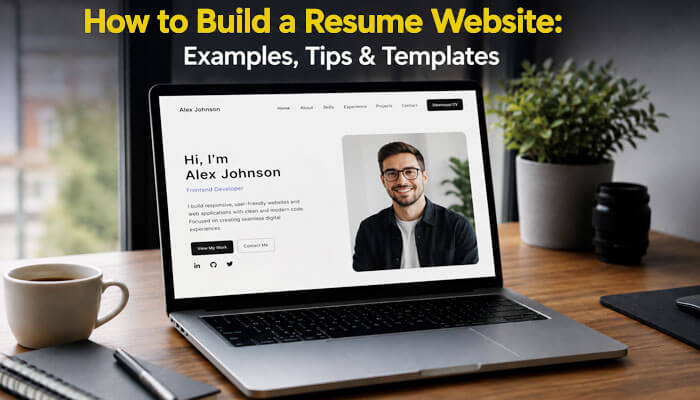

Learning how to build a resume website is one of the best ways to improve your online professional presence. A traditional resume is still useful, but a resume website gives you more space to show your skills, work experience, projects, achievements, testimonials, certifications, and contact details in one easy-to-share place.
A resume website works like your online career profile. Instead of sending only a PDF resume, you can share a professional link with recruiters, hiring managers, clients, employers, collaborators, and networking contacts. This link can include your resume, portfolio, case studies, work samples, bio, social profiles, and contact form.
In this complete guide, you will learn how to build a resume website step by step, what sections to include, which platforms to use, how to choose the right template, how to make your resume website, and how to avoid common mistakes before publishing.
To build a resume website, choose a professional platform, create a clean layout, showcase your experience and projects, add a downloadable resume, optimize for mobile devices and SEO, and publish a website that clearly communicates your professional value.
Quick Answer: How to Build a Resume Website
To build a resume website, choose a beginner-friendly website platform, buy a professional domain name, select a clean resume website template, add your resume sections, include portfolio examples, upload an ATS-friendly downloadable resume, add contact information, optimize the site for mobile users, and publish it online.
A strong resume website should include:
- A clear professional headline
- Short personal introduction
- Work experience
- Skills
- Education
- Certifications
- Portfolio or project examples
- Downloadable resume
- Contact form or email link
- LinkedIn and professional social links
- SEO-friendly page title and meta description
Key Takeaways
- A resume website is a digital career profile that supports your traditional resume.
- It can include your resume, portfolio, case studies, testimonials, certifications, and contact details.
- A one-page resume website is enough for most beginners, students, and job seekers.
- A multi-page resume website is better for professionals with many projects, services, blogs, or case studies.
- Your downloadable resume should stay simple, clean, and ATS-friendly.
- Your website should be mobile-friendly, accessible, safe, fast, and easy to update.
- The best resume website is clear, professional, trustworthy, and easy to contact.
Expert Insight
Many people think a resume website is only useful for designers or developers, but professionals in nearly every industry can benefit from having a dedicated online presence. A well-structured resume website allows recruiters and hiring managers to learn more about your experience, projects, achievements, and professional brand than a traditional one- or two-page resume can provide.
Search Intent Behind How to Build a Resume Website
People searching for how to build a resume website usually want more than a basic design tutorial. They want a practical guide that explains what to include, which platform to use, how to show experience, how to add a portfolio, and how to make the website useful for job applications.
The main search intent behind this topic includes:
| Search Intent | What the Reader Wants |
| Informational | They want to understand what a resume website is |
| Practical | They want step-by-step instructions |
| Design-focused | They want examples, templates, and layout ideas |
| Career-focused | They want to impress recruiters or clients |
| SEO-focused | They want their name and skills to appear online |
| Beginner-focused | They want simple tools without coding |
This is why a good resume website guide should explain both the design process and the career purpose behind the site. A resume website is not just a personal page. It is a professional branding tool that helps visitors understand your skills, work history, projects, and contact options quickly.
What Is a Resume Website?
A resume website is a personal website that presents your professional background online. It is similar to a digital resume, but it gives you more freedom to add visuals, links, project details, videos, case studies, testimonials, and career stories.
Unlike a one-page PDF resume, a resume website can include multiple sections or pages. You can use it to explain your work in more detail, show proof of your skills, and help people understand who you are professionally.
A resume website is useful for:
- Job seekers
- Freelancers
- Designers
- Developers
- Writers
- Marketers
- Students
- Consultants
- Coaches
- Photographers
- Entrepreneurs
- Career changers
- Remote workers
- Creative professionals
If your resume alone does not fully explain your value, a resume website can help you stand out.
Resume Website vs Traditional Resume
A resume website does not replace your traditional resume completely. Instead, it supports your resume and makes your professional profile stronger.
| Feature | Traditional Resume | Resume Website |
| Format | PDF or document | Online website |
| Length | Usually 1–2 pages | Flexible |
| Visuals | Limited | Images, videos, charts, screenshots |
| Portfolio | Usually links only | Full project pages |
| Updates | Must resend the new file | Easy to update anytime |
| Sharing | Email attachment | Shareable website link |
| SEO Value | No search visibility | Can appear in Google |
| Personal Branding | Limited | Stronger branding |
| Contact Options | Email or phone | Contact form, email, social links |
The best approach is to use both. Keep a clean PDF resume for job applications and use your resume website as a deeper professional profile.
Why You Should Build a Resume Website
A resume website gives you more control over your career story. It allows you to present your work in a professional way instead of depending only on job boards or social profiles.
1. It Builds Your Personal Brand
Your resume website helps people understand your professional identity. You can control the design, tone, layout, images, colors, and message. This makes your profile look more polished and memorable.
2. It Gives Recruiters More Information
A resume is short by design. A website lets you explain your achievements, projects, work samples, and career background in more detail. This is especially useful if your work requires proof, examples, or results.
3. It Makes Your Resume Easy to Share
Instead of attaching a file every time, you can share one link in your email signature, LinkedIn profile, job application, business card, social media bio, or portfolio.
4. It Supports SEO and Online Visibility
If your resume website is optimized properly, it can appear when people search your name or professional keywords. This can help recruiters, clients, and collaborators find you online.
5. It Helps You Stand Out
Many applicants submit similar resumes. A clean resume website can make you look more serious, organized, and professional. It shows that you understand digital presentation and personal branding.
Real-World Example
Imagine two candidates applying for the same marketing position. Both submit strong resumes, but one candidate also includes a professional resume website featuring portfolio examples, campaign results, certifications, testimonials, and a clear contact page. Recruiters often spend more time reviewing candidates who provide additional proof of their skills and accomplishments through a professional website.
Who Needs a Resume Website?
Not everyone needs a complex website, but many professionals can benefit from one. A resume website is especially useful if your work can be shown visually, explained through results, or supported with links.
| Profession | Why a Resume Website Helps |
| Web Developer | Shows live projects, GitHub links, and coding skills |
| Designer | Displays visual portfolio and case studies |
| Writer | Shares writing samples, blogs, and published work |
| Marketer | Shows campaign results, SEO work, ads, and analytics |
| Student | Highlights projects, internships, education, and goals |
| Freelancer | Builds trust and helps clients contact you |
| Consultant | Shows expertise, services, testimonials, and case studies |
| Photographer | Displays photo galleries and client work |
| Teacher | Shares teaching philosophy, experience, and resources |
| Career Changer | Explains your transition and transferable skills |
If your resume alone does not fully explain your value, a resume website is a smart addition.
What to Include on a Resume Website
Before learning how to build a resume website, you need to understand what content belongs on it. A resume website should be simple, clear, and focused on helping visitors understand your professional value quickly.
Essential Resume Website Sections
| Section | Purpose |
| Hero Section | Introduces who you are and what you do |
| About Section | Explains your background and career story |
| Experience | Shows previous roles, duties, and achievements |
| Skills | List your technical and soft skills |
| Portfolio | Displays projects, samples, or case studies |
| Education | Shows degrees, courses, and academic background |
| Certifications | Adds proof of training and expertise |
| Resume Download | Allows visitors to download your PDF resume |
| Testimonials | Builds trust with recommendations |
| Contact Section | Helps recruiters or clients reach you |
You do not need every section if it does not apply to you. The goal is to include only what supports your professional image.
Step-by-Step Guide: How to Build a Resume Website
Step 1: Define the Goal of Your Resume Website
Before choosing a design or platform, decide what you want your website to achieve. A resume website for a full-time job search may look different from a website for freelance clients.
Ask yourself:
- Am I looking for a job?
- Am I trying to get freelance clients?
- Do I want to show my portfolio?
- Do I want to rank my name on Google?
- Do I want to explain a career change?
- Do I want recruiters to contact me?
- Do I want to build long-term personal branding?
Your goal will decide your layout, content, tone, call-to-action, and template.
Example Goals
| Goal | Website Focus |
| Get hired | Resume, experience, skills, contact |
| Get clients | Services, portfolio, testimonials, contact |
| Show creative work | Visual portfolio and case studies |
| Build authority | Blog, media features, speaking, achievements |
| Career change | Transferable skills and story |
| Student profile | Education, projects, internships, goals |
Step 2: Choose a Professional Domain Name
Your domain name is your website address. A professional domain makes your resume website easier to remember and more trustworthy.
The best option is usually your full name.
Good Domain Examples
- johnsmith.com
- johnsmith.dev
- johnsmithportfolio.com
- sarahjohnsonwrites.com
- alexmillerdesign.com
- priyaresume.com
Tips for Choosing a Domain Name
- Use your real name if possible
- Keep it short and simple
- Avoid numbers unless necessary
- Avoid hyphens if possible
- Choose a professional extension like .com, .me, .dev, or .portfolio
- Make sure the name is easy to spell
- Use the same name across your LinkedIn and social profiles if possible
If your name is already taken, add your profession. For example, use “johnsmithdesigner.com” or “johnsmithmarketing.com.”
Step 3: Choose the Right Website Platform
You do not need advanced coding skills to build a resume website. Many platforms offer ready-made resume website templates.
| Platform | Best For | Skill Level |
| WordPress | SEO, blogging, flexibility | Beginner to advanced |
| Wix | Easy drag-and-drop resume websites | Beginner |
| Squarespace | Clean visual designs | Beginner |
| Webflow | Advanced design control | Intermediate |
| Carrd | Simple one-page websites | Beginner |
| Notion | Simple public resume pages | Beginner |
| GitHub Pages | Developers and coders | Intermediate |
| Framer | Modern interactive websites | Intermediate |
- Best Platform for Beginners
If you want a simple resume website, Wix, Squarespace, Carrd, or WordPress are beginner-friendly choices.
- Best Platform for SEO
WordPress is one of the best options if you want more SEO control, blogging features, plugins, schema, and long-term growth.
- Best Platform for Developers
GitHub Pages is a good option for developers because it lets you show coding ability while hosting your resume website.
Free vs Paid Resume Website Options
You can start with a free resume website, but a paid domain looks more professional.
| Option | Best For | Pros | Cons |
| Free website builder plan | Beginners testing ideas | Easy to start, no upfront cost | May show platform branding |
| Paid website builder plan | Job seekers and freelancers | Custom domain, cleaner branding | Monthly or yearly cost |
| WordPress hosting | Long-term personal branding | SEO control, flexible design | Requires setup and maintenance |
| GitHub Pages | Developers | Free hosting, shows technical skill | Needs basic technical knowledge |
| Carrd-style one-page site | Simple resume pages | Fast and affordable | Limited advanced features |
If you are serious about job search, freelancing, or personal branding, a custom domain is worth considering.
Step 4: Pick a Clean Resume Website Template
Your template should look professional, not crowded. A resume website should be easy to read and fast to navigate.
Choose a template with:
- Clean design
- Clear headline area
- Mobile-friendly layout
- Easy navigation
- Portfolio section
- Contact section
- Resume download button
- Fast loading design
- Simple fonts
- Good white space
Avoid templates with too many animations, confusing menus, tiny text, or heavy visuals. Your website should make your experience easier to understand, not harder.
Step 5: Plan Your Website Structure
A resume website can be a one-page site or a multi-page site.
One-Page Resume Website
A one-page resume website includes all important sections on a single page. This is best for students, job seekers, freelancers, and professionals who want a simple online profile.
Example layout:
- Hero section
- About me
- Skills
- Experience
- Portfolio
- Education
- Certifications
- Testimonials
- Download resume
- Contact
Multi-Page Resume Website
A multi-page resume website works better if you have many projects, services, blogs, or case studies.
| Page | Purpose |
| Home | Main introduction and summary |
| About | Career story and background |
| Resume | Work experience, education, skills |
| Portfolio | Project examples and case studies |
| Blog | Articles and industry thoughts |
| Contact | Contact form and social links |
For most beginners, a one-page website is enough.
Step 6: Write a Strong Hero Section
The hero section is the first thing visitors see. It should quickly explain who you are, what you do, and why someone should continue reading.
Good Hero Section Formula
Use this formula:
Name + Job Title + Main Value + Call-to-Action
Example
Hi, I’m Sarah Johnson, a Digital Marketing Specialist helping small businesses grow through SEO, content strategy, and paid advertising.
Buttons:
- View My Resume
- See My Work
- Contact Me
Hero Section Tips
- Keep it short
- Use your real name
- Mention your profession
- Add one clear value statement
- Include a professional photo if suitable
- Add a resume download button
- Add a contact button
Avoid vague headlines like “Welcome to my website.” Instead, say exactly who you are and what you offer.
Step 7: Add a Professional About Section
Your about section should tell your career story in a short and natural way. It should not be too personal or too long.
What to Include
- Your professional background
- Your current role or career goal
- Your key skills
- Your industry experience
- What type of work you enjoy
- What makes you different
- A short personal touch if relevant
Example About Section
I am a front-end developer with experience building responsive websites, landing pages, and user-friendly web applications. I enjoy turning design ideas into clean, functional digital experiences using HTML, CSS, JavaScript, and modern frameworks. My work focuses on performance, accessibility, and simple user experiences.
This paragraph is short, focused, and professional.
Step 8: Add Your Work Experience
Your experience section should be similar to your resume, but easier to scan online. Use job titles, company names, dates, and achievement-focused bullet points.
Better Experience Format
| Role | Company | Dates | Key Achievements |
| SEO Specialist | ABC Digital | 2023–Present | Increased organic traffic, improved rankings, managed content strategy |
| Marketing Intern | XYZ Agency | 2022–2023 | Supported campaigns, created reports, assisted with keyword research |
Tips for Writing Experience
- Use action verbs
- Add numbers when possible
- Focus on achievements, not only duties
- Keep bullet points short
- Mention tools and technologies
- Highlight leadership or problem-solving
Weak Example
Responsible for social media and website updates.
Strong Example
Managed weekly social media content and improved website engagement by updating landing pages, blog posts, and campaign visuals.
Achievement Bullet Formula for a Resume Website
Strong resume websites do not only list job duties. They show proof of results.
Use this formula:
Action Verb + Task + Tool/Method + Result
| Weak Bullet | Strong Bullet |
| Worked on social media | Created weekly social media content that improved brand consistency and engagement |
| Helped with SEO | Optimized blog headings, internal links, and meta descriptions to improve search visibility |
| Made websites | Built responsive landing pages using WordPress and improved mobile readability |
| Managed reports | Prepared monthly performance reports using Google Analytics and Search Console |
Even if you do not have exact numbers, you can still show process, tools, and outcomes.
Step 9: Add a Skills Section
Your skills section should be easy to scan. Divide your skills into categories instead of listing everything in one long line.
Example Skills Table
| Skill Type | Examples |
| Technical Skills | HTML, CSS, JavaScript, WordPress |
| Marketing Skills | SEO, Google Analytics, Content Strategy |
| Design Skills | Figma, Canva, Adobe Photoshop |
| Soft Skills | Communication, Teamwork, Problem Solving |
| Tools | Google Search Console, Ahrefs, SEMrush, Notion |
Choose only relevant skills. Do not add random skills that do not support your career goal.
Step 10: Add Portfolio or Project Examples
A portfolio section is one of the biggest advantages of a resume website. It gives proof of your work.
What to Include in a Project Card
Each project should include:
- Project title
- Short description
- Your role
- Tools used
- Problem solved
- Process
- Result
- Image or screenshot
- Link to live work if available
Project Example Format
Project Name: Personal Finance Blog Redesign
Role: SEO Content Strategist
Tools Used: WordPress, Google Search Console, Canva
Goal: Improve readability and search visibility
Result: Updated site structure, optimized blog headings, improved internal linking, and created a clearer content layout.
This format helps visitors understand not only what you made, but also how you think and solve problems.
Step 11: Add a Downloadable Resume
Your website should include a button that allows visitors to download your PDF resume.
Best button text examples:
- Download Resume
- Download My CV
- View PDF Resume
- Save My Resume
- Download Full Resume
Make sure your PDF file has a professional file name.
Good File Name
john-smith-resume.pdf
Bad File Name
finalresumeupdatednew2.pdf
A clean file name looks more professional and helps people find your resume after downloading it.
How to Make Your Resume Website ATS-Friendly
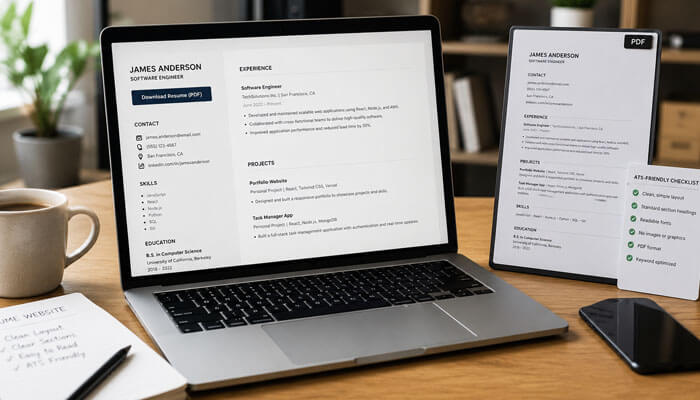
When learning how to build a resume website, many people forget that most job applications still require a traditional resume file. Your website can impress recruiters, but your downloadable resume should still be clean, simple, and ATS-friendly.
ATS stands for Applicant Tracking System. Many employers use these systems to scan resumes before a recruiter reviews them. Because of this, your website should include a downloadable resume that is easy for both software and humans to read.
ATS-Friendly Resume Download Tips
- Use a simple PDF or DOCX resume file
- Use standard headings like Work Experience, Education, Skills, and Projects
- Avoid graphics, icons, text boxes, and complicated tables inside the resume file
- Use clear job titles and dates
- Include keywords from your target job descriptions naturally
- Keep the resume file name professional
- Make sure your contact details are easy to find
- Test the download button before publishing
1. Best Resume File Name Format
Use this format:
2. your-name-resume.pdf
Example:
3. sarah-johnson-resume.pdf
Avoid file names like:
4. resume-final-new-updated-version2.pdf
Your resume website can be creative, but your downloadable resume should stay clean and professional.
Step 12: Add Contact Information
Your contact section should make it easy for recruiters, hiring managers, or clients to reach you.
Include:
- Professional email address
- Contact form
- LinkedIn profile
- GitHub link if relevant
- Portfolio link if separate
- Location or availability
- Freelance availability if applicable
Contact Section Example
Interested in working together or discussing a job opportunity? Send me a message, and I will respond as soon as possible.
Contact options:
- Email: yourname@email.com
- LinkedIn: linkedin.com/in/yourname
- Location: Available for remote work
- Resume: Download PDF
Avoid adding too much private information. You do not need to publish your full home address.
Step 13: Make Your Resume Website Mobile-Friendly
Many recruiters and clients may open your website on a phone. Your resume website should look clean on mobile devices.
Mobile-Friendly Checklist
- Text is easy to read
- Buttons are easy to tap
- Images resize properly
- Menu works on mobile
- Contact form is simple
- Resume download works
- Page loads quickly
- No horizontal scrolling
- Portfolio cards are easy to view
A website that looks good only on desktop can lose opportunities from mobile visitors.
Resume Website Accessibility Checklist
A professional resume website should be easy for everyone to use, including people using mobile devices, screen readers, keyboards, or slower internet connections. Accessibility also improves readability and creates a better user experience.
Use this checklist before publishing:
| Accessibility Item | What to Check |
| Text size | Body text should be easy to read |
| Color contrast | Text should be clear against the background |
| Image alt text | Every important image should have descriptive alt text |
| Button labels | Buttons should clearly say what they do |
| Keyboard navigation | Users should be able to move through the page easily |
| Form labels | Contact forms should have clear labels |
| Link text | Avoid vague links like “click here” |
| Mobile layout | Sections should display properly on phones |
| Simple language | Avoid unnecessary jargon |
| Fast loading | Compress large images and avoid heavy effects |
Accessibility is not only a technical improvement. It also shows professionalism, care, and attention to detail.
Step 14: Optimize Your Resume Website for SEO
SEO helps your resume website appear in search results when people search for your name, profession, or skills.
Basic SEO Tips
- Use your name in the page title
- Add your profession in the meta description
- Use clear H2 and H3 headings
- Add alt text to images
- Create a clean URL structure
- Link to your LinkedIn profile
- Add your resume website link to LinkedIn
- Write useful content if you add a blog
- Use professional keywords naturally
- Add schema markup if possible
SEO Title Example
John Smith | Front-End Developer Resume Website
Meta Description Example
Explore John Smith’s resume website, including front-end development projects, skills, work experience, portfolio examples, and contact details.
SEO Keywords to Use Naturally
- resume website
- online resume
- personal portfolio website
- professional resume website
- digital resume
- online CV
- career portfolio
- personal brand website
- portfolio resume
- professional website
Do not stuff keywords. Use them naturally where they make sense.
Personal Branding SEO for a Resume Website
If you want your resume website to appear when someone searches your name, you need to optimize it for personal branding SEO. This helps search engines understand who you are, what you do, and which professional profiles belong to you.
Personal Branding SEO Checklist
- Use your full name in the website title
- Add your profession in the homepage headline
- Use your name naturally in the About section
- Add links to your LinkedIn, GitHub, Behance, Medium, or portfolio profiles
- Use the same professional name across platforms
- Add a favicon for brand recognition
- Use a clear site name
- Add a professional profile photo
- Include a short author-style bio
- Add schema markup if your platform supports it
Resume Website Template Ideas
Choosing the right template depends on your industry, career stage, and goal.
| Template Type | Best For | Main Features |
| Minimal Resume Template | Corporate job seekers | Clean text, simple sections |
| Portfolio Resume Template | Designers, developers, writers | Project gallery, visuals |
| One-Page Resume Template | Beginners and students | All sections on one page |
| Freelancer Resume Template | Freelancers and consultants | Services, testimonials, contact |
| Creative Resume Template | Artists, photographers, designers | Large visuals and galleries |
| Developer Resume Template | Programmers | GitHub, code projects, tech stack |
| Executive Resume Template | Senior professionals | Leadership, achievements, case studies |
Resume Website Examples by Profession
Example 1: Web Developer Resume Website
A developer’s resume website should focus on projects, code quality, technical skills, and problem-solving.
Important sections:
- Hero section with developer title
- Tech stack
- Live project links
- GitHub profile
- Case studies
- Work experience
- Resume download
- Contact form
Sample headline:
Front-End Developer Building Fast, Responsive, and Accessible Websites
Example 2: Designer Resume Website
A designer’s resume website should be visual but still easy to navigate.
Important sections:
- Clean portfolio gallery
- Design case studies
- Before-and-after examples
- Tools used
- Client testimonials
- Creative process
- Resume download
Sample headline:
UI/UX Designer Creating Clean Digital Experiences for Modern Brands
Example 3: Writer Resume Website
A writer resume website should highlight writing samples, published articles, topics, and results.
Important sections:
- Writing samples
- Niche expertise
- Blog links
- Client work
- Editing experience
- Testimonials
- Contact details
Sample headline:
SEO Content Writer Helping Brands Turn Ideas into Search-Friendly Articles
Example 4: Student Resume Website
A student’s resume website should highlight education, projects, internships, skills, and career goals.
Important sections:
- Career objective
- Education
- Academic projects
- Internship experience
- Skills
- Certificates
- Volunteer work
- Contact section
Sample headline:
Computer Science Student Seeking Internship Opportunities in Web Development
Example 5: Freelancer Resume Website
A freelancer’s resume website should focus on services, proof, trust, and easy contact.
Important sections:
- Services
- Portfolio
- Testimonials
- Pricing or inquiry button
- Work process
- About section
- Contact form
Sample headline:
Freelance Digital Marketer Helping Small Businesses Grow Online
Best Resume Website Call-to-Action Examples
A call-to-action tells visitors what to do next. Your resume website should not end without a clear action.
| Career Goal | Best Call-to-Action |
| Job seeker | Download My Resume |
| Freelancer | Request a Project Quote |
| Student | View My Projects |
| Developer | View My GitHub |
| Designer | See My Portfolio |
| Writer | Read My Writing Samples |
| Consultant | Book a Consultation |
| Remote worker | Contact Me for Remote Roles |
Use one main call-to-action near the top of your website and repeat it near the bottom. This makes it easier for recruiters, clients, or employers to take the next step.
Best Design Tips for a Resume Website
Your resume website should look professional, but it does not need to be complicated.
1. Use Simple Colors
Choose two or three colors. A clean color palette looks more professional than too many bright colors.
Good color combinations:
- White, black, and blue
- White, navy, and gray
- Cream, brown, and black
- Light gray, dark green, and white
- White, charcoal, and gold
2. Use Easy-to-Read Fonts
Avoid decorative fonts for resume websites. Use clean fonts that are readable on desktop and mobile.
Good font types:
- Sans-serif fonts
- Clean heading fonts
- Simple body fonts
3. Use White Space
White space makes your website easier to read. Do not fill every part of the page with text, images, or buttons.
4. Keep Navigation Simple
Use simple menu labels:
- Home
- About
- Resume
- Portfolio
- Contact
Avoid confusing labels like “My Journey Universe” or “Experience Zone.” Simple labels work better.
5. Use Professional Images
If you include a photo, use a clean and professional image. It does not need to be overly formal, but it should match your industry.
Avoid:
- Blurry photos
- Party photos
- Heavy filters
- Distracting backgrounds
- Cropped group photos
Resume Website Privacy and Safety Tips
A resume website is public, so you should be careful about what personal information you publish. The goal is to make it easy for recruiters, clients, and employers to contact you without exposing private details.
Information You Can Safely Include
| Safe to Include | Why It Helps |
| Professional email address | Allows recruiters to contact you |
| LinkedIn profile | Builds trust and credibility |
| Portfolio links | Shows proof of work |
| City or country | Shows general location |
| Remote availability | Helps employers understand work options |
| Contact form | Reduces spam and protects your email |
Information You Should Avoid
| Avoid Publishing | Reason |
| Full home address | Privacy risk |
| Personal phone number | Can lead to spam calls |
| Government ID details | Security risk |
| Private family information | Not relevant professionally |
| Salary expectations | Better discussed later |
| Personal documents | Can expose sensitive data |
A safe resume website gives visitors enough information to trust you, but not so much that your privacy is at risk.
What Not to Put on a Resume Website
A resume website should be professional. Do not add information that can hurt your credibility.
Avoid adding:
- Personal home address
- Private phone number if not needed
- Unprofessional photos
- Too many personal details
- Salary expectations
- Negative comments about past employers
- Fake skills
- Outdated projects
- Broken links
- Auto-playing music
- Heavy animations
- Long paragraphs
- Spelling mistakes
Your resume website should make hiring easier, not create doubts.
Common Mistakes When Building a Resume Website
Mistake 1: Making the Website Too Fancy
A resume website should look clean and professional. Too many animations, colors, pop-ups, and effects can distract visitors from your skills and experience.
Mistake 2: Forgetting the Resume Download Button
Some recruiters still want a PDF resume. Always include a downloadable resume button.
Mistake 3: Not Updating the Website
An outdated resume website can hurt your credibility. Update your experience, projects, certifications, and contact details regularly.
Mistake 4: Using a Weak Headline
A headline like “Welcome to My Website” does not explain your value. Use a professional headline that includes your role and strength.
Mistake 5: Adding Too Much Text
Long paragraphs are hard to read online. Use short paragraphs, bullet points, and tables.
Mistake 6: Ignoring Mobile Users
A website that looks bad on mobile can lose visitors quickly. Always test your resume website on your phone before publishing.
Mistake 7: Hiding Contact Information
If someone likes your work but cannot contact you easily, your resume website is not doing its job.
Mistake 8: Not Checking Links
Broken LinkedIn, GitHub, portfolio, or resume download links look unprofessional. Test every link before sharing your website.
Mistake 9: Using the Same Content Everywhere
Your resume website should not simply copy your PDF resume word for word. Use the website to expand your story, show project proof, and guide visitors toward a clear next step.
Mistake 10: Publishing Without Testing
Before sharing your website, test it on desktop, tablet, and mobile. Also, check your contact form, resume download, portfolio links, and social links.
Resume Website Content Checklist
Use this checklist before publishing your website.
| Item | Completed? |
| Professional headline added | Yes / No |
| About section written | Yes / No |
| Work experience included | Yes / No |
| Skills organized clearly | Yes / No |
| Education added | Yes / No |
| Certifications added | Yes / No |
| Portfolio or projects included | Yes / No |
| Resume download button added | Yes / No |
| Contact form tested | Yes / No |
| LinkedIn link added | Yes / No |
| Mobile design checked | Yes / No |
| SEO title added | Yes / No |
| Meta description added | Yes / No |
| Images optimized | Yes / No |
| Grammar checked | Yes / No |
Resume Website Homepage Template
You can use this simple structure for your homepage.
Hero Section
Hi, I’m [Your Name], a [Your Job Title] specializing in [Main Skill or Industry]. I help [Target Audience or Employers] achieve [Main Result].
Buttons:
- View My Work
- Download Resume
- Contact Me
About Me
Write a short paragraph about your background, experience, interests, and career goal.
Skills
List your most relevant skills in categories.
Experience
Add your latest work experience with achievement-focused bullet points.
Portfolio
Show 3–6 best projects with short descriptions and links.
Education
Add your degree, university, courses, and certifications.
Testimonials
Add short recommendations from clients, managers, teachers, or colleagues.
Contact
Add your email, contact form, LinkedIn profile, and location or availability.
Resume Website About Me Template
Use this template:
I am a [job title/profession] with experience in [industry or skill area]. I specialize in [main skills] and enjoy working on [type of projects]. My background includes [experience, education, or achievement]. I am currently looking for [job opportunity, freelance work, internship, collaboration, etc.].
Example
I am a junior web developer with experience building responsive websites and landing pages using HTML, CSS, JavaScript, and WordPress. I enjoy creating clean user experiences and solving layout problems. My background includes academic projects, freelance website work, and continuous learning in front-end development. I am currently looking for entry-level web development opportunities.
Resume Website Portfolio Template
Use this format for each project:
Project Title:
Write the project name.
Project Summary:
Briefly explain what the project is.
Your Role:
Explain what you did.
Tools Used:
List software, platforms, or technologies.
Problem:
Explain the challenge.
Solution:
Explain your process.
Result:
Mention outcome, improvement, or learning.
Link:
Add a live link or case study link if available.
Resume Website Contact Template
Use this simple contact section:
Thank you for visiting my resume website. I am open to new opportunities, collaborations, freelance projects, and professional conversations. Feel free to contact me through email or connect with me on LinkedIn.
Contact:
- Email: [Your Email]
- LinkedIn: [Your LinkedIn URL]
- Portfolio: [Portfolio URL]
- Location: [City or Remote Availability]
- Resume: [Download Resume Button]
How to Make Your Resume Website Look Trustworthy
Trust is very important. Visitors should feel that your information is real, updated, and professional.
Add trust signals such as:
- Real name
- Professional photo
- Work samples
- Testimonials
- Certifications
- LinkedIn profile
- GitHub or portfolio links
- Clear contact details
- Updated resume
- Project results
- Client or employer names if allowed
Do not exaggerate your experience. Be honest and specific. A simple, truthful website is better than an impressive-looking website with weak or fake details.
How to Maintain Your Resume Website After Publishing
Building the website is only the first step. A resume website should be updated regularly so recruiters and clients always see your latest experience.
Monthly Checks
- Test the contact form
- Check resume download link
- Review broken links
- Update new projects
- Check mobile layout
- Review spelling and grammar
Every 3 Months
- Update work experience
- Add new certifications
- Refresh portfolio samples
- Improve your About section
- Update your skills list
- Review SEO title and meta description
Every 6–12 Months
- Redesign outdated sections
- Remove old or weak projects
- Add stronger testimonials
- Update your professional photo
- Review privacy settings
- Improve page speed
A resume website should grow with your career. Keeping it updated makes it more useful, trustworthy, and professional.
Final Publishing Checklist
Before publishing, check these points:
- Your name is spelled correctly
- Your job title is clear
- Your resume is updated
- Your contact form works
- Your email link works
- Your LinkedIn link works
- Your website looks good on mobile
- Your images load properly
- Your text has no spelling errors
- Your page loads quickly
- Your design looks professional
- Your portfolio links work
- Your PDF resume downloads correctly
- Your SEO title and meta description are added
- Your privacy-sensitive details are removed
- Your accessibility checklist is complete
- Your main call-to-action is clear
Why Resume Websites Matter More Than Ever
Modern hiring increasingly happens online. Recruiters, employers, clients, and networking contacts often search for candidates before scheduling interviews. A professional resume website helps control your online presence, showcase your strongest work, and provide a central location for your resume, portfolio, achievements, and contact information. As digital professional branding becomes more important, a resume website can serve as a valuable long-term career asset.
Conclusion
Learning how to build a resume website is a powerful step for job seekers, freelancers, students, and professionals who want to build a stronger online presence. A resume website gives you more space to show your experience, skills, projects, achievements, and personality in a professional way.
The best resume website is simple, clear, mobile-friendly, accessible, safe, and easy to navigate. It should include your professional headline, about section, experience, skills, portfolio, education, resume download, and contact details. You do not need a complicated design. You need a website that helps visitors quickly understand your value and contact you easily.
If you want to stand out in a competitive job market, a professional resume website can help you create a strong first impression and make your career story easier to share.
How to Build a Resume Website FAQs
1. What is the easiest way to learn how to build a resume website?
The easiest way to learn how to build a resume website is to start with a simple one-page layout. Choose a beginner-friendly platform, add your headline, about section, work experience, skills, portfolio, downloadable resume, and contact details.
2. What should I include when I build a resume website?
When you build a resume website, include your name, professional headline, short bio, work experience, skills, education, certifications, portfolio, downloadable resume, LinkedIn profile, and contact form. Keep the layout clean and easy to read.
3. Can beginners build a resume website without coding?
Yes, beginners can build a resume website without coding by using platforms like WordPress, Wix, Squarespace, Carrd, or similar website builders. These platforms offer ready-made templates that make it easier to create a professional online resume.
4. Should I add a downloadable resume to my resume website?
Yes, you should add a downloadable resume because many recruiters still prefer a PDF resume. Use a clean ATS-friendly format and name the file professionally, such as your-name-resume.pdf.
5. How do I make my resume website look professional?
To make your resume website look professional, use a clean design, simple colors, readable fonts, clear headings, strong project examples, and a visible contact button. Avoid clutter, heavy animations, broken links, and outdated information.
