



Budgets dictate reality in freelance web design. Clients love sharing links to heavily funded corporate websites during our initial kick-off calls. Pointing out bespoke, narrative-driven visuals, they demand that exact aesthetic for their local mom-and-pop shop. However, creating effective brand identities is not about copying the design budgets of global corporations. It is about building a distinctive and memorable presence that aligns with a business’s goals, audience, and available resources.
Then comes the dreaded budget reveal, where project funds barely cover a single custom illustration commission.
Traditional design advice tells us to push back firmly on client expectations. Others suggest compromising on visual quality to protect profit margins. I prefer finding clever structural workarounds.
Generic stock vectors usually create disjointed websites that ruin user trust. Figuring out how off-the-shelf libraries can actually support a cohesive brand system remains our core challenge. Over the past few months, I’ve integrated Ouch into my client builds.
My goal was simple: can a pre-packaged library genuinely replicate a custom-commissioned visual identity?
Constructing a Complete User Experience Flow
Building a portfolio website for a specialty coffee roaster requires more than just a flashy homepage graphic. My recent client needed a complete visual language extending across their entire digital footprint. We lacked nothing: visuals for the landing page, shop section, add-to-cart confirmation, checkout process, and that inevitable 404 error page.
First, I filtered the Ouch library for a sketchy, monochrome look matching their raw, industrial branding. Abandoning the style halfway through wasn’t necessary because Ouch focuses heavily on consistent UX coverage. Complex hero scenes worked perfectly for the main landing area. Scaled-down, matching graphical elements fit the functional app screens beautifully. By sticking strictly to one of their 101 available illustration styles, every single screen felt unified.
Finalizing the system meant downloading SVG files through my paid plan. Opening them inside my design tool took mere seconds. Mapping the single accent color directly to the client’s primary brand color tied everything together.
We launched a digital storefront that looked entirely bespoke. Completing it took a single afternoon rather than an entire month of back-and-forth sketches.
The Rapid Prototype Reality
Late Wednesday morning hits hard. Ronan, a local personal trainer, texts me in an absolute panic. Having just secured a temporary space for a weekend boot camp, he needs a high-converting landing page built by tonight. Capturing event registrations remains his top priority.
There’s zero time to brief a professional illustrator. Painstakingly drawing custom assets isn’t a viable option either.
Opening the Pichon desktop app gives me local access to all Ouch library assets. Skipping traditional vector graphics entirely, I navigate straight into 3D styles. Dragging three distinct fitness-themed graphics onto my canvas takes moments. Since they belong to the exact same category, lighting and textures match flawlessly.
Arranging these elements alongside bold typography wraps up the design phase. Publishing the live site happens minutes later.
Professional, polished renderings make this temporary pop-up event look highly established. That instantly solves our bland content problem under an extreme deadline.
Weighing the Alternatives for Freelance Workflows
Evaluating different asset pools happens constantly when piecing together small business brands. Custom illustration always stands as our absolute gold standard for unique brand positioning. Complete ownership and perfect alignment with your brand narrative come guaranteed.
But a $2,000 total website budget simply can’t support a dedicated illustrator.
Freepik acts as the default backup for countless freelancers. Massive volume exists there, yet finding matching elements across a multi-step user journey feels impossible. Landing pages end up looking radically different from checkout screens.
unDraw solves that consistency problem immediately. Instant color swapping helps immensely during rapid prototyping. One major drawback ruins the magic: ubiquity. Its single minimalist style runs rampant across the entire tech industry. Using it instantly signals a cheap, low-budget project.
Blush brings excellent customization options for very specific artist styles. Overall variety remains much smaller than what Icons8 provides, though. Ouch brings everything from colorfully bold to minimal monochrome into one unified place.
Stop digging through disparate cliparts scattered across random free vector sites. Having 28,000 business and 23,000 technology assets grouped into unified categories changes how we work. Building distinct identities for a local plumber and a software startup happens straight from the exact same platform.
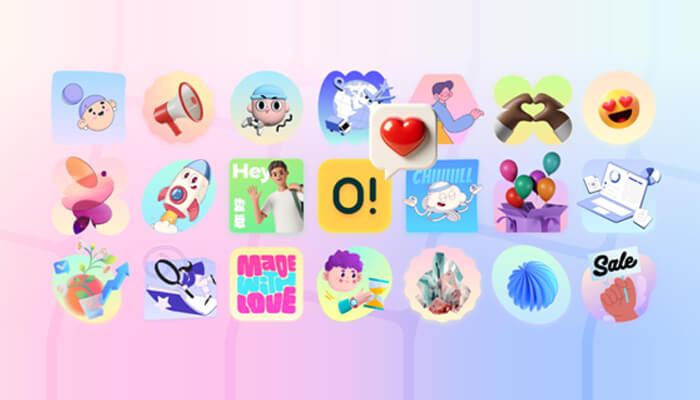
Modifying Pre-Made Scenes for Technical Portfolios
Recent projects brought an IT consultancy marketing site across my desk. Visuals representing highly abstract concepts like cloud infrastructure and cybersecurity were mandatory. Finding pre-made scenes perfectly matching those specific technical services happens rarely. Off-the-shelf options usually fall flat.
Luckily, Ouch treats layered vector graphics as searchable objects instead of flattened scenes. Selecting one of their 15 trendy styles got me started.
Using the Mega Creator free online editor let me customize every single layout detail. Starting with a base illustration of a server room gave me a solid foundation. Searching for specific tagged objects within the library came next.
Swapping generic office elements for targeted technology icons transformed the image. Rearranging characters made everything fit the wide aspect ratio of my client’s homepage layout.
Bringing that technical portfolio to life meant exporting the final customized scene as a Lottie JSON file. Implementing lightweight animations directly onto the live site became effortless. Static, text-heavy articles suddenly felt dynamic without bloating precious page load speeds.
Where the Pre-Packaged Approach Falls Short
Relying exclusively on centralized libraries introduces very specific friction points into your workflow. Take the free tier, which demands linking back to Icons8. Presenting clients with finished websites featuring mandatory attribution links looks incredibly unprofessional during paid freelance work. Factoring a Pro upgrade into your project costs becomes absolutely mandatory to secure SVG formats and drop those link requirements.
Technical constraints accompany the 3D assets too. Downloading them as PNGs or MOV files for animations works fine for basic needs. True structural editing requires working directly inside FBX formats instead. Modifying those specific files demands specialized 3D software alongside matching technical skills. Most 2D web designers lack that background entirely.
Licensing adds another significant hurdle for agencies. Clients might suddenly decide their new brand illustration belongs on physical merchandise for retail sale. Standard licenses simply don’t cover that extended usage. Contacting the company directly for a print-on-demand agreement creates administrative headaches, complicating what should be a straightforward client handoff.
Field Notes for Efficient Implementation
Navigating massive asset libraries requires serious discipline to avoid creating generic, boring layouts. Keep these strategies in mind.
- Install the Pichon app to drop assets straight into your design tool, bypassing web browsers completely.
- Filter exclusively by specific style names rather than general categories, ensuring visual consistency across every single screen.
- Download animated assets in Lottie or Rive formats for web projects instead of GIFs, keeping scaling perfectly crisp on high-resolution displays.
- Track your download credits closely on paid plans, making sure unused downloads roll over properly into your next billing period.
