



Most artificial intelligence tools are built around one person asking one assistant a series of questions. That approach works well for writing, research, and quick analysis, but it becomes less effective when a team must compare competing ideas, challenge assumptions, collect stakeholder input, and document why a decision was made. Clyde AI takes a different approach. It is an AI-powered collaboration and facilitation platform designed around structured problem-solving rather than an endless chatbot conversation.
Users can frame a problem, bring several AI advisers into a session, invite human participants, work through guided activities, and create a documented outcome. The platform is aimed at consultants, founders, product teams, operations leaders, educators and other professionals who regularly manage complicated decisions.
This Clyde AI review examines how the platform works, its current pricing, credit system, advisers, use cases, security practices, advantages, limitations and leading alternatives. It also explains how Clyde differs from Discord’s discontinued chatbot and Anthropic’s similarly named Claude AI.
Quick Verdict: Is Clyde AI Worth It?
Clyde AI may be worth trying when the goal is to work through a decision, not simply generate an answer.
Its strongest capabilities include:
- Multiple AI advisers with different perspectives
- Structured solo, asynchronous and live sessions
- Guided brainstorming, voting and trade-off analysis
- Persistent context across related sessions
- Custom advisers built around internal methods
- Decision records containing rationale and next steps
The platform is less compelling for people who mainly need content writing, coding, image generation, everyday research, or quick factual answers. ChatGPT or Claude will generally provide greater flexibility for those tasks, while Miro remains a stronger option for unrestricted visual whiteboarding.
Clyde is a distinctive and promising collaboration tool. However, its private-MVP wording, credit-based pricing, and limited independent testing mean users should verify current access and required features before purchasing a subscription.
Key Takeaways
- Clyde AI is an AI-native collaboration and decision-support platform.
- It is designed for workshops, planning, and complex problem-solving.
- Users can work alone, collect asynchronous feedback, or facilitate live sessions.
- Its core advisers examine problems from different analytical perspectives.
- Agent Studio lets users create custom advisers from internal frameworks.
- The Starter plan currently includes 75 one-time credits.
- Pro is displayed at $49 per month when billed annually.
- Pro for Teams uses custom pricing for organizations with 10 or more users.
- Clyde’s February 2026 legal terms still refer to private-MVP access.
- Clyde says customer content is not used to train generalized AI models.
- MeetClyde is unrelated to Discord’s discontinued Clyde chatbot.
- Clyde AI is also different from Anthropic’s Claude AI.
What Is Clyde AI?
Clyde AI is a structured collaboration platform that helps individuals and teams move from an unclear problem to a documented outcome.
Rather than opening with an empty chat box, Clyde guides users through a process:
- Define the problem.
- Select relevant AI advisers.
- Gather information and stakeholder input.
- Compare options and test assumptions.
- Reach a decision.
- Capture the rationale and next steps.
The company describes Clyde as an “AI-native collaboration layer.” Its central idea is that AI should participate directly in structured work instead of remaining a separate assistant that users consult between meetings.
Clyde can be used for strategic planning, brainstorming, retrospectives, product decisions, client workshops, launch preparation, and other situations where several perspectives must be considered. The official product pages emphasize solo, asynchronous, and live work, with the reasoning behind each decision preserved.
Clyde AI at a Glance
| Category | Details |
| Product type | AI-powered collaboration and facilitation platform |
| Main purpose | Structured workshops, problem-solving, and decisions |
| Working modes | Solo, asynchronous, and live |
| AI structure | Multiple advisers with distinct perspectives |
| Customization | Custom advisers through Agent Studio |
| Free plan | Starter with 75 one-time credits |
| Paid plan | Pro at $49 per month when billed annually |
| Team plan | Custom pricing for organizations with 10 or more users |
| Best suited for | Consultants, founders, product teams, operations, and educators |
| Main limitation | Credit-based use and limited independent testing |
| Operating company | Clyde AI LLC |
| Listed location | Denver, Colorado |
Current plan information reflects Clyde’s official pricing page reviewed on July 20, 2026.
Is Clyde AI Publicly Available in 2026?
Clyde’s website contains public pricing information, “Get Started” buttons, and a demo-request page. These elements indicate that the company is actively inviting prospective users and organizations to access the platform.
However, Clyde’s Terms of Use, effective February 26, 2026, still state that access during the Private MVP phase may be invitation-only, limited, experimental, or subject to change.
This creates an important distinction between the public marketing pages and the legal terms.
| Public Information | What It Suggests |
| Public pricing page | Commercial plans are being promoted |
| “Get Started” buttons | Prospective users can begin the access process |
| Demo-request page | Organizations can request a walkthrough |
| Private-MVP wording | Some access may remain controlled |
| Experimental-feature terms | Features may change or be discontinued |
Clyde may therefore be accepting new users while still treating parts of the product as beta or controlled access.
Before subscribing, confirm:
- Whether registration is immediately available
- Whether an invitation is required
- Whether a required feature remains in beta
- Whether paid users receive complete production access
- Whether availability differs by organization or region
- Whether private-MVP conditions apply to the selected plan
Who Created Clyde AI?
Clyde is operated by Clyde AI LLC, which identifies Denver, Colorado, as its base.
The company’s About page describes its team as including founders, engineers, and AI practitioners with backgrounds in enterprise software, collaboration, and applied artificial intelligence. Because these details are published by Clyde itself, they should be treated as company-provided background rather than independently audited credentials.
Clyde says the platform grew out of experience helping teams:
- Prepare workshops
- Gather scattered stakeholder input
- Structure complicated discussions
- Convert meetings into decisions
- Produce summaries and deliverables
The platform is positioned as a way to reduce the administrative work around decision-making rather than replace the person accountable for the final choice.
Is Clyde AI the Same as Discord’s Clyde Bot?
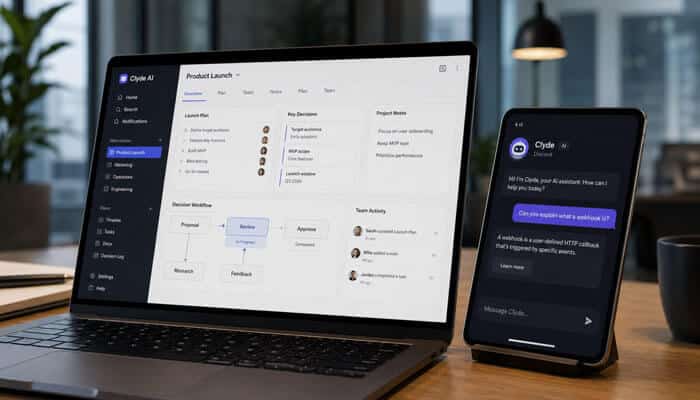
No. The MeetClyde platform reviewed here is not the same product as Discord’s former Clyde AI chatbot.
Discord introduced an experimental AI chatbot called Clyde in 2023. Discord later discontinued the AI experiment, although the Clyde name still appears as a support character and blog byline in Discord content.
| Product | Purpose | Status |
| Clyde AI from MeetClyde | Workshops, collaboration and structured decisions | Actively promoted in 2026 |
| Discord Clyde AI chatbot | Conversational AI within Discord | Discontinued |
| Discord Clyde character | Support personality and branding | Still appears in Discord content |
MeetClyde is not presented as a replacement, continuation, or successor to Discord’s chatbot. Discord continues to use Clyde as a support personality in some official content, which explains why the name still appears online.
How Does Clyde AI Work?
Clyde organizes work into a guided session rather than leaving users inside an unstructured conversation.
Step 1: Frame the Problem
Users begin by describing their situation in ordinary language.
Examples include:
- “Should we build or purchase a new analytics platform?”
- “Help us run a retrospective after a failed launch.”
- “Pressure-test our new pricing model.”
- “Prepare a structured product-planning session.”
- “Help us compare two potential markets.”
- “Turn our onboarding ideas into a specification.”
A focused decision is more useful than a broad topic because it gives the advisers something specific to examine.
Step 2: Select AI Advisers
Users can add advisers representing different analytical perspectives.
A pricing session might include:
- A Customer Proxy
- A Challenger
- A Risk Manager
- A financial specialist
- A go-to-market specialist
The purpose is to prevent the discussion from depending on one generic AI perspective.
Step 3: Choose a Working Mode
Clyde supports three primary working modes.
Solo
One person works through a problem with Clyde and selected advisers.
This may help:
- Founders preparing for a meeting
- Consultants designing a workshop
- Managers evaluating a proposal
- Researchers testing assumptions
- Professionals considering a difficult decision
Asynchronous
Stakeholders contribute at different times.
Clyde can collect and synthesize their responses so a team can make progress without requiring everyone to attend the same meeting.
Live
Participants work through a shared session in real time while Clyde organizes activities, contributions and outcomes.
Clyde’s public positioning consistently emphasizes the ability to work solo, asynchronously or live.
Step 4: Complete Structured Activities
The platform can guide participants through activities such as:
- Brainstorming
- Gathering stakeholder input
- Identifying assumptions
- Grouping related ideas
- Comparing alternatives
- Examining trade-offs
- Pressure-testing proposals
- Voting
- Assigning actions
- Recording unresolved questions
This structured approach is one of the clearest differences between Clyde and an ordinary chatbot.
Step 5: Capture the Outcome
At the end of a session, Clyde can document:
- What was decided
- Why it was selected
- Which alternatives were considered
- What evidence influenced the decision
- Which risks remain
- Who owns the next action
- What conditions could justify revisiting the decision
Clyde’s official comparison material emphasizes that decisions and their reasoning are retained rather than being lost between sessions.
Main Clyde AI Features
1. Multiple AI Advisers
The adviser system is Clyde’s defining feature.
Instead of interacting with one assistant expected to represent every discipline, users can bring several advisers into the same session. Clyde presents advisers with distinct lenses across areas such as business, product, and other professional domains.
Examples of adviser roles described in Clyde’s public materials include:
| AI Adviser | Main Role |
| Challenger | Pressure-tests assumptions |
| Customer Proxy | Represents the likely end-user perspective |
| Insight Synthesizer | Connects information and identifies patterns |
| Creative Catalyst | Reframes problems and suggests alternatives |
| Risk Manager | Identifies dependencies, blind spots and possible failures |
| Critic | Finds logical weaknesses and poor evidence |
These advisers are simulated analytical perspectives. They should not be treated as licensed legal, medical, financial or technical professionals.
2. Agent Studio and Custom Advisers
Clyde AI allows organizations to create custom advisers based on their own:
- Frameworks
- Playbooks
- Methodologies
- Past deliverables
- Internal processes
- Professional knowledge
- Organizational terminology
For example, a consulting firm could build a Clyde AI adviser around its client-discovery process, while a product team could create one based on its preferred prioritization framework.
Clyde AI’s public materials describe these custom advisers as being built or trained using a user’s intellectual property. However, the company does not provide enough technical detail to confirm whether this involves model fine-tuning, retrieval from uploaded documents, persistent instructions or another implementation method.
Before uploading sensitive business knowledge, organizations should confirm how Clyde AI stores, processes and retrieves the information used to create custom advisers.
Before relying on a custom adviser:
- Define its responsibilities clearly.
- Explain what it must not do.
- Remove unnecessary confidential information.
- Provide examples of acceptable recommendations.
- Specify when human approval is required.
- Test it against known situations.
- Review it when the underlying framework changes.
3. Persistent Context
Clyde promotes persistent context as a major difference from ordinary AI chats. Relevant session history, decisions and reasoning can remain available across related work.
Persistent context may be useful for:
- Quarterly strategy reviews
- Product-development cycles
- Client engagements
- Transformation programs
- Recurring retrospectives
- Long-term research projects
- Curriculum reviews
However, persistent memory can also preserve outdated assumptions. Teams should review earlier context rather than treating it as permanently accurate.
4. Real-Time Synthesis and Decision Support
Clyde is designed to organize human and AI contributions during a working session.
Its public positioning includes:
- Surfacing different perspectives
- Comparing trade-offs
- Synthesizing participant input
- Capturing the final decision
- Preserving the reasoning behind it
These features may reduce common workshop problems such as duplicated ideas, forgotten actions, and decisions that lack a clear rationale. A human facilitator should still verify that the AI has represented participant views accurately.
5. Document and Cloud-File Context
Clyde’s privacy policy says the service may process information submitted through the platform and describes the application as part of its services.
The policy states that the company uses security measures including encryption, limited access and secure hosting. It also notes that no system can guarantee complete security.
Users must ensure they have permission to upload:
- Employer documents
- Client materials
- Research reports
- Customer information
- Licensed content
- Confidential presentations
- Internal business frameworks
6. Decision Documentation
Ordinary chatbot conversations can become difficult to search and reuse.
Clyde is designed to preserve a structured record containing:
- The recommendation
- Supporting rationale
- Rejected alternatives
- Stakeholder concerns
- Risks and dependencies
- Action items
- Assigned owners
- Conditions for revisiting the decision
This can be useful when managers, clients, or auditors later ask why a particular decision was made.
7. Exports and Handoffs
Clyde’s public product positioning focuses on completing the full arc of work from framing a problem to capturing a decision.
Users should confirm the exact export formats and third-party integrations included in their chosen plan before paying, especially where an advertised handoff may be a formatted export rather than a complete two-way integration.
Which Clyde AI Features Are Available?
Not every promoted capability should be assumed to be included in every account or fully mature.
| Feature | Publicly Presented Status |
| Solo sessions | Available |
| Asynchronous stakeholder input | Available |
| Live sessions | Available |
| Multiple AI advisers | Available |
| Custom advisers | Promoted |
| Persistent context | Publicly promoted |
| Decision-rationale capture | Publicly promoted |
| Basic exports | Included with Starter |
| Advanced exports | Included with Pro |
| Unlimited stakeholder invitations | Included with Starter |
| Shared credit pools | Team plan |
| Priority support | Pro and team options |
| Custom integrations | Team option |
| Dedicated instances | Team option |
| Domain Experts | Coming soon |
Current plan and feature details should be confirmed before payment because Clyde’s legal terms allow private-MVP functionality to remain experimental or subject to change.
Clyde AI Use Cases
Clyde’s official solutions pages identify consultants, product and strategy leaders, operations teams, founders, educators and solo professionals as major target audiences.
Business Strategy
Teams may use Clyde to:
- Compare strategic alternatives
- Test a business-model change
- Evaluate a market expansion
- Review competitive positioning
- Analyze a company pivot
- Prepare an executive recommendation
- Identify risks before committing resources
Product Management
Product teams can use structured sessions to:
- Prioritize features
- Evaluate build-versus-buy decisions
- Review product assumptions
- Plan a launch
- Create an initial specification
- Analyze onboarding problems
- Align technical and commercial stakeholders
Workshops and Retrospectives
Potential workshop uses include:
- Team retrospectives
- Client-discovery sessions
- Strategic-planning workshops
- Program reviews
- Change-readiness assessments
- Cross-functional alignment
- Post-launch reviews
- Decision meetings
Consulting and Advisory Work
Clyde appears particularly relevant to consultants who regularly prepare and summarize client sessions.
Consultants may use it to develop:
- Discovery questions
- Workshop agendas
- Client hypotheses
- Decision briefs
- Recommendations
- Presentation drafts
- Post-session summaries
- Action plans
Clyde’s demo page promotes reduced workshop preparation and synthesis time. That should be treated as a company claim rather than a guaranteed result.
Startup and Founder Decisions
Founders may use different advisers to:
- Review a pricing model
- Compare target audiences
- Test a go-to-market strategy
- Evaluate a market pivot
- Prepare for investors
- Identify launch risks
- Examine a hiring decision
- Structure a co-founder discussion
Operations and Transformation
Operations teams may use Clyde to:
- Compare proposed process changes
- Evaluate organizational readiness
- Analyze centralization decisions
- Plan transformation programs
- Identify implementation risks
- Establish owners and checkpoints
- Gather input across departments
Education and Research
Potential uses include:
- Curriculum planning
- Learning-objective development
- Program retrospectives
- Research-methodology discussions
- Stakeholder feedback
- Study-design reviews
AI-generated recommendations should not replace academic supervision, ethical approval, institutional review or expert judgment.
Individual Professional Decisions
Solo professionals may use Clyde for:
- Career planning
- Negotiation preparation
- Difficult workplace conversations
- Client engagements
- Presentation preparation
- Independent strategic analysis
Clyde AI Pricing in 2026
Clyde uses a credit-based pricing model. Credits are consumed by session setup, activities, exports and some adviser functions.
The official pricing page currently displays three options.
| Plan | Displayed Price | Included Credits | Estimated Sessions | Best For |
| Starter | Free | 75 one-time credits | Approximately 2–3 | Testing Clyde |
| Pro | $49 per month, billed annually | 300 credits per month | Approximately 8–10 | Consultants and frequent users |
| Pro for Teams | Custom pricing | Shared credit pool | Depends on agreement | Organizations with 10 or more users |
The Pro price is shown as a founding-member rate, reduced from a displayed regular price of $79 per month. Users should confirm whether the promotional rate remains available at checkout.
Starter Plan
The free Starter plan currently includes:
- 75 one-time credits
- Approximately two to three sessions
- Full session flow
- Unlimited stakeholder invitations
- Clyde as the orchestrator
- One custom AI adviser
- Basic exports
- No credit card requirement
Because the credits are a one-time allocation rather than a recurring monthly allowance, Starter is best understood as a trial.
Pro Plan
The Pro plan currently includes:
- 300 monthly credits
- Approximately eight to ten sessions
- Everything included with Starter
- Unlimited access to listed AI advisers
- Custom AI advisers
- Advanced exports
- Purchasable credit top-ups
- Top-up credits that do not expire
- Priority support
- Domain Experts when released
At $49 per month billed annually, the base annual commitment is $588, excluding taxes and additional credits.
Pro for Teams
The team option is designed for organizations with at least 10 users.
It advertises:
- A shared credit pool
- Pro features
- Priority support
- Custom integrations
- Optional dedicated instances
- Additional organizational controls
- Trial availability
The company does not publish a fixed team price.
How Do Clyde AI Credits Work?
Clyde’s pricing page explains that credits are used as users create and run sessions.
Its official plan descriptions clearly state that Starter includes 75 one-time credits and Pro includes 300 monthly credits, with estimated session ranges of two to three and eight to ten, respectively.
A session’s actual credit use will depend on factors such as:
- Session setup
- Number of activities
- Stakeholder-input stages
- Custom advisers
- Exports
- Session complexity
Estimated Session Cost
If a session consumes approximately 25 to 30 credits:
- 75 Starter credits may cover about two complete sessions.
- 300 Pro credits may cover roughly 10 to 12 similar sessions.
These are estimates rather than guaranteed usage amounts.
Pricing Questions to Ask Before Subscribing
Before purchasing Pro or a team plan, confirm:
- Do unused monthly credits roll over?
- Is month-to-month billing available?
- What is the monthly billing price?
- How much do credit top-ups cost?
- What happens to top-up credits after cancellation?
- Are annual subscriptions refundable?
- Are taxes included?
- Do stakeholder contributions consume credits?
- Can team administrators set usage limits?
- Can credits be reassigned between users?
- Is the founding-member rate guaranteed at renewal?
The pricing page states that purchased top-up credits do not expire. It does not make the same promise for the 300 credits included each month with Pro.
Clyde AI Pros and Cons
Pros
- More structured than a standard chatbot
- Supports multiple AI perspectives
- Works for solo and team sessions
- Includes asynchronous and live collaboration
- Captures decision rationale
- Supports custom advisers
- Retains context across related sessions
- Offers a free trial allocation
- Includes unlimited stakeholder invitations
- Provides basic and advanced export options
- May reduce workshop preparation and synthesis work
- Keeps human decision-makers in control
Cons
- Credit consumption can make costs difficult to predict
- Free credits do not renew monthly
- The displayed Pro rate requires annual billing
- Team pricing is not public
- Legal terms still mention a private MVP
- Features may change while the product is evolving
- Independent performance benchmarks are limited
- Verified long-term customer reviews are limited
- AI advisers may produce incorrect recommendations
- The technical implementation of custom advisers is not fully explained
- It cannot replace licensed professional advice
Is Clyde AI Safe?
Clyde publishes a security page, privacy policy and Terms of Use.
The security page presents Clyde as using encryption and a privacy-first AI architecture. The privacy policy also says the company uses industry-standard security measures, including encryption, limited access and secure hosting.
Clyde says customer information is processed to operate the platform and provide AI-supported results. Users should still conduct an independent security review before submitting confidential or regulated information.
Does Clyde Have SOC 2 Certification?
Clyde’s security page refers to SOC 2 compliance or readiness language, but organizations should request formal documentation before claiming that the Clyde application has completed an independent SOC 2 attestation.
Infrastructure certifications belonging to a hosting provider should not automatically be presented as Clyde’s own application-level certification.
Organizations considering sensitive use should request:
- Current compliance documentation
- A data-processing agreement
- A penetration-test summary
- A subprocessor list
- Data-retention terms
- Incident-notification commitments
- Formal security attestations
Privacy and Data Collection
Clyde’s privacy policy explains that the company may collect personal, account and service-use information when people visit its website or use the application. It also says users may have rights to access, correct, delete or restrict the use of personal information, depending on applicable privacy law.
Information that may be processed can include:
- Names and contact details
- Company and role information
- Account information
- Workspace information
- Session text
- Uploaded materials
- Chat messages
- Browser and device information
- Usage information
- Feedback and support requests
Information You Should Not Upload
Avoid submitting unnecessary:
- Passwords
- Authentication codes
- Private encryption keys
- Banking login details
- Unredacted identity documents
- Protected health information
- Restricted customer databases
- Confidential legal files without approval
- Trade secrets prohibited by company policy
- Documents covered by an NDA without authorization
Security safeguards reduce risk, but no cloud platform can guarantee absolute protection.
Who Owns Content Uploaded to Clyde AI?
Clyde AI’s Terms of Use explain how users may access the platform and outline their responsibilities when uploading or creating content.
Before submitting employer, client, or third-party materials to Clyde AI, users should confirm that they have the legal and contractual right to use and upload that information. The terms also require account holders to be at least 18 years old and properly authorized when acting on behalf of an organization.
Businesses should request contractual clarification when ownership of Clyde AI-generated content is commercially important, especially when the output will be:
- Sold or licensed
- Published publicly
- Included in a client deliverable
- Used as proprietary intellectual property
- Incorporated into a paid product or service
For high-value commercial projects, review Clyde AI’s latest terms and obtain legal advice before relying on AI-generated outputs as exclusive intellectual property.
AI Accuracy and Legal Limitations
AI-generated recommendations may contain mistakes, incomplete reasoning, or unsupported claims.
Clyde should support—not replace—human accountability.
Users should independently verify:
- Financial calculations
- Legal interpretations
- Medical information
- Market statistics
- Technical recommendations
- Research claims
- Competitor information
- Regulatory requirements
A named decision owner should review the evidence and approve any high-impact action.
Clyde AI vs. ChatGPT
Clyde and ChatGPT can both support brainstorming and analysis, but they are built around different workflows.
| Category | Clyde AI | ChatGPT |
| Main interface | Structured working session | General conversational workspace |
| Primary purpose | Workshops, decisions and collaboration | Research, writing, coding and broad productivity |
| AI perspectives | Multiple named advisers | One main assistant with customizable tools |
| Team workshops | Central use case | Usually requires manual structure |
| Asynchronous input | Built into Clyde’s positioning | Not the primary workflow |
| Decision rationale | Captured as a structured outcome | Usually organized by the user |
| Coding | Limited role | Major capability |
| Image generation | Not a central feature | Supported |
| Pricing approach | Activity credits | Subscription and usage limits |
Clyde’s own comparison pages distinguish it from general-purpose assistants such as ChatGPT, Claude and Gemini by emphasizing multiple advisers, structured sessions and captured decision rationale.
Choose Clyde AI When:
- You are facilitating a complicated decision.
- Several perspectives must be represented.
- Stakeholder input must be collected.
- You need structured activities.
- Decision reasoning must be preserved.
Choose ChatGPT When:
- You need broad research assistance.
- You regularly create or edit content.
- You require coding help.
- You need image generation.
- You want a flexible everyday assistant.
Clyde AI vs. Claude AI
Clyde AI and Claude AI are separate products from different companies. Clyde is operated by Clyde AI LLC and focuses on structured collaboration. Claude is a general-purpose AI assistant developed by Anthropic.
| Category | Clyde AI | Claude AI |
| Developer | Clyde AI LLC | Anthropic |
| Main purpose | Workshops and structured decisions | General analysis, writing, research and coding |
| Interface | Guided sessions | Conversational assistant |
| Multiple advisers | Core product feature | Can be simulated using prompts |
| Live workshops | Central use case | Not its primary format |
| Document analysis | Used within structured work | Major general-purpose capability |
| Coding | Limited role | Major use case |
| Decision rationale | Built into outcomes | Organized manually by the user |
| Best suited for | Facilitation and team decisions | Flexible individual and team AI work |
Clyde’s FAQ and comparison materials position Claude, ChatGPT and Gemini as general-purpose assistants, while presenting Clyde as a structured multi-adviser environment. This is Clyde’s own market positioning rather than an independent performance benchmark.
Best Clyde AI Alternatives
1. ChatGPT
Best for: General research, content creation, coding and everyday AI productivity
ChatGPT is the strongest broad alternative for users who need:
- Research
- File analysis
- Writing
- Coding
- Image generation
- Project-based work
- Custom assistants
Its main weakness compared with Clyde is that users must create their own workshop structure and adviser roles.
2. Claude
Best for: Long documents, careful analysis, writing and coding
Claude is a strong option for:
- Reading substantial documents
- Synthesizing information
- Drafting detailed content
- Research
- Coding
- Iterative analysis
It provides a more open-ended assistant experience than Clyde’s guided sessions.
3. Miro
Best for: Visual workshops and collaborative whiteboards
Miro is more suitable when participants need:
- Boards
- Diagrams
- Sticky notes
- Voting
- Timers
- Visual mapping
- Flexible workshop canvases
Choose Miro when spatial brainstorming is the priority. Choose Clyde when multiple AI perspectives and documented reasoning matter more.
4. Notion AI
Best for: Knowledge management, documents and ongoing project work
Notion combines AI with:
- Documents
- Wikis
- Databases
- Projects
- Meeting notes
- Enterprise knowledge
- Custom workflows
It is a stronger fit for ongoing organizational knowledge, while Clyde is more specialized around completing a defined decision or session.
5. A Manual Collaboration Stack
Best for: Teams that prefer established specialist tools
A company could combine:
- ChatGPT or Claude for analysis
- Miro for workshops
- Notion for documentation
- Slack or Microsoft Teams for communication
- PowerPoint or Google Slides for presentations
- Jira, Asana or Linear for execution
This approach offers flexibility but spreads the context, rationale and actions across several platforms.
Clyde AI Alternatives Comparison
| Tool | Best For | Main Strength | Main Limitation |
| Clyde AI | Structured decisions | Advisers, facilitation and rationale capture | Credit-based and still evolving |
| ChatGPT | General AI productivity | Broad range of capabilities | Workshops require manual structure |
| Claude | Document analysis | Strong long-form analysis and writing | Less focused on facilitated sessions |
| Miro | Visual workshops | Flexible collaborative canvas | Outcomes may need manual synthesis |
| Notion AI | Knowledge management | AI inside documents and projects | Less specialized for decision workshops |
| Manual stack | Established organizations | Maximum flexibility | Fragmented context and administration |
Who Should Use Clyde AI?
Clyde may be a strong fit for:
- Independent consultants
- Consulting firms
- Product managers
- Strategy leaders
- Startup founders
- Small executive teams
- Operations managers
- Transformation teams
- Workshop facilitators
- Educators
- Curriculum designers
- Researchers
- Solo professionals
It is particularly relevant when a decision involves competing priorities and the reasoning must be preserved for future reference.
Who Should Avoid Clyde AI?
Clyde may not be the right choice for users who:
- Need only quick factual answers
- Primarily want AI writing or coding
- Require a permanently free high-usage tool
- Prefer an unrestricted visual canvas
- Already have an effective facilitation process
- Cannot upload information to cloud AI platforms
- Need independently certified professional advice
- Do not want to track credits
- Require complete project-management functionality
- Need a mature product with extensive public customer evidence
How to Test Clyde AI Before Paying
Use the Starter credits to evaluate one real but non-sensitive decision.
A useful trial should test:
- How quickly you can define the problem
- Whether the advisers provide genuinely different perspectives
- How accurately Clyde organizes stakeholder input
- Whether the activities improve the decision
- How many credits the session consumes
- Whether exports are useful without extensive editing
- Whether the final rationale reflects the actual discussion
- Whether participants find the workflow clear
- Whether the process saves measurable preparation time
- Whether the platform meets your security requirements
Do not judge the platform using only a generic brainstorming prompt. Test it with the type of structured decision you would actually use in your work.
Tips for Getting Better Results
Begin With a Decision, Not a Topic
Weak request:
Help us improve our marketing.
Stronger request:
Help us decide whether to move 30% of next quarter’s paid-search budget into creator partnerships.
A clear decision gives each adviser something specific to examine.
Add Relevant Context
Include:
- The objective
- Available evidence
- Budget
- Deadline
- Stakeholders
- Previous decisions
- Customer information
- Known risks
- Success criteria
Select Advisers That May Disagree
Do not choose only perspectives that support the preferred outcome.
For a launch decision, combine:
- Customer Proxy
- Challenger
- Risk Manager
- Financial specialist
- Go-to-market specialist
Ask What Would Change the Decision
Request an explanation of:
- Which assumptions support the recommendation
- Which evidence would weaken it
- What event would justify reconsideration
- Which warning indicators should be monitored
Separate Facts From Assumptions
Label information as:
- Verified fact
- Internal estimate
- Stakeholder opinion
- AI-generated inference
- Unresolved question
Review the Final Synthesis
Before sharing the result, confirm that:
- Minority views were not removed.
- Similar ideas were not combined incorrectly.
- Calculations are accurate.
- Recommendations follow the evidence.
- Actions have owners and deadlines.
- Unsupported claims are clearly labelled.
How This Clyde AI Review Was Researched
This review examined:
- Clyde’s official homepage
- Pricing information
- Product comparison pages
- AI-adviser descriptions
- Solutions and use-case pages
- Terms of Use
- Privacy policy
- Security documentation
- Company About page
- Demo information
- Public Discord pages explaining its continuing Clyde branding
Claims were evaluated using four evidence levels:
| Evidence Level | Meaning |
| Publicly documented | Clearly described in official product material |
| Conditional | Dependent on a plan, contract or access level |
| Coming soon | Announced but not confirmed as fully available |
| Not independently verified | A company claim without sufficient third-party testing |
A complete hands-on assessment would still need to test:
- Registration and onboarding
- Actual access restrictions
- Credit consumption
- Adviser accuracy
- Live-session stability
- Asynchronous participation
- Document imports
- Export quality
- Permission controls
- Data deletion
- Customer support
- Measurable return on investment
Claims about productivity, time savings and output quality should be treated as expected benefits until supported by independent testing or measurable customer case studies.
Conclusion:
Clyde AI is not simply another chatbot. It is a structured collaboration platform designed to help people move from an uncertain problem to a documented decision.
Its combination of problem framing, multiple AI advisers, asynchronous participation, live facilitation, persistent context and recorded rationale gives it a distinct position between general-purpose AI assistants and traditional workshop software.
Consultants, founders, product leaders, educators and operations teams may find it particularly useful when they need to examine competing priorities, involve stakeholders and preserve why a decision was made.
However, prospective users should consider several limitations:
- Clyde’s legal terms still refer to a private MVP.
- Independent performance testing remains limited.
- The credit system may make costs difficult to predict.
- Team pricing is not public.
- Some functionality may continue to evolve.
- AI-generated advice still requires verification.
ChatGPT or Claude will generally provide greater flexibility for research, writing and coding. Miro remains stronger for visual whiteboarding, while Notion AI is more suitable for ongoing organizational knowledge.
Clyde AI is most compelling when the central question is:
How can humans and several AI perspectives work through a complicated problem, reach a defensible decision and preserve the reasoning behind it?
For that specific workflow, Clyde offers an original and potentially valuable approach—provided users verify current access, plan terms and security requirements before subscribing.
Clyde AI FAQs
1. What is Clyde AI?
Clyde AI is an AI-powered collaboration platform that helps individuals and teams structure workshops, compare options, gather stakeholder input and document important decisions.
2. What is Clyde AI used for?
Clyde AI is used for strategic planning, product decisions, consulting workshops, retrospectives, launch preparation and other complex problem-solving activities.
3. Is Clyde AI free?
Yes. Clyde AI offers a Starter plan with 75 one-time credits, which the platform estimates may support approximately two to three sessions.
4. How much does Clyde AI cost in 2026?
Clyde AI Pro is displayed at $49 per month when billed annually and includes 300 monthly credits. Pro for Teams is available with custom pricing.
5. What is the best Clyde AI alternative?
ChatGPT is the best general-purpose Clyde AI alternative, while Claude is strong for document analysis, Miro for visual workshops and Notion AI for knowledge management.
