
If you have ever clicked “I’m not a robot” before signing up for a website, sending a form, or accessing a page, you have probably used a CAPTCHA. But what is a CAPTCHA challenge response, and what happens after you complete the CAPTCHA? A CAPTCHA challenge response is the information generated by the CAPTCHA system after a user completes a verification step. It helps the website check whether the interaction appears to come from a real person or an automated system.
In simple terms, a CAPTCHA challenge asks you to complete a task or prove that your activity looks legitimate. The CAPTCHA service then processes your response. The website’s server checks that response before deciding whether to allow the action. Depending on the CAPTCHA system, this may involve a challenge, a token, a risk score, or a combination of signals.
Understanding what is a CAPTCHA challenge response is useful for both everyday internet users and website owners. It explains why a CAPTCHA may appear, why a website sometimes asks you to try again, why a CAPTCHA can expire, and why developers must verify CAPTCHA responses on the server instead of trusting the browser alone.
What Is a CAPTCHA Challenge Response?
A CAPTCHA challenge response is the result generated when a user completes a CAPTCHA verification process.
CAPTCHA stands for Completely Automated Public Turing test to tell Computers and Humans Apart. Its main purpose is to help websites distinguish normal
human activity from automated or abusive traffic.
A simple CAPTCHA process looks like this:
Website → CAPTCHA challenge → User response → CAPTCHA verification → Website decision
For example, imagine you are creating an account on a website.
1. The website displays a CAPTCHA.
2. You click a checkbox or complete a visual challenge.
3. The CAPTCHA service processes your interaction.
4. A response or token is generated.
5. The website sends that response to the CAPTCHA service for verification.
6. The server receives the verification result.
7. The website allows, blocks, or reviews the requested action.
So, when someone asks what is a CAPTCHA challenge response, the easiest answer is:
It is the verification result or response token produced after a CAPTCHA interaction, which a website can send to the CAPTCHA service to check whether the request appears legitimate.
The exact technical format depends on the CAPTCHA provider and version being used.
How Does a CAPTCHA Challenge Response Work?
A CAPTCHA challenge response is part of a larger verification process. The visible CAPTCHA is only one part of that process.
Here is a simple example.
Suppose you visit an online store and want to create an account.
Step 1: The website loads CAPTCHA
The website has CAPTCHA protection installed on its registration form.
The CAPTCHA system may check different signals and decide whether you need to interact with a challenge.
Step 2: You complete the CAPTCHA
You might see:
- An “I’m not a robot” checkbox
- Image-selection questions
- An invisible CAPTCHA
- Another type of verification challenge
Not every CAPTCHA requires a visible puzzle. For example, Google’s reCAPTCHA v3 works without user interaction and returns a score that the website can use when deciding what action to take.
Step 3: A response is generated
After the CAPTCHA interaction, the client-side integration can obtain a response token.
In Google’s reCAPTCHA system, for example, the response can be available through the g-recaptcha-response form parameter, the JavaScript API, or a callback.
Step 4: The server verifies the response
This is an important security step.
The website should not simply trust a value sent by the user’s browser. Its backend should send the response to the CAPTCHA verification service.
Google’s documentation explains that the response token must be verified through the appropriate verification API.
Step 5: The website makes a decision
The verification result can tell the website whether the response is valid.
Depending on the CAPTCHA system and website rules, the site may:
- Allow the request
- Ask the user to complete another challenge
- Block the request
- Require another security step
- Send the request for additional review
CAPTCHA Challenge vs. CAPTCHA Response
The words challenge and response are related, but they are not the same thing.
| Term | Meaning | Simple example |
| CAPTCHA challenge | The test or verification step presented to a user | “Select all images with traffic lights” |
| CAPTCHA response | The result generated after the user completes the test | A response token |
| Response token | A temporary value used by the website to verify the CAPTCHA result | g-recaptcha-response |
| Verification | The server-side process that checks the response | Sending the token to the CAPTCHA service |
| Verification result | The result returned to the website | Success, failure, score, or error |
Think of it like a school test.
Challenge = question
Response = your answer
Verification = teacher checking the answer
The technology is more complicated than a classroom test, but the basic idea is similar.
What Is a CAPTCHA Response Token?
A CAPTCHA response token is a temporary piece of information generated during the verification process.
It is not simply a message saying “this person is human.”
Instead, it is information that the website can submit to the CAPTCHA provider for verification.
For example, Google’s reCAPTCHA documentation states that response tokens have restrictions. A reCAPTCHA user response token is valid for two minutes and can only be verified once. If the token is too old or has already been used, the verification can fail.
This short lifetime is important because it helps reduce replay attacks.
In simple terms:
CAPTCHA response token = temporary proof that a CAPTCHA verification process took place.
It should not be treated as a permanent password or identity credential.
Why Does a CAPTCHA Challenge Response Matter?
CAPTCHA systems are commonly used to reduce automated abuse.
Websites may use CAPTCHA protection around actions such as:
- Account registration
- Login attempts
- Password recovery
- Contact forms
- Comment forms
- Online purchases
- Promotional forms
- Search functions
- High-value or sensitive actions
The goal is not necessarily to stop every bot. Modern CAPTCHA systems are better understood as one part of a broader system for detecting suspicious or abusive activity.
A website may combine CAPTCHA with:
- Rate limiting
- IP reputation
- Device signals
- Login protections
- Fraud detection
- Web application firewalls
- Account security controls
- Behavioral analysis
This is why a CAPTCHA challenge should not be viewed as a complete security solution by itself.
Types of CAPTCHA Challenges
CAPTCHA technology has changed significantly over time.
1. Text CAPTCHA
Older CAPTCHA systems often showed distorted letters or numbers.
The user had to read the characters and type them into a box.
For example:
- Displayed: A7K9P
- User enters: A7K9P
These systems became difficult for users and increasingly vulnerable to automated recognition.
They can also create accessibility problems, particularly for people with visual disabilities.
2. Image CAPTCHA
Image CAPTCHAs ask users to identify objects in pictures.
A challenge might say:
“Select all images containing bicycles.”
The user selects the appropriate images and submits the challenge.
Image challenges are familiar to many internet users, but they can also be difficult for people with certain disabilities.
3. Checkbox CAPTCHA
A common example is the:
“I’m not a robot”
checkbox.
The user clicks the checkbox, and the CAPTCHA system may decide whether the interaction appears legitimate.
Sometimes the checkbox is enough. In other cases, the user may receive an additional challenge.
Google describes reCAPTCHA v2 as supporting a checkbox that can either pass the user without a CAPTCHA challenge or ask the user to complete one.
4. Invisible CAPTCHA
An invisible CAPTCHA may not show a traditional CAPTCHA box immediately.
Instead, the system can run as part of an action such as clicking a button.
If the traffic appears suspicious, the system may present a challenge.
This approach can reduce friction for normal users while still adding an additional security layer.
5. Score-Based CAPTCHA
Some modern CAPTCHA systems do not require users to solve a visible puzzle.
Google’s reCAPTCHA v3, for example, returns a score for an interaction.
The website can use that score as one signal when deciding how to handle the request.
For example, a website could choose to:
- Allow a low-risk action
- Add additional verification
- Rate-limit suspicious traffic
- Send a request for further review
This is different from a traditional CAPTCHA where every user sees the same puzzle.
What Is the Difference Between CAPTCHA and reCAPTCHA?
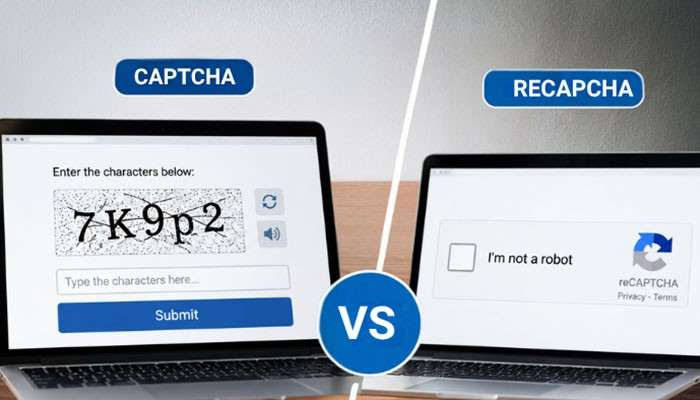
CAPTCHA is the general technology or concept used to distinguish human activity from automated activity.
reCAPTCHA is Google’s CAPTCHA and abuse-detection service.
So:
CAPTCHA = general concept
reCAPTCHA = Google’s implementation/service
There are also other CAPTCHA and bot-detection providers.
It is useful not to use the two terms as if they always mean exactly the same thing.
What Happens When a CAPTCHA Response Fails?
A CAPTCHA response can fail for several reasons.
A failure does not automatically mean that the user is a bot.
For example, the response could fail because:
- The token expired
- The token was already used
- The CAPTCHA was not completed
- The website configuration is incorrect
- The response was missing
- The verification request failed
- There was a network problem
- The CAPTCHA service could not be reached
- The website’s backend rejected the verification
- The user’s activity triggered additional security checks
Google specifically documents an error called timeout-or-duplicate, which can occur when a response token is no longer valid because it is too old or has already been used.
Why Does CAPTCHA Keep Asking Me to Verify?
Have you ever solved a CAPTCHA and then been asked to solve another one?
This can happen when the website’s security system still considers the request suspicious or when the first verification was unsuccessful.
Possible reasons include:
1. Unstable internet connection
If the CAPTCHA cannot communicate correctly with its verification service, the process may fail.
2. Browser problems
JavaScript, cookies, extensions, or browser settings can sometimes interfere with CAPTCHA systems.
3. VPN or proxy usage
Some websites may apply additional checks to traffic coming through shared VPN or proxy infrastructure.
4. High-volume activity
Sending many requests quickly can trigger additional security checks.
5. Expired response
If too much time passes before the response is verified, the token may no longer be valid.
6. Website configuration problems
Sometimes the problem is on the website’s side rather than the user’s side.
How to Fix a CAPTCHA Challenge Response Error
If you are an ordinary website visitor, try these steps:
1. Refresh the page.
2. Complete the CAPTCHA again.
3. Make sure your internet connection is stable.
4. Disable problematic browser extensions temporarily.
5. Try a different browser.
6. Clear relevant browser data if the problem continues.
7. Avoid repeatedly submitting the form.
8. If you use a VPN or proxy, try the website without it if appropriate.
9. Wait a short time if the website is repeatedly rejecting requests.
10. Contact the website’s support team if the problem continues.
If the issue happens only on one website, the problem may be related to that site’s CAPTCHA configuration.
How Developers Verify a CAPTCHA Challenge Response
For developers, this is one of the most important parts of CAPTCHA implementation.
A common mistake is to assume:
“The browser says CAPTCHA passed, so the request must be safe.”
That is not enough.
The backend should verify the response with the CAPTCHA provider.
A simplified flow looks like this:
User
↓
Website CAPTCHA
↓
User completes challenge
↓
Response token generated
↓
Website backend
↓
CAPTCHA verification service
↓
Verification result
↓
Website allows or rejects request
For Google’s reCAPTCHA, the server-side verification process uses the response token and the site’s secret credential. Google states that the secret key should be kept secure and that the response token should be verified within its allowed lifetime.
Why Should CAPTCHA Verification Happen on the Server?
The browser is controlled by the user.
That means developers should not rely only on client-side information for a security decision.
If a website accepts a form simply because the browser sends a field such as:
captcha=success
an attacker could potentially manipulate that request.
A stronger approach is:
Browser → Website server → CAPTCHA provider → Website server
The website server receives the CAPTCHA response and asks the CAPTCHA provider whether it is valid.
This gives the backend an independent verification step.
CAPTCHA Response Token vs. CAPTCHA Answer
These terms can sometimes cause confusion.
A traditional CAPTCHA answer might be something a user types or selects.
For example:
- Challenge: Enter the letters shown.
- User answer: ABCD7
But a modern CAPTCHA system may generate a response token behind the scenes after the interaction.
Therefore, the user’s visible answer and the technical response token are not necessarily the same thing.
| Item | What it means |
| CAPTCHA challenge | The test shown to the user |
| User input | What the user types, clicks, or selects |
| CAPTCHA response | Technical result generated by the CAPTCHA system |
| Response token | Temporary value sent for verification |
| Server verification | Backend check of the response |
| Final decision | Website’s action after verification |
This distinction is especially important for developers.
Is a CAPTCHA Response a Security Guarantee?

No.
A CAPTCHA can help reduce automated abuse, but it is not a guarantee that a request came from a real person.
Modern attackers can use sophisticated automation, human-solving services, compromised browsers, or other techniques to get around some forms of CAPTCHA.
At the same time, a legitimate human can sometimes be incorrectly challenged.
For this reason, CAPTCHA should usually be treated as one security signal, not the entire security system.
A website handling sensitive actions may need multiple layers of protection.
CAPTCHA and Accessibility
Accessibility is an important part of CAPTCHA design.
A challenge that is easy for one person may be difficult or impossible for another person.
For example, image-based challenges can create problems for people with visual disabilities.
The Web Content Accessibility Guidelines include specific requirements related to CAPTCHA. WCAG says that when CAPTCHA is used to confirm that content is being accessed by a person rather than a computer, alternatives using different sensory modes should be provided.
Good CAPTCHA implementations should therefore consider:
- Keyboard access
- Screen readers
- Visual disabilities
- Hearing disabilities
- Cognitive accessibility
- Clear instructions
- Alternative verification methods
Security should not unnecessarily prevent legitimate users from accessing a website.
CAPTCHA Challenge Response and Privacy
CAPTCHA systems may process information about an interaction to assess whether it appears legitimate.
Exactly what information is collected depends on the CAPTCHA provider, implementation, product version, and website.
Website owners should therefore review the provider’s current privacy and data-processing documentation before implementation.
They should also avoid treating CAPTCHA as a reason to collect unrelated personal information.
A good security implementation should use the minimum information needed for its intended purpose while meeting applicable privacy requirements.
Is CAPTCHA Good for Website Security?
CAPTCHA can be useful when a website is dealing with automated abuse, but its effectiveness depends on how it is implemented.
A website should not expect CAPTCHA alone to stop:
- Credential stuffing
- Scraping
- Spam
- Fake account creation
- Automated purchases
- API abuse
- Distributed automated attacks
A broader security strategy may include:
- Rate limiting
- Authentication controls
- Multi-factor authentication
- Bot detection
- IP and network reputation
- Web application firewalls
- Fraud monitoring
- Account activity monitoring
The right combination depends on what the website is trying to protect.
CAPTCHA vs. Rate Limiting
CAPTCHA and rate limiting solve different problems.
CAPTCHA asks whether an interaction appears to come from a legitimate user.
Rate limiting controls how many requests can be made within a specific period.
For example, suppose an attacker sends thousands of password-reset requests.
A CAPTCHA may challenge some of those requests.
Rate limiting can restrict the number of password-reset requests allowed from a particular source or account.
Using multiple controls can provide stronger protection than relying on only one.
Common CAPTCHA Challenge Response Errors
Here are some common errors users and developers may encounter:
| Error | Possible meaning |
| Missing response | No CAPTCHA response was received |
| Invalid response | The response could not be validated |
| Expired response | The response was submitted too late |
| Duplicate response | The same response was already used |
| Network error | Communication with the CAPTCHA service failed |
| Configuration error | The website’s CAPTCHA setup may be incorrect |
| Challenge failed | The CAPTCHA verification was unsuccessful |
The exact error names differ between CAPTCHA providers.
For developers, the provider’s official documentation should be used to interpret individual error codes.
Best Practices for Website Owners Using CAPTCHA
If you operate a website, CAPTCHA should be implemented carefully.
Use CAPTCHA where it actually helps
Do not place difficult challenges on every page without a security reason.
Excessive CAPTCHA can frustrate legitimate users.
Verify responses server-side
Never treat a browser-side success message as complete security verification.
Protect secret credentials
Server-side CAPTCHA credentials should not be exposed in client-side code.
Handle expired tokens
If a response expires, allow the user to obtain a fresh response.
Provide accessible alternatives
Make sure people with disabilities have a reasonable way to complete the verification.
Monitor failures
A sudden increase in CAPTCHA failures may indicate a configuration issue, an attack, or a usability problem.
Keep the implementation updated
CAPTCHA providers change APIs, products, security recommendations, and supported versions. Developers should use current official documentation.
Does CAPTCHA Affect SEO?
CAPTCHA is primarily a security and abuse-prevention tool, not an SEO ranking technique.
Adding a CAPTCHA to a website does not automatically improve Google rankings.
For SEO, the bigger concern is user experience and accessibility.
If important content is hidden behind a CAPTCHA, users and search engines may have difficulty accessing it depending on how the page is implemented.
CAPTCHA should therefore be used carefully, especially around publicly accessible content.
For pages intended to perform well in Google Search, website owners should continue to focus on:
- Helpful content
- Clear page structure
- Good page experience
- Accessible content
- Crawlable pages
- Original information
- Accurate titles and headings
- Strong internal linking
- Relevant search intent
Google’s current Search guidance emphasizes helpful, reliable, people-first content rather than writing to a specific word count or trying to manipulate ranking systems.
Does CAPTCHA Help Google Rankings?
Not directly.
There is no reliable reason to add CAPTCHA simply because you think it will increase rankings.
CAPTCHA has a security purpose.
SEO has a search visibility purpose.
They can exist on the same website, but they solve different problems.
A better approach is to use CAPTCHA where it helps control abuse while keeping important user-facing content easy to access.
What Is a CAPTCHA Challenge Response in Simple Words?
If you want the shortest explanation, remember this:
A CAPTCHA challenge is the test.
A CAPTCHA response is the result of that test.
A response token is the temporary technical value used to verify the interaction.
Server-side verification checks whether that response is valid.
For example:
You → Complete CAPTCHA → Response token → Website server → CAPTCHA service → Result → Website decision
That is the basic idea behind a CAPTCHA challenge response.
Conclusion
So, what is a CAPTCHA challenge response?
It is the technical response produced after a CAPTCHA verification process. The website uses that response to communicate with the CAPTCHA service and determine whether the interaction can be trusted enough to continue.
The process can be summarized in five simple steps:
1. A website presents or runs a CAPTCHA check.
2. The user completes the required interaction, if one is shown.
3. The CAPTCHA system generates a response or token.
4. The website’s server verifies that response.
5. The website decides whether to allow the requested action.
Modern CAPTCHA systems are more than simple “type the letters” puzzles. Some use invisible checks, while others return risk scores rather than showing a traditional challenge.
For website owners, the key lesson is that CAPTCHA should be part of a broader security strategy. For users, understanding the CAPTCHA challenge response process makes it easier to understand why a verification may succeed, fail, expire, or appear again.
Most importantly, good CAPTCHA implementation should balance security, usability, accessibility, privacy, and performance rather than treating CAPTCHA as a one-size-fits-all solution.
What Is a CAPTCHA Challenge Response FAQs
1. What is a CAPTCHA challenge response?
A CAPTCHA challenge response is the technical result generated after a user completes a CAPTCHA verification. A website can send the response to the CAPTCHA provider to verify the interaction before allowing an action.
2. What is a CAPTCHA response token?
A CAPTCHA response token is a temporary value generated during CAPTCHA verification. The website’s backend sends it to the CAPTCHA service to check whether the response is valid.
3. Is a CAPTCHA response the same as the CAPTCHA answer?
Not necessarily. A CAPTCHA answer may be the text a user enters or the images they select. The CAPTCHA response can be a technical token generated after that interaction.
4. How long does a CAPTCHA response last?
The lifetime depends on the CAPTCHA provider. For Google’s reCAPTCHA response tokens, the documented validity period is two minutes, and a token can be verified only once.
5. Why does my CAPTCHA response expire?
A CAPTCHA response may expire because too much time passed before the website verified it. Starting the CAPTCHA process again normally generates a fresh response.
6. Why does CAPTCHA say “try again”?
It can happen because the challenge was not completed successfully, the response expired, the browser or network caused a problem, or the website’s security system requested another verification.
7. Can a CAPTCHA be solved automatically?
Some automated systems can attempt to bypass CAPTCHA protection, which is why CAPTCHA should not be treated as a complete security solution. Websites often combine CAPTCHA with other security controls.
8.Is CAPTCHA safe?
CAPTCHA is designed as a security and abuse-prevention measure. However, the privacy and security implications depend on the provider and implementation. Website owners should review the current provider documentation and privacy requirements.
9. Can CAPTCHA block real people?
Yes. A legitimate user can sometimes be challenged or rejected incorrectly. This is one reason accessibility, usability, and alternative verification methods matter.
10. Does CAPTCHA improve SEO?
CAPTCHA is not an SEO ranking tactic. Its main purpose is security. Websites should focus on useful content, accessibility, crawlability, and a good user experience for SEO.
11. What should I do if CAPTCHA keeps failing?
Try refreshing the page, completing the challenge again, checking your internet connection, trying another browser, temporarily disabling problematic extensions, and contacting the website if the issue continues.