



The BlockAway app offers a simple browser-based way to access websites through a web proxy without installing traditional desktop or mobile software. This makes it relevant for remote workers, freelancers, and businesses that need quick access to public websites while traveling, working across different networks, or handling everyday online research.
For business use, however, convenience is only part of the picture. The BlockAway app can support tasks such as checking public websites, reading documentation, and accessing online resources, but it should not be treated as a replacement for a corporate VPN, Secure Web Gateway, or Zero Trust security platform.
This guide explains how BlockAway, blockaway com, and the BlockAway proxy fit into remote work, including their features, privacy considerations, limitations, Premium options, and the situations where businesses may need a more advanced security solution.
Quick Answer
The BlockAway app is a browser-based proxy that can help remote workers and business users access public websites without installing software. It is useful for lightweight browsing and research, but it should not replace a company-approved VPN or enterprise security platform for sensitive business activity.
Key Takeaways
- The BlockAway app is primarily a browser-based web proxy, not a traditional downloadable business application.
- It allows users to access public websites without installing conventional software.
- A BlockAway proxy acts as an intermediary between the browser and the destination website.
- The service may be useful for authorized public research and everyday business browsing.
- The BlockAway app does not protect all device traffic and should not replace a company-approved VPN or enterprise security platform.
- Blockaway.com states that complete anonymity is not guaranteed and that certain connection information may be logged.
- Its Premium service includes additional features, but current terms restrict account sharing and simultaneous multi-device use.
- Automated crawling and scraping through Blockaway.com are prohibited under its published terms.
- Businesses should verify the exact BlockAway domain and review its current privacy policy before use.
What Is the BlockAway App?
The BlockAway app is primarily a browser-based web proxy that lets users access websites through an intermediary server without installing traditional desktop or mobile software.
BlockAway.io states that users can enter a website URL and start a proxy session directly from a compatible browser on desktop, mobile, or tablet devices.
The basic connection works like this:
User → BlockAway proxy → Destination website
For remote workers and businesses, the BlockAway app may be useful for:
- Accessing public websites through a browser
- Conducting general business research
- Checking online documentation and resources
- Browsing from different devices or networks
- Avoiding unnecessary software installation
Its simple setup can be convenient, but businesses should still evaluate privacy, security, compliance, and reliability before using a public proxy for work-related activity.
What Is BlockAway Proxy?
A BlockAway proxy acts as an intermediary between a user’s browser and the website being accessed. The BlockAway app uses this browser-based structure to route website requests through its proxy server instead of connecting directly to the destination.
Normal browsing:
Browser → Website
Proxy browsing:
Browser → BlockAway proxy → Website
Blockaway.com’s Terms of Use describe this process as “indirect browsing.” Its server retrieves the requested resource and sends it back to the user, which means the destination website normally sees the proxy connection rather than the user’s original IP address.
However, Blockaway.com also states that complete anonymity is not guaranteed. Businesses should therefore treat the service as a browser-access tool rather than a complete privacy or security solution.
What Does BlockAway Actually Route Through the Proxy?
The BlockAway app attempts to route requested webpages and related resources through its proxy servers, but some external scripts, media, images, or other page elements may not always follow the same proxy path.
Blockaway.com’s Terms of Use also state that webpages or resources may be modified for compatibility, functionality, or security purposes.
Businesses should not assume BlockAway guarantees:
- Complete anonymity
- Full-device traffic protection
- Perfect reproduction of every webpage
- Protection for applications outside the proxy session
- Enterprise-level traffic monitoring
- Compatibility with every website
For business use, BlockAway is best viewed as a browser-level proxy rather than a full network security platform.
How BlockAway Supports Remote Work
Remote employees often work across home networks, coworking spaces, hotels, airports, client offices, mobile hotspots, and public Wi-Fi. The BlockAway app can provide an alternative browser route for permitted public websites when normal access is limited or inconvenient.
1. No Traditional Installation Is Required
The BlockAway app works through a web browser, so users do not need to download conventional software, install extensions, or change complex network settings.
This can be useful for workers using:
- Temporary or travel devices
- Mobile and tablet browsers
- Personal computers
- Systems with software-installation restrictions
Businesses should still follow internal security policies before allowing third-party proxy services.
2. It Can Support Public Business Research
Remote teams often rely on public online information for everyday work.
BlockAway may help with:
- Competitor and market research
- Supplier and pricing checks
- Product research
- Industry news
- Technical documentation
- Government and public-company resources
A proxy is better suited to public information than confidential business records, credentials, or customer data.
3. It Can Work Across Common Browsers and Devices
BlockAway.io supports browser-based access across common desktop, mobile, and tablet environments.
Because the service runs through a browser, users can access it without installing separate software for each operating system. This can be convenient for workers who regularly switch between devices or locations.
4. It May Help During Business Travel
The BlockAway app may provide quick browser access while employees are working from hotels, airports, conference venues, or other shared networks.
However, using a proxy does not make public Wi-Fi automatically safe. Sensitive business activity should still rely on HTTPS, strong authentication, updated devices, and company-approved security tools.
5. It May Help With Basic Website Checks
Business owners, marketers, publishers, and web teams can also use BlockAway for simple public-page checks, such as:
- Confirming whether a webpage loads
- Reviewing public content
- Testing an alternative access route
- Checking landing pages
- Troubleshooting basic access problems
Blockaway.com’s terms note that some resources may be modified during proxy delivery and that compatibility with every website is not guaranteed. For critical testing, dedicated browser-testing and monitoring tools remain more appropriate.
BlockAway App vs VPN for Business
The BlockAway app provides browser-level proxy access, while a business VPN is designed to create a broader secure connection between a remote device and an organization’s network.
| Feature | BlockAway Web Proxy | Business VPN |
|---|---|---|
| Browser-based access | Yes | Yes |
| Installation required | Usually no | Often required |
| Hides IP from proxied destination | Generally yes | Generally yes |
| Covers other applications | Generally no | Usually |
| Full-device traffic tunnel | No | Common |
| Corporate authentication | Limited | Common |
| Centralized IT management | Not its main purpose | Common |
| Internal system access | Not its primary role | Common |
| Best fit | Lightweight web access | Secure remote access |
NIST explains that VPNs can create secure tunnels between remote devices and organizational gateways while supporting authentication and access controls. For this reason, the BlockAway app should not be treated as a direct replacement for a company-approved VPN.
BlockAway Proxy vs Enterprise Web Security
Enterprise security platforms usually provide more controls than a basic public proxy. The BlockAway app mainly provides browser-based access, while enterprise systems may combine identity checks, policy enforcement, monitoring, and data protection.
Common enterprise capabilities include:
- User authentication
- Access policies
- Content filtering
- Malware protection
- Data-loss prevention
- Domain restrictions
- Activity logging
- Identity-based permissions
- Security monitoring
- Centralized administration
CISA describes authenticated proxies as systems that can enforce user-, group-, and location-aware controls. This makes enterprise web-security platforms more suitable when a company needs centralized protection rather than simple browser access.
Where BlockAway Fits in a Remote-Work Technology Stack
The BlockAway app fits mainly into the public browser-access layer of a remote-work setup rather than replacing collaboration, identity, endpoint-security, or secure-access tools.
| Business Need | Typical Technology |
|---|---|
| Communication | Slack, Teams or similar software |
| Video meetings | Zoom, Meet or Teams |
| Document collaboration | Microsoft 365 or Google Workspace |
| Password protection | Business password manager |
| Internal remote access | Managed VPN or Zero Trust access |
| Endpoint security | Managed endpoint protection |
| Identity control | MFA and identity management |
| Public browser proxy | BlockAway or similar proxy |
| Cloud storage | Approved cloud platform |
A remote company may use several of these technologies together because each solves a different business and security requirement.
What Business Data Should Go Through a Public Proxy?
The BlockAway app is better suited to low-risk public browsing than confidential business activity. Companies should classify information before allowing employees to send it through any third-party proxy.
| Data Type | Examples | Recommended Approach |
|---|---|---|
| Public | News, product pages, public websites | Lower risk |
| Internal | Nonpublic planning or operational material | Use approved systems |
| Confidential | Contracts, customer or employee information | Avoid unapproved public proxies |
| Highly sensitive | Banking, payment data, admin credentials | Use approved secure infrastructure |
Public research and confidential company records should not be handled in the same way. Sensitive information should remain within security tools approved by the organization.
Can BlockAway Handle Business SaaS Platforms?
Modern CRM, accounting, webmail, project-management, and cloud platforms may rely on cookies, JavaScript, APIs, persistent sessions, WebSockets, MFA, and browser storage. The BlockAway app may therefore work differently depending on the website or application.
Blockaway.com’s current Terms of Use state that compatibility with every website or web resource is not guaranteed. Even when a SaaS platform loads successfully, employees should avoid entering sensitive credentials through an unapproved proxy and follow company security policies instead.
BlockAway Free vs Premium for Business Users
Users evaluating blockaway com should know that Blockaway.com currently offers an optional Premium service in addition to its standard proxy access.
Premium features listed in its May 28, 2026 Terms of Use include:
- Faster and less-loaded proxy servers
- Removal of proxy-system advertising
- Preferred proxy-server location selection
- Removal of standard file-size limits
- Priority customer support
However, Premium accounts also have important restrictions:
- Only one device may connect at a time
- Account credentials cannot be shared with other users
- Compatibility with every website is not guaranteed
These restrictions mean Premium should not automatically be treated as a multi-user enterprise plan. Businesses should test required websites and review the current terms before relying on it for regular work.
Standard vs Premium at a Glance
Blockaway.com offers both standard proxy access and a paid Premium option with additional performance, location, and support features.
| Feature | Standard Service | Premium |
|---|---|---|
| Browser proxy access | Yes | Yes |
| Faster, less-loaded servers | Standard proxy servers | Included |
| Preferred server location | Not listed as a standard feature | Available |
| Proxy advertisements | May appear | Removed |
| Standard file-size limit | Applies | Removed |
| Priority support | No | Yes |
| Account sharing | No team-sharing feature | Not permitted |
| Multiple simultaneous devices | Not specified | Not permitted |
Businesses considering Premium should first test the standard service with the websites they need. Blockaway.com’s terms recommend confirming website compatibility before purchasing because not every site or web resource is guaranteed to work correctly.
BlockAway Privacy Policy: What Businesses Should Know
Privacy is important when using the BlockAway app because proxy traffic passes through a third-party service.
Blockaway.com’s Privacy Policy states that log files may include:
- IP addresses
- Browser type
- Internet Service Provider
- Date and time
- Referring and exit pages
- Possible click information
The policy also states a goal of retaining information needed for legitimate law-enforcement inquiries for up to 60 days from the date of access.
Businesses using the BlockAway app should review the current privacy policy before routing work-related activity through the service, especially when company data or employee accounts are involved.
Is BlockAway Safe for Business Browsing?
The BlockAway app may be suitable for low-risk public browsing, but its safety depends on the website being accessed, the information involved, company policy, and the security controls already in place.
Important factors include:
- Whether business credentials are entered
- The sensitivity of the data
- Company security policies
- Network and browser security
- Compliance requirements
Blockaway.com’s terms state that complete anonymity is not guaranteed and that the service is not responsible for malware, data compromise, or device damage caused by third-party websites. Businesses should therefore treat BlockAway as a browsing utility rather than a security guarantee.
Lower-Risk Business Uses
The BlockAway app is generally better suited to authorized activities involving public information rather than confidential company data.
Examples include:
- Reading public news
- Checking supplier websites
- Viewing public documentation
- Researching products
- Reviewing competitor pages
- Accessing industry resources
- Checking whether a public webpage loads
These activities usually involve less sensitive information than financial, customer, or internal business systems.
Higher-Risk Uses
The BlockAway app is less appropriate for activities involving sensitive credentials, financial information, customer records, or confidential company systems.
Higher-risk examples include:
- Online banking
- Payroll and accounting platforms
- CRM systems
- Customer databases
- Corporate email
- Payment processors
- HR systems
- Administrator dashboards
- Confidential cloud storage
Use company-approved security infrastructure for these activities.
Can Employees Use BlockAway at Work?
The BlockAway app should only be used on work devices when company policy permits third-party proxy services. NIST advises remote workers to follow organizational telework rules and use an employer-provided VPN when required.
Before using BlockAway, employees should check:
- Does company policy permit proxies?
- Is the website approved?
- Will confidential information be entered?
- Is a corporate VPN available?
- Has IT provided another approved access method?
Employees should not use a proxy to bypass security controls deliberately implemented by their organization.
BlockAway App and Public Wi-Fi
The BlockAway app may provide browser access while working from hotels, airports, cafés, or other shared networks, but using a proxy does not automatically make public Wi-Fi secure.
Remote workers should use:
- HTTPS websites
- Strong unique passwords
- Multi-factor authentication
- Updated devices
- Device encryption
- Approved VPN access
- Endpoint security
The FTC advises users to verify HTTPS when transmitting information, while NIST recommends using an organization’s VPN when available.
BlockAway for Freelancers and Small Businesses
The BlockAway app can be convenient for freelancers and small businesses that need quick access to public resources without installing additional software.
Suitable activities may include:
- Competitor research
- Vendor research
- Industry news
- Market research
- Product comparisons
- Public documentation
- Basic website checks
Sensitive client passwords, contracts, financial records, customer information, and private files should remain within approved secure systems.
BlockAway for Marketing Teams
Marketing teams may use the BlockAway proxy for occasional public checks such as:
- Competitor websites
- Landing pages
- Product pages
- Industry publications
- Campaign pages
- News resources
For automated data collection, however, Blockaway.com’s usage rules impose clear restrictions.
Can Businesses Use BlockAway for Web Scraping?
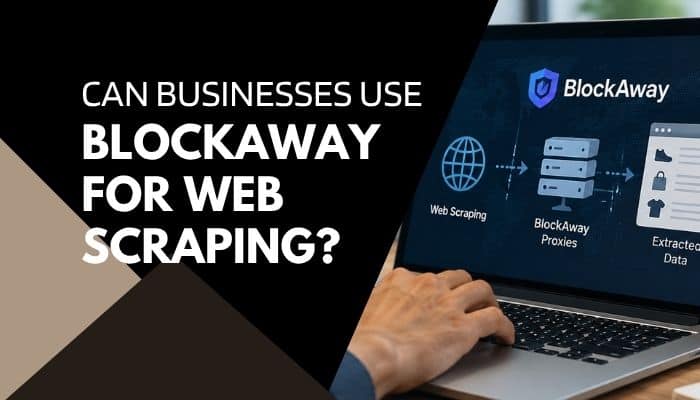
Blockaway.com’s Terms of Use prohibit several forms of automated activity, including:
- Automated crawling or scraping
- Repeated scripted requests
- Automated loops
- Robots
- Headless browsers
- Other excessive non-human requests
Businesses should therefore not treat Blockaway.com as a web-scraping infrastructure. Marketing and SEO teams requiring large-scale automated collection should use tools designed for that purpose while following applicable website terms and laws.
Performance, Downloads and Reliability
The BlockAway app routes browser requests through an intermediary proxy server, so performance can depend on server load, network conditions, and the website being accessed.
Blockaway.com’s terms indicate that standard access may restrict excessively large files, while Premium removes the standard file-size limitation.
The service should not be relied on for guaranteed continuous availability. Temporary interruptions may be manageable for public research but unsuitable for:
- Customer support
- Payroll
- Financial systems
- Production monitoring
- Sales operations
- Time-sensitive workflows
Business-critical systems generally require more dependable infrastructure than an occasional public proxy.
Advantages of BlockAway for Business Users
For appropriate public browsing, the BlockAway app offers several practical advantages.
No Conventional Installation
Users can access the service through a browser without installing a traditional desktop client.
Fast Setup
A user can enter a website URL and begin browsing without configuring a full network connection.
Cross-Device Convenience
The browser-based service can be used across common desktop, tablet, and mobile environments.
Useful for Public Research
BlockAway can provide an alternative route for accessing public business information, documentation, and research resources.
Low Technical Barrier
Basic proxy browsing does not require advanced networking knowledge or complicated configuration.
Optional Premium Features
Blockaway.com promotes Premium features such as faster proxy access, server-location options, fewer usage restrictions, and additional support.
Limitations Businesses Should Understand
The BlockAway app also has important limitations that businesses should consider before using it for work-related browsing.
It Does Not Protect Every Application
A browser proxy generally does not automatically route traffic from:
- Email applications
- Desktop software
- Cloud-sync tools
- Video-meeting software
- Background services
- Separate browser sessions
Complete Anonymity Is Not Guaranteed
Using a proxy can hide the user’s IP address from the destination website, but businesses should not treat proxy browsing as a guarantee of complete anonymity or privacy.
Website Compatibility Can Vary
Interactive or complex websites may not always behave correctly when accessed through a browser proxy.
Pages May Be Modified
Proxy services may process webpage content before displaying it, which can affect scripts, media, or other page elements.
Logging Policies Matter
Businesses should review the provider’s current privacy policy to understand what connection or usage information may be collected.
Enterprise Administration Is Limited
BlockAway is not positioned as a complete enterprise identity, endpoint-security, Data Loss Prevention, or Zero Trust management platform.
How Businesses Can Use BlockAway More Responsibly
Businesses using the BlockAway app should set clear rules so employees know when proxy access is appropriate and when approved security tools are required.
Step 1: Confirm Company Policy
Use BlockAway only if third-party proxy services are permitted by company policy.
Step 2: Verify the Exact Domain
Confirm that you are using the intended BlockAway domain before entering any information.
Step 3: Review the Privacy Policy
Check the current policy for:
- Logging
- Data collection
- Retention
- Cookies
- Third-party services
Step 4: Keep Sensitive Data Protected
Use the BlockAway app mainly for low-risk public browsing, not confidential company information.
Step 5: Avoid Sensitive Credentials
Use company-approved systems for banking, payroll, CRM, administrative, and other important accounts.
Step 6: Verify HTTPS
Make sure websites use HTTPS before transmitting information.
Step 7: Use Approved VPN Access
Follow the VPN or secure-access method required by your IT or security team.
Step 8: Close Sessions After Use
Log out of accounts and close proxy sessions when browsing is complete.
What Businesses Should Check Before Approving BlockAway
Before approving the BlockAway app for workplace use, businesses should check:
- Whether the exact BlockAway domain is verified
- What data the service collects and logs
- How long connection data may be retained
- Whether company policy permits third-party proxies
- Whether sensitive business data could pass through the service
- Whether required websites work correctly
- Whether account-sharing or device limits affect team use
- Whether the service offers suitable support and reliability
- Whether a company VPN or Zero Trust platform is already available
- Whether the BlockAway app is appropriate for the specific business task
A simple review like this helps businesses avoid using a public proxy where stronger enterprise security controls are required.
BlockAway App Pros and Cons for Businesses
The BlockAway app offers convenient browser-based access, but businesses should weigh its practical benefits against its security and operational limitations.
| Pros | Cons |
|---|---|
| No conventional installation | Not a complete security platform |
| Simple browser-based access | Does not protect all device traffic |
| Useful for public research | Complete anonymity is not guaranteed |
| Works across common devices | Website compatibility can vary |
| Helpful while traveling | Company policy may restrict proxy use |
| Premium option available | Premium accounts cannot be shared |
| Low technical barrier | Limited enterprise administration |
| Quick setup | Automated scraping is restricted |
When BlockAway Is Not the Right Business Tool
The BlockAway app is not the best choice when a business requires advanced security, centralized management, or protected access to confidential systems.
A more advanced solution may be needed for:
- Internal company network access
- Full-device encrypted connections
- Identity-based access controls
- Data-loss prevention
- Centralized employee management
- Security monitoring and auditing
- Compliance reporting
- Device-security checks
- Enterprise support
- Protected administrator access
In these situations, a managed VPN, Secure Web Gateway, or Zero Trust access platform may be more appropriate.
Is BlockAway a Good Fit for Remote Work?
The BlockAway app can be useful for authorized public browsing, basic research, and occasional web access when no sensitive credentials or confidential business data are involved.
It is generally a better fit when:
- Company policy permits proxy use
- The information being accessed is public
- No confidential credentials are required
- Browser-level access is sufficient
- Continuous availability is not critical
For confidential systems, financial information, customer data, or business-critical applications, company-approved secure infrastructure is the safer choice.
Conclusion
The BlockAway app fits a narrow but practical role in modern business browsing: fast, browser-based access to public websites without the friction of traditional software installation. For freelancers, remote teams, marketers, and small businesses, that convenience can be useful when the task is low-risk, authorized, and limited to public information.
Its value, however, depends on knowing where convenience ends and enterprise security begins. The BlockAway app is not a substitute for managed VPN access, Zero Trust controls, centralized identity management, or the safeguards required for confidential business systems.
For companies, the smarter approach is to treat BlockAway as a lightweight browsing utility rather than core infrastructure. Used selectively and within company policy, it can support flexible remote work without being asked to solve security problems it was never designed to handle.
Ultimately, the business case for BlockAway is not about bypassing barriers. It is about using the right tool for the right level of risk.
FAQs About BlockAway app
1. Does the BlockAway app require administrator permission?
The BlockAway app works through a browser, so basic use does not normally require installing desktop software or changing system settings.
2. Can the BlockAway app work behind a company firewall?
The BlockAway app may work if the company network allows access to the proxy domain. Corporate firewalls or filtering systems can still restrict proxy services.
3. Can the BlockAway app change the location websites detect?
The BlockAway app can make a destination website see the proxy server’s IP rather than the user’s original IP. Available server-location options may also affect the apparent connection region.
4. Can the BlockAway app affect website analytics?
Yes. Traffic routed through the BlockAway app may appear in website analytics under the proxy server’s IP or location rather than the user’s direct connection.
5. Can the BlockAway app replace browser security tools?
No. The BlockAway app provides proxy browsing, but businesses should still use browser security, endpoint protection, HTTPS, and other approved safeguards.
6. Can contractors use the BlockAway app for business browsing?
The BlockAway app may be suitable for approved public browsing, but it should not replace identity-controlled access for contractors using private company systems.
7. Can the BlockAway app help with regional website checks?
The BlockAway app may help with basic regional page checks when suitable proxy locations are available, but dedicated localization tools are better for precise testing.
8. Does the BlockAway app improve browsing speed?
The BlockAway app does not guarantee faster browsing. Performance can vary depending on proxy-server load, network quality, website response time, and routing distance.
