




Cash flow keeps a small business moving, covering payroll, suppliers, rent, taxes, inventory, debt payments, and unexpected costs. Even a profitable company can face a cash shortage when customer payments arrive after major expenses are due. BMO Online Banking gives small-business owners a clearer view of balances, transactions, transfers, payments, and deposits in one digital banking environment. In Canada, businesses can use standard Online Banking or Online Banking for Business for more advanced financial controls, while U.S. businesses have access to BMO Digital Banking and related business-banking services.
Combined with accurate bookkeeping and a cash-flow forecast, BMO Online Banking can help owners track available cash, plan upcoming obligations, and make better day-to-day financial decisions.
Quick Answer
BMO Online Banking helps small businesses manage cash flow by giving owners faster access to balances, transactions, payments, transfers, deposits, and account activity.
Depending on the country and banking service, businesses may also use tools such as payment approvals, multiple-user access, EFT or ACH payments, alerts, Cash Flow Insights, international transfers, and accounting integrations. These features can help owners monitor available cash, organize payments, and spot potential cash-flow issues earlier.
Key Takeaways
- Cash flow depends on the timing of money coming in and going out, not just revenue or profit.
- BMO Online Banking can help small-business owners monitor balances, transactions, payments, and other account activity more closely.
- Online Banking for Business offers added controls such as multiple users, payment approvals, alerts, and advanced payment options.
- Cash Flow Insights and transaction data can help owners identify spending patterns and potential liquidity pressure.
- Deposited cheques may not always be immediately available, so available funds matter more than the displayed balance alone.
- Banking fees, transaction limits, supplier payments, and customer collections should all be included in cash-flow planning.
- Credit lines and overdraft facilities can support short-term liquidity, but they also create interest and repayment obligations.
- Banking data is most useful when combined with accurate bookkeeping and an updated cash-flow forecast.
Why Cash Flow Matters to Small Businesses
Cash flow shows how money moves into and out of a business. A company may be profitable on paper but still face financial pressure when customer payments arrive after major expenses are due.
Common cash inflows include:
- Customer payments
- Online sales
- Subscription revenue
- Merchant settlements
- Loan proceeds
- Owner investment
Common cash outflows include:
- Payroll
- Rent
- Inventory
- Supplier payments
- Taxes
- Insurance
- Software and advertising costs
- Loan repayments
For example, a business may record $60,000 in monthly sales but receive only $25,000 in actual payments. If $38,000 in expenses are already due, the business can still face a short-term cash shortage.
BMO Online Banking can help owners monitor:
- Available balances
- Incoming deposits
- Supplier and bill payments
- Recent transactions
- Transfers between accounts
- Unusual account activity
Business owners should also check whether enough cash remains available for payroll, taxes, suppliers, and other upcoming obligations.
Used with accurate bookkeeping and a simple cash-flow forecast, BMO Online Banking can give small-business owners a clearer view of their current liquidity and help them prepare for future expenses.
How BMO Online Banking Supports Cash-Flow Management
BMO Online Banking gives small-business owners faster access to balances, transactions, transfers, supplier payments, automatic payments, e-Statements, and other account activity. This makes it easier to track cash throughout the month instead of relying only on monthly statements.
Monitor Available Cash
Before spending on:
- Inventory
- Equipment
- Advertising
- Contractors
- Hiring
- Expansion
owners can check current balances and upcoming obligations first.
A displayed balance should not always be treated as fully available cash because some funds may already be needed for payroll, taxes, suppliers, or debt payments.
Compare Expected and Actual Payments
Owners can compare expected customer payments with deposits that actually arrive.
For example, if a $10,000 payment was expected on Monday but has not appeared by Wednesday, the business can follow up quickly instead of assuming the money is available.
Review Outgoing Transactions
BMO Online Banking can also help owners review spending patterns such as:
- Supplier charges
- Payroll payments
- Merchant fees
- Loan repayments
- Recurring subscriptions
- Unexpected withdrawals
Reviewing this activity regularly can improve cash-flow forecasting and help identify unnecessary or unusual spending earlier.
How BMO Cash Flow Insights Help Small Businesses
Cash Flow Insights can help small-business owners monitor important changes in account activity without reviewing every transaction manually. Through BMO Online Banking for Business, users may access real-time balances, transaction history, transaction search, payments, and user-management tools.
Cash-flow monitoring can help identify:
- Sudden drops in available cash
- Large customer deposits
- Unexpected expenses
- Recurring charges
- High-spending periods
- Unusual transactions
Cash Flow Insights should support, not replace, a full financial forecast. A complete forecast may also include unpaid invoices, upcoming bills, taxes, inventory needs, and planned spending. Combining banking activity with bookkeeping and future projections gives owners a clearer financial picture.
BMO Online Banking Login
The BMO Online Banking login should always be accessed through BMO’s official website or mobile app. Business users should also select the correct Canadian or U.S. banking platform for their account and services.
For safer access:
- Use BMO’s official website or app
- Check the web address before signing in
- Avoid unexpected links in emails or texts
- Never share passwords, PINs, or verification codes
- Use a strong, unique password
- Keep devices and browsers updated
- Review account activity regularly
Protecting login credentials is part of cash-flow management because unauthorized transfers or account fraud can directly affect available business funds.
BMO Online Banking for Business
BMO Online Banking for Business is designed for companies that need more control than standard business banking provides. In Canada, standard Online Banking supports everyday tasks such as transfers, supplier payments, account monitoring, e-Statements, and bill payments.
Online Banking for Business can add features such as:
- Multiple business users
- Payment limits
- Multiple approval levels
- Electronic funds transfers
- Global payments
- Interac e-Transfers for Business
- Account alerts
- Customizable reports
- Mobile business banking access
These tools can be especially useful as financial responsibilities become more complex.
Why Multiple Users Matter
As a business grows, banking tasks may be shared between owners, bookkeepers, accountants, managers, and accounts-payable staff.
A simple access structure may look like this:
| User | Typical Responsibility | Appropriate Control |
|---|---|---|
| Bookkeeper | Prepare bills | Payment preparation |
| Accounts staff | Enter supplier details | Limited access |
| Manager | Review invoices | Review permission |
| Owner | Approve large payments | Final approval |
| Accountant | Review transactions | Reporting access |
Separating payment preparation from approval can strengthen internal controls and reduce the risk of unauthorized or incorrect payments.
U.S. Online Banking for Business
In 2026, BMO expanded its U.S. BMO Online Banking for Business experience for small and midsized companies.
The updated platform focuses on:
- Viewing balances and recent activity
- Moving money with fewer steps
- Managing users and account access
The U.S. rollout began on April 27, 2026, making the platform more relevant to growing businesses that need stronger payment and user-management controls.
Receiving Customer Payments Faster
Faster customer payments can improve working capital and reduce the gap between making a sale and receiving usable cash. BMO Online Banking can support this process through payment and cash-management options that vary by country and service.
Canadian businesses may use:
- Interac e-Transfer
- EFT services
- Merchant payment solutions
- Moneris
- Wire payments
In the United States, businesses may have access to ACH collections, merchant services, Remote Deposit Capture, eligible Zelle services, Real-Time Payments, and wires. BMO Online Banking can help owners monitor when those incoming payments reach their accounts.
The main goal is simple: reduce the time between invoicing a customer and having cash available for business expenses.
Mobile Deposits, Cheque Holds and Available Cash
A deposit showing in BMO Online Banking does not always mean the full amount is immediately available to spend. Cheque deposits may be subject to holds depending on the deposit method, amount, account, and applicable banking policy.
For mobile cheque deposits, businesses should check both the deposited amount and the date the funds are expected to become available.
Account balance is not always the same as available cash.
| Item | Amount |
|---|---|
| Bank balance shown | $25,000 |
| Cheque funds on hold | -$8,000 |
| Available funds | $17,000 |
| Payroll due tomorrow | -$12,000 |
| Remaining liquidity | $5,000 |
A business relying only on the displayed balance could overestimate how much money is available for new spending.
Managing Supplier Payments
Managing supplier payments carefully can protect liquidity. BMO Online Banking allows eligible businesses to review account activity and handle payments, while more advanced business services may support EFTs, ACH payments, wires, and other payment options.
Business owners should track:
- Supplier name
- Invoice amount
- Due date
- Payment method
- Scheduled payment date
- Payment status
Paying too early can reduce available cash, while paying too late may create penalties or damage supplier relationships. A simple payment calendar can help businesses meet obligations without unnecessarily reducing working capital.
International Payments and Foreign-Currency Cash Flow

Businesses buying inventory or services overseas also need to consider exchange-rate changes. Through qualifying services connected with BMO Online Banking, companies may access international wires and other cross-border payment options.
For international payments, monitor:
- Invoice currency
- Payment currency
- Exchange rate
- Transfer fees
- Settlement date
- Payment deadline
Exchange-rate movements can change the final cost of a foreign invoice, so international expenses should not always be treated as fixed domestic-currency amounts.
BMO Online Banking Sign In
A BMO Online Banking sign in should be completed through BMO’s official website or mobile banking channel. Protecting login credentials is important because unauthorized transactions can directly affect business cash flow.
For safer access:
- Use trusted BMO channels.
- Check the web address carefully.
- Avoid suspicious email or text links.
- Never share passwords, PINs, or verification codes.
- Use a strong, unique password.
- Review transactions regularly.
- Report suspicious activity quickly.
Keeping devices, browsers, and security software updated can provide another layer of protection.
Payment Approvals, Internal Controls and Fraud Protection
As a company grows, BMO Online Banking tools and appropriate internal controls can help reduce payment errors and unauthorized transactions.
A useful approach is to separate responsibilities:
Employee prepares payment → Manager verifies invoice → Owner approves payment
This structure can help reduce:
- Unauthorized payments
- Duplicate transactions
- Incorrect supplier details
- Payment errors
- Internal fraud
Multiple users, payment limits, and approval levels can help businesses control who prepares, reviews, and authorizes transactions. Banking technology is most effective when it is supported by clear internal financial procedures.
Using Account Alerts to Protect Cash Flow
Business owners cannot watch every transaction throughout the day. Account alerts can provide an extra layer of oversight by highlighting activity that may require attention.
Through BMO Online Banking for Business, eligible users may receive account-activity alerts by email or text.
Alerts can help businesses respond faster to:
- Unexpected withdrawals
- Large or unusual transactions
- Balance changes
- Suspicious account activity
- Payments requiring attention
Alerts do not replace bookkeeping or fraud monitoring, but they can help owners notice important changes sooner and protect available cash.
How to Create a 30-Day Small-Business Cash-Flow Forecast
A cash-flow forecast becomes more useful when actual banking activity is compared with expected income and expenses. BMO Online Banking can help business owners review balances and transactions while updating their forecast.
Use this basic formula:
Opening cash + expected inflows − expected outflows = projected closing cash
Step 1: Record Current Available Cash
Start with money that is actually available. Do not include funds that are still subject to deposit holds.
Step 2: Estimate Customer Receipts
List expected payments for the next 30 days, including:
- Customer invoices
- Online sales
- Merchant settlements
- Subscription revenue
- Contract payments
Avoid counting overdue invoices until payment is reasonably expected.
Step 3: List Essential Expenses
Include major obligations such as:
- Payroll
- Rent
- Taxes
- Supplier bills
- Utilities
- Insurance
- Loan payments
- Inventory
Step 4: Add Variable Spending
Estimate costs that may change each month, including:
- Advertising
- Fuel
- Travel
- Repairs
- Freelancers
- Seasonal inventory
Step 5: Calculate Projected Closing Cash
| Cash-Flow Item | Amount |
|---|---|
| Opening available cash | $30,000 |
| Customer payments | +$20,000 |
| Other income | +$3,000 |
| Payroll | -$14,000 |
| Supplier invoices | -$11,000 |
| Rent | -$4,000 |
| Taxes | -$5,000 |
| Other expenses | -$6,000 |
| Projected closing cash | $13,000 |
Step 6: Review the Forecast Weekly
| Period | Main Items to Review |
|---|---|
| Days 1–7 | Payroll, deposits, urgent suppliers |
| Days 8–14 | Receivables, rent, subscriptions |
| Days 15–21 | Taxes, inventory, loan payments |
| Days 22–30 | Remaining bills and discretionary spending |
A business may have enough cash at month-end but still face a shortage during one particular week.
Step 7: Compare Forecast With BMO Activity
Use BMO Online Banking to compare expected transactions with deposits and payments that actually clear. Update the forecast whenever customer payments, expenses, or other assumptions change.
A useful cash-flow forecast should be updated regularly rather than treated as a one-time calculation.
BMO Online Banking and Accounting Software Integration
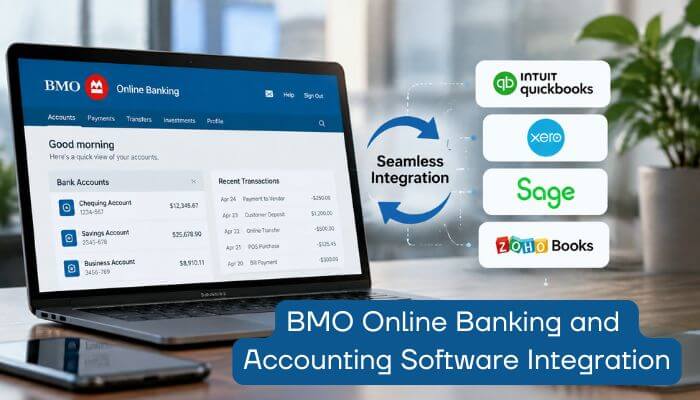
BMO Online Banking shows actual balances, transactions, and payments, while accounting software provides a broader view of business finances.
Accounting software may track:
- Accounts receivable
- Accounts payable
- Outstanding invoices
- Revenue and expenses
- Payroll
- Sales taxes
- Profit and loss
- Balance-sheet accounts
For eligible U.S. businesses, BMO Business Bill Pay’s Pay, Bill & Sync service can connect with platforms such as QuickBooks, Xero, and NetSuite. Bills, payments, and vendor information can be synchronized between systems.
BMO also supports invoice-to-email functionality, allowing vendor invoices to be added for review and payment. This can reduce manual entry and make accounts-payable management more efficient.
How BMO Business Banking Fees Affect Cash Flow
Banking fees reduce available cash, so businesses should compare monthly charges with their actual transaction activity. BMO Online Banking users should consider not only account fees but also transaction limits, deposits, transfers, and other service charges.
As of September 2026, BMO Canada’s Everyday Business Account has a $25 monthly plan fee and includes specified allowances for transactions, deposited items, cash deposits, and Interac e-Transfers.
In the U.S., BMO Simple Business Checking includes 100 free transactions per statement period and up to $2,000 in cash deposits without an additional cash-deposit fee. Its $10 monthly maintenance fee may be waived when balance requirements are met.
Businesses should review:
- Monthly transaction volume
- Cash and cheque deposits
- Electronic transfers
- Wire payments
- International transactions
- Branch activity
- Bill-payment needs
A low monthly fee does not always mean a lower total banking cost if the business regularly exceeds included limits.
BMO fees, limits, and account terms can change, so businesses should verify current pricing before choosing an account.
Building a Business Cash Reserve With BMO
Keeping every dollar in an operating account can make reserved money look available for everyday spending. BMO Online Banking can help business owners monitor separate balances when funds are divided for different purposes.
Operating Cash
Money used for payroll, suppliers, bills, and daily operating expenses.
Tax Reserve
Funds set aside for upcoming tax obligations.
Emergency Reserve
Cash reserved for unexpected expenses, delayed customer payments, repairs, or temporary revenue declines.
Growth Reserve
Money saved for hiring, equipment, inventory, or future expansion.
BMO Canada offers a Business Premium Rate Savings Account that businesses may use alongside a linked business chequing account. Keeping reserves separate can make it easier to distinguish operating cash from money intended for future obligations.
The right reserve level depends on:
- Payroll commitments
- Revenue stability
- Seasonality
- Supplier terms
- Debt payments
- Access to credit
- Customer concentration
Managing a Short-Term Cash-Flow Gap With BMO
A temporary cash-flow gap can occur when expenses become due before expected customer payments arrive. BMO Online Banking can help owners monitor account activity while evaluating whether existing reserves or financing may be needed.
Possible liquidity options include:
- Cash reserves
- Business line of credit
- Operating line of credit
- Business overdraft
- Short-term financing
BMO Canada offers credit and overdraft products that may help eligible businesses cover temporary operating needs. Borrowing creates interest and repayment obligations, so it should address a manageable timing gap rather than an ongoing shortage.
Before borrowing, consider:
- Why the shortage occurred
- When incoming cash is expected
- Interest costs
- Repayment requirements
- Whether the shortage is temporary or recurring
BMO Business Login
The term BMO business login can refer to different banking platforms depending on the country, account type, and services activated.
In Canada, BMO Online Banking supports common business-banking activities, while Online Banking for Business provides more advanced features such as multiple users, payment approvals, EFTs, alerts, and reporting tools.
In the U.S., business customers may use BMO Digital Banking or Online Banking for Business depending on their account and service needs.
For safer access:
- Start from BMO’s official website or app
- Choose the correct country and banking service
- Avoid unfamiliar login links in emails or texts
- Check the web address before entering credentials
Standard BMO Online Banking vs Online Banking for Business
The right platform depends on the size and complexity of the business.
| Business Need | Standard Online Banking | Online Banking for Business |
|---|---|---|
| View balances | Yes | Yes |
| Review transactions | Yes | Yes |
| Transfer money | Yes | Yes |
| Pay everyday bills | Yes | Yes |
| Supplier payments | Yes | Yes |
| Multiple users | More limited | Advanced user management |
| Payment approvals | Limited or service-dependent | Multiple approval levels |
| EFT payments | Service-dependent | Available |
| Global payments | More limited | Available through eligible services |
| Reporting | Basic | More advanced |
| Best suited for | Simpler banking needs | Growing or complex businesses |
Exact features can vary by country, account, service package, and eligibility.
A Practical Weekly Cash-Flow Routine
Small-business owners do not need to monitor banking data all day. A simple routine can make BMO Online Banking more useful for regular cash-flow management.
Daily
Check:
- Large deposits
- Major withdrawals
- Unusual transactions
Every Monday
Review:
- Available cash
- Bills due this week
- Customer payments expected
- Payroll and tax obligations
- Large supplier payments
Midweek
Check whether expected customer payments have arrived and follow up on overdue invoices when needed.
Every Friday
Compare actual cash flow with your forecast and update the opening balance for the next week.
Monthly
Review:
- Bank fees
- Supplier costs
- Loan payments
- Subscriptions
- Recurring transfers
- Cash reserves
Quarterly
Look for bigger trends, such as:
- Slower customer payments
- Rising expenses
- Seasonal cash shortages
- Higher bank fees
- Changing reserve needs
Using BMO Online Banking with this simple routine can help owners spot cash-flow problems earlier and keep financial planning more organized.
Common Cash-Flow Mistakes Small Businesses Should Avoid
Common mistakes that can weaken business cash flow include:
- Treating the full bank balance as spendable cash
- Ignoring unpaid customer invoices
- Failing to plan for payroll
- Forgetting upcoming tax obligations
- Paying supplier invoices earlier than necessary
- Waiting too long to arrange financing
- Mixing personal and business spending
- Giving too many employees full account access
- Ignoring transaction and deposit fees
- Clicking unverified banking links
Using BMO Online Banking alongside accurate bookkeeping, cash-flow forecasting, and proper account controls can help business owners avoid many of these mistakes.
Is BMO Online Banking Good for Managing Small-Business Cash Flow?
BMO Online Banking can be useful for small-business cash-flow management because it gives owners access to balances, transactions, payments, transfers, alerts, and other account activity.
Key benefits include:
- Real-time account visibility
- Transaction monitoring
- Customer and supplier payments
- Cash Flow Insights
- Payment approvals
- Multiple-user access
- Account alerts
- Accounting integrations
- International payments
- Mobile banking access
However, banking tools do not replace complete financial management. Business owners still need to monitor:
- Accounts receivable
- Accounts payable
- Payroll and taxes
- Debt obligations
- Inventory
- Future expenses
- Cash reserves
BMO Online Banking works best when combined with accurate bookkeeping, cash-flow forecasting, and regular financial reviews.
Conclusion
For small businesses, cash flow is ultimately about timing, visibility, and control. BMO Online Banking can give owners a clearer view of balances, payments, deposits, and upcoming financial pressure, helping them make decisions before a shortfall becomes a problem.
The technology is most valuable when it supports disciplined financial management. Forecasting, accurate bookkeeping, controlled spending, payment approvals, and adequate reserves still matter more than any single banking feature.
For growing companies, BMO Online Banking can become part of a broader cash-management system rather than simply a place to check balances. Used well, it can help business owners protect liquidity, respond faster to changing conditions, and make more confident financial decisions.
FAQs About BMO Online Banking
1. Can BMO Online Banking automatically include scheduled payments in a cash-flow forecast?
For eligible Online Banking for Business users, certain future-dated scheduled transactions can be included automatically in BMO’s Cash Flow Forecasting tools.
2. Can BMO Online Banking connect directly to accounting or treasury systems through APIs?
Yes. Eligible business clients can use BMO APIs to access banking data and payment services from connected accounting or treasury systems.
3. Can BMO Online Banking provide historical balance data for business analysis?
Eligible clients can access historical balance information and transaction history through BMO’s business-banking API services.
4. Can BMO Online Banking schedule wire payments in advance?
Yes. Eligible Online Banking for Business users can create future-dated wire payments, helping businesses plan outgoing cash more accurately.
5. Can BMO Online Banking export payment data for reporting?
Eligible business-banking tools can create customizable payment reports and export data for financial analysis or recordkeeping.
6. Can BMO Online Banking help test different cash-flow scenarios?
BMO Cash Flow Forecasting tools can support what-if scenarios, helping businesses compare possible financial outcomes with their expected baseline.
7. Can BMO Online Banking retrieve deposited cheque images?
Eligible Online Banking for Business API users can retrieve images of deposited cheques and other supported items for financial records.
8. Can BMO Online Banking validate third-party accounts before payments?
Eligible BMO business APIs can support third-party account validation before certain transactions are created, adding another control to payment workflows.
