


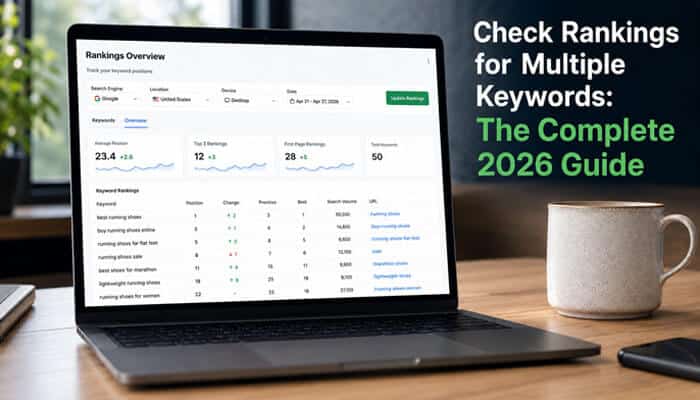

Knowing how to Check Rankings for Multiple Keywords is essential for understanding whether your SEO strategy is actually improving search visibility, traffic, and conversions. Tracking several keywords at once helps you spot ranking gains, sudden drops, competitor movements, quick-win opportunities, and pages that are close to reaching the top search results.
In 2026, keyword tracking goes beyond traditional Google positions. AI Overviews, featured snippets, People Also Ask, local packs, mobile results, and location-based SERP can all affect visibility and clicks. This guide explains how to Check Rankings for Multiple Keywords using free and paid tools, monitor competitors, track the right SEO metrics, and turn ranking data into actions that can improve organic traffic and revenue.
Why You Need to Check Rankings for Multiple Keywords
Tracking a single keyword gives you a snapshot; tracking multiple keywords reveals patterns, opportunities, and risks across your entire SEO strategy.
Key benefits of multi-keyword rank tracking:
- Early anomaly detection — Catch ranking drops before they translate into significant traffic loss
- Resource prioritization — Direct content and link-building efforts toward keywords with the highest growth potential
- ROI measurement — Correlate ranking improvements with organic traffic and conversion data to quantify SEO value
- Competitive benchmarking — Understand your Share of Voice relative to competitors across your core keyword set
- SERP feature visibility — Monitor appearances in featured snippets, local packs, People Also Ask, and AI Overviews that impact real-world clicks
Without multi-keyword tracking, you’re optimizing in the dark.
Methods to Check Rankings for Multiple Keywords
You can check rankings for multiple keywords using three main approaches: free tools, manual methods, and dedicated rank tracking software.
1. Google Search Console (Free)
Google Search Console (GSC) is the best free option to check rankings for multiple keywords you already rank for.
Step-by-step workflow:
- Log in to Google Search Console and select your verified property
- Navigate to Performance and then Search results in the left sidebar
- Toggle on Average position at the top of the report (it’s off by default)
- Set your desired date range (GSC keeps a maximum of 16 months of history)
- Switch to the Queries tab to see your top keywords with average position, impressions, and CTR
- Switch to the Pages tab to see which URLs rank, and click any page for its keyword breakdown
Pro tip: Apply a position filter (Position greater than 4 AND Position less than 20) to find striking distance keywords ready for quick wins.
Limitations: GSC shows average positions, not daily fluctuations, and only for keywords your site already ranks for.
2. Manual Incognito Search (Free, Time-Intensive)
For competitor keywords or validation, manual searches work but only with proper setup to avoid personalization bias.
How to do it right:
- Use an incognito or private browsing window to prevent personalized results based on your search history and location
- Set your location manually or append URL parameters like &gl=us for US results, &gl=ca for Canada, etc.
- Add &pws=0 to disable personalized search results
- Count your position manually, starting from the top organic result (excluding ads)
- Record the date, keyword, position, and URL in a spreadsheet
Example URL format:
https://www.google.com/search?q=your+keyword&pws=0&gl=us&hl=en
Limitations: Extremely time-consuming for multiple keywords, prone to human error, and doesn’t scale.
3. Dedicated Rank Tracking Tools (Paid, Recommended)
For serious SEO work, dedicated rank tracking tools are essential to check rankings for multiple keywords at scale with accuracy, automation, and SERP feature tracking.
Free Google Sheets Rank Tracker Templates (2026)
You don’t need expensive tools to check rankings for multiple keywords. Several free Google Sheets templates automate rank tracking with formulas and conditional formatting.
Top free templates:
| Template | Features | Best For |
| Scale Growth Keyword Rank Tracker | 5 tabs: weekly positions, SERP features, competitor comparison, monthly distribution, auto-highlighting formulas | Small teams, freelancers |
| Scale Growth SEO Tracking Spreadsheet | 6 tabs: rankings, traffic, backlinks, technical issues, content calendar, competitor benchmarks | Comprehensive SEO tracking |
| Markifact Google Rank Tracker | Auto-imports Google results, exports to Sheets, tracks historical positions | DIY automation |
| Asana Rank Tracker Template | Integrates with project management, client-ready reporting | Agencies |
DIY option: Use the IMPORTFROMGOOGLE formula (via ImportFromWeb add-on) to pull live Google results into Sheets, then add ranking position with conditional formulas.
Automate Rank Tracking with Google Search Console API (2026)
Google has no live rank API, but the Search Console API provides free, first-party position data for your verified properties.
Step-by-step setup:
- Create a Google Cloud Project — Go to console.cloud.google.com and create a new project
- Enable the Search Console API — Navigate to API Library, search for Search Console API, and enable it
- Create a Service Account — Go to Credentials, create a Service Account, and generate a JSON key file
- Grant Access — Add the service account email as a Read user in your Search Console property
- Query the API — Use the searchAnalytics.query endpoint with dimensions query and page to retrieve position data
Example API request body:
json
{
“startDate”: “2026-08-01”,
“endDate”: “2026-08-16”,
“dimensions”: [“query”, “page”],
“rowLimit”: 25000
}
Pro tip: Use automation tools like n8n, Zapier, or Python scripts to pull GSC API data daily into Google Sheets or your database.
Limitations: GSC API only shows data for properties you own (no competitor tracking), and data is delayed 24-48 hours.
Best Tools to Check Rankings for Multiple Keywords in 2026
Here’s a comparison of the top rank tracking tools tested and verified for 2026, based on accuracy, update frequency, SERP feature coverage, and value.
Top Rank Tracking Tools Comparison Table
| Tool | Best For | Starting Price | Keywords Included | Update Frequency | AI Search Tracking | Free Trial |
| SE Ranking | Best overall value | 103.20 USD per month (annual) | 2,000 daily | Daily plus on-demand | Yes (ChatGPT and Gemini) | 14 days |
| Semrush | All-in-one SEO teams | 139 USD per month (Pro) | 500 | Daily | Yes (AI Overviews) | 7 days |
| AccuRanker | Accuracy and speed | 224 USD per month (Professional) | 2,000 | On-demand plus daily | Yes (AccuLLM) | 14 days |
| Ahrefs | Backlink-first workflows | 129 USD per month (Lite) | 750 | Daily | Yes (Brand Radar) | No (paid only) |
| Nightwatch | Local and multi-location SEO | Approximately 79 USD per month | 250 | Daily | Yes (LLM monitoring) | 14 days |
| Mangools SERPWatcher | Budget pick | 29.90 USD per month (annual) | 200 | Daily | No | 10 days |
| Wincher | Lightweight option | Approximately 49 USD per month | 500 | Daily | No | 14 days |
| Advanced Web Ranking | White-label agency reports | 139 USD per month | 2,000 | Daily or weekly | Yes (ChatGPT) | 30 days |
| Google Search Console | Free basics | Free | Unlimited | Approximately 24-48 hour delay | No | N/A |
Tool Recommendations by Use Case
Best overall value: SE Ranking delivers the lowest cost per keyword (approximately 0.05 USD per keyword per month) with daily tracking, multi-location support, and AI visibility features.
Best for accuracy and speed: AccuRanker offers near real-time on-demand refresh (2-second updates) ideal for volatile industries and enterprise SEO teams.
Best for local SEO: Nightwatch provides hyper-local tracking down to ZIP-code and street level with geo-grid heatmaps across 107,000 plus locations.
Best budget option: Mangools SERPWatcher at 29.90 USD per month (annual) is ideal for beginners and small sites tracking up to 200 keywords daily.
Best free option: Google Search Console remains the best free tool to check rankings for multiple keywords you already rank for, though it lacks daily granularity and competitor tracking.
Competitor Rank Tracking & Share of Voice (2026)

Checking your rankings alone isn’t enough. Track competitor positions and calculate Share of Voice to understand your true market position.
How to track competitor rankings:
- Identify 3-5 direct competitors — Use tools like Semrush, Ahrefs, or manual SERP analysis
- Export their top-ranking keywords — Most tools allow competitor keyword exports
- Track shared keywords — Monitor keywords where you and competitors both rank
- Calculate Share of Voice — SOV equals (Your impressions divided by Total impressions for tracked keywords) multiplied by 100
AI Share of Voice (2026 metric): Track brand mentions in AI Overviews, ChatGPT, Perplexity, and Gemini. AI SOV equals (Your brand mentions divided by Total competitor mentions) multiplied by 100 for tracked prompts.
Tools with competitor tracking:
| Tool | Competitor Keywords | Share of Voice | AI SOV |
| Semrush | Yes (unlimited) | Yes | Yes (AI Toolkit) |
| AccuRanker | Yes (unlimited) | Yes | Yes (AccuLLM) |
| SE Ranking | Yes (up to 5 competitors) | Yes | Yes |
| Ahrefs | Yes (unlimited) | No | No |
| Nightwatch | Yes (unlimited) | Yes | Yes |
Best White-Label Rank Tracking Tools for Agencies (2026)
Agencies need branded reports, client portals, and scalable pricing. Here are the top white-label rank trackers in 2026:
| Tool | Entry Price (Annual) | White-Label Tier | API Access | Best For |
| Nightwatch | 32 USD per month (250 keywords) | All plans include white-label | Yes | Small-mid agencies |
| Advanced Web Ranking | 139 USD per month (2,000 keywords) | All plans | Yes | Large agencies (7,000-35,000 keywords) |
| AccuRanker | 224 USD per month (2,000 keywords) | Agency add-on required | Yes (unlimited) | Enterprise, on-demand refresh |
| SE Ranking | 103.20 USD per month (2,000 keywords) | All plans | Yes | Value-focused agencies |
| Wincher | Approximately 49 USD per month (500 keywords) | All plans | No | Budget solo operators |
| ProRankTracker | 29 USD per month (500 keywords) | All plans | Yes | Cheapest per-keyword at scale |
Agency workflow best practices:
- Create a dedicated project per client domain
- Tag keywords by search intent (informational, transactional, navigational)
- Set target URLs for each keyword (the page you intend to rank)
- Enable white-label PDF reports with your agency logo and domain
- Use API access to integrate with Looker Studio, Google Analytics, or custom client portals
How to Set Up Multi-Keyword Rank Tracking (Step-by-Step)
Follow this workflow to check rankings for multiple keywords effectively in 2026.
Step 1: Build a Prioritized Keyword List
Not all keywords deserve equal tracking attention. Group keywords by business goal and search intent: transactional, informational, and navigational.
Tier your keywords:
- Tier 1 (Top 5-10 percent): Money keywords tied directly to revenue. Track daily. Any movement gets immediate attention.
- Tier 2 (Middle 25 percent): Content clusters and active campaigns. Track weekly. These are keywords where you’re ranking on page two and aiming for page one.
- Tier 3 (Remaining 70 percent): Long-tail and informational keywords. Track monthly. These provide top-of-funnel awareness but have lower immediate commercial intent.
Rule of thumb: Track your top 100-500 core keywords that drive traffic and revenue, not 1,000 plus vanity terms you’ll never act on.
Step 2: Set Baseline Positions
Before making any SEO changes, record current rankings for all tracked keywords. This baseline lets you measure the impact of optimizations, content updates, or algorithm changes.
Step 3: Configure Tracking Frequency by Keyword Category
Match your tracking cadence to keyword importance and volatility.
| Tracking Frequency | Best For | Why It Works |
| Daily | eCommerce, news sites, highly competitive industries, Tier 1 money keywords | Rankings fluctuate quickly in fast-moving industries. Daily monitoring detects sudden drops, competitor moves, or algorithm impacts immediately. |
| Weekly | Most service businesses, B2B websites, mid-sized brands, Tier 2 keywords | Provides a balanced view of trends without overreacting to minor daily fluctuations. Ideal for steady-growth SEO campaigns. |
| Monthly | Small local businesses, low-competition niches, Tier 3 long-tail keywords | Suitable when ranking changes are gradual and competition is limited. Focus remains on long-term performance rather than short-term volatility. |
Step 4: Enable Automated Alerts
Set thresholds for meaningful ranking movements (for example, plus or minus 5 positions) rather than reacting to daily noise. Configure alerts for significant shifts on Tier 1 keywords.
Step 5: Export and Preserve Historical Data
GSC’s rolling data limit cuts off at 16 months. Export GSC data monthly to preserve historical trend data for year-over-year analysis.
Step 6: Build Monthly Ranking Reports
Summarize gains, losses, near-miss opportunities (positions 8-15), and SERP feature appearances. Tie ranking changes to traffic and conversion data in GA4.
Keyword Mapping Template for Rank Tracking (2026)
Keyword mapping assigns each target keyword to a specific URL, preventing content cannibalization and improving rank tracking clarity.
Essential columns for your keyword map:
| Column | Purpose |
| Cluster | Topic group (for example, rank tracking tools) |
| Primary Keyword | Main target keyword |
| Supporting Keywords | Related long-tail variations |
| Search Intent | Informational, transactional, navigational |
| Funnel Stage | TOFU, MOFU, BOFU |
| Target URL | Page you want to rank |
| Current Rank | Where you currently rank |
| Target Rank | Goal position (for example, top 3) |
| Cannibalization Risk | Yes or No (multiple pages ranking for same keyword) |
| Priority Score | (Volume plus Value plus SERP Fit) minus Difficulty |
Free templates:
- Scale Growth Keyword Mapping Template (3 tabs: Keyword-URL Map, Research Pool, Cannibalization Check)
- VibeSEO Keyword Mapping Template
How to use:
- Export GSC queries (last 6 months)
- Cluster keywords by topic, not just shared words
- Assign one primary keyword per URL
- Flag cannibalization risks (multiple URLs ranking for same keyword)
- Schedule internal links before publishing
What to Track Beyond Position (2026 Best Practices)
In 2026, ranking position alone is a vanity metric. Track these additional signals to get the full picture of your search visibility.
5 Metrics to Track (Not Just Position)
- Visibility Score — Aggregate metric across all tracked keywords that shows real trend, not daily noise
- SERP Feature Appearances — Featured snippets, local packs, People Also Ask, video carousels, and AI Overviews that impact CTR
- Click-Through Rate (CTR) — Position 2 with 0.5 percent CTR is worse than position 4 with 3 percent CTR. Always watch both numbers.
- Device-Specific Rankings — Mobile rankings often differ from desktop. Track both separately.
- Location-Specific Rankings — For local SEO, track rankings at city, ZIP-code, or even street level.
SERP Features That Matter in 2026
| SERP Feature | Impact on CTR | Tracking Priority |
| AI Overviews (Google AI Mode) | Can reduce organic CTR by 50 percent plus if you’re not cited | Critical |
| Featured Snippets (Position 0) | Captures 35 percent plus of clicks for query | High |
| Local Pack (3-Pack) | Dominates local intent queries | Critical for local SEO |
| People Also Ask (PAA) | Expands SERP real estate, can siphon clicks | Medium-High |
| Video Carousels | Can push organic results below the fold | Medium |
| Shopping Ads plus Top Ads | Can push first organic result to position 4 plus | High for commercial queries |
Historical Rank Data Backup Strategy (2026)
GSC’s rolling 16-month limit means you’ll lose historical data unless you export it. Here’s how to preserve your rank tracking history:
Monthly export workflow:
- Export GSC data — Performance, then Export, then Google Sheets (CSV)
- Save with date stamp — Filename format: GSC_Rankings_YYYY-MM.csv
- Store in cloud — Google Drive, Dropbox, or version-controlled database
- Automate with API — Use GSC API to pull data daily into Sheets or database
What to export:
- Query (keyword)
- Page (URL)
- Clicks
- Impressions
- CTR
- Average position
- Date range
Pro tip: Use tools like Coefficient, Supermetrics, or custom scripts to auto-sync GSC data to Google Sheets on a schedule.
Common Mistakes to Avoid When Checking Rankings for Multiple Keywords
Even experienced SEOs make these rank tracking mistakes that lead to bad decisions and wasted budget.
8 Rank Tracking Mistakes (and How to Fix Them)
| Mistake | What Goes Wrong | Better Approach |
| Tracking too many keywords | Data overload, no actionable insights | Focus on 100-500 high-impact keywords tied to revenue |
| Ignoring mobile rankings | Inaccurate insights (60 percent plus traffic is mobile) | Track device-specific data separately |
| Not tracking local intent | Missed go-opportunities for local businesses | Use geo-based tracking (city, ZIP, street level) |
| Focusing only on number 1 position | Misleading success metric; ignores SERP features and CTR | Track SERP features, CTR, and visibility score |
| Manual checking only | Biased data, doesn’t scale, human error | Use professional rank tracking tools |
| Ignoring revenue correlation | Vanity metrics without business impact | Track conversions and traffic per keyword, not just position |
| Checking rankings daily and panicking | Daily fluctuations are noise, not signal | Weekly trends are signal. Monthly trends are fact. |
| Tracking rank position only, ignoring SERP features | A number 3 ranking below AI Overview, local pack, and ads gets fraction of old clicks | Track SERP feature appearances and AI Overview visibility |
How to Analyze Keyword Ranking Data to Improve SEO
Collecting ranking data is only step one. Here’s how to turn it into action.
1. Identify Quick Wins (Striking Distance Keywords)
Filter for keywords ranking in positions 5-15. These are one content refresh or on-page optimization away from page one.
Action: Update content, add internal links, improve meta tags, and resubmit for indexing. Measure delta next cycle.
2. Spot Content Cannibalization
If multiple pages rank for the same keyword, you’re splitting your own ranking power.
Action: Consolidate overlapping content, use canonical tags, or differentiate intent between pages.
3. Correlate Rankings with Traffic and Conversions
Export rank data as CSV weekly and join it with GA4 landing page performance.
Action: Prioritize keywords that drive conversions, not just high-volume terms.
4. Monitor Competitor Movements
Track competitor rankings for shared keywords to spot their content updates, link-building wins, or technical issues.
Action: Reverse-engineer their wins. If a competitor jumps 5 plus positions, audit their page for content improvements, new backlinks, or schema markup.
5. Layer in AI Visibility Monitoring
A comprehensive 2026 SEO visibility strategy must include both traditional rank tracking and AI visibility metrics (AI Overviews, ChatGPT citations, etc.).
Action: Use tools like AccuRanker, SE Ranking, or Advanced Web Ranking that track AI Overview appearances and citations.
How Often Should You Check Rankings for Multiple Keywords?
The answer depends on your site size, industry volatility, and business goals.
General guideline for 2026:
- Daily: Tier 1 money keywords (top 20-50 terms), eCommerce, news sites, highly competitive industries
- Weekly: Most service businesses, B2B websites, Tier 2 keywords (50-150 terms)
- Monthly: Tier 3 long-tail keywords, small local businesses, low-competition niches
Best practice: Daily automated tracking with weekly human review is the right cadence for most sites.
Conclusion
Knowing how to Check Rankings for Multiple Keywords is essential for building a data-driven SEO strategy in 2026. Instead of focusing on a single search term, multi-keyword tracking helps you identify ranking gains and losses, discover quick-win opportunities, monitor competitors, measure Share of Voice, and understand how SERP features influence your organic visibility.
The most effective approach is to Check Rankings for Multiple Keywords using a combination of Google Search Console, dedicated rank-tracking tools, historical data, and regular performance reviews. Prioritize keywords that contribute to traffic, leads, and revenue, while also monitoring CTR, SERP features, mobile rankings, local visibility, and AI search appearances. Consistent tracking turns keyword positions into actionable insights, helping you improve content, strengthen SEO performance, and make better decisions based on measurable results.
FAQ: Check Rankings for Multiple Keywords
1. Can I check rankings for multiple keywords for free?
Yes. Google Search Console shows average positions for all keywords your site ranks for. For competitor keywords or daily tracking, use free tiers of tools like Mangools SERPWatcher (10-day trial) or Wincher (limited free plan).
2. How many keywords should I track?
Focus on 100-500 core keywords that drive traffic and revenue. Tracking 500 plus keywords you never act on creates noise without insights.
3. Is daily rank tracking necessary?
For most websites, daily tracking on priority keywords and weekly tracking on long-tail or lower-priority keywords is a practical balance. Daily fluctuations are noise; weekly trends are signal.
4. What’s the best free tool to check rankings for multiple keywords?
Google Search Console is the best free option for keywords you already rank for. For competitor tracking, use manual incognito searches with &pws=0&gl=us parameters.
5. Do I need to track AI Overview rankings in 2026?
Yes. AI Overviews can reshape discovery and reduce organic CTR by 50 percent plus if you’re not cited. Track AI Overview visibility alongside traditional rankings.
6. Can I automate rank tracking with Google Sheets?
Yes. Use free templates like Scale Growth’s Keyword Rank Tracker or build your own with the IMPORTFROMGOOGLE formula via ImportFromWeb add-on.
7. How do agencies track rankings for multiple clients?
Use white-label tools like Nightwatch, Advanced Web Ranking, or SE Ranking that support unlimited projects, branded reports, and API access for client portals.
