




This Advanced Web Ranking API guide was reviewed using official Advanced Web Ranking documentation and recent AWR product updates. API parameters, limits, supported search engines, and plan eligibility can change, so verify important settings before launching a production integration.
The Advanced Web Ranking API enables SEO agencies, developers, analysts, and in-house marketing teams to access ranking data and manage Advanced Web Ranking projects programmatically.
Instead of repeatedly downloading reports from the AWR dashboard, businesses can transfer SEO information into client portals, spreadsheets, data warehouses, business-intelligence tools, and custom reporting systems.
The API is particularly useful for organizations that manage multiple websites, monitor large keyword sets, compare competitors, or need to connect rankings with traffic, conversions, leads, and revenue.
Advanced Web Ranking also supports visibility metrics, Search Console information, search volume, keyword difficulty, Market Share data, bulk SERP exports, and AI-response information from supported search experiences.
Advanced Web Ranking APIQuick Answer:
The Advanced Web Ranking API uses HTTPS requests and a developer token generated inside an AWR account.
Most project-management and SEO-data operations use the following base endpoint:
- https://api.awrcloud.com/v2/get.php
- Market Share operations use:
- https://api.awrcloud.com/api/marketshare/v1/endpoint.php
The API can create and update projects, retrieve project details, export rankings, trigger ranking updates, access visibility and search-volume data, schedule SERP exports, retrieve competitor metrics, and analyze AI-generated responses.
The API uses an action-based structure. Each request identifies the action being performed and includes the required project, date, search-engine, website, or keyword-group information.
Key Takeaways
- The general API and Market Share API use different endpoints.
- Most data-retrieval operations use GET requests.
- Project creation, modification, and deletion generally use POST requests.
- Modern ranking exports use a two-stage schedule-and-download process.
- Bulk SERP exports also require separate scheduling and retrieval actions.
- Larger exports may not be available immediately.
- Most API operations have hourly request limits.
- Some ranking updates and project changes consume keyword units.
- AI-response data can include snippets, citations, links, and brand mentions.
- API tokens should always be stored securely on the server.
What Is the Advanced Web Ranking API?
The Advanced Web Ranking API is an interface that allows external software to communicate with an AWR account.
A request normally contains:
- An API action
- An authentication token
- A project name or ID
- A date or date range
- A search-engine ID
- A website or competitor ID
- A keyword-group ID
- An output format
Depending on the operation, the response may include:
- JSON data
- CSV files
- Plain-text output
- Downloadable archives
- Export identifiers
- Filenames
- Status messages
The API supports both read and write operations.
Read operations retrieve ranking, visibility, competitor, keyword, SERP, and AI-search information. Write operations can create projects, add keywords, change competitors, update search engines, adjust tracking frequency, and remove projects.
Changes made through project-management actions affect the connected AWR account. Write operations should therefore be tested carefully before being used across important client projects.
Common Advanced Web Ranking API Use Cases
An SEO agency can automatically transfer weekly ranking data into a white-label client dashboard.
An e-commerce company can combine keyword rankings with product revenue to identify search terms that influence sales.
An enterprise SEO team can store daily ranking and visibility information in a data warehouse for long-term analysis.
A content team can monitor pages that are losing positions, ranking keywords, click share, or search visibility.
A brand team can examine when its company is mentioned, cited, or linked in supported AI-generated responses.
Who Should Use the AWR API?
The Advanced Web Ranking API becomes valuable when manual exports no longer scale.
It is suitable for:
- SEO agencies managing multiple client campaigns
- Enterprise teams monitoring several websites
- Developers creating custom SEO tools
- Analysts building advanced dashboards
- Consultants automating recurring reports
- Companies storing SEO history in databases
- Teams monitoring traditional and AI-search visibility
- Organizations combining SEO data with internal business information
A custom integration may not be necessary when a company needs only an occasional report. Manual exports or an existing reporting connector may be easier for basic use cases.
Before You Start
Before building an integration, confirm that you have:
- An AWR account with Developer API access
- At least one configured tracking project
- A valid developer token
- A completed ranking update
- The required project name or ID
- A secure place to store the token
- A destination for exported data
- A system for handling failed requests
- A plan for preventing duplicate records
The API token is available in the Connectors & API section of the AWR account settings.
Treat the token like a password. Anyone with access to it may be able to retrieve information or perform supported project-management actions.
Advanced Web Ranking API Requirements
| Requirement | Details |
|---|---|
| Authentication | Developer API token |
| Protocol | HTTPS |
| Character Encoding | UTF-8 |
| General Endpoint | /v2/get.php |
| Market Share Endpoint | /api/marketshare/v1/endpoint.php |
| Common Output Types | JSON, CSV, text, and archives |
| Default Limit | 2,000 calls per hour for most actions |
| Plan Access | Yearly plans and eligible monthly plans |
AWR does not normally charge a separate fee for every API request. However, ranking updates, keyword-difficulty updates, project creation, and other resource-intensive actions may consume keyword units from the subscription.
How to Protect Your API Token
Store the token in:
- An environment variable
- An encrypted credential manager
- A protected server configuration
- A secure deployment platform
- A continuous-integration secret store
Do not place it inside:
- Public repositories
- Front-end JavaScript
- Screenshots
- Shared spreadsheets
- Client reports
- Public documentation
- Browser-accessible files
- Unrestricted server logs
Because the authentication token may be included in request parameters, avoid storing complete request URLs in public or shared logs.
How to Set Up the Advanced Web Ranking API
1. Obtain Your Developer Token
Sign in to AWR and open:
Settings → Connectors & API
Copy the Developer API token and save it securely.
Do not send the token through email, chat messages, or publicly accessible project-management tools.
2. Select the Correct Endpoint
Use the general endpoint for:
- Creating projects
- Updating projects
- Retrieving project details
- Retrieving keywords
- Checking available ranking dates
- Scheduling ranking exports
- Exporting visibility
- Retrieving search volume
- Retrieving keyword difficulty
- Exporting Search Console information
- Exporting landing-page data
- Scheduling bulk SERP exports
- Retrieving AI-response information
Use the Market Share endpoint for:
- Retrieving Market Share projects
- Retrieving search-engine IDs
- Retrieving keyword groups
- Retrieving website and competitor IDs
- Comparing domains
- Retrieving domain keywords
- Retrieving ranking URLs
- Examining URL-level keyword data
3. Begin With a Read-Only Request
Start with a low-risk action such as retrieving project details.
Use the general endpoint and provide these parameters separately:
| Parameter | Example Value |
|---|---|
| Action | details |
| Project | example.com |
| Token | Your secure API token |
Keeping the endpoint and parameters separate is also safer when adding technical content to WordPress.
4. Inspect the Full Response
An HTTP success response does not always mean the AWR operation succeeded.
Check:
- The HTTP status
- The returned AWR code
- The response message
- Export identifiers
- Returned filenames
- Download status
- Missing parameters
- Available keyword units
Common problems include:
- Incorrect tokens
- Invalid project names
- Missing project IDs
- Unsupported dates
- Insufficient keyword units
- Incorrect action names
- Exports that are still processing
5. Test One Complete Export
After the read-only request works, test a full ranking export.
- Schedule the export.
- Save the returned filename.
- Wait for the export to be generated.
- Request the completed file.
- Download the archive.
- Validate the file format.
- Extract the CSV or JSON data.
- Store the data in a test location.
- Confirm that duplicate records are not created.
This process verifies the complete workflow needed for an automated reporting system.
GET and POST Methods
Not every Advanced Web Ranking API operation uses the same request method.
| Operation | Method | Typical Information |
|---|---|---|
| Create Project | POST | Websites, keywords, and search engines |
| Update Project | POST | Add, remove, and edit instructions |
| Delete Projects | POST | One or more projects |
| Retrieve Projects | GET | Authentication token |
| Get Project Details | GET | Project name |
| Export Rankings | GET | Project and date range |
| Trigger an Update | GET | Project IDs and update speed |
| Retrieve AI Responses | GET | Project ID, date, and search engine |
| Retrieve Market Share Data | GET | Project and competitor filters |
The supported search depth can range from one to ten result pages. Available update frequencies may include daily, weekly, biweekly, monthly, and on-demand.
Project creation requires at least one website, keyword, and search engine.
When modifying websites or keywords, AWR uses operation codes:
| Code | Meaning |
|---|---|
| 0 | Add |
| 1 | Remove |
| 2 | Edit |
Main Advanced Web Ranking API Actions
| Action | Purpose |
|---|---|
create |
Create a project |
update |
Modify an existing project |
projects |
Retrieve general API project names |
details |
Retrieve project configuration |
get_keywords |
Retrieve keywords and keyword groups |
get_dates |
Retrieve available ranking dates |
delete_projects |
Remove selected projects |
estimate_on_demand |
Estimate ranking update consumption |
on_demand |
Trigger ranking updates |
estimate_keyword_difficulty |
Estimate keyword difficulty update consumption |
update_keyword_difficulty |
Trigger keyword difficulty updates |
export_ranking |
Schedule a ranking export |
get_export |
Retrieve a ranking export |
export_serps |
Schedule a bulk SERP export |
get_serps |
Retrieve a SERP export |
get_ai_responses |
Retrieve or schedule AI response data |
export_search_volume |
Retrieve search volume or trend data |
export_keyword_difficulty |
Retrieve keyword difficulty data |
The general API uses projects to retrieve project names.
The Market Share API uses the different action getProjects. These similar action names should not be used interchangeably.
How to Discover Project and Filter IDs
Many API errors occur because an integration uses a project name where an ID is required, or an ID where a project name is expected.
Use the following sequence:
- Retrieve the available projects.
- Select the required project.
- Retrieve its details.
- Retrieve keyword groups.
- Retrieve search engines.
- Retrieve websites and competitors.
- Retrieve available ranking dates.
- Save the mappings in a controlled table.
- Refresh the mappings periodically.
Do not assume that project IDs, search-engine IDs, or keyword-group IDs are identical across different AWR accounts.
Project Name vs. Project ID
- The general API commonly uses a project name for actions such as project details and ranking exports.
- Market Share and AI-response operations commonly require a numeric project ID.
- Always check the requirements for the specific action.
How to Export Ranking Data
AWR supports a legacy ranking-file workflow and a more flexible modern export process.
Legacy Ranking Files
The list action checks whether daily ranking files exist for a selected project and date.
The get action retrieves the listed archive.
This workflow may remain useful for older integrations built around daily compressed files.
Modern Ranking Export Workflow
For most new integrations:
- Use export_ranking to schedule an export.
- Save the returned filename.
- Use get_export to retrieve the completed archive.
- Extract the exported records.
- Validate and store the data.
Use the following base endpoint:
- https://api.awrcloud.com/v2/get.php
- For the scheduling request, select the export_ranking action.
- For the retrieval request, select the get_export action.
This format avoids placing long query-string URLs inside the WordPress article while still giving readers the necessary implementation information.
Ranking Export Parameters
| Parameter | Purpose |
|---|---|
project |
Select one project |
startDate |
Set the oldest export date |
stopDate |
Set the newest export date |
format |
Choose CSV or JSON |
searchEngineId |
Filter by search engine |
keywordGroupId |
Filter by keyword group |
websiteId |
Filter by website or competitor |
addProjectName |
Include the project name |
addSearchIntent |
Include keyword intent |
addTitleLinks |
Include SERP titles and links |
addPixelPosition |
Include pixel-position data |
addSerpFeatures |
Include detected SERP features |
addClickShare |
Include click-share information |
encodeurl |
Encode exported URLs |
The keyword-group parameter may support:
- -1 for all keywords
- -2 for branded keywords
- -3 for non-branded keywords
An export can therefore be limited to a specific date range, search engine, competitor, website, or keyword group.
Why Pixel Position Matters
A numerical organic position does not always show where a listing appears visually.
A page may remain in position three but move much lower on the screen because the results page contains:
- Advertisements
- AI Overviews
- Local results
- Shopping results
- Videos
- Featured snippets
- Image carousels
Pixel-position data provides additional context about the listing’s real screen placement.
Why Click Share Matters
Click share helps estimate how much of the available search traffic a website may capture.
A page can maintain the same ranking position while receiving fewer clicks because new SERP features appear above it.
Click-share, pixel-position, and SERP-feature information provide context that a basic ranking column cannot offer.
SEO Data Available Through the API
The Advanced Web Ranking API provides much more than keyword positions.
| Data type | Main use |
| Rankings | Track keyword positions |
| Visibility | Measure overall search exposure |
| Top Sites | Identify domains appearing across SERPs |
| Search Console | Analyze connected Google performance data |
| Landing Pages | Identify pages ranking for keyword groups |
| CTR | Estimate clicks associated with positions |
| Search Volume | Retrieve volume and trend data |
| Keyword Difficulty | Evaluate competition and intent |
| SERP exports | Analyze complete result pages |
| AI responses | Analyze mentions, links, and citations |
| Market Share | Compare competing domains |
Visibility Data
Visibility metrics summarize performance across a larger keyword set.
An integration can compare:
- The main website and competitors
- Branded and non-branded keywords
- Mobile and desktop engines
- Different countries or locations
- Performance before and after a site update
- Product or service categories
Visibility is often easier to communicate in executive reporting than hundreds of individual rankings.
CTR and SEO Forecasting
CTR information can be combined with search volume to estimate potential traffic.
Estimated visits = search volume × expected CTR
A broader forecast can include conversions:
Estimated conversions = estimated visits × conversion rate
Potential value can then be estimated:
Estimated value = estimated conversions × average conversion value
These calculations are estimates rather than guaranteed results. They provide a consistent method for comparing SEO opportunities.
Search-Volume Data
Search-volume exports can support:
- Keyword prioritization
- Branded and non-branded analysis
- Seasonal trend identification
- Traffic forecasting
- Product-demand research
- Category-interest monitoring
Search volume should be evaluated alongside intent, relevance, difficulty, conversion potential, and the current SERP layout.
Keyword-Difficulty Data
Keyword-difficulty information may include:
- Global difficulty
- Domain difficulty
- URL difficulty
- Content score
- Search intent
- Search volume
- Current ranking position
- SERP features
Difficulty should not be used as the only prioritization metric.
A low-difficulty keyword may generate little business value, while a competitive keyword may justify additional investment because it produces qualified traffic or sales.
How to Retrieve AI Responses
The AI Responses feature is one of the most important additions to a modern Advanced Web Ranking API workflow.
Use the general AWR endpoint and select the get_ai_responses action.
Required information includes:
- Project ID
- Date
- Search-engine ID
An optional keyword-group ID can narrow the request.
| Keyword Group Value | Meaning |
|---|---|
-1 |
All keywords |
-2 |
Branded keywords |
-3 |
Non-branded keywords |
AI-Response Modes
An optional keyword-group ID can narrow the request.
| Keyword Group Value | Meaning |
|---|---|
-1 |
All keywords |
-2 |
Branded keywords |
-3 |
Non-branded keywords |
| Mode | Purpose |
|---|---|
plain |
Return available data directly |
schedule |
Schedule a larger export |
download |
Retrieve a scheduled export |
When using the schedule mode, save the returned export ID. Use that ID when requesting the completed download.
The AI-response data may include:
- Generated text snippets
- Citations
- Inline links
- Brand mentions
Questions AI-Response Data Can Answer
A custom dashboard can analyze:
- How frequently a brand appears in generated responses
- Whether the company is mentioned without a link
- Which pages receive citations
- Which competitors appear for the same topics
- Which keyword groups generate AI responses
- Whether branded visibility differs from non-branded visibility
- Whether AI-search visibility improves over time
A mention and a citation are not always the same.
A mention may refer to a brand in plain text, while a citation normally identifies a webpage used as a source.
Normalize AI Data Carefully
Different AI-search platforms may return different structures.
A useful data model should preserve:
- Platform
- Search engine
- Project
- Keyword
- Date
- Response text
- Mention type
- Citation URL
- Inline URL
- Brand
- Competitor
- Original response
Keeping the original response makes future reprocessing possible when the data model changes.
Adding AI Search Engines Through the API
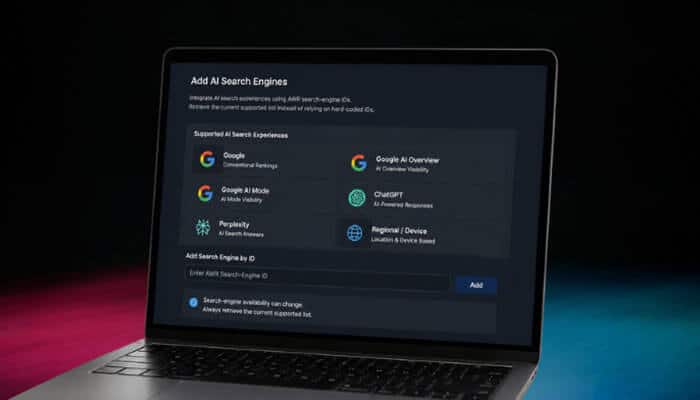
Supported AI-search experiences can be added to projects through their AWR search-engine IDs.
Depending on current availability, projects may compare:
- Conventional Google rankings
- Google AI Overview visibility
- Google AI Mode visibility
- ChatGPT responses
- Perplexity responses
- Regional search engines
- Device-specific search engines
Search-engine availability can change. Retrieve the current supported list instead of permanently relying on one hard-coded ID.
How Bulk SERP Exports Work
Ranking exports mainly show where tracked websites appear.
Bulk SERP exports provide broader information about the complete search-results environment.
The workflow is:
- Use export_serps to schedule the export.
- Save the returned filename and hash.
- Use get_serps to retrieve the completed information.
Use the general AWR endpoint for both actions.
The download request requires:
- Project name
- Filename
- Export hash
Bulk SERP Export Use Cases
Bulk SERP information can support:
- Competitor discovery
- SERP-feature monitoring
- Ranking-URL audits
- Search-intent research
- Result-layout analysis
- Domain-overlap comparisons
- Historical SERP analysis
- Detection of new competitors
- Identification of dominant content formats
How to Use the Market Share API
The Market Share API uses a separate endpoint and a different set of action names.
| Action | Returned Data |
|---|---|
getProjects |
Project IDs and names |
getSearchEngines |
Search engine IDs |
getKeywordGroups |
Keyword group IDs |
getWebsites |
Main and competitor websites |
getMetadata |
Market Share performance metrics |
getDomainKeywords |
Keywords associated with a domain |
getDomainUrls |
Ranking URLs for a domain |
getUrlKeywords |
Keywords associated with a URL |
Market Share data may include:
- Market share
- Estimated visits
- Click share
- Visibility
- Ranking keyword counts
- Ranking URL counts
Practical Market Share Workflow
- Retrieve the available projects.
- Select a project ID.
- Retrieve search engines.
- Retrieve keyword groups.
- Retrieve websites and competitors.
- Request Market Share metadata.
- Identify a competitor gaining visibility.
- Retrieve the competitor’s ranking keywords.
- Retrieve its strongest URLs.
- Analyze keywords associated with a selected URL.
On-Demand Ranking Update Speeds
The on-demand action can request updates for one project, several projects, or all projects.
| Speed | Documented Delivery Target |
|---|---|
| Slow | Within 48 hours |
| Fast | Within 12 hours |
| Ultrafast | Within 1 hour |
Before requesting an update, use the estimation action to review expected keyword-unit consumption.
Faster updates may be useful after:
- Website migrations
- Major technical corrections
- Product launches
- Important content releases
- Search-algorithm changes
- Urgent client requests
- Significant competitor changes
Routine reports may not require ultrafast processing.
How Asynchronous Exports Work
Several AWR operations schedule an export instead of returning the complete dataset immediately.
A reliable workflow is:
- Submit the scheduling request.
- Save all returned identifiers.
- Wait before checking the file.
- Retry the download request at controlled intervals.
- Stop after a defined retry limit.
- Download the completed archive.
- Confirm its format and size.
- Validate the expected columns.
- Store the original raw file.
- Load normalized records into the reporting system.
Do not repeatedly schedule the same export while waiting. The original job may still be processing.
Recommended Data-Warehouse Structure
A clean data model separates descriptive information from measurable performance data.
Dimension Tables
| Table | Example Fields |
|---|---|
| Projects | Project ID, name, and primary domain |
| Keywords | Keyword ID, text, and group |
| Search Engines | Engine ID, market, and device |
| Websites | Website ID, domain, and competitor status |
| Dates | Date, week, month, and quarter |
| Pages | URL, directory, and content type |
Fact Tables
| Table | Example Metrics |
|---|---|
| Ranking Facts | Position, pixel position, and click share |
| Visibility Facts | Visibility score and estimated visits |
| Keyword Facts | Search volume, keyword difficulty, and search intent |
| Market Share Facts | Market share, ranking URLs, and ranking keywords |
| AI Response Facts | Mentions, citations, and inline links |
| SERP Feature Facts | Feature type, presence, and ownership |
This structure makes it easier to combine AWR information with analytics, conversions, revenue, and customer data.
Advanced SEO Use Cases
Automated Client Dashboards
Agencies can send rankings, visibility, competitor metrics, SERP features, and AI citations to branded client dashboards.
Content-Decay Detection
A scheduled process can identify pages losing:
- Rankings
- Visibility
- Click share
- Ranking keywords
- SERP features
- AI citations
SEO Forecasting
Ranking, search-volume, CTR, conversion, and revenue assumptions can be combined to estimate the potential value of improving a keyword group.
Competitor Intelligence
Market Share and SERP exports can reveal:
- Competitors gaining visibility
- Their strongest pages
- Keywords associated with those pages
- SERP features they occupy
- AI responses in which they appear
- New domains entering the market
AI-Search Visibility Monitoring
AI-response data can help track company mentions, links, and citations across supported search experiences.
Project Quality Control
An agency can automatically verify that every project contains:
- The correct primary website
- Required competitors
- Approved keyword groups
- Correct search engines
- Appropriate update frequency
- Recent ranking data
Data Warehousing
Daily or weekly exports can be stored in systems such as BigQuery, Snowflake, PostgreSQL, or another analytical database for long-term reporting.
Advanced Web Ranking API vs. Other AWR Integrations
A custom API integration is not always the best option.
| Option | Best Use |
|---|---|
| Developer API | Custom applications and automated pipelines |
| Looker Studio Connector | Low-code reporting dashboards |
| MCP Connection | Natural-language interaction with AWR data |
| BigQuery Integration | Large-scale scheduled data storage |
| Manual Exports | Occasional analysis |
Use the Developer API when an organization needs control over:
- Data storage
- Custom calculations
- Historical models
- Validation rules
- Internal applications
- Multi-client automation
- Proprietary business-data integration
Use a reporting connector when the main goal is visualization and a custom extraction system is unnecessary.
Advanced Web Ranking API Limitations
- Request Limits: Most actions have an hourly request limit. Some project and export operations have more restrictive limits.
- Keyword-Unit Consumption: Project changes, ranking updates, and keyword-difficulty updates may consume subscription resources.
- Asynchronous Processing: A successful scheduling response does not mean the file is immediately available.
- Live Account Changes: Create, update, and delete requests affect the connected AWR account.
- Data Availability: Ranking information becomes available only after the relevant update has completed.
- Platform-Specific AI Structures: Different AI-search platforms may use different response fields and hierarchies.
- Historical Restrictions: Some Market Share actions accept only supported historical dates.
- Changing Capabilities: Search-engine IDs, plan access, limits, and endpoint parameters may change. Production systems should use configurable settings instead of permanently embedding every value.
Advanced Web Ranking API Best Practices
- Keep authentication on the server.
- Rotate the token after suspected exposure.
- Cache stable project and filter IDs.
- Avoid permanently hard-coding search-engine IDs.
- Use incremental exports.
- Estimate usage before triggering large updates.
- Validate dates before scheduling exports.
- Use controlled backoff for pending files.
- Set a maximum retry count.
- Preserve raw files before transforming them.
- Separate extraction from reporting.
- Test destructive actions in a non-critical project.
- Alert administrators after repeated failures.
- Maintain an audit record of project changes.
- Validate schemas before loading data.
- Prevent duplicate records.
- Encrypt sensitive credentials.
Separating extraction, transformation, and reporting makes failures easier to diagnose.
A dashboard error should not automatically cause the extraction system to send repeated API requests.
Common Advanced Web Ranking API Errors
| Error | Likely cause | Recommended response |
| Invalid token | Incorrect authentication | Reload or rotate the token |
| Project not found | Wrong project name or ID | Retrieve the current project list |
| Invalid date | Unsupported ranking date | Check available dates |
| Insufficient units | Request exceeds account capacity | Reduce the update scope |
| Export in progress | File is still being generated | Retry after waiting |
| Duplicate export | An identical export exists | Use the existing export reference |
| Missing filename | Download information was not stored | Save the scheduling response |
| Missing hash | SERP request is incomplete | Use the returned hash |
| Invalid action | Wrong action for the endpoint | Review the selected API area |
| Temporary error | Processing problem | Retry a limited number of times |
| Unexpected structure | Response format changed | Preserve raw data and investigate |
Integrations should evaluate response codes, required fields, and returned content rather than depending on one exact error sentence.
Pre-Launch Implementation Checklist
Before launching an integration, verify that:
- The API token is secure.
- The correct endpoint is being used.
- Project names and IDs are not confused.
- Dates are validated.
- Export identifiers are stored.
- Download retries are limited.
- Logs do not reveal the token.
- Downloaded files are validated.
- Duplicate records are prevented.
- Original exports are retained.
- Destructive actions require extra checks.
- Request limits are monitored.
- Keyword-unit usage is estimated.
- Failure alerts are configured.
- Official documentation is reviewed regularly.
Conclusion: Advanced Web Ranking API
The Advanced Web Ranking API can transform AWR from a standalone rank-tracking platform into a central source of SEO, competitor, SERP, and AI-search intelligence.
It can automate project management, export detailed ranking data, trigger fresh updates, retrieve Market Share information, analyze complete SERPs, and incorporate AI-response mentions and citations into reporting systems.
Start with a secure read-only request and test one complete asynchronous ranking export. Once that workflow becomes reliable, expand gradually into visibility, Search Console, click share, search volume, keyword difficulty, Market Share, bulk SERP exports, and AI-response analysis.
The best integration is not the one that sends the most requests. It is the one that retrieves only the necessary information, validates every response, protects credentials, respects API limits, and converts raw search data into decisions that improve organic and AI-search visibility.
Advanced Web Ranking API FAQs
1. Is the Advanced Web Ranking API available on every plan?
Developer API access is available with yearly subscriptions and eligible monthly plans. Verify current plan requirements before building a production integration.
2. Is There an Additional Fee for API Calls?
AWR does not generally charge a separate fee for every request. However, ranking updates and other resource-intensive actions may consume subscription keyword units.
3. Does the API Provide Real-Time Rankings?
Not necessarily. The API returns information from completed ranking updates. On-demand updates can be requested at different speeds, but they are not instantaneous.
4. Can the Advanced Web Ranking API Track AI Search?
Yes. Supported AI-response exports may include generated snippets, mentions, citations, and inline links.
5. Can AWR Export Complete SERP Information?
Yes. The bulk SERP workflow schedules the export first and then retrieves the completed data using the returned filename and hash.
6. What Is the Difference Between Ranking and Market Share Data?
Ranking exports focus on positions for tracked keywords, websites, search engines, and dates. Market Share data compares domains using visibility, click share, estimated visits, ranking keywords, and ranking URLs.
7. Can ChatGPT and Google AI Experiences Be Added Through the API?
Supported AI and search experiences can be added using current AWR search-engine IDs. Verify the latest supported engine list before updating a project.
8. Why Is an Export Not Downloading Immediately?
The export may still be processing. Save the returned identifier and retry the related download operation after waiting.
9. Should I Use the API or Looker Studio?
Use the API for custom applications, data storage, transformations, and automated workflows. Use Looker Studio when the main objective is creating visual reports with less development.
10. How Should an Agency Begin an AWR Integration?
Begin with a read-only project-details request. Then test one ranking export from scheduling through download before adding project updates, Market Share analysis, SERP exports, or AI-response reporting.
