



Instagram lets creators and businesses direct followers to online stores, blogs, newsletters, booking pages, affiliate offers, and other websites. However, understanding how to see who clicks on your Instagram link is more complicated than checking who liked a post, followed your account, or viewed a Story.
Instagram may show aggregate information such as profile visits, website actions, Story link taps, views, reach, and interactions. What it does not normally provide is a username-by-username report identifying every person who clicked an external link.
For example, Instagram might show that your Story generated 80 link taps. You may also see which accounts viewed that Story, but Instagram does not identify the 80 viewers who tapped the link.
The most reliable way to measure Instagram traffic is to combine Instagram Insights with unique UTM parameters, Google Analytics 4, short-link analytics, and conversion tracking.
This guide explains what Instagram actually shows in 2026, how to check your available link metrics, and how to track website visitors without relying on unsafe “profile visitor” applications.
Quick Answer: How to See Who Clicks on Your Instagram Link
When people search for how to see who clicks on your Instagram link, they often expect Instagram to show a list of usernames. Instagram does not normally provide such a list.
Depending on your account type and available features, Instagram may show aggregate measurements such as:
- Profile visits
- Website clicks or external-link activity
- Story link taps
- Views
- Accounts reached
- Interactions
- Accounts engaged
- Advertisement results
These totals show how much activity occurred, but not the identity of every person responsible for it.
For deeper tracking, create a separate UTM-tagged URL for each Instagram placement and analyze the resulting traffic in Google Analytics. A reputable short-link or link-in-bio service can provide additional data about clicks, devices, referrers and approximate locations.
However, these tools do not automatically receive a visitor’s Instagram username. A visitor normally becomes identifiable only after voluntarily submitting a form, completing a purchase, creating an account, or contacting you directly.
Key Takeaways
- Instagram does not provide a named list of bio-link clickers.
- Story viewers are not the same as Story link clickers.
- Creator and business accounts receive broader analytics than personal accounts.
- Instagram allows users to add up to five profile links.
- Unique UTM parameters can separate bio, Story, collaboration and advertising traffic.
- Google Analytics shows what visitors do after reaching your website, not their Instagram usernames.
- Short-link services provide aggregate click information rather than verified identities.
- Leads, sales, bookings and revenue are more meaningful than raw click totals.
What Each Instagram Tracking Method Can Show
| Tracking method | What it can show | Can it reveal Instagram usernames? |
| Instagram Insights | Views, reach, interactions, profile activity and Story link taps | No |
| Story viewer list | Accounts that viewed the Story | Not which viewers clicked |
| Google Analytics 4 | Sessions, campaigns, landing pages, events and revenue | No |
| UTM parameters | Traffic source, placement and campaign | No |
| Short-link analytics | Clicks, referrers, devices and approximate locations | No |
| Link-in-bio analytics | Page views and button clicks | Usually no |
| Lead form or checkout | Information voluntarily submitted by a visitor | Potentially |
| CRM | Identified leads, sales stages and customer value | Only after identification |
How to See Who Clicks on Your Instagram Link
Instagram does not offer a standard report showing the names or usernames of everyone who clicked an external link.
Instagram Insights focuses on aggregate account and content performance, including:
- Views
- Reach
- Interactions
- Engaged accounts
- Follower trends
- Profile activity
- Story performance
- Advertisement results
Professional users can review overall trends and results for individual posts, Stories, Reels and live videos. However, Instagram does not normally connect each external-link click to a specific Instagram account.
Instagram might show results such as:
- 2,000 profile visits
- 260 external website actions
- 120 Story link taps
- 40 new followers
- 15 direct-message replies
However, Instagram will not normally identify:
- Which 260 users selected a profile link
- Which Story viewers tapped the link sticker
- Which follower repeatedly opened your website
- Which visitor selected a particular profile link
- Which Instagram user completed a purchase
Website analytics can provide more information about sessions, pages, and conversions. However, the visitor’s Instagram username is not automatically passed to the destination website.
What Instagram Actually Shows in 2026
The metrics available to you can vary according to:
- Account type
- Content format
- App version
- Device
- Country
- Feature rollout
- Organic or paid distribution
- Selected reporting period
Personal accounts may receive limited dashboard information, while creator and business accounts have access to broader professional tools and Insights.
A typical Instagram dashboard may include:
| Instagram measurement | What it indicates | Identifies individual clickers? |
| Views | Times eligible content was displayed or played | No |
| Accounts reached | Estimated unique accounts that saw the content | No |
| Interactions | Likes, comments, saves, shares and similar activity | Not for external links |
| Accounts engaged | Unique accounts that interacted with content | No |
| Profile visits | Visits to your Instagram profile | No |
| Website or external-link activity | Aggregate website actions when available | No |
| Story link taps | Aggregate taps on a Story link sticker | No |
| Followers | Audience growth and follower trends | No |
| Advertisement results | Results attributed to paid content | No public username list |
| Story viewers | Accounts that viewed a Story | Viewers only |
Instagram may use different labels for link-related activity, including:
- Website clicks
- External-link taps
- Link taps
- Profile activity
- Website activity
- External-link activity
Tap the information icon beside a metric to confirm exactly what your current version of Instagram includes before using that number in a formal campaign report.
Story Viewers Are Not Story Link Clickers
A Story viewer list does not prove who clicked an external link.
When you publish a Story containing a link sticker, Instagram may provide two separate sets of information:
- Accounts that viewed the Story
- The total number of link taps
Instagram does not normally connect these data sets or mark the viewers who selected the sticker.
Consider this example:
| Story result | Total |
| Story viewers | 2,000 |
| Accounts reached | 1,850 |
| Link taps | 140 |
| Replies | 18 |
| Profile visits | 75 |
You may see the Story viewer list, but Instagram will not normally place a link symbol beside the 140 people who clicked.
A visitor can be connected to the campaign only after taking an identifiable action, such as:
- Sending a direct message
- Submitting a lead form
- Using a unique discount code
- Booking an appointment
- Completing a purchase
- Creating a website account
- Voluntarily entering an Instagram username
The order of names in a Story viewer list is not evidence that someone tapped your link.
Personal vs Professional Instagram Analytics
Personal, creator, and business accounts may receive different dashboards and tools.
| Account type | Dashboard information | Professional tools | Named clicker list |
| Personal | Limited information may be available | No | No |
| Creator | Yes | Yes | No |
| Business | Yes | Yes | No |
A creator or business account is more suitable when you need to:
- Measure campaign performance
- Track audience trends
- Compare posts, Reels and Stories
- Review advertisement results
- Access business or creator tools
- Report performance to clients or sponsors
None of these account types provides a username-by-username list of people who clicked an external link.
How to Switch to a Professional Instagram Account
To switch from a personal account:
- Open the Instagram mobile app.
- Go to your profile.
- Tap the menu icon.
- Open Settings and activity.
- Select Account type and tools.
- Choose the option to switch to a professional account.
- Select Creator or Business.
- Complete the category and contact-information prompts.
Choose a creator account when the profile primarily represents:
- A content creator
- Influencer
- Artist
- Public figure
- Coach
- Personal brand
Choose a business account when the profile represents:
- A company
- Online store
- Agency
- Local business
- Service provider
- Organization
Instagram’s menu names can vary slightly according to your account, device, and app version.
How to See How Many People Click Your Instagram Profile Link
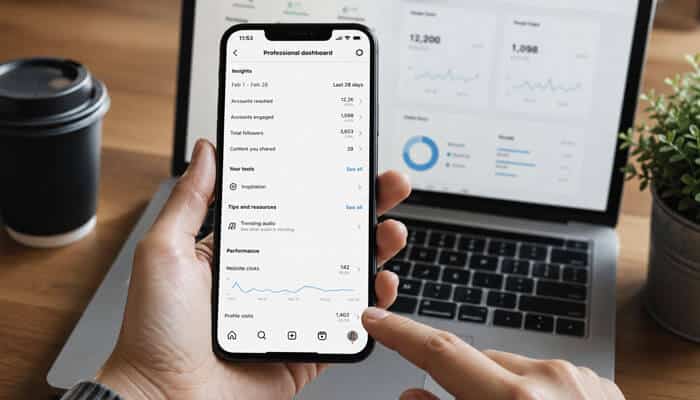
Although Instagram does not show individual clicker identities, it may show the total amount of link-related activity.
The exact metric may not appear on every account, but the general process is:
- Open your Instagram profile.
- Tap Insights, Your Dashboard, or Professional Dashboard.
- Choose the required reporting period.
- Open your profile or account activity.
- Look for website, external-link or link-related activity.
- Tap the information icon beside the metric.
- Confirm whether it represents website clicks, contact actions or a broader group of profile interactions.
Check the Metric Definition
Do not automatically assume that every metric containing the word “profile” or “link” represents an external website visit.
Instagram profiles may also include:
- Email buttons
- Call buttons
- Text buttons
- Directions
- Booking actions
- Other contact options
Read Instagram’s definition before calling the number “website clicks” in a report.
Calculate Your Profile Link Click-Through Rate
When Instagram provides both profile visits and external-link actions, calculate:
Profile link click-through rate = External-link actions ÷ Profile visits × 100
Example:
- Profile visits: 2,500
- External-link actions: 300
300 ÷ 2,500 × 100 = 12%
The estimated profile link click-through rate is 12%.
This percentage is more useful than the total number of clicks because it shows how effectively your bio, offer and call to action persuade profile visitors to leave Instagram.
Treat the result as an estimate because Instagram’s metrics and definitions may vary across reporting screens.
How to Check Instagram Story Link Taps
Instagram’s link sticker allows a Story creator to direct viewers to an external website.
To review an active Story:
- Open the Story.
- Tap Activity.
- Select Insights.
- Review the available views, reach, and interaction measurements.
- Look for link taps or link-related activity.
For an older Story:
- Open your professional dashboard or Insights.
- Select Content you shared.
- Choose the Story.
- Review the available performance data.
The viewer list and link-tap total remain separate. A Story with 100 link taps does not provide the names of those 100 clickers.
Instagram Allows Up to Five Profile Links
Instagram currently lets users add up to five websites to a profile.
Possible destinations include:
- Online store
- Latest article
- Newsletter signup
- Booking page
- Portfolio
- Podcast
- Course
- Affiliate offer
To add a website:
- Open your Instagram profile.
- Tap Edit profile.
- Select Links.
- Tap Add external link.
- Enter the URL.
- Add a clear title.
- Save the link.
- Reorder your links when necessary.
The main limitation is that Instagram’s native account-level reporting may not clearly compare every destination. Unique tracking URLs make individual links easier to measure.
How to Track Each Instagram Profile Link Separately
Create a different UTM-tagged URL for every destination.
| Profile destination | Recommended utm_content |
| Online store | profile_store |
| Newsletter | profile_newsletter |
| Booking page | profile_booking |
| Portfolio | profile_portfolio |
| Latest article | profile_article |
Store Link
https://example.com/store?utm_source=instagram&utm_medium=organic_social&utm_campaign=profile_links&utm_content=profile_store
Newsletter Link
https://example.com/newsletter?utm_source=instagram&utm_medium=organic_social&utm_campaign=profile_links&utm_content=profile_newsletter
Booking Link
https://example.com/book?utm_source=instagram&utm_medium=organic_social&utm_campaign=profile_links&utm_content=profile_booking
Google Analytics can then separate store visits from newsletter signups and booking-page visits.
You still cannot see each visitor’s Instagram username, but you can identify the destination that produces the most sessions, leads and sales.
How to Track Instagram Links With UTM Parameters
UTM parameters are tracking labels added to a destination URL.
They help Google Analytics identify where a website visit came from and which placement or campaign generated it.
| Parameter | Purpose | Example |
| utm_source | Identifies the platform | |
| utm_medium | Identifies the channel | organic_social |
| utm_campaign | Identifies the promotion | summer_launch |
| utm_content | Identifies the placement or creative | bio_primary |
| utm_term | Optional keyword or audience label | existing_followers |
| utm_id | Optional campaign identifier | sl_2026 |
Instagram Bio Example
https://example.com/product?utm_source=instagram&utm_medium=organic_social&utm_campaign=summer_launch&utm_content=bio_primary
Instagram Story Example
https://example.com/product?utm_source=instagram&utm_medium=organic_social&utm_campaign=summer_launch&utm_content=story_demo
Creator Collaboration Example
https://example.com/product?utm_source=instagram&utm_medium=influencer&utm_campaign=summer_launch&utm_content=creator_name
Instagram Advertisement Example
https://example.com/product?utm_source=instagram&utm_medium=paid_social&utm_campaign=summer_launch&utm_content=video_ad_1
UTM Naming Best Practices
Use a consistent naming system across all campaigns.
- Use lowercase values.
- Avoid spaces.
- Separate words with underscores or hyphens.
- Use Instagram consistently as the source.
- Separate paid and organic traffic.
- Assign a unique utm_content value to each placement.
- Keep campaign names short but understandable.
- Record every URL in a campaign spreadsheet.
- Do not change the naming structure halfway through a campaign.
A practical naming system is:
| Traffic type | Source | Medium |
| Organic Instagram content | organic_social | |
| Instagram advertisement | paid_social | |
| Creator collaboration | influencer | |
| Direct-message campaign | dm |
Consistent naming prevents one campaign from being divided across several rows in Google Analytics.
How to Find Instagram Traffic in Google Analytics 4
After publishing your tagged link:
- Open your GA4 property.
- Go to Reports.
- Select Acquisition.
- Open Traffic acquisition.
- Change the primary dimension to:
- Session source
- Session medium
- Session source/medium
- Session campaign
- Search for Instagram.
- Add a secondary dimension for the landing page, campaign or manual ad content.
What Google Analytics Can Show
GA4 can help you determine:
- How many sessions came from Instagram
- Which Instagram placement attracted visitors
- Which campaign performed best
- Which landing pages received traffic
- How engaged visitors were
- Whether visitors submitted a form
- Whether visitors subscribed
- Whether products were added to a cart
- Whether purchases were completed
- How much revenue was generated
What Google Analytics Cannot Show
Google Analytics does not automatically receive:
- The visitor’s Instagram username
- The visitor’s follower status
- The visitor’s position in a Story viewer list
- The exact Instagram profile that clicked
- Private Instagram account information
It measures website activity, not named Instagram identities.
How to Test Instagram Tracking in GA4
Test each important URL before publishing it.
Use the Realtime Report
- Open your UTM-tagged URL on a mobile device.
- Open Reports and then Realtime in GA4.
- Confirm that an active user appears.
- Look for the source, medium, or campaign.
- Visit key pages and complete a test action.
Use DebugView
DebugView displays events and user properties as Google Analytics collects them from a debug-enabled device.
Use it to test events such as:
- page_view
- view_item
- generate_lead
- sign_up
- add_to_cart
- begin_checkout
- purchase
Google calls an event that measures an action important to a business a key event. DebugView can help confirm that these events are being collected correctly.
How to Track Instagram Links With a Short-Link Service
A short-link service records an engagement before redirecting the visitor to the final destination.
Depending on the platform and subscription, analytics may include:
- Total engagements
- Clicks over time
- Referrers
- Devices
- Countries or cities
- Top-performing links
- Link-in-bio button activity
Recommended Setup
First, create the complete UTM-tagged URL:
https://example.com/offer?utm_source=instagram&utm_medium=organic_social&utm_campaign=summer_offer&utm_content=bio
Then shorten the complete URL:
https://brand.link/summer
This creates two measurement layers:
- The short-link service records the redirect or engagement.
- Google Analytics records the website session and subsequent behavior.
Can Short Links Reveal Instagram Usernames?
No. Short-link platforms may show aggregate technical and location information, but they do not automatically receive the Instagram username connected to each click.
Approximate location data should not be treated as proof that a particular follower selected your link.
Direct Profile Links vs Link-in-Bio Pages
Instagram’s five-link feature gives users an alternative to a separate link-in-bio landing page.
| Setup | Main advantage | Main limitation |
| Direct profile links | Fewer steps before the destination | Native per-link reporting may be limited |
| Link-in-bio page | Easier button-level comparison | Adds another page |
| One campaign link | Concentrates attention on one action | Older content may refer to a changed destination |
| Branded landing page | Full design and analytics control | Requires website setup |
| Shortened campaign link | Easy to share and measure | Depends on a redirect provider |
Use Direct Profile Links When
- You have one or two important destinations.
- Reducing friction is the main priority.
- The destination pages work well on mobile.
- Each destination uses unique UTM parameters.
Use a Link-in-Bio Page When
- You regularly promote several resources.
- You need button-level analytics.
- Your content covers several topics.
- You want one permanent profile URL.
- You frequently change campaign destinations.
Do not display unnecessary buttons simply because space is available. Put the most important destination first.
Advanced Tracking for Instagram Advertisements
Organic profile and Story links use account or content Insights. Paid Instagram advertisements use Meta Ads Manager and website-event tracking.
Important Paid-Ad Metrics
| Metric | What it measures |
| Link clicks | Clicks on links associated with the advertisement |
| Outbound clicks | Clicks that take people away from Meta |
| Landing-page views | Visits where the external page successfully loaded |
| Results | Actions associated with the selected objective |
| Cost per result | Average amount spent for each result |
| Leads or purchases | Tracked website outcomes |
| Return on ad spend | Revenue compared with advertising cost |
Landing-page views are often more useful than raw clicks when your goal is actual website traffic. Someone can click an advertisement but close the destination before it finishes loading.
For lead or sales campaigns, prioritize:
- Qualified leads
- Completed registrations
- Appointment bookings
- Purchases
- Cost per acquisition
- Revenue
- Return on advertising spend
Meta Pixel
Meta Pixel measures actions people take on a website after interacting with Meta advertising.
Common events include:
- Page views
- Product views
- Leads
- Registrations
- Add-to-cart actions
- Checkout starts
- Purchases
Conversions API
Conversions API creates a connection between a business’s marketing data and Meta’s advertising systems.
A measured customer journey might look like:
Instagram ad → Landing-page view → Product view → Add to cart → Checkout → Purchase
Meta Pixel and Conversions API do not provide creators with a username-by-username list of organic profile or Story link clickers.
Privacy note: Follow applicable privacy, cookie-consent, and data-protection requirements when collecting website analytics or identifiable customer information. Do not use approximate data to guess or expose an anonymous visitor’s identity.
How to Identify Instagram Leads Without Invading Privacy
You cannot force an anonymous website visitor to reveal an Instagram identity. You can invite visitors to provide information voluntarily.
Use a Short Lead Form
Request only the details needed to respond:
- Name
- Email address
- Phone number when necessary
- Company
- Reason for contacting you
- Optional Instagram username
Do not require an Instagram username unless it is genuinely necessary.
Create an Instagram Landing Page
An Instagram-specific landing page should include:
- A clear headline
- One primary offer
- A short benefit-focused explanation
- Relevant proof
- A form or purchase button
- One strong call to action
A dedicated page makes Instagram traffic and conversions easier to analyze.
Use an Instagram-Only Discount Code
Example:
INSTAGRAM10
A customer using the code can be attributed to the Instagram campaign even when the original website session was not recorded correctly.
Ask How the Customer Found You
Add this question to your checkout or contact form:
How did you hear about us?
Possible answers:
- TikTok
- YouTube
- Friend or referral
- Other
Self-reported attribution is imperfect, but it adds useful context to your analytics.
Why Instagram and Google Analytics Numbers Do Not Match
Different platforms measure different events.
| Platform | What it may count |
| A tap inside Instagram | |
| Short-link service | A redirect or link engagement |
| Google Analytics | A successfully processed session or event |
| Ecommerce platform | A store session, checkout or order |
| CRM | An identified lead or customer |
| Meta Ads Manager | Ad clicks, landing-page views and attributed results |
Numbers may differ because:
- A visitor closes the page before it loads.
- The website loads slowly.
- Analytics scripts are blocked.
- The visitor rejects analytics consent.
- A redirect removes tracking parameters.
- One person clicks several times.
- A security service checks the link.
- The URL is shared outside Instagram.
- Reporting time zones differ.
- Date ranges do not match.
- One report counts users while another counts sessions.
- Attribution rules differ.
- One platform counts taps while another counts loaded pages.
A reasonable discrepancy does not automatically mean that one reporting system is broken.
Pre-Launch Instagram Tracking Checklist
Complete this checklist before publishing an important link:
- Open the link on a mobile device.
- Confirm that the correct page loads.
- Verify that the website uses HTTPS.
- Check every UTM parameter for spelling errors.
- Confirm that redirects preserve the parameters.
- Test the link inside Instagram’s in-app browser.
- Confirm that the destination is mobile-friendly.
- Open GA4 Realtime.
- Verify that the visit appears.
- Use DebugView to test key events.
- Submit a test lead form.
- Complete a test checkout when possible.
- Confirm that a conversion is not recorded twice.
- Test the page on different devices.
- Remove test leads and orders from final reports.
Common Tracking Problems
| Problem | Likely cause | Recommended action |
| Instagram campaign does not appear | Missing or incorrect UTMs | Rebuild and test the URL |
| UTM parameters disappear | A redirect removes query parameters | Correct the redirect |
| Instagram shows more taps than GA4 visits | Page failed to load, or analytics was blocked | Check speed, consent and tags |
| A purchase appears twice | Duplicate browser and server events | Configure deduplication |
| Instagram traffic appears in several rows | Inconsistent capitalization | Use one lowercase naming system |
| Form submissions are missing | Key event is not configured | Create and test the event |
| Link opens the wrong page | Old short-link destination | Update and retest the redirect |
How to Measure Instagram Link Quality
Raw click totals do not reveal whether the traffic produced valuable outcomes.
Profile Link Click-Through Rate
External-link actions ÷ Profile visits × 100
This estimates how effectively your profile encourages visitors to open a link.
Landing-Page Conversion Rate
Conversions ÷ Instagram landing-page sessions × 100
A conversion might be:
- Purchase
- Lead
- Booking
- Download
- Email subscription
- Registration
Cost per Conversion
For paid campaigns:
Advertising cost ÷ Conversions
Revenue per Instagram Session
Instagram-attributed revenue ÷ Instagram sessions
Lead-to-Customer Rate
Customers from Instagram leads ÷ Total Instagram leads × 100
A campaign producing 100 relevant visitors and 10 purchases may be more valuable than one producing 2,000 clicks and no sales.
How to Improve Instagram Link Clicks
Use a Specific Bio Call to Action
Weak examples:
- Click here
- Learn more
- Visit our website
Stronger examples:
- Download the free pricing guide
- Book your consultation
- Shop the new collection
- Read the complete tutorial
- Get the free checklist
- Join the weekly newsletter
Tell visitors exactly what they will receive.
Match the Destination to the Content
A Reel about one product should direct visitors to that product rather than a generic homepage.
A Story promoting a webinar should link directly to the registration page.
Reducing unnecessary steps can improve conversion performance.
Put the Most Important Link First
When using several profile links, place the main campaign destination first.
Use a clear, benefit-driven title, such as:
- Download the Free Guide
- Shop New Arrivals
- Book a Consultation
- Read the Latest Article
Reduce Unnecessary Choices
Instagram permits up to five website links, but displaying five competing offers may distract visitors.
Use fewer links when one campaign is the main priority.
Improve Story Link Stickers
Make the sticker:
- Easy to notice
- Large enough to tap
- Relevant to the Story
- Supported by a clear call to action
- Positioned away from interface controls
- Connected to a fast mobile page
Test One Variable at a Time
Possible tests include:
- Bio call-to-action wording
- Link title
- Story design
- Landing-page headline
- Offer
- Button text
- Product image
- Link order
- Video versus static Story
Use a different utm_content value for each variation.
Common Instagram Link-Tracking Mistakes
- Treating Story Viewers as Clickers
A Story viewer list does not identify who selected the link sticker.
- Reusing One Untagged URL Everywhere
You cannot compare bio, Story, collaboration and advertising traffic when every placement uses the same plain URL.
- Changing UTM Capitalization
Inconsistent naming can divide one campaign into several analytics rows.
- Measuring Clicks but Ignoring Conversions
Traffic has limited business value when visitors do not complete the intended action.
- Linking to a Slow or Irrelevant Page
A slow or poorly matched destination can cause visitors to leave before analytics records the session.
- Treating Location Data as Identity
A city, device, or referrer does not prove that a particular follower clicked your link.
- Comparing Different Date Ranges
Use matching dates and time zones across Instagram, GA4, Ads Manager and short-link platforms.
- Assuming Every Account Has Identical Metrics
Instagram introduces features gradually, so dashboards and metric labels can differ.
- Avoid Apps Claiming to Reveal Every Instagram Clicker
Be cautious of applications promising to reveal:
- Exact bio-link clickers
- Hidden Story link clickers
- Secret profile visitors
- Anonymous Instagram stalkers
- People repeatedly checking your profile
- Private data unavailable inside Instagram
Warning signs include:
- Asking for your Instagram password
- Asking you to disable two-factor authentication
- Promising access to secret data
- Requiring unofficial software
- Producing unverifiable username lists
- Requesting excessive permissions
- Charging money before displaying supposed visitors
Use reputable analytics tools that measure destination URLs rather than applications claiming to expose private Instagram identities.
What Is Instagram Link History?
Instagram Link History is sometimes confused with creator analytics.
Link History allows an Instagram user to review websites that they personally visited through Instagram’s in-app browser. It does not allow a creator to see who clicked the creator’s links.
The difference is:
- Link History: Shows links you visited.
- Instagram Insights: Shows aggregate account and content performance.
- Named clicker list: Not provided for external Instagram links.
Recommended Instagram Tracking Setup
Basic Setup
Use:
- Instagram dashboard or Insights
- One clear profile link
- Monthly performance review
Best for creators who only need general traffic trends.
Intermediate Setup
Use:
- Creator or business account
- Unique UTM-tagged links
- Google Analytics 4
- Separate bio and Story URLs
- GA4 key events
- Campaign-tracking spreadsheet
Best for publishers, freelancers and small businesses.
Advanced Setup
Use:
- Instagram Insights
- Unique UTMs
- Branded short links
- Dedicated landing pages
- GA4 ecommerce or lead events
- Meta Pixel
- Conversions API
- CRM integration
- Campaign-specific coupon codes
- Revenue attribution
Best for ecommerce stores, agencies and businesses running paid campaigns.
Conclusion: How to See Who Clicks on Your Instagram Link
Understanding how to see who clicks on your Instagram link requires separating aggregate analytics from personal identity.
Instagram can show content performance, profile activity, Story results, and advertising outcomes. However, it does not normally reveal exactly which Instagram users clicked an external bio or Story link.
The most reliable tracking system combines:
- Instagram Insights for native performance
- UTM parameters for campaign attribution
- Google Analytics for website behavior
- Short-link analytics for link-level data
- Dedicated landing pages for conversions
- Forms and checkout data for voluntary identification
- Meta Pixel and Conversions API for paid campaigns
- CRM and revenue data for business outcomes
Do not try to uncover anonymous visitors through questionable tracker applications. Focus on which content, link placement, offer and call to action produce the most valuable result while respecting visitor privacy.
Clicks are only the first signal. Leads, purchases, bookings, registrations and revenue show whether your Instagram strategy is actually working.
How to See Who Clicks on Your Instagram Link FAQs
1. How to See Who Clicks on Your Instagram Link?
Instagram does not show the usernames of people who click your external links. When checking how to see who clicks on your Instagram link, you can only access total link activity such as website clicks, Story link taps, and profile actions through Instagram Insights. For deeper tracking, use UTM parameters, Google Analytics 4, and short-link analytics to measure traffic and conversions.
2. Can I See the Names of People Who Click My Instagram Bio Link?
No, Instagram does not provide a list of users who clicked your bio link. Even Creator and Business accounts only show aggregated data, such as the number of link clicks or website actions. Individual visitor identities remain hidden unless users voluntarily share their details through forms, purchases, or messages.
3. Does Instagram Show Who Clicked My Story Link Sticker?
No, Instagram does not reveal which specific Story viewers clicked your link sticker. You can view the total number of link taps and the accounts that viewed your Story separately, but Instagram does not connect those two data points.
4. How Can I Track Instagram Link Clicks More Accurately?
To track Instagram link performance accurately, use a combination of Instagram Insights, UTM-tagged URLs, Google Analytics 4, and link-tracking tools. These methods help you understand where visitors come from, which campaigns perform best, and whether clicks lead to sales, signups, or other conversions.
5. Are Apps That Show Instagram Link Clickers Real?
Most apps claiming to show exactly who clicked your Instagram link or visited your profile are unreliable. Instagram does not provide this information through official tools. Avoid apps that request your password or promise access to private visitor data, as they may risk account security.
