



AI-generated cat content is exploding right now—and if you’re serious about creating viral clips, choosing the right AI cat video generators is everything. Whether you’re building a TikTok page or experimenting with AI image to video, the tools you use will directly impact your results.
As someone who has tested dozens of platforms, I’ve narrowed it down to the 10 best tools for ai cat video creation in 2026—based on real usage, not just features.
Part 1. What Are the 10 Best AI Cat Video Generators in 2026?
Before diving into details of the AI cat video generators, here’s a quick comparison:
| Tool | Best For | Ease of Use | Output Quality | Platform |
| Pollo.ai | All-in-one creation | ⭐⭐⭐⭐⭐ | ⭐⭐⭐⭐⭐ | Web / iOS / Android |
| Luma Dream Machine | Smooth motion | ⭐⭐⭐⭐ | ⭐⭐⭐⭐ | Web |
| Runway (Gen-4) | Advanced control | ⭐⭐⭐ | ⭐⭐⭐⭐⭐ | Web |
| CapCut AI | Viral edits | ⭐⭐⭐⭐⭐ | ⭐⭐⭐⭐ | Web / Mobile |
| Kling AI | Long videos | ⭐⭐⭐ | ⭐⭐⭐⭐ | Web |
| Pika (Pro 2.0) | Meme content | ⭐⭐⭐⭐ | ⭐⭐⭐⭐ | Web |
| Canva AI | Templates | ⭐⭐⭐⭐⭐ | ⭐⭐⭐ | Web |
| Sora (OpenAI) | Complex scenes | ⭐⭐ | ⭐⭐⭐⭐⭐ | Limited |
| HeyGen | Talking cats | ⭐⭐⭐⭐ | ⭐⭐⭐⭐ | Web |
| Adobe Firefly | Commercial use | ⭐⭐⭐ | ⭐⭐⭐⭐⭐ | Web |
1. Pollo.ai — Best Overall AI Cat Video Generator
My experience:
This is the tool I keep coming back to. It feels like a control center for AI video rather than just a generator.
What stands out:
- Combines multiple top models
- Strong image to video and text to video
- Great motion realism
Pros:
- Beginner-friendly
- Consistent character output
- Works across web, iOS, Android
Cons:
- Advanced settings take time to master
Best for: Beginners to advanced creators who want flexibility
2. Luma Dream Machine — Best for Natural Motion
My experience:
When I tested image to video, Luma gave the smoothest motion—especially for jumping or running cats.
Pros:
- Realistic physics
- Clean animation
Cons:
- Limited creative control
Best for: Turning cat photos into lifelike clips
3. Runway (Gen-4) — Best for Precision Editing
My experience:
Runway feels like a professional editing suite. It’s powerful but not beginner-friendly.
Pros:
- Fine control over motion
- Advanced tools like motion brush
Cons:
- Steep learning curve
Best for: Creators who want detailed control
4. CapCut AI — Best for Viral Content
My experience:
Capcut AI — If your goal is TikTok virality, this is incredibly efficient. It almost “knows” what works.
Pros:
- Auto captions & beat sync
- Trend-focused templates
Cons:
- Less control over generation
Best for: Short-form creators
5. Kling AI — Best for Long-Form Cat Videos
My experience:
This surprised me. It handles longer storytelling better than most tools.
Pros:
- Long video generation
- Good consistency
Cons:
- Slower generation
Best for: Story-based cat content
6. Pika (Pro 2.0) — Best for Meme Animation
My experience:
This is where things get weird—in a good way. Perfect for exaggerated humor.
Pros:
- Fun effects
- Great for memes
Cons:
- Less realistic
Best for: Funny, chaotic cat videos
7. Canva AI — Best for Beginners
My experience:
This is the easiest tool I’ve tested. You can create something decent in minutes.
Pros:
- Drag and drop simplicity
- Built-in assets
Cons:
- Limited realism
Best for: Casual users
8. Sora (OpenAI) — Best for Cinematic Scenes
My experience:
The realism is on another level—but access is limited.
Pros:
- Complex scene generation
- High-end visuals
Cons:
- Not widely available
Best for: High-production projects
9. HeyGen — Best for Talking Cats
My experience:
This is different—it’s more about personality than visuals.
Pros:
- Voice + avatar sync
- Unique use cases
Cons:
- Not focused on full video generation
Best for: Cat influencers & storytelling
10. Adobe Firefly (Video Model) — Best for Professional Workflows
My experience:
Very polished and safe for commercial use.
Pros:
- Copyright-safe output
- Adobe integration
Cons:
- Less playful
Best for: Brands and agencies
Summary:
If you’re just starting out, I strongly recommend Pollo AI. It offers the best balance between ease of use, power, and flexibility, especially for AI image to video workflows.
Part 2. Why Should You Choose Pollo.ai Over Other Tools?
Pollo.ai isn’t just another tool—it’s more like an AI video creation agent that connects multiple leading models into one system.
What Makes It Different?
- Multi-model integration
- Advanced motion + camera controls
- High-quality rendering
- Supports both beginners and pros
Why I Personally Prefer It
1. Everything in One Place
Instead of switching between tools, I can do everything inside Pollo.ai—from idea to final export.
2. Better Results with Less Effort
Compared to other tools, I get usable results faster, with fewer retries.
3. More Control Without Complexity
I can adjust motion, camera, and style without needing technical knowledge.
4. Reliable Output Quality
Even with complex prompts, the results stay consistent—which is critical for building a channel.
5. Cross-Platform Flexibility
I’ve used it on both desktop and mobile, and the experience is surprisingly smooth.
Part 3. How Can You Create a Funny AI Cat Video Using Pollo.ai?
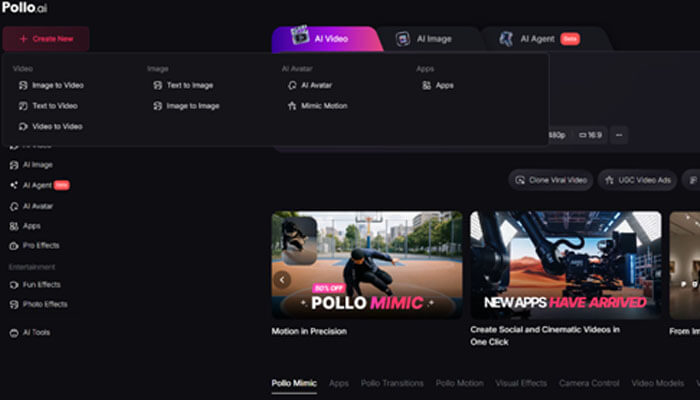
1. How to Use Image to Video for AI Cat Content?
Steps:
- Upload a cat image
- Add a simple motion prompt
- Adjust motion level
- Generate video
Example Prompt:
“The cat starts dancing dramatically under spotlight, funny expression”
2. How to Use Text to Video for Creative Scenes?
Steps:
- Open text to video
- Write a detailed prompt
- Select style and duration
- Generate and refine
Example Prompt:
“A cat wearing a suit yelling in an office meeting, cinematic lighting, close-up, 4K”
3. What Tips Help Make Videos Go Viral?
- Keep actions simple but exaggerated
- Use zoom or camera shake
- Add relatable captions after generation
- Focus on emotional or funny scenarios
FAQs
1. What is the best AI cat video generator?
Based on current tools and usability, all-in-one platforms with both text-to-video and image-to-video capabilities are considered the best because they allow flexible content creation without requiring editing skills.
2. Can I monetize AI cat videos on YouTube or TikTok?
Yes, but platforms require originality and added value. Simply generating repetitive AI clips may not qualify for monetization—you need unique storytelling or editing.
3. Is AI image to video better than text-to-video?
Image-to-video usually produces more consistent and realistic results, while text-to-video offers more creative freedom.
4. What makes an AI cat video go viral?
Strong hooks, exaggerated humor, and relatable scenarios are the most important factors for viral success.
Conclusion
The rise of ai cat content has made video creation faster and more accessible than ever. With the right AI cat video generator, you can produce viral content in minutes.
If you’re just getting started, go with Pollo.ai—it’s the most balanced and beginner-friendly option available today.
References
- Industry testing of AI video generation tools (2026)
- Creator community discussions and platform policies
- Practical experiments with AI image-to-video workflows
