


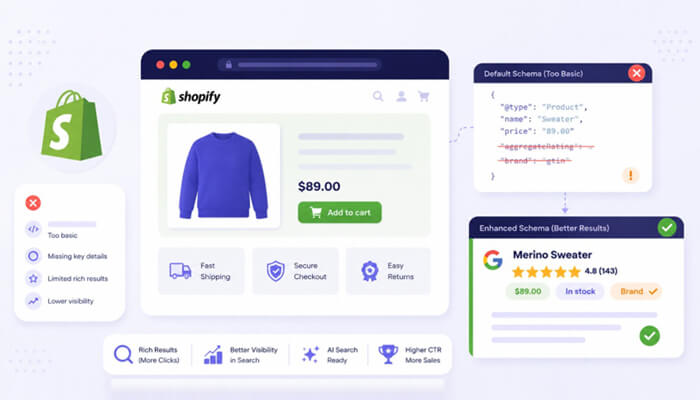

Getting clicks from Google depends a lot on how your store appears in search results. Product listings with star ratings, pricing, stock status, and FAQs usually stand out more than plain search results. While Shopify Default Schema Markup is included by default, it only covers basic structured data and often misses the details needed for stronger visibility in search.
A proper Shopify schema markup tool helps add the missing structured data that improves rich results, supports AI-driven search experiences, and makes product listings more informative. In this post, we’ll break down what Shopify’s default schema leaves out, how it affects SEO performance, and what a complete schema setup should actually include.
What Shopify’s Default Schema Includes
Modern Shopify themes, specifically Dawn v15.0 and above, do include basic Product schema through the structured_data Liquid filter. A single line in the product template generates a JSON-LD block covering:
- Product name
- Price
- Image
- Basic availability (sometimes)
That sounds reasonable. The problem is what’s missing. And the list of what’s missing is long.
The Critical Gaps in Shopify’s Default Schema
Shopify’s default schema setup leaves out several important details –
No AggregateRating Markup
Shopify doesn’t automatically output AggregateRating schema even when a store has dozens of verified reviews. Without it, Google cannot display star ratings in search results.
Rich results with star ratings and pricing achieve 82% higher click-through rates than standard listings. Every product page running without review schema is leaving that CTR improvement on the table.
Missing Brand and GTIN Properties
Even when the vendor field is filled in Shopify’s admin, the brand property is frequently absent from the generated schema. Similarly, GTIN (Global Trade Item Number) and mpn identifiers are rarely included, yet these are essential for Google Shopping eligibility and for AI engines to accurately match products across sources.
Incomplete Variant-Level Data
For stores selling products in multiple sizes, colors, or styles, Shopify’s default output often treats all variants as a single product block. Google’s ProductGroup schema allows each variant to be marked up with its own identifier, price, and availability. Without it, a store selling a shirt in 12 sizes might show one availability status that doesn’t reflect what’s actually in stock.
No FAQ, HowTo, or BreadcrumbList Schema
Collection pages, the homepage, blog posts, and About pages typically receive zero structured data from Shopify’s default setup. The FAQPage schema can expand a search listing with an accordion-style Q&A directly in the SERP, pushing competitors further down the page. BreadcrumbList schema helps Google display navigation paths that build user trust before a click. Neither comes standard.
Collection Pages Often Lack Structured Data
Shopify’s default schema touches product pages almost exclusively. Collection pages, which often rank for high-intent category keywords, get no CollectionPage or ItemList schema. Google is left to infer page structure from raw HTML, reducing the chance of enhanced search features appearing for those URLs.
Why This Matters More Now Than It Did Two Years Ago
The way search engines understand and display e-commerce stores has changed significantly, making complete and accurate schema markup more important than ever
AI Search Has Raised the Bar
Google AI Overviews, ChatGPT Shopping, and Perplexity all rely on structured data to surface product recommendations confidently. LLMs grounded in knowledge graphs achieve 300% higher accuracy compared to those relying solely on unstructured text. Microsoft has confirmed directly that schema markup helps their LLMs understand content. When a shopper asks an AI assistant, “Does this brand ship internationally?” or “Is this product good for sensitive skin?”, the answer needs to come from somewhere structured, and the FAQPage and Organization schema provide exactly that.
Only 31.3% of Websites Use Any Schema at all
Despite how beneficial schema markup benefits are, only 31.3% of websites implement any structured data. For competitive Shopify categories, that gap is a significant open door. Stores that implement a complete schema now are establishing a structural SEO advantage that compounds over time as AI-powered search becomes the dominant discovery channel.
Common Errors That Can Affect Rich Result Eligibility
Even stores that have added some schema beyond Shopify’s defaults frequently run into problems. The most common issues include:
- Price formatted with commas – “1,299.00” instead of “1299.00” causes parsing failures
- Duplicate schema blocks – one from the theme, one injected by a review app, creating conflicting data
- AggregateRating without visible reviews – this violates Google’s guidelines and can trigger a manual action
- Missing availability field – Google requires InStock/OutOfStock in the offers block for rich results
These are routine problems that a dedicated schema markup tool is built to catch and resolve automatically.
What a Complete Shopify Schema Implementation Looks Like

Here’s a stripped-down example of what proper Product JSON-LD looks like when the critical gaps are filled:
{
“@context”: “https://schema.org/”,
“@type”: “Product”,
“name”: “Merino Wool Crew Neck Sweater”,
“image”: “https://example.com/images/sweater-navy.jpg”,
“description”: “Lightweight merino wool crew neck sweater in 8 colors.”,
“brand”: {
“@type”: “Brand”,
“name”: “YourBrandName”
},
“sku”: “MWS-001-NAV”,
“gtin13”: “0123456789012”,
“offers”: {
“@type”: “Offer”,
“url”: “https://example.com/products/merino-crew-neck”,
“priceCurrency”: “USD”,
“price”: “89.00”,
“availability”: “https://schema.org/InStock”,
“seller”: {
“@type”: “Organization”,
“name”: “YourStoreName”
}
},
“aggregateRating”: {
“@type”: “AggregateRating”,
“ratingValue”: “4.8”,
“reviewCount”: “143”
}
}
Compare this to a Shopify default output that might include only name, price, and image, and the difference in what Google can display is immediately clear.
Shopify Default Schema vs a Dedicated Schema Tool
Here’s the difference between Shopify’s default schema setup and what a dedicated schema markup tool actually offers for SEO and rich results.
| Capability | Shopify Default | Shopify Schema Markup Tool |
| Setup effort | Zero | Low (guided setup) |
| Covers all page types | No | Yes |
| Variant-level accuracy | No | Yes |
| Error detection | No | Yes |
| AI search optimization | No | Yes |
| FAQ / HowTo schema | No | Yes |
| Validation integration | No | Built-in |
Shopify schema markup tool handles the full implementation from product pages and collections to blog posts and FAQ sections, without requiring any Liquid template editing. It also validates the output automatically, so errors are caught before Google does.
Conclusion
Shopify’s default schema markup was designed for a simpler era of search. Today, with AI Overviews, Google’s continued expansion of rich result types, and intensifying competition in every product category, “basic” is no longer enough. The gaps in Shopify’s built-in structured data directly limit how well a store can perform in both traditional and AI-powered search.
Filling those gaps doesn’t require a developer or months of work. It requires the right tool, the right validation, and the right understanding of what Google and AI search engines actually need to surface a store’s products with confidence.
FAQs
Does Shopify automatically add structured data to all page types?
No. Most Shopify themes only generate basic Product schema on product pages. Collection pages, the homepage, blog posts, and other templates typically receive no structured data at all.
Why aren’t star ratings showing on my Shopify product listings in Google?
Star ratings require the AggregateRating schema to be present and valid on the page. Shopify’s default schema does not include this property, even when the store has reviews.
Can adding schema markup hurt my Shopify store’s SEO?
An incorrectly implemented schema, such as claiming ratings when no reviews are visible, can trigger a Google manual action. A properly validated schema only helps rankings and rich result eligibility.
Do I need a developer to add complete schema markup to Shopify?
Not necessarily. A dedicated schema markup tool can automatically implement and maintain full structured data across a store without any Liquid or code editing, making it accessible to non-developers.
Will fixing schema markup immediately improve my rankings?
Schema doesn’t directly change rankings, but it improves eligibility for rich results, which dramatically increase CTR. Higher CTR can positively influence rankings over time, and AI search visibility improves as soon as structured data is indexed.
