
The secret behind creating a beautiful and professional presentation in e-commerce and online catalogs is visual harmony. Lack of uniformity in the imagery of the product listing of similar products will confuse customers and destroy confidence in your brand. Such a cohesive visual language does not just add to the overall look of a catalog but also adds to the way the viewer navigates the products, stimulating the desire to explore further and engage more. Using tools like an AI background generator, you can establish a unified aesthetic that enhances brand perception and simplifies content management across multiple listings.
Defining Visual Harmony in Product Listings
Visual harmony in product listing is making sure that there is coherence in color, space, and background style in your catalog. The consistency of category and product variation in terms of alignment and layout allows the viewer to read the page with ease, which reduces cognitive load. Backgrounds are binding elements that make different pictures look like a part of a larger mechanism and not as a separate object. This cohesion is also supported by repetition and rhythm in the visual aspect of the image, such as shadows, lighting, and patterns of the background. Retaining these points, each product has a professional atmosphere and simultaneously stands in its own light.
How Inconsistent Backgrounds Disrupt Visual Flow
When the images of a product are characterized by mixed lighting, various tones, or other settings, the viewer experiences the interrupted flow of the visual. The similar items may be out of place, and the catalog may appear to be disorderly and hectic. Irrelevant imagery is disorienting and not helpful to appreciate the worth of the product, and it is harder to compare the alternatives and focus on the key features. Even the slight manipulations in shadow, perspective, or background color will reduce the perceived professionalism and blur the sense of order, which is what customers unconsciously require. Such inconsistencies are even more likely to occur in large multi-listing environments and may shatter the trust in the brand being attentive to the details.
Pippit’s Role in Standardizing Visual Presentation with an AI Background Generator
Pippit helps to maintain the visual presentation in harmony with several features related to harmonization. The site allows the elimination of clean backgrounds, providing a neutral starting point for all products. The presets may be applied to multiple listings where they would be consistent and would not need any adjustments. The subtle differences are enabled by timely control, and therefore, photographs are special and adhere to a unifying design. Pippit, nevertheless, is able to retain individuality in its consistency even though it is capable of dealing with a large range of product lines, which allows you to create a catalog that is highly organized and attractive to the eye. The application of these tools saves time and effort, which would have been spent on matching a number of images manually, making it easier to work with large stocks.
Steps to Maintain Visual Harmony Across Listings with an AI Background Generator
Step 1: Upload listing images into one editing flow
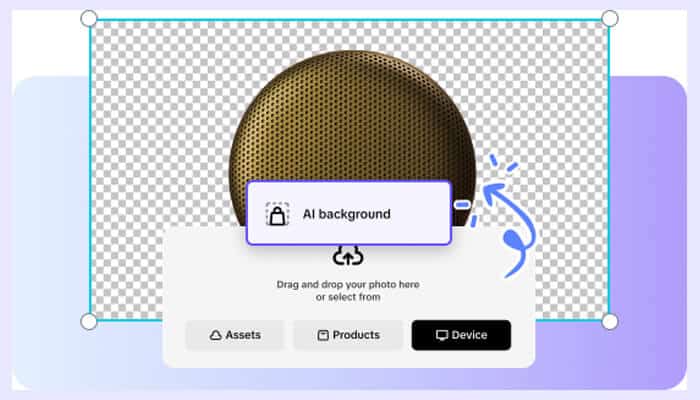
Sign up for the Pippit AI generator background and open “Image Studio” from the left sidebar. Choose “AI Background” under “Level up marketing images” and upload multiple product images used across listings. Use drag-and-drop or the “Device” option to import files from your PC. If needed, sample photos help visualize consistency before applying it to real listings.
Step 2: Apply consistent backgrounds across all images
The AI Background tool removes each original backdrop instantly, allowing full control over visual consistency. Select a unified background from “Preset,” upload a brand-matched one through “Reference,” or generate a consistent style using “Prompt.” Click the “Generate” tab to receive four variations for each image. Choose the most uniform option. You may also use “AI design” for cohesive promotional layouts or “Add Text” to maintain consistent labeling.
Step 3: Download aligned listing visuals
After achieving visual harmony, click “Download” in the top right corner of the editor. Choose the file format and size that fits your platform guidelines, then click “Download” to save the images. You can export them with or without a watermark as required.
Creating a Background System for Listing Uniformity Using an AI Background Generator
As a continuity, add a fixed background style that will be employed as a foundation for all product listings. Take differences in tones across different categories to maintain coherence and product differences. Prudent application of presets may ensure that the alterations in the light, shadows, or texture do not interfere with the visual rhythm. The approach establishes a recognizable system over the long run, increasing brand awareness. The customers become aware of the appearance and feel of the catalog, and this can increase the interaction and loyalty. Such an organized application of Pippit gives quality and speed consistency, especially where large or growing inventories are involved.
Balancing Consistency and Flexibility Across Listings
A lot of coherence is nice, but excessive rigidity may cause the images to be monotonous. The slight changes in light, the background colour, or some details of the design produce the visual appeal without disrupting the overall harmony. Promotional campaigns or seasonal updates may be easily applied by just tweaking presets without disturbing core alignment. This flexibility of AI enables Pippit to implement these alterations without altering the visual system that is developed. Additionally, integration with other tools, such as a free AI video editor, can expand content creation beyond static images while keeping the brand’s visual identity consistent. The balance is such that the listings are always new, attractive, and consistent in all marketing channels.
Long-Term Benefits of Harmonized Visual Listings
Standardized product images contribute to the process of scanning and browsing because a prospective buyer can easily notice the products of interest without delays. The catalog can be expanded more easily because new items can be put under an already existing system of background, and do not create disparities. The overhead is low since the reusable presets and prompt-based AI generation do not require manual changing of the presets. As time passes, brand awareness and credibility improve with regular images, and it is an element of professionalism and detailing. Leveraging tools like Pippit alongside a video agent for multimedia content can amplify this effect, ensuring both visual and video assets maintain a unified style that resonates with your audience.
Conclusion
The visual harmony is not only a question of taste, but a business advantage of any multi-listing catalog. The similarity of the backgrounds, colors, and designs also provides a smooth browsing experience, a credible brand, and effective content management. One of the sure methods to achieve this consistency is by using AI background generation, which will conserve human effort and improve image quality. Pippit is a special platform that not only simplifies the background removal procedure but also enables a plan and integrated visual systems. Arranged, harmonized pictures are employed to make products stand on their own and contribute to a smooth, professional catalog, which ultimately gives your listing an edge in the crowded markets.