




When your images are blurry or too small, the results look unprofessional. Enlarging a low-resolution photo often leads to pixelation and lost detail, making it unusable for websites, social media, or print. This is where AI image upscalers come in, promising to increase resolution while preserving clarity. Two major players dominate this space: ImgUpscaler vs Gigapixel AI, with ImgUpscaler offering a fast, web-based solution, and Gigapixel AI providing powerful desktop software for more advanced needs.
Choosing the right one depends entirely on your needs. Do you need speed and convenience for daily tasks, or do you require uncompromising detail for professional projects? This comparison breaks down their features, performance, and ideal use cases to help you decide which tool is the right fit for your workflow in 2026.
ImgUpscaler: Fast and Accessible AI Upscaling
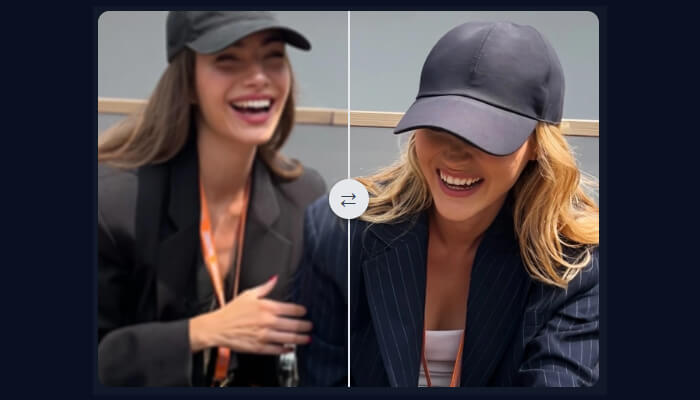
ImgUpscaler is a browser-based platform designed for simplicity and speed. It allows anyone to enhance photos without downloading or installing complex software. Its core strength lies in its accessibility. You can upload an image, select your desired enlargement, and get a high-quality result in seconds. This makes it an excellent Image Upscaler for users who need to improve images for blogs, social media, or e-commerce listings quickly. The entire process is straightforward, removing the technical barriers often associated with photo editing.
Beyond simple enlargement, ImgUpscaler functions as a versatile AI Photo Editor. It often includes a suite of tools that handle common editing tasks, such as background removal, object erasing, and color correction. This integrated approach saves users from jumping between different applications. Instead of needing a separate tool for each task, you can upload your image once and perform multiple enhancements within the same user-friendly interface. This convenience is a huge advantage for those with fast-paced workflows.
Key Features
* Web-Based Interface: No software installation is required. You can access it from any computer with an internet connection.
* Batch Processing: Upload and enhance multiple images at once, which is a major time-saver for large projects.
* Fast Processing Speeds: The platform is optimized for quick turnarounds, delivering results in seconds or minutes.
* Multiple AI Tools: Often includes features beyond upscaling, such as background removal and photo restoration.
Pros & Cons
* Pros:
* Extremely easy to use with a minimal learning curve.
* Very fast processing for standard image sizes.
* Accessible from any device with a web browser.
* Often includes a free trial or a limited free plan.
* Cons:
* Fewer manual controls compared to desktop software.
* Final quality may not match specialized professional tools for very large prints.
* Requires a stable internet connection to function.
Best For
ImgUpscaler is the perfect choice for social media managers, content creators, bloggers, and small business owners. Its speed and ease of use make it ideal for anyone who needs to quickly improve images for digital use without getting bogged down in technical settings.
Gigapixel AI: The Professional’s Choice for Detail
Gigapixel AI from Topaz Labs is a dedicated desktop application built for one purpose: to create the most detailed and artifact-free image enlargements possible. It is the go-to tool for professional photographers, graphic designers, and print specialists who demand the highest level of quality. Unlike web-based tools that prioritize speed, Gigapixel AI uses complex, resource-intensive AI models to analyze and reconstruct images with incredible precision.
The software gives users granular control over the enhancement process. You can choose from several specialized AI models tailored to different types of images, such as portraits, landscapes, or computer-generated graphics. Additionally, you can fine-tune settings for noise suppression and blur removal to achieve the perfect result. This level of control allows professionals to rescue previously unusable photos and prepare them for large-format printing or high-resolution digital displays.
Key Features
* Specialized AI Models: Includes different models for specific image types like portraits (with Face Recovery), architecture, and natural landscapes.
* Fine-Tuning Controls: Sliders for noise reduction and detail enhancement give you complete control over the final look.
* Offline Processing: As a desktop application, it works without an internet connection and leverages your computer’s processing power.
* RAW File Support: Works directly with RAW camera files, preserving the maximum amount of image data for the best results.
Pros & Cons
* Pros:
* Produces industry-leading image quality and sharpness.
* Incredible detail recovery, especially in portraits and textures.
* One-time purchase model instead of a recurring subscription.
* Works offline, providing privacy and security.
* Cons:
* Requires a powerful computer with a dedicated graphics card for reasonable speeds.
* Processing can be very slow for large files or high upscaling factors.
* Has a steeper learning curve than web-based tools.
* Higher upfront cost.
Best For
Gigapixel AI is built for professionals who cannot compromise on quality. This includes photographers preparing images for gallery prints, graphic designers working on large-scale advertisements, and digital artists who need to upscale their work without losing fidelity.
Side-by-Side: ImgUpscaler vs Gigapixel AI
To make the choice clearer, here is a direct comparison of the key features and attributes of both tools. This table highlights their core differences and helps you see which one aligns better with your priorities.
| Feature | ImgUpscaler | Gigapixel AI |
| Platform | Web-Based (Browser) | Desktop (Windows/macOS) |
| Ease of Use | Very Easy | Moderate Learning Curve |
| Processing Speed | Very Fast | Slow to Moderate |
| Quality | Very Good for Digital | Exceptional for Print/Pro |
| Manual Controls | Limited | Extensive |
| Pricing Model | Subscription / Freemium | One-Time Purchase |
| Internet Required | Yes | No |
| Best For | Speed and Convenience | Maximum Quality and Detail |
The Verdict: Which Upscaler Should You Choose?
The “better” tool is the one that fits your specific needs. There is no single winner for everyone, as both platforms excel in different areas. Your choice should come down to a simple question: do you value speed and convenience, or do you prioritize absolute image quality and control?
Choose ImgUpscaler if:
You are a content creator, marketer, or small business owner who regularly works with images for the web. Your priority is getting good-looking results quickly and efficiently. You prefer a simple, intuitive interface and the flexibility of a web-based tool you can access anywhere. You need more than just an upscaler and appreciate having a suite of other AI editing tools in one place.
Choose Gigapixel AI if:
You are a professional photographer, print designer, or digital artist. Your work demands the highest possible image fidelity, and you need to produce enlargements for large prints or high-resolution displays. You have a powerful computer, are comfortable with more advanced software, and prefer to have complete manual control over the final output. The upfront cost is an investment in a tool that delivers uncompromising quality.
Conclusion
Both ImgUpscaler and Gigapixel AI are powerful tools that solve the problem of low-resolution images, but they do so with different philosophies. ImgUpscaler offers a fast, accessible, and user-friendly solution perfect for everyday digital needs. Gigapixel AI provides a robust, professional-grade application for users who require the ultimate in detail and clarity.
By understanding your own priorities regarding speed, quality, and budget, you can confidently select the AI upscaler that will best enhance your images and streamline your creative workflow.
