



Understanding Your HP Printer Model
Alright, so you need to grab some new HP ink cartridges, but you’re staring at a wall of numbers and letters and have no clue where to start. Don’t sweat it. The first step to getting the right HP ink cartridges is figuring out exactly what kind of HP printer you have. It sounds obvious, but it’s super important.
Locating Your Printer’s Model Number
This is usually the easiest part. Most HP printers have their model number printed right on the front or top of the device. Look for labels that say “HP Photosmart,” “HP DeskJet,” “HP OfficeJet,” or something similar, followed by a series of numbers and letters. Sometimes it’s on the back or even inside the ink cartridge access door. If you’re still stuck, check the original box your printer came in or the receipt you used to buy it. Knowing this exact model number is the key to finding compatible HP ink cartridges.
Identifying Specific Ink Requirements
Once you’ve got the model number, you need to know what kind of ink it actually uses. Not all HP printers take the same cartridges, even within the same series. Some might use standard black and color cartridges, while others might have separate cartridges for cyan, magenta, and yellow, plus a black one. Some newer models might even use ink tanks instead of traditional HP ink cartridges.
- Check the labels on your current ink cartridges. They usually have the number you need.
- Look for stickers or labels on the printer itself that indicate the ink cartridge type.
- If you’re buying from a place like CW Outlet & Supplies, they often have tools where you can type in your printer model and it’ll show you the correct ink.
Consulting Your Printer’s Manual
If you’re really scratching your head, your printer’s manual is your best friend. It will have a dedicated section on ink, usually listing the exact part numbers for the HP ink cartridges your specific model needs. If you’ve lost the physical manual, don’t worry. You can almost always find a digital version on HP’s support website. Just search for your printer model, and you should be able to download a PDF of the manual. It’s a bit old-school, but it works!
Sometimes, printers have a little diagram showing where the ink goes and what type it is. It’s worth taking a peek if you’re unsure. It can save you a lot of hassle later on.
Decoding HP Ink Cartridge Numbers
Alright, so you’ve figured out which HP printer you have, and now you’re staring at a wall of ink cartridges. It can feel a bit like deciphering a secret code, right? But don’t worry, understanding HP ink cartridge numbers is actually pretty straightforward once you know what to look for. It’s not just random letters and numbers; they tell you a lot about what you’re buying.
The Significance of HP Ink Cartridge Series
HP uses specific series numbers for their ink cartridges, and these are super important. Think of them like model numbers for the ink itself. You’ll see things like HP 61, HP 63, HP 65, or even higher numbers. These series are generally designed to work with a particular range of HP printers. Using the wrong series can mean the cartridge won’t fit, or worse, it might not be recognized by your printer at all. It’s always best to stick to the series recommended for your specific printer model. If you’re unsure, checking the packaging of your old cartridge or the printer manual is a good bet. Sometimes, retailers like CW Outlet & Supplies will have helpful guides on their websites too, matching cartridge numbers to printer models.
Standard vs. High-Yield HP Ink Cartridges
Within each HP ink cartridge series, you’ll often find two main options: standard and high-yield. The number on the cartridge usually indicates this. For example, you might see an HP 63 and an HP 63XL. The ‘XL’ signifies a high-yield cartridge. The main difference is the amount of ink inside.
- Standard Cartridges: These have a lower ink capacity and are usually cheaper upfront. They’re good if you print infrequently or only need to print a few pages here and there.
- High-Yield (XL) Cartridges: These contain significantly more ink. While they cost more initially, they generally offer a lower cost per page when you print a lot. They also mean fewer trips to the store or fewer cartridge changes.
So, if you print a lot of documents for school, work, or just for fun, opting for the high-yield version is often the smarter financial choice in the long run.
Specialty and Photo HP Ink Cartridges
Beyond the everyday black and color cartridges, HP also offers specialty inks. These are usually for specific tasks, like printing photos. You might find individual color cartridges (like cyan, magenta, yellow) for photo printers, or special black inks designed for sharp text. Some photo printers use a combination of pigment-based black ink for documents and dye-based inks for vibrant photos. Always check your printer’s specifications to see if it requires individual color cartridges or a tri-color cartridge, and if it has any special ink requirements for photo printing. Using the correct type of ink ensures the best quality prints, whether it’s a report or a family picture.
When you’re looking at HP ink cartridges, don’t just grab the first one you see. Take a moment to check the cartridge number and the yield type (standard or XL). It might save you a headache and some money down the line. It’s a small detail that makes a big difference in your printing experience.
Choosing Between Original and Compatible HP Ink
When it comes to buying HP ink cartridges, you’ve got a couple of main paths: stick with the official HP brand, or go for a compatible option. It’s a decision that can affect your print quality, your wallet, and even your printer’s health. Let’s break down what each choice means.
Benefits of Original HP Ink Cartridges
Sticking with original HP ink cartridges is often the safest bet, especially if you want to be sure about quality and compatibility. HP designs their ink and printers to work together perfectly. This means you generally get:
- Consistent, reliable print quality: Photos look sharp, text is clear, and colors are accurate. You know what you’re going to get.
- Guaranteed compatibility: Original HP ink cartridges are made specifically for your HP printer model. There’s no guesswork involved.
- Printer warranty protection: Using genuine HP ink usually keeps your printer’s warranty valid. If something goes wrong with the printer itself, HP is less likely to blame it on third-party ink.
- Better longevity for prints: Original HP inks are formulated for durability, meaning your printed documents and photos are less likely to fade over time.
For many users, the peace of mind that comes with using original HP ink cartridges is well worth the extra cost. It’s like buying a specific part for a specific car – it’s designed to fit and work without issues.
When Compatible HP Ink Cartridges Make Sense
Okay, so original HP ink cartridges are great, but they can be pricey. This is where compatible ink cartridges come into play. These are third-party cartridges that are designed to work with HP printers. They’re often significantly cheaper, which is a big draw for people who print a lot and are trying to save money.
Here’s why someone might choose compatible HP ink cartridges:
- Cost Savings: This is the main reason. Compatible cartridges can be half the price, or even less, than their genuine HP counterparts. If you’re printing hundreds of pages a month, this adds up fast.
- Availability: Sometimes, you might not be able to get original HP ink cartridges quickly, especially if you’re in a remote area or a specific retailer is out of stock. Compatible options are often widely available.
- Environmental Considerations: Some compatible cartridges are made from recycled materials or are designed to be refilled, which can be a more eco-friendly choice for some consumers.
If your printing needs are mostly for everyday documents, drafts, or internal memos where absolute top-tier photo quality isn’t the priority, compatible HP ink cartridges can be a very practical solution. It’s about balancing cost with your specific printing requirements.
Risks Associated with Non-Genuine Ink
While compatible HP ink cartridges can save you money, they aren’t without their potential downsides. It’s important to be aware of these before you make the switch. Some common issues include:
- Print Quality Variations: The ink formulation might not be as good as HP’s. This can lead to duller colors, less sharp text, or even smudging. Photos might not look as vibrant.
- Compatibility Problems: Even if a compatible cartridge is supposed to work with your printer, sometimes it just doesn’t. You might get error messages, or the printer might not recognize the cartridge at all.
- Printer Damage: In rare cases, poorly made compatible cartridges can leak ink or have components that damage your printer’s print heads or other internal parts. This could end up costing you more in repairs than you saved on the ink.
- Reduced Cartridge Yield: Some compatible cartridges might not print as many pages as advertised, meaning you’ll have to replace them more often than you expected. This can negate some of the initial cost savings.
When you’re looking at compatible options, especially from places like CW Outlet & Supplies, it’s a good idea to check reviews and see if they have a good reputation for quality and reliability. Not all compatible HP ink cartridges are created equal, and some are definitely better than others.
Evaluating Ink Yield and Cost Per Page
So, you’ve figured out which HP ink cartridges your printer needs. Great! But before you hit ‘buy,’ let’s talk about how much ink you’re actually getting and what it’s going to cost you over time. It’s not just about the price tag on the box, you know.
Understanding Page Yield Ratings
Every HP ink cartridge comes with a “page yield” rating. This is basically an estimate from HP on how many pages you can print before the ink runs out. They usually test this using a standard page, which is typically about 5% coverage (think a simple text document). Don’t expect to get this exact number for every print job, especially if you print a lot of photos or graphics.
Here’s what you need to know about these ratings:
- Standard vs. High-Yield (XL): High-yield cartridges, often labeled ‘XL’, have more ink and a higher page yield. They usually cost more upfront, but they can be cheaper per page in the long run.
- ISO Standards: HP, like other manufacturers, often follows ISO standards for testing. This gives you a more consistent way to compare different cartridges, but remember it’s still an estimate.
- Your Printing Habits Matter: If you print mostly text, you’ll likely get closer to the rated yield. If you print photos or documents with heavy graphics, your yield will be lower.
Calculating the True Cost of HP Ink Cartridges
Just looking at the price of a single HP ink cartridge can be misleading. To really know what you’re spending, you need to figure out the cost per page. This is where those page yield ratings come in handy.
Here’s a simple way to do it:
- Find the Price: Note the actual price you’ll pay for the cartridge (including tax, if applicable). If you’re buying from a place like CW Outlet & Supplies, check if they have any bundle deals.
- Find the Page Yield: Look for the estimated page yield for that specific cartridge.
- Divide: Price of Cartridge / Page Yield = Cost Per Page.
For example, if a black HP ink cartridge costs $20 and has a yield of 200 pages, your cost per page is $0.10. If a high-yield version costs $35 and yields 500 pages, your cost per page drops to $0.07. See? That XL cartridge is a better deal per page.
It’s easy to get caught up in the initial price of HP ink cartridges. But thinking about the cost per page helps you see the bigger financial picture. Sometimes, spending a little more upfront on a higher-yield cartridge saves you money down the road, especially if you print frequently. It’s all about looking beyond the immediate purchase.
Optimizing Your Printing for Longevity
Want your ink to last longer? There are a few things you can do. It’s not just about buying the right HP ink cartridges; it’s also about how you use them.
- Print in Draft Mode: For everyday documents where high quality isn’t needed, use your printer’s draft or economy mode. It uses less ink and can significantly extend the life of your cartridges.
- Consolidate Prints: Instead of printing one page at a time, try to group your printing jobs. This can help the printer manage ink usage more efficiently.
- Turn Off Your Printer Properly: Always use the power button on your printer to turn it off. Simply unplugging it can sometimes cause the printer to run a cleaning cycle the next time you turn it on, using up ink unnecessarily.
Navigating HP Ink Subscription Services
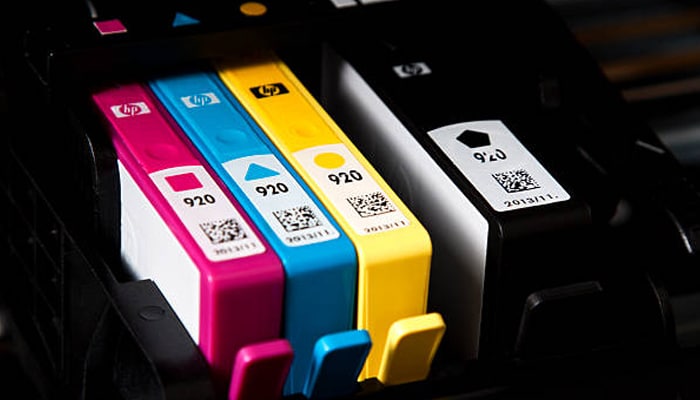
So, you’ve got your HP printer humming along, and you’re thinking about how to keep those ink levels topped up without a second thought. HP has a program for that, called HP Instant Ink. It’s basically a subscription service for your printer ink. Instead of buying individual hp ink cartridges when you run out, you pay a monthly fee based on how many pages you print. This can be a real game-changer if you print a lot or if you just hate running out of ink at the worst possible moment.
How HP Instant Ink Works
It’s pretty straightforward, really. When you sign up, you pick a plan that matches your typical printing needs. Your printer then connects to HP’s network and lets them know when your ink is getting low. HP automatically ships new hp ink cartridges to your door before you even run out. You just pop them in when they arrive. It’s designed to be super convenient, so you don’t have to keep track of cartridge numbers or run to the store.
Comparing Subscription Plans
HP offers a few different plans, usually based on page counts:
- Free Plan: For very light printing, like maybe 15 pages a month. It’s a good way to try it out.
- $1.99/month Plan: This gets you 50 pages.
- $3.49/month Plan: This one is for 100 pages.
- $5.49/month Plan: This plan covers 300 pages.
- Higher Tiers: They have plans for even more pages if you’re printing hundreds of documents.
Any unused pages usually roll over to the next month, up to a certain limit, which is nice. If you go over your plan’s page limit, you can buy extra pages in blocks, usually for a small fee.
The main idea behind these plans is to shift the cost from buying physical hp ink cartridges to a predictable monthly service fee. It aims to save money for people who print consistently, especially if they print photos or color documents, where ink can get expensive quickly. It also means you’re less likely to have dried-out ink cartridges sitting around if you don’t print very often, as HP sends them as needed.
Is an HP Ink Subscription Right for You?
Think about your printing habits. Do you print a few pages here and there, or do you have a steady stream of documents coming out of your printer? If you print more than, say, 20-30 pages a month regularly, an HP Instant Ink subscription could save you money compared to buying individual hp ink cartridges. It’s also great if you value convenience and want to avoid the hassle of ink shopping. However, if you print very infrequently, or if you like to stock up on ink yourself, it might not be the best fit. It’s worth checking out the different plans on the HP website to see which one fits your budget and printing volume. CW Outlet & Supplies often sees customers benefit greatly from these plans, especially small businesses and families with heavy printing needs.
Where to Purchase HP Ink Cartridges
So, you’ve figured out exactly which HP ink cartridges you need. Great! Now, where do you actually buy them? It might seem straightforward, but there are a few things to keep in mind to make sure you get the right product at a fair price and avoid any headaches.
Authorized Retailers for HP Ink
Buying from places that are officially partnered with HP is usually your safest bet. These stores are vetted and are expected to sell genuine HP ink cartridges. Think of your local electronics store or big box retailers that have a dedicated HP section. They often have a good selection, and you can usually talk to someone if you have questions.
- Major electronics chains (like Best Buy)
- Office supply stores (like Staples or Office Depot)
- Supermarkets with electronics departments
Always check if the retailer is listed as an authorized HP partner if you want that extra peace of mind.
Online Marketplaces and HP Ink
Online shopping is super convenient, and you can find HP ink cartridges on pretty much every major e-commerce site. You’ll often find competitive pricing here, which is a big plus. However, this is also where you need to be a bit more careful.
- Amazon
- com
- Newegg
When buying online, pay close attention to the seller. Is it sold directly by HP or a well-known retailer, or is it a third-party seller? Reading reviews can help, but be aware that sometimes reviews can be misleading.
The sheer volume of options online can be overwhelming. It’s easy to get tempted by a super low price, but remember that the cheapest option isn’t always the best. Sometimes, a slightly higher price from a trusted seller is worth it to avoid getting a dud.
Avoiding Counterfeit HP Ink Cartridges
This is a big one. Counterfeit ink can cause all sorts of problems, from poor print quality to damaging your printer. They might look like the real deal, but they’re often filled with lower-quality ink or are simply refilled cartridges passed off as new. Here’s how to steer clear:
- Be Wary of Unbelievably Low Prices: If a deal seems too good to be true, it probably is. Genuine HP ink cartridges have a certain cost associated with their quality and research.
- Check Packaging Carefully: Counterfeiters sometimes get the packaging wrong. Look for misspellings, blurry logos, or flimsy boxes. Genuine HP packaging is usually high quality.
- Buy from Reputable Sources: Stick to the authorized retailers and well-known online sellers mentioned above. CW Outlet & Supplies, for instance, is a place we trust for genuine printer supplies.
It’s really about being a smart shopper. You want to get the best value for your HP ink cartridges without compromising your printer’s performance or longevity.
Wrapping It Up
So, picking the right HP ink isn’t some big mystery, is it? We’ve gone over the basics, like checking your printer model and understanding the difference between standard and high-yield cartridges. Remember, using the correct ink means your printer will work better and your prints will look good. Don’t just grab the first thing you see; take a minute to look at the box. It really does make a difference in the long run, saving you headaches and maybe even some cash. Happy printing!
