




Keeping accurate records of business travel is important for many drivers, employees and business owners who use vehicles for work. Mileage records can help document business journeys, monitor vehicle use and support expense or tax reporting where applicable. However, simply recording mileage is not enough. The information also needs to be accurate, consistent and properly organised.
Vehicle Mileage Tracking can become difficult when drivers rely on memory, forget to record journeys or fail to distinguish personal travel from business trips. Digital mileage tracking tools can reduce some of these challenges, but users still need to review their records and correct errors.
Understanding common mileage tracking mistakes can help drivers establish better recordkeeping habits and avoid unnecessary administrative work.
1. Relying on Memory to Record Trips
One of the most common mistakes is waiting until the end of the day, week or month to record business journeys.
When several trips have taken place, it can be difficult to remember exact distances, destinations and dates. Important details may be forgotten or entered incorrectly.
How to Avoid It
Record journeys as close to the time of travel as possible. Automatic tracking can also help capture basic trip information while driving, reducing reliance on memory.
Even when automated tracking is used, review the recorded information regularly to make sure it accurately reflects the journey.
2. Forgetting to Record Short Business Journeys
Drivers sometimes focus on longer business trips and overlook shorter journeys. A quick visit to a supplier, client, post office or worksite can still form part of business travel depending on the circumstances.
Multiple short trips can add up over time, so leaving them out can result in incomplete mileage records.
How to Avoid It
Create a consistent process for recording every relevant business journey, regardless of distance. Reviewing your mileage records regularly can help identify missing trips.
3. Mixing Business and Personal Mileage
Using the same vehicle for work and personal activities can make mileage classification more complicated.
For example, someone might use their vehicle to attend a client meeting in the morning and then make a personal stop later that day. If all journeys are recorded together without clear categories, it can become difficult to distinguish the different types of travel.
How to Avoid It
Use separate categories for business and personal journeys. Review each trip and classify it correctly according to the rules applicable to your circumstances.
A digital mileage tracking system may make this easier by allowing users to assign categories to individual trips.
4. Failing to Record the Business Purpose
A mileage record that contains only a date and distance may lack useful context. Depending on the applicable recordkeeping requirements, recording the reason for business travel can make the documentation more useful.
For example, a journey could be described as a client meeting, supplier visit, worksite inspection or business conference.
How to Avoid It
Add a short note explaining the purpose of each business journey. The description does not need to be lengthy; it should simply provide enough context to identify why the trip occurred.
5. Assuming GPS Tracking Is Always Accurate
GPS technology can make Vehicle Mileage Tracking much easier, but automated tracking is not completely immune to errors.
Location signals can sometimes be affected by environmental conditions, device settings or connectivity. An app may also interpret a route differently from the actual journey or record a trip that contains a personal stop.
How to Avoid It
Treat automatic tracking as a useful tool rather than a replacement for review. Check routes, distances and classifications regularly.
If a trip looks unusual, compare the information with your calendar, appointments or other records to determine whether an adjustment is needed.
6. Not Checking for Missing Trips
Even automated systems can occasionally fail to record a journey. A driver may also accidentally disable location services or change a setting that affects automatic tracking.
If records are never reviewed, missing trips may not be discovered until much later.
How to Avoid It
Set aside a few minutes each week to review your mileage records. Check whether the journeys shown in your calendar or work schedule correspond with the trips recorded by your tracking system.
Identifying missing information early makes it easier to correct.
7. Entering Incorrect Distances
Manual mileage entries can contain simple numerical errors. A driver might enter the wrong distance, transpose numbers or accidentally duplicate a journey.
Even small mistakes can become significant when they occur repeatedly.
How to Avoid It
Use automatic distance calculation where practical and compare unusual entries with the route actually travelled. If manual entry is required, enter the information immediately and double-check the number before saving it.
8. Failing to Keep Supporting Records
Mileage information may be more useful when supported by other business documentation.
For example, calendar appointments, invoices, work orders, meeting records or client communications may help demonstrate why a particular business journey occurred.
How to Avoid It
Keep mileage information alongside relevant business records. This can make it easier to verify trips later and provide additional context if a journey needs to be reviewed.
The exact documentation required depends on the purpose of the records and the rules applicable to the individual or business.
9. Waiting Until Tax or Accounting Deadlines
Another common mistake is treating mileage recordkeeping as something that only needs attention when accounts or tax returns are due.
Trying to reconstruct months of driving history at once can be time-consuming and may result in incomplete information.
How to Avoid It
Maintain records throughout the year. A weekly or monthly review is generally easier than attempting to rebuild a complete mileage history from memory.
Regular maintenance also makes it easier to spot inconsistencies while the information is still fresh.
10. Failing to Back Up Digital Records
Digital mileage records can be convenient, but users should consider what happens if their device is lost, damaged or replaced.
Depending entirely on a single device or application without understanding its backup and export options could make records harder to retrieve.
How to Avoid It
Check whether your mileage tracking system provides data export, cloud storage or backup options. Keep appropriate copies of important records and make sure you know how to retrieve them when necessary.
11. Ignoring Privacy and Permission Settings
GPS-based tracking requires access to location information. Users should understand how their tracking system collects and stores location data.
Incorrect permission settings can also prevent automatic tracking from working properly.
How to Avoid It
Review the application’s location permissions and privacy settings. Understand what information is collected, how it is stored and how long it is retained.
Users should choose settings that provide the functionality they need while taking reasonable steps to protect their information.
12. Not Reviewing Records Before Using Them
Even well-maintained mileage records should be reviewed before being used for accounting, expense reporting or tax purposes.
An automatic system may capture information, but the user remains responsible for checking whether the records are complete and correctly classified.
How to Avoid It
Before submitting or relying on mileage records, check:
- Dates and times
- Starting and ending locations
- Distances
- Business and personal classifications
- Business purposes
- Duplicate entries
- Missing journeys
- Unusual routes
This final review can help identify errors before they create additional administrative problems.
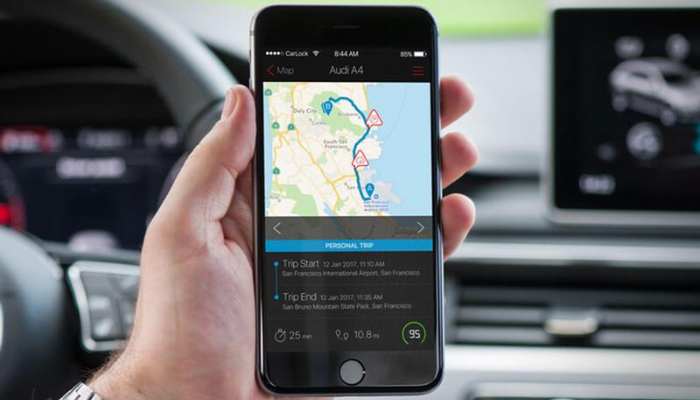
Building Better Vehicle Mileage Tracking Habits
Avoiding mileage mistakes is largely about developing a consistent routine. Technology can reduce manual work, but good recordkeeping still requires attention.
A practical routine could involve recording or automatically capturing trips during the week, reviewing them every few days and performing a more detailed monthly check.
The most effective approach will depend on how frequently you drive for work and what records you need to maintain.
Final Thoughts
Accurate Vehicle Mileage Tracking can make business travel records easier to maintain and review. However, common mistakes such as relying on memory, forgetting short journeys, mixing personal and business travel, overlooking business purposes and trusting automated tracking without review can reduce the quality of those records.
Using digital tracking tools, reviewing trips regularly, keeping supporting documentation and maintaining appropriate backups can help create a more reliable recordkeeping process.
Mileage and tax requirements vary depending on location and individual circumstances, so users should check the rules that apply to their particular situation and seek professional accounting or tax guidance where appropriate.
With consistent habits and regular reviews, vehicle mileage tracking can become a manageable part of everyday business administration rather than a task that has to be reconstructed at the end of the year.
