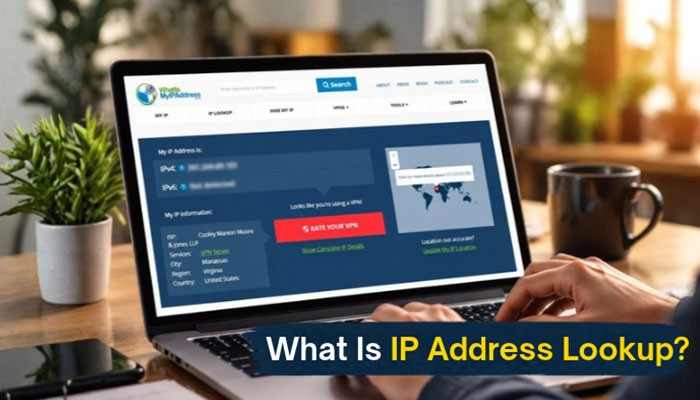

The internet works through millions of connected devices communicating with each other every second. Every device connected to a network receives a unique digital identifier called an IP address, and an IP Address Lookup helps analyze information connected to this identifier. This address helps websites, applications, and online services understand where a connection is coming from and how data should be delivered.
An IP Address Lookup is a process used to find information connected to an IP address, such as its approximate location, internet service provider (ISP), network type, and other publicly available details. It is commonly used by businesses, cybersecurity teams, website owners, and everyday users who want to understand online connections better.
Whether you are checking suspicious traffic, analyzing website visitors, improving online security, or learning how internet networks work, understanding IP addresses can provide valuable insights. This complete guide explains what an IP Address Lookup does, what information it provides, how accurate it is, and how it is used in real-world situations.
What Is an IP Address?
An IP address (Internet Protocol address) is a numerical label assigned to a device connected to the internet or a private network. It allows devices to send and receive information correctly.
Think of an IP address like a home address for your internet connection. Just as a postal address helps deliver letters to the correct location, an IP address helps online data reach the right device.
There are two main types of IP addresses:
| Type | Description |
| IPv4 | The traditional IP format using four numbers separated by dots, such as 192.168.1.1 |
| IPv6 | A newer format created to support more internet-connected devices using longer address combinations |
What Is IP Address Lookup?
An IP Address Lookup is an online method that collects available information about a specific IP address. By entering an IP address into a lookup tool, users can discover details related to that address.
A typical lookup may show:
- Approximate geographic location
- Country, region, and city information
- Internet Service Provider (ISP)
- Organization linked to the IP
- Network type
- Time zone
- Proxy or VPN detection information
However, an IP lookup does not reveal private personal information such as someone’s name, home address, passwords, or browsing history.
How Does IP Address Lookup Work?
An IP Address Lookup works by comparing an IP address against large databases that contain information about internet networks.
The process usually involves:
1. Entering an IP address: Users provide the IP address they want to check.
2. Database comparison: The lookup service compares the address with stored IP registration and geolocation data.
3. Information collection: The tool gathers available details from sources such as regional internet registries, ISP records, and location databases.
4. Results display: The system shows information such as ISP, approximate location, and network details.
These databases are updated regularly, but accuracy can vary depending on the IP type and available information.
What Information Can You Find Through an IP Address Lookup?
An IP Address Lookup can provide different levels of information depending on the service being used.
1. Geographic Location
Most lookup tools can estimate:
- Country
- State or province
- City
- Approximate coordinates
The location is usually based on ISP registration data rather than the exact physical location of a device.
2. Internet Service Provider Details
The lookup process can identify the company providing internet access.
Examples include:
- Broadband providers
- Mobile network operators
- Hosting companies
- Data centers
3. Network Information
Users may find details such as:
- Autonomous System Number (ASN)
- Network range
- Organization name
- Connection type
4. Security Information
Some tools can identify whether an IP address is associated with:
- VPN services
- Proxy servers
- Hosting providers
- Reported suspicious activity
IP Address Lookup vs IP Tracking: What Is the Difference?
Many people confuse IP lookup with IP tracking. Although they are related, they are not the same.
| Feature | IP Address Lookup | IP Tracking |
| Purpose | Finds available information about an IP | Monitors IP activity over time |
| Uses | Research and analysis | Security monitoring |
| Shows exact location? | Usually no | Usually no |
| Common users | Businesses, researchers, website owners | Security teams and administrators |
An IP Address Lookup provides information about an address, while tracking usually involves monitoring network activity.
How Accurate Is IP Address Location Data?
The accuracy of IP location information depends on several factors.
Generally:
- Country-level information is often highly accurate.
- City-level information may be less precise.
- Mobile network locations can change frequently.
- VPNs and proxies can hide the original connection location.
For example, a user may appear to be located in a nearby city because the ISP routes internet traffic through another location.
Common Uses of IP Address Lookup
Businesses and individuals use IP lookup technology for many purposes.
Website Analytics
Website owners use IP information to understand:
- Visitor locations
- Regional traffic patterns
- Audience behavior
This helps improve content strategies and user experience.
Cybersecurity Protection
Security teams use IP analysis to:
- Detect unusual login attempts
- Identify suspicious traffic
- Block harmful connections
Digital Marketing
Marketers may use location data to create:
- Regional campaigns
- Localized website experiences
- Better audience targeting
Troubleshooting Network Problems
IT professionals use lookup tools to investigate:
- Connection issues
- Server access problems
- Network configuration errors
Can IP Address Lookup Reveal Someone’s Identity?
No. An IP Address Lookup cannot normally reveal a person’s identity.
An IP address may show:
- ISP information
- Approximate location
- Network details
It does not normally provide:
- Full name
- Phone number
- Home address
- Private online activity
Only internet service providers may have customer account information connected to an IP address, and access to that data usually requires legal authorization.
Are IP Address Lookup Tools Safe to Use?
Most legitimate lookup services are safe because they only display publicly available network information.
Before using a tool, consider:
- Check whether the website has a privacy policy.
- Avoid entering sensitive personal information.
- Use trusted security resources.
- Understand that results may not always be exact.
Public IP Address vs Private IP Address
| IP Type | Meaning | Example |
| Public IP | Address visible on the internet | 203.0.113.10 |
| Private IP | Address used inside a local network | 192.168.0.1 |
A public IP address can usually be searched through an IP Address Lookup tool, while private IP addresses only work within local networks.
How Businesses Benefit From IP Lookup Technology
Companies use IP intelligence to improve security and customer experience.
Benefits include:
- Fraud prevention
- Better website personalization
- Traffic analysis
- Network management
- Threat detection
For example, an online business may analyze unusual login locations to identify possible account misuse.
Limitations of IP Address Lookup
Although useful, IP lookup technology has limitations.
Important points to remember:
- Location results are estimates.
- VPN users may appear in another location.
- Shared networks can represent many users.
- Dynamic IP addresses can change over time.
- Database accuracy depends on updates.
Using multiple information sources can provide better analysis.
Conclusion
An IP Address Lookup is a useful technology for understanding internet connections, analyzing network information, improving cybersecurity, and studying online traffic patterns. It provides valuable details such as approximate location, ISP information, and network data while protecting personal privacy.
Although IP lookup tools are helpful, users should understand their limitations. Results are estimates, not exact tracking methods, and factors like VPNs, mobile networks, and changing IP addresses can affect accuracy.
As the internet continues to grow, understanding how IP addresses work can help individuals and businesses make smarter decisions about online security, analytics, and digital operations.
What Is IP Address Lookup FAQs
1. What is an IP Address Lookup used for?
An IP Address Lookup is used to find publicly available information connected to an IP address, including location estimates, ISP details, and network information.
2. Can an IP Address Lookup find an exact address?
No. Most lookup tools cannot identify a person’s exact home address. They usually provide an approximate geographic location.
3. Is an IP address the same as a device location?
No. An IP address represents a network connection. It does not always show the exact physical location of a device.
4. Can VPNs hide IP address information?
Yes. VPN services can replace a user’s real IP address with another server location, affecting lookup results.
5. Are IP lookup results always accurate?
No. Accuracy depends on database quality, ISP information, network type, and whether the connection uses VPNs or proxies.
6. Can I find someone’s name using an IP address?
No. Public IP lookup services do not provide personal identity information linked to an IP address.