



The best budget 4K TVs now offer features that once belonged to premium models, including Mini-LED backlighting, quantum-dot color, local dimming, Dolby Vision, higher refresh rates, and advanced gaming support.
Price alone, however, does not define good value. The best budget 4K TVs balance picture quality, brightness, motion handling, smart features, connectivity, and screen size without forcing buyers to overspend.
Quick Answer
The best budget 4K TVs balance picture quality, brightness, smart features, connectivity, and screen size at a reasonable price.
Strong value options include the TCL QM6K for gaming and overall performance, the Hisense U6SF Pro for bright-room viewing, and region-specific choices such as Roku Select models and Xiaomi X Pro QLED.
Key Takeaways
- The best budget 4K TVs should balance picture quality, brightness, features, and price.
- Mini-LED usually offers better backlight control than standard LED TVs.
- QLED can improve color, but it does not guarantee better contrast.
- Native 120Hz or 144Hz is more important than marketing terms such as “Game Booster.”
- A 55-inch TV is a strong value choice for many living rooms.
- Brightness and reflection handling matter in well-lit rooms.
- Local dimming improves contrast for movies and HDR content.
- Gamers should check VRR, ALLM, input lag, HDMI support, and refresh rate.
- Business buyers should review warranty terms before commercial use.
- Older models can offer excellent value when heavily discounted.
How We Chose the Best Budget 4K TVs
We compared the best budget 4K TVs using current manufacturer specifications, regional availability, independent testing, and overall price-to-performance value.
The main factors included:
- Picture quality and contrast
- Local dimming
- SDR and HDR brightness
- Reflection handling
- Color performance
- Native refresh rate
- Gaming features
- Upscaling
- Smart TV software
- HDMI connectivity
- Screen-size options
- Warranty coverage
Independent testing also matters because TVs with similar specifications can perform very differently in real-world viewing conditions.
Best Budget 4K TVs 2026
The best budget 4K TVs 2026 market includes both new models and discounted previous-generation TVs that still deliver strong performance.
Mini-LED, QLED, local dimming, and higher refresh rates are now appearing at increasingly affordable prices.
Top Budget Models to Compare
- TCL QM6K: QD-Mini LED, native 144Hz, Dolby Vision, Google TV, and strong gaming features. Although introduced in 2025, it remains RTINGS’ current top overall budget-TV pick.
- Hisense U6SF Pro: Mini-LED with strong brightness, anti-reflection features, and gaming support up to 144Hz. Hisense positions the U6 family as part of its value-focused 2026 Mini-LED lineup.
- Roku Select Series 4K QLED: A 2026 QLED range available from 50 to 85 inches, designed mainly for affordable streaming with a 60Hz panel.
- Roku Pro Series: Uses Mini-LED local dimming, a 120Hz panel, Dolby Vision IQ, and Roku OS for buyers wanting stronger performance.
- Xiaomi X Pro QLED: An India-focused value option with Google TV, Dolby Vision, HDR10+, and 60Hz panels with DLG 120Hz on the 55-, 65-, and 75-inch models.
- Vizio Mini LED Quantum 4K: A lower-cost U.S. option with Mini-LED local dimming, Dolby Vision, HDR10+, and a native 60Hz panel.
Budget 4K TV Comparison
| Model | Display | Refresh Rate | Smart Platform | Best For |
|---|---|---|---|---|
| TCL QM6K | QD-Mini LED | Native 144Hz | Google TV | Gaming and overall value |
| Hisense U6SF Pro | Mini-LED | Up to 144Hz | Fire TV | Bright rooms |
| Roku Select 4K QLED | QLED | 60Hz | Roku OS | Simple streaming |
| Roku Pro Series | QLED Mini-LED | 120Hz | Roku OS | Movies and streaming |
| Xiaomi X Pro QLED | QLED | 60Hz + DLG 120Hz | Google TV | India-focused value |
| Vizio Mini LED Quantum 4K | Mini-LED Quantum | Native 60Hz | Vizio OS | Low-cost U.S. option |
RTINGS currently lists the TCL QM6K as its overall budget-TV pick and the Vizio Mini LED Quantum 4K as its cheap-TV choice. Its September 2026 Mini-LED guide, however, favors the Hisense U6SF Pro in the budget Mini-LED category, showing why availability, price, and use case should be considered alongside rankings.
For shoppers comparing the best budget 4K TVs, the strongest value comes from matching the TV’s brightness, refresh rate, display technology, and smart platform to how it will actually be used.
TCL QM6K: Strong Overall Budget Performance
Among the best budget 4K TVs, the TCL QM6K stands out for buyers who want strong gaming features, Mini-LED contrast, and premium-style specifications without flagship pricing.
Key features include:
- 4K QD-Mini LED display
- Quantum-dot color
- Native 144Hz refresh rate
- VRR up to 144Hz
- Local dimming
- Dolby Vision IQ and HDR10+
- AMD FreeSync Premium Pro
- Filmmaker Mode
- Google TV
- Onkyo 2.1 audio
TCL provides four HDMI inputs, including one eARC connection. HDMI ports 1 and 2 support up to 4K at 144Hz, while ports 3 and 4 support up to 4K at 60Hz.
Independent testing found strong black levels, low input lag, and good gaming performance. However, direct reflections from bright windows or lamps can be distracting, and HDR brightness is only moderate.
Best For
- Console and PC gaming
- Movies and streaming
- HDR content
- Everyday living-room use
Hisense U6SF Pro: Strong Bright-Room Alternative
The Hisense U6SF Pro is another of the best budget 4K TVs for shoppers who prioritize brightness, Mini-LED contrast, and glare reduction in well-lit rooms.
It is available in:
- 55 inches
- 65 inches
- 75 inches
- 85 inches
- 100 inches
Hisense equips the U6SF Pro with a matte anti-reflective screen, Mini-LED local dimming, Fire TV, and a native 144Hz refresh rate. Independent testing found excellent contrast and strong brightness but also noted blurry fast motion, narrow viewing angles, and some uniformity issues.
55″ TV: Is 55 Inches the Best Value?
For shoppers comparing the best budget 4K TVs, a 55″ TV often provides an excellent balance of price, screen size, picture quality, and model selection.
RTINGS recommends approximately 7 feet 5 inches for mixed viewing or 5 feet 6 inches for a more cinematic 40-degree field of view on a 55-inch screen. These are guidelines rather than strict rules.
| Screen Size | Mixed Viewing Distance | Cinema-Style Distance |
|---|---|---|
| 43-inch | 5 ft 10 in | 4 ft 4 in |
| 50-inch | 6 ft 9 in | 5 ft |
| 55-inch | 7 ft 5 in | 5 ft 6 in |
| 65-inch | 8 ft 10 in | 6 ft 6 in |
| 75-inch | 10 ft 2 in | 7 ft 6 in |
| 85-inch | 11 ft 6 in | 8 ft 6 in |
A higher-performing 55-inch Mini-LED TV can offer better overall value than a larger entry-level model with weaker contrast, brightness, or gaming features.
TV Screen Sizes: Which Size Should You Buy?
Choosing among the best budget 4K TVs also means matching the screen size to your room, viewing distance, and intended use.
43 Inches
Best for:
- Bedrooms
- Small apartments
- Secondary TVs
50 Inches
A practical choice for smaller living rooms where 55 or 65 inches may feel too large.
55 Inches
Offers a strong balance of:
- Price
- Picture size
- Model availability
- Gaming features
65 Inches
Well suited to larger living rooms and more immersive movies.
75 Inches
Best for large rooms with longer viewing distances.
85 Inches and Above
Suitable for:
- Home theaters
- Large entertainment rooms
- Conference spaces
Always measure the available wall or TV stand before ordering, including room for the stand and bezel.
Best Inexpensive TVs: What Makes a Cheap TV Good?
The best inexpensive TVs are not always the models with the lowest price. Strong value comes from keeping picture quality, usability, and essential features while cutting costs in less important areas.
Manufacturers may save money on:
- Premium materials
- Built-in speaker power
- Remote-control extras
- High-end design finishes
These compromises are often acceptable because accessories such as soundbars can be added later. Poor contrast, weak brightness, or ineffective backlighting are much harder to improve.
Features Worth Prioritizing
When comparing the best budget 4K TVs, look for:
- 4K resolution
- Strong contrast
- Adequate brightness
- Good reflection handling
- Local dimming when available
- HDR support
- Smooth motion
- Reliable smart-TV software
- Enough HDMI ports
Gamers should also prioritize VRR, ALLM, low input lag, and a native 120Hz or higher refresh rate where the budget allows.
Best Budget 4K TVs With Excellent Performance
The best budget 4K TVs with excellent performance should deliver strong picture quality, useful features, and smooth everyday performance without relying on specifications that add little real value.
Best for Movies
For movies, prioritize:
- Strong contrast
- Effective local dimming
- Deep blacks
- Good HDR performance
- Dolby Vision support
- Filmmaker Mode
The TCL QM6K is a strong option because its QD-Mini LED system and local dimming help improve contrast and dark-room viewing.
Best for Bright Rooms
For bright rooms, look for:
- High SDR brightness
- Good reflection handling
- Anti-glare screen treatment
- Strong daytime visibility
The Hisense U6SF Pro stands out for its bright Mini-LED picture and anti-reflection screen, which Hisense specifically designed to reduce glare from lamps and windows.
Best for Gaming
When comparing the best budget 4K TVs, gamers should prioritize:
- Native 120Hz or 144Hz refresh rate
- VRR
- ALLM
- Low input lag
- High-refresh HDMI support
The TCL QM6K uses a native 144Hz panel and supports high-refresh gaming, making it especially attractive for consoles and gaming PCs.
Mini-LED vs QLED vs LED
When comparing the best budget 4K TVs, understanding the difference between LED, QLED, and Mini-LED makes it easier to judge picture quality and value.
| Display Type | How It Works | Main Benefits | Key Limitation |
|---|---|---|---|
| LED TV | Uses an LCD panel with an LED backlight | Affordable, widely available, good for everyday viewing | Picture quality depends heavily on panel and backlight quality |
| QLED | Adds quantum dots to an LED/LCD display | Better color volume and brighter, richer colors | Does not automatically improve blacks, local dimming, or refresh rate |
| Mini-LED | Uses much smaller LEDs for more precise backlight control | Better contrast, brighter highlights, stronger HDR, and improved local dimming | Usually costs more than basic LED or QLED models |
A TV can combine both QLED and Mini-LED technologies. For example, Roku’s Pro Series uses QLED Mini-LED, while TCL markets the QM6K as QD-Mini LED.
Brightness and Reflection Handling Matter
When comparing the best budget 4K TVs, brightness and reflection handling are especially important in rooms with windows, lamps, or strong daylight.
Focus on:
- SDR brightness: Helps regular TV, sports, and streaming remain visible in bright rooms.
- HDR brightness: Makes highlights in HDR movies and games appear more vivid.
- Reflection handling: Reduces distracting glare from windows and lights.
High brightness alone is not enough. A TV also needs effective reflection handling to maintain a clear picture in a well-lit room. RTINGS likewise recommends considering both factors for bright-room viewing.
Viewing Angles Can Change the Buying Decision
Viewing angles are another factor when comparing the best budget 4K TVs, particularly for families, sports viewing, meeting rooms, or wide seating arrangements.
A TV with narrow viewing angles may lose:
- Color accuracy
- Brightness
- Black depth
- Contrast
Wide viewing angles matter less when you normally sit directly in front of the screen, but they become important when several people watch from different positions
4K Upscaling and Picture Processing
Not everything shown on a 4K TV is native 4K. Cable channels, DVDs, older streaming content, and many 1080p videos still require upscaling.
Good picture processing can:
- Preserve fine detail
- Keep text and edges sharp
- Reduce visible artifacts
- Improve lower-resolution content
Poor processing can make content appear soft, excessively sharpened, or surrounded by visible halos. RTINGS notes that upscaling matters most when watching lower-resolution or lower-bitrate sources.
Should You Buy a 60Hz, 120Hz, or 144Hz TV?
Refresh rate is especially important when choosing the best budget 4K TVs for gaming, sports, or fast-moving content.
60Hz
Best for:
- Movies
- Regular television
- Streaming
- Casual gaming
120Hz
Better for:
- Modern consoles
- Sports
- Fast-action games
- Smoother motion
144Hz
Best suited to:
- Gaming PCs
- High-frame-rate gaming
- Buyers wanting greater gaming flexibility
Always distinguish a native refresh rate from marketing features. Xiaomi, for example, lists its 55-, 65-, and 75-inch X Pro QLED models as 60Hz panels with DLG 120Hz capability rather than native 120Hz panels.
For gaming, verify the panel’s native refresh rate, VRR support, and HDMI capabilities instead of relying only on terms such as “Game Booster” or “120Hz mode.”
What Should Gamers Look for in a Budget 4K TV?
When comparing the best budget 4K TVs, gamers should look beyond resolution and prioritize features that improve responsiveness, motion, and high-frame-rate gaming.
Important features include:
- Native 120Hz or 144Hz refresh rate
- Variable Refresh Rate (VRR)
- Auto Low Latency Mode (ALLM)
- Low input lag
- High-refresh HDMI support
- HDR gaming
- Good motion handling
HDMI Ports Matter
Not every HDMI port necessarily supports the TV’s maximum gaming refresh rate.
Roku’s Pro Series, for example, has four HDMI inputs, but only two support HDMI 2.1 at 120Hz. One of the four ports also handles eARC.
Buyers connecting multiple devices should plan for:
- PlayStation
- Xbox
- Gaming PC
- Soundbar
HDMI, eARC and Connectivity Explained
Connectivity is an important part of choosing the best budget 4K TVs, especially if you plan to connect several consoles, streaming devices, computers, or audio systems.
Check for:
- Enough HDMI ports
- USB connections
- Ethernet
- Optical audio
- Bluetooth
- Dual-band Wi-Fi
- Chromecast or Google Cast
- AirPlay
What Is eARC?
eARC stands for Enhanced Audio Return Channel. It allows compatible TVs to send higher-quality audio through HDMI to a soundbar or AV receiver.
Check which HDMI port supports eARC before connecting your audio system.
Other Useful Connections
Ethernet can provide a stable streaming connection, while Bluetooth is useful for headphones and wireless accessories. USB ports are also convenient for media playback and compatible peripherals.
Smart TV Platforms Matter More Than You Think
Software can strongly influence everyday usability, so the best budget 4K TVs should combine good picture quality with a fast, reliable smart platform.
| Platform | Common TV Brands |
|---|---|
| Google TV | TCL, Sony, Xiaomi and others |
| Roku OS | Roku and Roku TV partners |
| Fire TV | Amazon and selected Hisense models |
| Tizen | Samsung |
| webOS | LG |
Look for:
- Major streaming apps
- Responsive navigation
- Voice search
- Casting support
- User profiles
- Software updates
A slow smart platform can eventually be replaced with an external streaming device, but poor display quality cannot.
Xiaomi X Pro QLED: Value Option for India
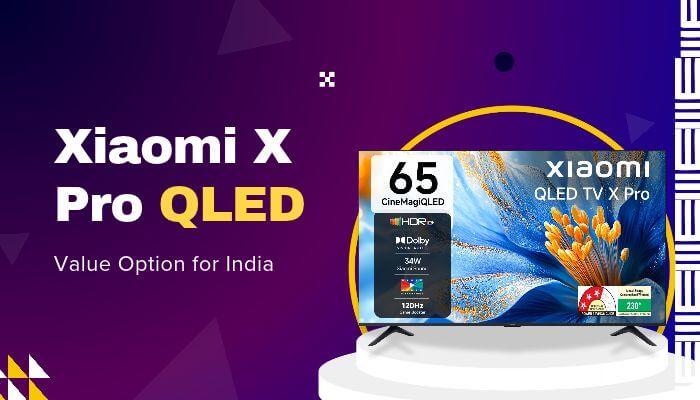
For Indian shoppers comparing the best budget 4K TVs, Xiaomi’s X Pro QLED provides a useful combination of QLED color, Dolby Vision, HDR10+, Filmmaker Mode, smart features, and multiple screen sizes.
Available sizes include:
- 43-inch
- 55-inch
- 65-inch
- 75-inch
Key features include:
- 4K QLED display
- Dolby Vision
- HDR10+
- Filmmaker Mode
- Google TV
- Google Cast
- AirPlay 2
- Miracast
- 32GB storage
- eARC
- ALLM
The 55-, 65-, and 75-inch versions use 60Hz panels with DLG 120Hz, rather than native 120Hz panels. Xiaomi lists the 43-, 55-, and 65-inch versions as 2025 models and the 75-inch version as a 2026 model.
Is Samsung Worth Considering on a Budget?
Samsung can still deserve a place among the best budget 4K TVs when models such as the Q7F are available at competitive sale or clearance prices.
The 55-inch Q7F includes:
- QLED display
- Q4 AI Processor
- Quantum HDR
- HDR10+
- 4K upscaling
- Filmmaker Mode
- Tizen Smart TV
- Samsung TV Plus
- Samsung Knox Security
Samsung’s official specifications also list 20W two-channel audio and Motion Xcelerator.
For value-focused buyers, a discounted Samsung model can sometimes make more sense than paying extra simply for a newer entry-level TV.
Where Can I Buy a Cheap TV?
Shoppers looking for where can I buy a cheap TV should compare the best budget 4K TVs across several reputable sellers rather than assuming one store always has the lowest price.
Compare:
- Official manufacturer stores
- Major electronics retailers
- Authorized online sellers
- Reputable marketplaces
- Local authorized dealers
- Open-box outlets
- Certified refurbished stores
Before ordering, check:
- Exact model number
- Final price
- Delivery and installation costs
- Return policy
- Manufacturer warranty
- Seller authorization
- Wall-mount charges
- Open-box or refurbished status
Always compare the exact model number because similarly named TVs can differ in features, specifications, or regional configurations.
New vs Open-Box vs Refurbished TVs
When comparing the best budget 4K TVs, a discounted open-box or refurbished model can offer strong value, but condition, warranty coverage, and return protection matter as much as price.
New TV
Usually offers:
- Full manufacturer warranty
- Factory packaging
- Complete accessories
- Lowest condition risk
Open-Box TV
Can be worthwhile when:
- The panel is undamaged
- Warranty coverage remains valid
- Accessories are complete
- The return policy is clear
Refurbished TV
Manufacturer-certified refurbishment is generally preferable.
Check:
- Warranty length
- Dead-pixel policy
- Panel condition
- Included accessories
- Stand and remote
- Return policy
- Shipping protection
Do not sacrifice meaningful warranty protection for a small discount.
Best Budget 4K TV for Business and Office Use
Some of the best budget 4K TVs can also work well in offices, meeting rooms, reception areas, and training spaces when they are used for occasional presentations or video conferencing.
Common business uses include:
- Conference rooms
- Presentations
- Video meetings
- Reception displays
- Training rooms
- Dashboard monitoring
- Digital menus
Business buyers should prioritize:
- Clear text
- Laptop compatibility
- HDMI connectivity
- Casting support
- Wide viewing angles
- Reliability
- Warranty terms
A consumer 55-inch TV can be cost-effective for occasional office use, but displays operating for long periods every day may be better served by a dedicated commercial model.
Consumer TV vs Commercial Display
Businesses comparing the best budget 4K TVs with commercial displays should consider long-term operating needs rather than purchase price alone.
| Feature | Consumer TV | Commercial Display |
|---|---|---|
| Purchase price | Usually lower | Usually higher |
| Streaming features | Usually strong | Varies |
| Home entertainment | Excellent | Secondary |
| Signage controls | Limited | Usually stronger |
| Long operating hours | Model-dependent | Often designed for extended use |
| Central management | Uncommon | More common |
| Commercial warranty | May be limited | Designed for business use |
A cheaper consumer TV may save money initially, but a commercial display can offer better signage controls, operating durability, and warranty coverage for intensive business use.
Check Warranty Rules Before Commercial Use
Warranty coverage should be checked carefully when the best budget 4K TVs are being considered for offices, shops, hotels, restaurants, or other commercial environments.
LG India, for example, states that damage caused by commercial, business, or industrial use is excluded from its domestic-use warranty, while designated B2B products such as Commercial TVs and Hotel TVs have separate warranty coverage.
Warranty conditions can vary by:
- Country
- Brand
- Model
- Seller
- Intended use
- Promotion
Always read the warranty terms for the exact model before installing a consumer television in a commercial setting.
How Much Should You Spend on a Budget 4K TV?
When comparing the best budget 4K TVs, set your budget around screen size, picture quality, and the features you will actually use rather than choosing the cheapest or largest model.
1. Choose the Correct Screen Size
Start with the size that fits your room and viewing distance.
2. Prioritize Picture Quality
Compare:
- Contrast
- Brightness
- Local dimming
- Motion handling
- HDR performance
3. Add the Features You Actually Need
Consider whether you need:
- 120Hz or 144Hz gaming
- Premium audio
- Voice assistants
- Extra HDMI ports
- Smart-home features
This approach helps prevent paying for unnecessary extras or sacrificing picture quality just to get a larger screen.
What Is the Real Cost of a Budget 4K TV?
The best budget 4K TVs should also provide good long-term value, so consider total ownership cost rather than the television’s selling price alone.
Additional costs may include:
- Wall mount
- Installation
- Soundbar
- HDMI cables
- Streaming device
- Extended warranty
- Streaming subscriptions
- Electricity
A slightly more expensive TV with better speakers, enough HDMI ports, and reliable software can sometimes cost less overall than a cheaper model requiring several upgrades.
When Is the Best Time to Buy a Cheap TV?
Strong TV discounts commonly appear during:
- Black Friday
- Cyber Monday
- Holiday sales
- Regional shopping festivals
- New-model launches
- Previous-generation clearance
- Manufacturer promotions
A discounted previous-generation television can offer excellent value if its picture quality, features, and warranty remain competitive. A newer model is not automatically the better purchase.
Regional Model Numbers Matter
Regional differences are important when researching the best budget 4K TVs because the same TV family may have different model numbers, features, software, and warranties across countries.
Differences can include:
- Model numbers
- Screen sizes
- Smart platforms
- Tuners
- Refresh-rate features
- Speakers
- HDMI ports
- Warranty coverage
- Pricing
Xiaomi’s X Pro QLED, for example, is particularly relevant to Indian buyers, while the Hisense U6SF Pro tested by RTINGS is a U.S.-market model.
Always verify the specifications for the exact regional model and screen size before buying.
Common Budget 4K TV Buying Mistakes
Avoid these mistakes when comparing the best budget 4K TVs:
- Buying based on brand name alone
- Choosing screen size over picture quality
- Assuming every HDR TV delivers strong HDR
- Confusing marketing refresh rates with native refresh rates
- Ignoring room brightness and reflections
- Overlooking HDMI and gaming limitations
- Buying only because of a large discount
- Ignoring warranty and return terms
How to Choose the Best Budget 4K TV
Use this quick checklist before choosing among the best budget 4K TVs:
- Room: Measure viewing distance and available space.
- Size: Choose the right screen size for the room.
- Display: Compare LED, QLED, and Mini-LED.
- Brightness: Check daytime visibility and reflection handling.
- Contrast: Look for good blacks and local dimming.
- Gaming: Check refresh rate, VRR, ALLM, and input lag.
- Processing: Consider upscaling for lower-resolution content.
- Smart Platform: Choose software with the apps you use.
- Connectivity: Check HDMI, USB, Wi-Fi, and audio connections.
- Warranty: Review coverage before buying.
- Price: Compare the exact model across reputable sellers.
Conclusion
The market for the best budget 4K TVs has changed significantly. Features once associated with premium models—Mini-LED backlighting, higher refresh rates, advanced HDR, and stronger gaming support—are now available at far more accessible prices.
That shift gives buyers more choice, but it also makes disciplined comparison more important. The strongest value does not always come from the biggest screen, the newest model, or the deepest discount. It comes from matching picture quality, brightness, connectivity, software, warranty, and screen size to how the TV will actually be used.
Models such as the TCL QM6K, Hisense U6SF Pro, Roku Select and Pro Series, and Xiaomi X Pro QLED illustrate how competitive the value segment has become across different markets.
For buyers comparing the best budget 4K TVs, the smartest purchase is the one that delivers the right performance at the right price without paying for features that add little practical value.
FAQs About best budget 4k tvs
1. Do the best budget 4K TVs need fast internet?
A stable broadband connection is important for 4K streaming. Faster speeds are especially useful when several devices share the same network.
2. Can the best budget 4K TVs work with an antenna?
Yes, many models support over-the-air television through a built-in tuner, but tuner standards and channel availability vary by country and model.
3. Can a budget 4K TV replace a computer monitor?
Yes, especially for presentations, video, dashboards, and casual PC use. Check text clarity, input lag, HDMI support, and viewing distance first.
4. Should I calibrate a budget 4K TV after buying it?
Basic picture adjustments can improve image quality. Movie or Filmmaker modes often provide a more natural starting point than highly vivid default settings.
5. Do budget 4K TVs show ads on the home screen?
Some smart-TV platforms include sponsored content or recommendations. The amount and placement depend on the operating system, region, and software version.
6. Can the best budget 4K TVs be wall-mounted?
Most best budget 4K TVs support wall mounting, but confirm the TV’s VESA pattern, weight, bracket compatibility, and installation requirements.
7. Do budget 4K TVs support streaming without an external device?
Most modern budget smart TVs include major streaming apps, although app availability and long-term software support vary by platform and region.
