


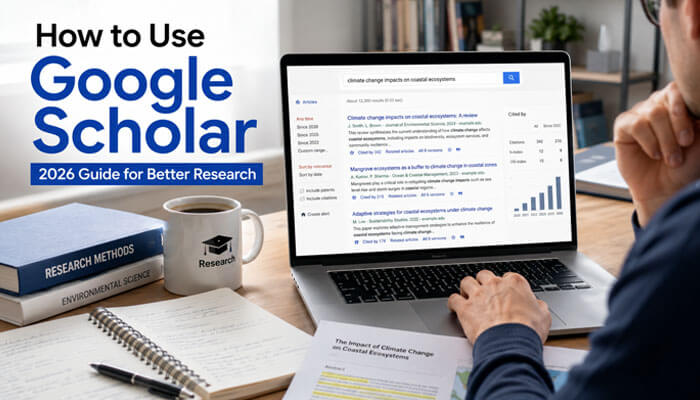

Learning how to use Google Scholar can make your research faster, cleaner, and more reliable. Whether you are a student, teacher, blogger, researcher, journalist, legal writer, healthcare writer, or professional content creator, Google Scholar helps you find academic papers, journal articles, books, theses, case law, patents, citations, and trusted research sources in one place.
Unlike normal Google Search, Google Scholar focuses mainly on scholarly literature. This means it can help you find research papers, expert studies, university publications, academic books, conference papers, legal opinions, and citation records that are useful for essays, assignments, literature reviews, blog posts, reports, white papers, and evidence-based content.
In this 2026 guide, you will learn how to use Google Scholar step by step, how to search smarter, how to find free full-text papers, how to use citations, how to set up alerts, how to avoid weak sources, and how to use Google Scholar for better research.
Quick Answer: How to Use Google Scholar
This quick answer explains how to use Google Scholar without confusion.
To use Google Scholar, open Google Scholar, type your research topic into the search box, review the academic results, use filters such as year and date, open PDF or HTML links when available, check “Cited by” to find newer research, use “Related articles” to discover similar studies, and click the quote icon to copy citations in styles such as APA, MLA, or Chicago.
For better results, search with clear keywords instead of long questions. Use quotation marks for exact phrases, search by author when needed, filter recent papers, save useful articles to your library, connect your university library if available, and set up alerts for new research updates.
If you are a beginner, the best way to understand how to use Google Scholar is to start with one clear topic, compare several papers, and read the abstract before deciding whether the source is useful.
Key Takeaways
- Google Scholar helps users find scholarly literature, including academic papers, books, theses, patents, legal opinions, and citation records.
- The best way to search is by using clear keywords, exact phrases, author names, date filters, and topic-specific terms.
- “Cited by” helps you find newer papers that mention an older source.
- “Related articles” helps you discover similar research.
- PDF and HTML links can help you access free full-text versions.
- Google Scholar citations are useful, but you should always double-check citation formatting.
- Google Scholar is excellent for research discovery, but serious academic projects may also require library databases.
- Advanced Search, library links, alerts, profiles, and Google Scholar Metrics can help users research more deeply.
- Anyone learning how to use Google Scholar should focus on source quality, not only search results.
What Is Google Scholar?
Google Scholar is a free academic search engine from Google that helps users find scholarly literature across many subjects. It is designed for research-focused searching instead of general web browsing.
You can use Google Scholar to find:
- Journal articles
- Research papers
- Academic books
- Conference papers
- Theses and dissertations
- Technical reports
- Preprints
- Abstracts
- Patents
- Legal opinions
- Court cases
- Citation records
Google Scholar is especially useful when you want sources that are more academic than regular blog posts or general websites. It is commonly used by students, professors, researchers, content writers, lawyers, healthcare writers, journalists, and anyone who needs evidence-based information.
A simple way to explain how to use Google Scholar is this: search a topic, review scholarly results, check dates and citations, open the strongest sources, and verify the information before using it.
What Google Scholar Includes and Does Not Include
Before learning how to use Google Scholar for serious research, it is important to understand what it can and cannot show. Google Scholar includes many types of scholarly content, but it is not the same as a full university database or a subject-specific research platform.
Google Scholar may include:
- Journal articles
- Conference papers
- Academic books
- Theses and dissertations
- Technical reports
- Preprints
- Abstracts
- Court opinions
- Patents
- Research papers from universities and repositories
However, Google Scholar may not include every academic source available online. Some records may be incomplete, some sources may lead only to abstracts, and some articles may require payment or library access. This is why Google Scholar is best used as a strong research discovery tool, not the only source for every academic project.
For simple essays, blog research, and topic exploration, Google Scholar is very useful. For systematic reviews, medical research, legal research, thesis-level work, or high-stakes writing, it is better to combine Google Scholar with library databases, official journals, government websites, PubMed, DOAJ, Semantic Scholar, or subject-specific academic databases.
This difference matters because how to use Google Scholar properly depends on your goal. A blogger may need credible background research, while a graduate student may need peer-reviewed papers, library databases, and citation management.
Why Google Scholar Is Useful for Research
Google Scholar saves time because it brings scholarly content from many publishers, universities, repositories, journals, and academic websites into one searchable platform. Instead of checking many websites one by one, you can search one topic and quickly compare papers, citations, authors, dates, and available full-text links.
Google Scholar is useful because it helps you:
- Find reliable sources for assignments
- Build a literature review
- Support blog posts with academic references
- Track research trends
- Find expert authors on a subject
- Discover newer papers through citation tracking
- Locate free versions of paid research papers
- Create basic citations for bibliographies
- Follow updates on a topic through alerts
- Find legal opinions and case law
- Compare old and new research on the same topic
If you want to write stronger content, Google Scholar can help you replace weak claims with research-backed explanations. This is why learning how to use Google Scholar is helpful for both academic writing and online publishing.
What I Learned From Using Google Scholar for Research
One lesson I learned after using Google Scholar for research projects, content writing, and source verification is that finding papers is usually the easy part. The real challenge is evaluating which sources are reliable, relevant, and current enough to support your work.
In practice, reading abstracts before opening full papers saves significant time. I have also found that the “Cited by” feature often uncovers more useful and recent research than the original search results. Many of the strongest sources for literature reviews and evidence-based writing come from following citation trails rather than relying only on initial keyword searches.
For most topics, combining keyword searches, citation tracking, and source evaluation produces better results than simply selecting the first paper that appears.
Google Scholar vs Google Search
Google Scholar and normal Google Search are both useful, but they serve different purposes.
| Feature | Google Scholar | Google Search |
| Main purpose | Academic research | General web search |
| Best for | Papers, studies, books, citations | News, websites, blogs, videos |
| Source type | Scholarly literature | All types of web content |
| Citation tools | Available | Not built for academic citations |
| “Cited by” tracking | Yes | No |
| Research alerts | Yes | Yes, but not academic-focused |
| Legal case search | Available for some jurisdictions | Not focused on legal research |
| Best users | Students, researchers, writers | General users |
Use normal Google Search when you need general information, news, tutorials, product pages, images, or videos. Use Google Scholar when you need academic evidence, research studies, expert papers, scholarly books, and citation-based sources.
A smart researcher knows how to use Google Scholar and Google Search together. Google Search can explain a topic simply, while Google Scholar can help you verify claims with academic sources.
Who Should Use Google Scholar?
Google Scholar is useful for many types of users, not only university researchers.
| User Type | How Google Scholar Helps |
| Students | Finds sources for essays, projects, and assignments |
| Researchers | Helps with literature reviews and citation tracking |
| Teachers | Finds academic material for lessons and references |
| Bloggers | Adds research-backed support to articles |
| Journalists | Helps verify claims with studies and expert sources |
| Legal researchers | Helps find case law and legal opinions |
| Healthcare writers | Helps locate medical and scientific studies |
| Business writers | Helps find market, management, and economic research |
| SEO writers | Helps improve content depth, originality, and EEAT |
If your work depends on accuracy, evidence, or expert support, learning how to use Google Scholar can improve the quality of your research.
Best Google Scholar Workflow by User Type
Different users need Google Scholar for different reasons. A student may need essay sources, while a researcher may need citation tracking or literature review support.
| User Type | Best Workflow |
| Student | Search topic, filter by date, read abstracts, save sources, check citations |
| Blogger | Find studies, confirm claims, explain findings simply, avoid overclaiming |
| Researcher | Use Cited by, Related articles, alerts, profiles, and reference managers |
| Teacher | Find readable academic sources, books, and recent papers for lessons |
| Legal writer | Use case law search, check jurisdictions, and verify with legal databases |
| Health writer | Use recent peer-reviewed studies and confirm with medical databases |
| Business writer | Search for market, management, leadership, and consumer behavior research |
| SEO writer | Find expert definitions, original studies, and credible evidence |
This workflow helps users understand how to use Google Scholar based on their actual purpose instead of following one generic method.
How to Use Google Scholar Step by Step
Using Google Scholar is simple, but using it well requires the right search habits. This section explains how to use Google Scholar in a practical way, from the first search to final source selection.
Step 1: Open Google Scholar
Open Google Scholar in your browser. You will see a simple search box, similar to Google Search.
Type your topic into the search box. For example:
- digital marketing small business
- climate change agriculture
- artificial intelligence education
- servant leadership workplace
- social identity theory
- remote work productivity
Avoid typing very long questions at first. Google Scholar works better when you use clear research keywords.
Step 2: Search With Strong Keywords
A common mistake is searching with full sentences like:
How does social media affect teenagers in modern society?
A better Google Scholar search would be:
social media effects teenagers mental health
This gives Google Scholar clearer terms to match with academic papers.
Good keywords usually include:
- Main topic
- Population or group
- Method or issue
- Outcome or result
- Date or field if needed
| Weak Search | Better Search |
| How does sleep affect students? | sleep academic performance, students |
| Is remote work good? | remote work productivity employees |
| Why is exercise healthy? | Physical Activity Health Benefits for Adults |
| Does AI help education? | artificial intelligence education learning outcomes |
The better your keywords, the better your research results. If you want to know how to use Google Scholar more effectively, start by improving your keywords before changing filters.
Step 3: Use Quotation Marks for Exact Phrases
Use quotation marks when you want Google Scholar to search for an exact phrase.
Example:
“social identity theory”
This tells Google Scholar to look for that phrase together instead of searching the words separately.
Use quotation marks for:
- Theory names
- Book titles
- Famous phrases
- Specific concepts
- Exact research terms
Examples:
- “climate change adaptation”
- “servant leadership”
- “consumer buying behavior”
- “digital literacy”
- “machine learning”
- “public health policy”
This is one of the easiest ways to make Google Scholar results more accurate.
Step 4: Use the Year Filter
Google Scholar results are often sorted by relevance, not always by the newest date. If you need recent research, use the year filter on the left side of the results page.
You can choose options such as:
- Since 2026
- Since 2025
- Since 2022
- Custom date range
- Sort by date
This is especially helpful for topics that change quickly, such as:
- Artificial intelligence
- Digital marketing
- Healthcare
- Cybersecurity
- Education technology
- Climate science
- Business trends
- Legal updates
For evergreen topics, older classic papers may still be useful. For fast-changing topics, recent research is usually more important.
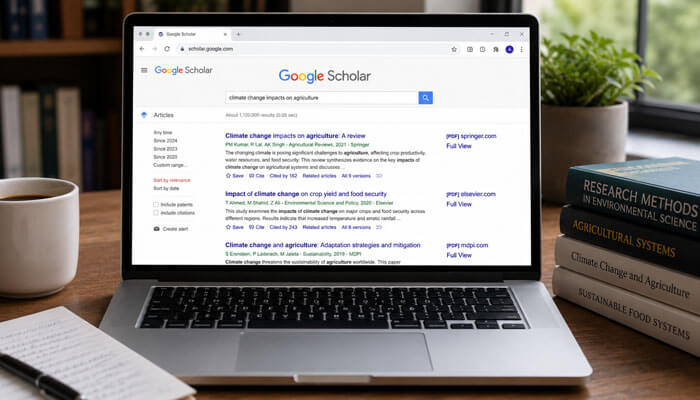
Step 5: Open PDF or HTML Full-Text Links
Many Google Scholar results show a PDF or HTML link on the right side. These links often lead to free full-text versions from universities, repositories, authors, or publishers.
Look for labels such as:
- [PDF]
- [HTML]
- Full text
- Repository link
- University archive link
If the main article is behind a paywall, check these options:
- Click the PDF link on the right
- Click “All versions.”
- Search the article title in quotation marks
- Check your school or university library access
- Look for the author’s institutional page
- Search trusted repositories
Never download papers from suspicious websites. Use legal and trustworthy sources whenever possible. This is an important part of how to use Google Scholar safely.
Understanding the Google Scholar Results Page
When you search on Google Scholar, each result usually includes useful information.
| Result Element | What It Means |
| Title | Name of the paper, book, or source |
| Authors | People who wrote the work |
| Publication source | Journal, conference, book, or website |
| Year | When it was published |
| Snippet | Short preview of the content |
| PDF/HTML link | Possible free full-text access |
| Cited by | Number of works that cited it |
| Related articles | Similar research papers |
| All versions | Other available copies |
| Cite icon | Citation formats and export options |
| Save icon | Saves the item to your Scholar library |
Understanding these parts helps you decide whether a source is useful before opening it. When people ask how to use Google Scholar, this result page is where most of the real research decisions happen.
How to Read Google Scholar Results Correctly
Not every Google Scholar result is equally strong. You should check the details before using a source.
Before choosing a source, ask:
- Who wrote it?
- Is the author an expert?
- Where was it published?
- Is it a peer-reviewed journal?
- Is the date still relevant?
- Does the paper match your topic?
- Is the method reliable?
- Are the citations strong?
- Is the full text available?
- Does the paper support your exact point?
A high citation count can be useful, but it does not automatically mean the paper is perfect. A newer paper may have fewer citations simply because it was recently published.
How to Use “Cited by” on Google Scholar
The “Cited by” feature is one of the most powerful tools in Google Scholar. It shows other papers that have cited the source you are viewing.
This helps you:
- Find newer research
- See how a study influenced later work
- Discover debates around a topic
- Track academic discussion
- Find updated evidence
- Build a stronger literature review
Example:
If you find an important paper from 2018, click “Cited by” to find newer papers from 2022, 2023, 2024, 2025, or 2026 that discussed that same study.
This method is called forward citation searching. It is useful when you want to move from an older source to newer research. Anyone learning how to use Google Scholar for literature reviews should practice using “Cited by” often.
How to Use “Related Articles”
The “Related articles” link helps you find papers similar to the result you are viewing. This is helpful when one paper is close to your topic, but you need more supporting sources.
Use “Related articles” when:
- You found one good paper and want more like it
- You need similar studies for a literature review
- You want to compare different research findings
- You want more sources for the same topic
- You are exploring a new subject
This feature can save time because it helps you discover papers you may not find through your first keyword search.
How to Use Google Scholar Advanced Search
Google Scholar Advanced Search helps you narrow your results when a normal keyword search gives too many results. This is useful when you need papers by a specific author, from a specific publication, within a date range, or with exact phrases.
You can use Advanced Search to find:
- Articles with all words
- Articles with an exact phrase
- Articles with at least one of several words
- Articles without certain words
- Articles by a specific author
- Articles published in a specific journal
- Articles from a selected date range
For example, instead of searching only:
digital marketing small business
You can use Advanced Search to find papers with the exact phrase:
“digital marketing”
and also include:
small business
This helps you avoid unrelated results and find more accurate academic sources.
When Should You Use Advanced Search?
Use Google Scholar Advanced Search when:
- Your topic is too broad
- You are getting too many unrelated results
- You need papers from a specific author
- You want articles from a certain journal
- You need sources from a specific year range
- You are doing a literature review
- You need stronger academic evidence
Advanced Search is especially useful for students, researchers, and writers who want more control over their research results. If basic search does not work, this is the next step in how to use Google Scholar properly.
Useful Google Scholar Search Operators
Search operators help you control your results more precisely.
| Search Method | Example | Use |
| Exact phrase | “digital marketing” | Finds the exact phrase |
| Author search | author:”john smith” | Finds papers by author |
| Minus sign | machine learning -healthcare | Excludes a word |
| OR | “remote work” OR telework | Searches either term |
| Title words | intitle | Finds words in the title |
| Date filter | Since 2022 | Shows newer results |
| Combined search | “AI tools” education -chatbot | Narrows results |
Use search operators carefully. Too many operators can make results too narrow. Start simple, then refine.
How to Search by Author in Google Scholar
If you know the author’s name, you can search by author to find their work.
Use this format:
author:”author name”
Example:
author:”donald knuth”
You can also search with a topic:
author:”john smith” machine learning
This helps when:
- You need papers by a specific researcher
- You want to check an expert’s work
- You are following a professor or scholar
- You want to verify whether an author has written on a topic
If the author has a Google Scholar profile, you may be able to view their publications, citations, co-authors, research interests, and citation metrics.
How to Search by Title
If you know the exact title of a paper, put the title in quotation marks.
Example:
“The Theory of Planned Behavior”
This helps you find:
- A specific article
- Different versions of the same paper
- PDF copies
- Citation records
- Related works
- Later studies that cite the article
Searching by exact title is also useful when you find a paper mentioned in another article’s references.
How to Search by Topic
When searching by topic, start broad and then narrow down.
Example broad search:
online learning
Better narrow search:
online learning student engagement higher education
Even better:
online learning student engagement higher education 2021 2026
You can narrow a topic by adding:
- Age group
- Country
- Industry
- Method
- Outcome
- Theory
- Year range
- Problem
- Population
| Broad Topic | More Focused Search |
| leadership | Servant leadership employee engagement |
| marketing | social media marketing small business |
| education | Online Learning Student Motivation |
| health | Sleep quality and mental health in college students |
| technology | artificial intelligence writing education |
Focused searches usually give better results than broad searches. This is one of the most useful lessons in how to use Google Scholar for accurate research.
How to Find Recent Research Papers
If you are learning how to use Google Scholar for current topics, recent filters are very important.
To find recent research papers on Google Scholar:
- Search your topic.
- Use the left-side year filter.
- Select “Since 2025” or “Since 2026.”
- Click “Sort by date” if you want the newest additions first.
- Use “Cited by” on strong papers.
- Set up an alert for future updates.
Recent research is important for topics such as:
- Artificial intelligence
- Medicine
- SEO
- Cybersecurity
- Education technology
- Climate change
- Finance
- Law
- Digital media
For historical or theoretical topics, older papers may still be valuable. A strong research article often combines classic sources with recent studies.
How to Find Free Research Papers on Google Scholar
Many academic articles are locked behind publisher paywalls, but Google Scholar can still help you find free versions.
Try these methods:
- Look for a PDF link on the right side.
- Click “All versions” under the result.
- Search the full title in quotation marks.
- Check university repository links.
- Check author profile pages.
- Use your school or library access.
- Look for preprint versions when appropriate.
Free versions may be hosted by:
- University repositories
- Author websites
- Institutional archives
- Preprint servers
- Government websites
- Open-access journals
Always make sure the version is trustworthy and legal to access. Learning how to use Google Scholar for free papers does not mean using unsafe download sites.
How to Connect Google Scholar to Your Library
One of the most useful but often missed features of Google Scholar is library access. If you are a student, teacher, or university member, you may be able to connect Google Scholar to your school or college library.
This can help you access full-text articles that may normally be locked behind a paywall.
To connect Google Scholar to your library:
- Open Google Scholar.
- Click the menu icon.
- Go to Settings.
- Choose Library links.
- Search for your university, college, or library name.
- Select the correct library.
- Save your settings.
- Search again and look for library access links next to results.
After setup, you may see links such as:
- Find it at the Library
- Full Text at Your University
- View through the Library
- Check access
- Institutional access
This is a legal and safer way to read research papers through your institution. If the link does not work from home, your library may require login, proxy access, or VPN access.
How to Use Google Scholar for Citations
Google Scholar has a citation tool that can generate basic citations for search results. Click the quote icon under a result to see citation formats.
Common citation styles include:
- APA
- MLA
- Chicago
- Harvard
- Vancouver
You can copy the citation and paste it into your bibliography or reference list.
However, you should not blindly trust auto-generated citations. Always check:
- Author names
- Article title
- Journal title
- Year
- Volume and issue
- Page numbers
- DOI
- Capitalization
- Citation style rules
Google Scholar citations are convenient, but citation formatting can sometimes be incomplete or incorrect. For academic submissions, double-check the citation using your school, journal, or style guide requirements. This is an important part of how to use Google Scholar responsibly.
How to Export Citations to Reference Managers
Google Scholar can also help you export citations to reference managers. This is useful if you are working on a long essay, thesis, research paper, or literature review.
Common reference managers include:
- Zotero
- Mendeley
- EndNote
- RefWorks
- BibTeX-based tools
Reference managers help you:
- Save sources
- Organize papers
- Insert citations into documents
- Create bibliographies
- Avoid losing important references
- Manage hundreds of sources more easily
If you only need a few citations, copying from Google Scholar may be enough. If you are working on a large research project, use a reference manager.
How to Use Google Scholar Alerts
Google Scholar Alerts help you stay updated when new research appears for your topic. This is useful for students, researchers, writers, and professionals who track a subject over time.
You can create alerts for:
- Research topics
- Author names
- Specific keywords
- New papers in your field
- Citation updates
- Emerging trends
Example alert topics:
- artificial intelligence education
- remote work productivity
- climate change agriculture
- digital marketing small business
- social media mental health
Alerts are helpful because you do not need to search the same topic every week. New results can be delivered to your email. If you want to know how to use Google Scholar for long-term research, alerts are one of the best features to set up.
How to Use Google Scholar Library
Another helpful part of how to use Google Scholar is learning how to save and organize papers.
Google Scholar has a library feature that lets you save papers for later. This is useful when you are collecting sources for an assignment, article, or research project.
You can use your library to:
- Save useful articles
- Organize research
- Add labels
- Group sources by topic
- Return to papers later
- Build a reading list
Example labels you can create:
- Literature Review
- SEO Research
- Education Studies
- Health Sources
- AI Papers
- Legal Cases
- Thesis Sources
- Blog References
A well-organized library saves time and prevents you from losing useful papers.
How to Use Google Scholar Profiles
Google Scholar Profiles are useful for researchers and authors. A profile can show a scholar’s publications, citation counts, research areas, co-authors, and citation history.
You can use profiles to:
- Check an author’s expertise
- Find more papers by the same researcher
- Follow an author’s new work
- View citation trends
- Discover related researchers
- Verify academic background
If you are a researcher, creating a Google Scholar Profile can help people find your work. If you are a student or writer, author profiles can help you identify credible experts in your topic area. This is another reason how to use Google Scholar is valuable for source evaluation.
Google Scholar Metrics Explained
Google Scholar Metrics helps users explore the influence and visibility of academic publications. It is mainly useful for researchers, authors, graduate students, and people comparing journals or publication areas.
Google Scholar Metrics may show:
- h5-index
- h5-median
- Top publications
- Research categories
- Highly cited articles
- Publication-level citation influence
The h5-index shows how many articles from a publication were cited at least that many times during a recent five-year period. The h5-median shows the median citation count of the articles included in that h5-index.
For beginners, this may sound technical, but the simple idea is this:
Google Scholar Metrics helps you understand which academic publications are receiving attention in recent scholarly literature.
However, do not use metrics alone to judge quality. A highly cited journal or paper may still need careful reading. A newer paper may be valuable even if it has fewer citations because it has not had enough time to collect citations.
How to Use Google Scholar for Literature Reviews
Google Scholar is very useful for literature reviews because it helps you find key papers, related studies, and citation networks.
A simple literature review process:
- Start with broad keywords.
- Identify highly relevant papers.
- Check publication date and journal quality.
- Use “Cited by” to find newer papers.
- Use “Related articles” to find similar studies.
- Read abstracts first.
- Save useful papers to your library.
- Group sources by theme.
- Compare findings.
- Identify research gaps.
For serious academic work, Google Scholar should be part of your research process, not the only tool. You may also need subject databases, university library databases, government sources, and peer-reviewed journals.
Students who want to understand how to use Google Scholar for literature reviews should focus on patterns, disagreements, methods, and research gaps instead of collecting random articles.
How to Evaluate Sources on Google Scholar
A paper appearing on Google Scholar does not automatically mean it is the best source for your work. You still need to evaluate it.
Use this checklist:
| Question | Why It Matters |
| Is the author credible? | Shows expertise |
| Is the source peer-reviewed? | Improves reliability |
| Is the journal reputable? | Reduces weak source risk |
| Is the date current? | Important for modern topics |
| Is the method clear? | Shows research quality |
| Are claims supported by data? | Avoids unsupported conclusions |
| Is the paper relevant? | Prevents off-topic citations |
| Are there conflicts of interest? | Helps detect bias |
| Is the paper cited by others? | Shows influence |
| Does newer research agree? | Helps avoid outdated claims |
Good research is not only about finding sources. It is about choosing the right sources.
How to Avoid Weak, Outdated, or Retracted Research
Knowing how to use Google Scholar also means knowing how to avoid poor-quality sources. Not every paper in Google Scholar should be trusted automatically.
Before using a paper, check:
- Is the paper published in a reputable journal?
- Is the author clearly identified?
- Is the article peer-reviewed?
- Is the publication date still relevant?
- Does the paper have a clear method?
- Are the findings supported by data?
- Has the paper been corrected or retracted?
- Are there conflicts of interest?
- Do other studies support the same claim?
- Is the full paper available, or only the abstract?
A common mistake is using a paper only because it has many citations. Citation count can show influence, but it does not always prove accuracy. Some older papers are highly cited because they are famous, controversial, or historically important. Some may even be outdated.
For sensitive topics such as health, law, finance, psychology, medicine, or public policy, always check multiple sources before making strong claims.
Google Scholar for Students
Students can use Google Scholar to find sources for:
- Essays
- Assignments
- Research papers
- Presentations
- Debates
- Final-year projects
- Literature reviews
- Case studies
- Dissertations
Student tips:
- Start with simple keywords.
- Read the abstract before downloading the full paper.
- Use recent filters for current topics.
- Save useful sources.
- Copy citations, but verify formatting.
- Ask your library if you cannot access a paper.
- Do not cite papers you have not read.
- Avoid using only one source for a major claim.
Google Scholar can improve academic writing because it helps students support ideas with research instead of general opinions. For students, knowing how to use Google Scholar correctly means finding sources, checking them, and using them honestly.
Google Scholar for Bloggers and Content Writers
Bloggers and content writers can use Google Scholar to improve EEAT, trust, and content depth. Research-backed articles often feel more credible than articles based only on general advice.
Writers can use Google Scholar to:
- Find statistics
- Support claims
- Explain complex topics
- Add expert-backed insights
- Improve topical authority
- Reduce thin content
- Create more trustworthy guides
- Find original studies instead of copying competitors
Example:
Instead of writing:
Remote work improves productivity.
A stronger research-based line would be:
Several studies have examined how remote work affects productivity, employee satisfaction, communication, and work-life balance. The results may vary depending on job type, management style, tools, and home environment.
This sounds more balanced, accurate, and trustworthy. For bloggers, how to use Google Scholar is not only about citations; it is about writing with evidence and balance.
AI tools always improve student learning.
Write:
Research on AI tools in education is still developing. Some studies suggest that AI can support personalized learning and writing assistance, but results may depend on student skill level, teacher guidance, tool quality, privacy practices, and how the technology is used.
This type of writing sounds more trustworthy because it avoids exaggerated claims and explains the topic with balance.
Google Scholar for SEO Research
Google Scholar is not an SEO keyword tool, but it can help with content quality. If you write informational articles, Google Scholar can help you understand a topic deeply before writing.
You can use it to find:
- Expert definitions
- Original research
- Academic theories
- Historical background
- Data-backed explanations
- Industry-related studies
- Evidence for claims
- Research gaps
- Expert authors
For SEO content, Google Scholar is especially useful when writing about:
- Health
- Finance
- Education
- Psychology
- Law
- Technology
- Science
- Business
- Marketing
- Environment
Using academic research can help your article become more helpful, original, and trustworthy. This is why content writers should learn how to use Google Scholar before writing on complex or sensitive topics.
How to Use Google Scholar for Legal Research
Google Scholar can also help users find legal opinions and case law, especially for U.S. legal research. This can be useful for law students, legal writers, journalists, and people researching legal history.
You can search case law by selecting the case law option and entering legal keywords, case names, or topics.
Examples:
- free speech education case law
- privacy rights workplace
- copyright fair use
- contract dispute damages
- employment discrimination
Legal research can be complex, so Google Scholar should not replace professional legal advice. For serious legal matters, use official legal databases, court websites, or consult a qualified legal professional.
Google Scholar Search Examples
Here are useful examples you can copy and modify.
| Research Goal | Search Example |
| Find the exact theory | “social identity theory” |
| Find papers by author | author: “Albert Bandura.” |
| Find recent AI research | artificial intelligence education since 2024 |
| Find health studies | Sleep quality and mental health in students |
| Find marketing research | social media marketing small business |
| Find legal opinions | copyright fair use case law |
| Find papers excluding a topic | machine learning -healthcare |
| Compare two terms | “remote work” OR telework |
| Find the topic in the title | intitle employee engagement |
These examples show how small changes in search terms can improve your results.
Example: How to Research a Topic Using Google Scholar
Let’s say your topic is:
How social media affects student mental health
Here is a simple research workflow:
| Step | What to Do | Example |
| 1 | Start broad | social media mental health students |
| 2 | Use the exact phrase | “social media” “mental health” students |
| 3 | Add age group | adolescents’ social media mental health |
| 4 | Filter by date | Since 2022 |
| 5 | Open strong papers | Read abstracts first |
| 6 | Use Cited by | Find newer related studies |
| 7 | Use Related articles | Find similar research |
| 8 | Save sources | Add to Google Scholar library |
| 9 | Compare findings | Look for agreement and disagreement |
| 10 | Cite carefully | Verify APA/MLA format |
This method gives you a stronger research base than simply opening the first result. It also shows how to use Google Scholar in a practical, repeatable workflow.
Real Example: Researching a Topic With Google Scholar
Suppose you are researching whether remote work improves employee productivity.
A beginner might search the topic, open the first result, and use it as evidence.
A stronger approach would be:
- Search for remote work productivity employees.
- Review multiple abstracts.
- Filter for recent studies.
- Check highly cited papers.
- Use “Cited by” to find newer research.
- Compare studies with different conclusions.
- Save the strongest sources.
- Verify citations before writing.
This process produces a more balanced and reliable understanding of the topic and demonstrates why Google Scholar is most effective when used systematically.
Advantages and Limitations of Google Scholar
Google Scholar is powerful, but it is not perfect.
| Advantages | Limitations |
| Free to use | Some full papers are paywalled |
| Covers many subjects | Coverage is not always transparent |
| Shows citation counts | Citation counts can be misunderstood |
| Helps find PDFs | Not all free versions are available |
| Supports alerts | Alerts may include irrelevant results |
| Useful for discovery | Not enough for every systematic review |
| Easy citation tool | Citations may need correction |
| Finds related articles | Results may still require manual checking |
The best approach is to use Google Scholar as a strong starting point, then verify sources carefully. A balanced article about how to use Google Scholar should explain both benefits and limits.
Google Scholar Alternatives You Can Also Use
Google Scholar is powerful, but it should not always be your only research tool. Depending on your topic, other academic platforms may give better filters, cleaner records, or more subject-specific results.
| Tool | Best For |
| PubMed | Medical and biomedical research |
| Semantic Scholar | AI-powered academic paper discovery |
| DOAJ | DOAJ Open-access journals |
| JSTOR | Humanities, history, and social sciences |
| ScienceDirect | Scientific and technical research |
| IEEE Xplore | Engineering, computing, and technology |
| SSRN | Social science and legal preprints |
| ResearchGate | Researcher profiles and paper discovery |
| University library databases | Paid academic sources through institutions |
| Government websites | Official reports, laws, and statistics |
For best results, use Google Scholar as your starting point, then confirm important information through subject-specific databases or official sources.
Can AI Search Replace Google Scholar?
AI-powered search tools can help users summarize information, generate explanations, and discover topics quickly. However, they do not replace direct access to scholarly literature.
Google Scholar allows users to evaluate original papers, review methodologies, examine citations, compare studies, and verify claims using primary academic sources. AI tools may assist with understanding research, but they should not be treated as substitutes for reading the underlying evidence.
The strongest research workflow combines Google Scholar for source discovery and AI tools for organization, summarization, and learning support while always verifying important claims against the original publication.
How to Use Google Scholar With AI Tools
In 2026, many people use AI tools to summarize, organize, or understand research. This can be helpful, but AI should not replace reading the original source.
A safe workflow:
- Find research papers on Google Scholar.
- Read the title, abstract, and conclusion.
- Download the full paper when available.
- Use AI only to help summarize or explain difficult sections.
- Check the original paper before citing anything.
- Never cite an AI summary as if it were the original study.
AI can help you understand research faster, but the original academic source should remain your main reference. Knowing how to use Google Scholar with AI tools means using AI as support, not as proof.
How to Use Google Scholar for Better Blog Content
If you are writing a blog article, Google Scholar can help you improve content depth and originality.
Use it to add:
- Better definitions
- Research-backed explanations
- Balanced viewpoints
- Expert terminology
- Real study findings
- Updated academic discussion
- Stronger EEAT signals
- More trustworthy claims
Example content improvement:
Weak version:
Exercise is good for mental health.
Better version:
Research on physical activity and mental health often connects regular exercise with mood, stress management, sleep quality, and overall well-being. However, the benefits can depend on consistency, intensity, health condition, and lifestyle factors.
This style sounds more natural, careful, and credible.
How to Organize Your Research Notes
Finding papers is only the first step. You also need to organize what you find.
Use a simple research note table:
| Source | Main Idea | Useful Quote/Data | Citation Needed? | Notes |
| Paper 1 | Defines topic | Key definition | Yes | Use in intro |
| Paper 2 | Shows data | Statistic | Yes | Use in the evidence section |
| Paper 3 | Different view | Limitation | Yes | Use for balance |
| Paper 4 | Recent study | 2026 update | Yes | Use in the trend section |
This method prevents confusion when writing long articles, essays, or reports. If you want to master how to use Google Scholar, build a habit of saving notes as soon as you find useful sources.
Common Google Scholar Mistakes to Avoid
A big part of how to use Google Scholar is knowing what not to do.
Many beginners use Google Scholar like a normal Google Search. That can lead to weak results.
Avoid these mistakes:
- Searching with long, full questions
- Ignoring the publication date
- Using only the first result
- Trusting citation count without reading the paper
- Copying citations without checking them
- Citing papers you did not read
- Ignoring newer studies
- Using paywalled abstracts as if they were full papers
- Depending only on Google Scholar for systematic reviews
- Forgetting to save useful sources
Better research takes time, but Google Scholar can make the process much easier.
Research Habits That Separate Beginners From Experienced Researchers
Experienced researchers often follow a different approach than beginners.
Instead of collecting as many papers as possible, they focus on identifying the most relevant and credible sources. They compare multiple studies, look for agreement and disagreement between findings, check publication dates, evaluate methodologies, and verify important claims through more than one source.
A common beginner mistake is assuming that the highest-ranked search result is automatically the best source. In reality, strong research often requires reviewing several papers before selecting the most useful evidence.
Google Scholar Troubleshooting: Common Problems and Fixes
Sometimes Google Scholar does not show the results or full papers you expect. Here are common problems and simple fixes.
| Problem | Possible Reason | What to Do |
| Too many unrelated results | Search terms are too broad | Use exact phrases and advanced search |
| No recent papers | Results are sorted by relevance | Use the year filter or sort by date |
| The article is behind a paywall | Publisher requires a subscription | Check PDF, All versions, or library links |
| The citation looks incorrect | Auto citation may be incomplete | Verify citation manually |
| Author results are mixed | Many authors share similar names | Add topic, co-author, or institution |
| PDF link does not open | File removed or access blocked | Try all versions or library access |
| The results are too old | Date filter not applied | Use “Since 2025” or a custom date range |
| Too few results | The search is too narrow | Remove extra keywords or operators |
These fixes can help beginners use Google Scholar more effectively without wasting time. Troubleshooting is part of how to use Google Scholar well because not every search works the first time perfectly.
Best Practices for Better Research in 2026
To get the best results, use Google Scholar with a clear research plan.
Best practices:
- Start with broad keywords.
- Learn the common terms used by experts.
- Use quotation marks for exact concepts.
- Filter by year for recent research.
- Read abstracts before full papers.
- Use “Cited by” for newer research.
- Use “Related articles” for similar studies.
- Save important sources.
- Organize papers with labels.
- Check citations carefully.
- Compare multiple sources before making claims.
- Use library databases for deeper academic work.
- Use Advanced Search when normal search results are too broad.
- Connect Google Scholar to your library when you need legal access to paid papers.
- Check whether important claims are supported by more than one source.
The goal is not just to collect many papers. The goal is to find the most useful, accurate, and relevant evidence. The best answer to how to use Google Scholar is to search carefully, read critically, and verify before citing.
Final Checklist: How to Use Google Scholar Effectively
Before finishing your research, check this list:
- Did you search with clear keywords?
- Did you use quotation marks for exact phrases?
- Did you check recent papers?
- Did you open PDF or full-text versions?
- Did you use “Cited by” for newer studies?
- Did you use “Related articles” for similar research?
- Did you save important papers?
- Did you check author’s credibility?
- Did you verify citation formatting?
- Did you compare more than one source?
- Did you avoid citing papers you did not read?
- Did you use other databases when needed?
- Did you check for weak, outdated, or retracted research?
- Did you use Advanced Search for difficult topics?
- Did you organize your notes before writing?
If you can answer yes to most of these questions, you are using Google Scholar in a smarter and more reliable way.
Conclusion
Learning how to use Google Scholar is one of the best ways to improve your research skills in 2026. It helps you find academic papers, books, theses, legal opinions, patents, citations, and expert sources that can make your writing more accurate and trustworthy.
For the best results, use strong keywords, filter by date, check PDF links, explore “Cited by,” use “Related articles,” save useful sources, connect library access when available, and verify citation details before submitting or publishing your work. Google Scholar is not perfect, but when used correctly, it is a powerful research tool for students, researchers, writers, and professionals.
If you want better research, stronger evidence, and more credible content, Google Scholar is a smart place to start. The more you practice how to use Google Scholar, the easier it becomes to find strong academic sources quickly.
How to Use Google Scholar FAQs
1. How to Use Google Scholar for Academic Research?
To learn how to use Google Scholar for academic research, enter relevant keywords, review scholarly sources, use date filters, and explore citations to find credible and evidence-based information.
2. How to Use Google Scholar to Find Free Research Papers?
When learning how to use Google Scholar, look for PDF or HTML links beside search results. You can also use “All Versions” to locate free copies available through universities and open-access repositories.
3. How to Use Google Scholar for a literature review?
The best way to understand how to use Google Scholar for a literature review is to identify key studies, use the “Cited by” feature to find newer research, and compare findings across multiple sources.
4. How to Use Google Scholar to Find Recent Articles?
To master how to use Google Scholar, use the date filters on the results page and sort by date to discover the latest studies, papers, and scholarly publications related to your topic.
5. How to use Google Scholar citations correctly?
A key part of learning how to use Google Scholar is using the citation tool. Click the quotation mark icon below a result to generate APA, MLA, or Chicago citations, then verify the details before using them.
