



A Sandbox, Not a Ladder
One of the most common misconceptions about educational software is the distinction between a game and a tool. Many “coding games” operate on a ladder system: solve a puzzle, unlock a level, get three stars, and move on. These are fun, but they are often passive experiences where the child is guiding a character through a pre-determined path.
ScratchJr is fundamentally different. It is an open-ended creation tool, similar to a box of digital LEGO bricks. Upon opening the application, a child is not greeted with a level select screen, but with a blank canvas (the Stage) and a friendly cat sprite. There are no high scores to beat and no wrong answers. The core experience is defined by what the child wants to create. Do they want the cat to dance? Do they want to send a rocket to the moon? The app provides the tools to make it happen, placing the agency entirely in the hands of the user.
Visual Logic and Color-Coded Creativity with ScratchJr for PC
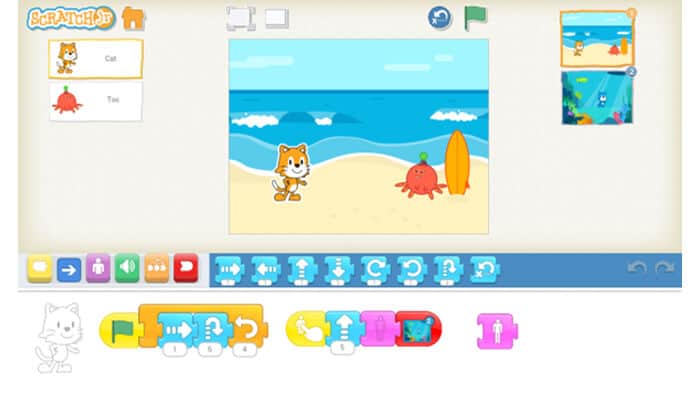
The genius of the interface lies in its block-based programming language. Text is minimal, making it accessible to children who are still learning to read. The creating process involves dragging puzzle-piece blocks into a coding area and snapping them together to form a script. These blocks are intuitive and color-coded by function.
Yellow blocks are “Trigger” blocks, determining when an action starts—for example, when the green flag is clicked or when a character is tapped. Blue blocks control motion, allowing characters to move up, down, jump, or rotate. Purple blocks handle looks, letting sprites grow, shrink, or disappear. Green blocks add sound, including the ability for children to record their own voices, which is a massive hit for personalization. Orange control blocks introduce basic loops and pauses, while Red blocks end the script.
By experimenting with these combinations, children learn the cause-and-effect relationship of algorithms. They realize that the order of instructions matters. If you tell a character to jump and then move right, it looks different than moving right and then jumping. This trial-and-error process helps build computational thinking skills organically.
The Power of Personalization
What keeps children engaged with ScratchJr for hours is the ability to make the world their own. The app comes with a library of pre-made backgrounds and characters, but the real magic happens in the Paint Editor. Children can modify existing characters—changing the color of a shirt or adding a hat—or draw entirely new ones from scratch.
The camera integration and microphone tools further blur the line between the digital and physical worlds. A child can take a selfie and map it onto an astronaut’s face, or record their own “meow” for the cat. This level of customization transforms the app from a generic tech demo into a personal storytelling engine. A child isn’t just coding a generic dog; they are coding *their* dog.
Educational Utility on the Big Screen with ScratchJr for PC

While originally designed for tablets, running ScratchJr on a Windows PC offers distinct advantages. The larger screen real estate of a monitor allows for a better view of the coding blocks and the stage simultaneously, reducing the need for constant scrolling. For younger children developing fine motor skills, using a mouse can sometimes be more precise than a finger, especially when editing intricate details in the paint editor.
Furthermore, the PC environment promotes a more focused “workstation” mindset. It separates the coding activity from the casual tablet consumption often associated with watching videos or playing passive games. It turns the computer into a laboratory for logic and design.
Bringing the Experience to Windows
Since ScratchJr was built primarily for mobile ecosystems, getting it up and running on a Windows PC requires a small workaround, but the payoff is worth the effort. The most reliable method to replicate the full tablet experience on a desktop is by using an Android emulator. An emulator creates a virtual tablet environment on your computer, allowing you to run Android apps seamlessly with mouse and keyboard support.
The setup process is straightforward. First, you will need to choose and install a reputable Android emulator on your PC. Once your virtual environment is ready, you can access the necessary files to get the app running. You can download ScratchJr directly to your computer to begin the process. After the file is downloaded, simply drag and drop it into your emulator window to install it.
Once inside the emulator, the app functions exactly as it would on a tablet. You click to drag blocks instead of tapping, and you can use your computer’s microphone for recording custom sounds. This setup ensures that your child has access to powerful creative tools on the best hardware available in your home.
